Welcome Guest ( Log In | Register )

Bump Topic Topic Closed RSS Feed
208 Pages « < 107 108 109 110 111 > » Bottom

Outline · [ Standard ] · Linear+

Maxis Maxis Wireless Broadband Thread #2, 3G/3.5G Broadband

views
     
cruxidex
post Sep 12 2009, 12:11 PM

Enthusiast
*****
Senior Member
898 posts

Joined: Aug 2006
From: Kajang, Selangor


the maxis bb software also same as mobile partner but older ones like in myceloteh.com website cannot recognize the new maxis modem

well, 5in the morning maa~ all are sleeping... during now only can get 1.2mbps huhu
KKW
post Sep 12 2009, 12:17 PM

Look at all my stars!!
*******
Senior Member
2,954 posts

Joined: Apr 2008


QUOTE(cruxidex @ Sep 12 2009, 12:11 PM)
the maxis bb software also same as mobile partner but older ones like in myceloteh.com website cannot recognize the new maxis modem

well, 5in the morning maa~ all are sleeping... during now only can get 1.2mbps huhu
*
oh.. icic..
so the mobile partner or maxis bb software cant use in modem?
cruxidex
post Sep 12 2009, 01:15 PM

Enthusiast
*****
Senior Member
898 posts

Joined: Aug 2006
From: Kajang, Selangor


QUOTE(KKW @ Sep 12 2009, 12:17 PM)
oh.. icic..
so the mobile partner or maxis bb software cant use in modem?
*
try first and see http://www.myceloteh.com/?page_id=26
take the 1st one and just direct install no need to uninstall your 3mobile connect software

then set it up properly then try connect with it
fcbarcelona-my
post Sep 12 2009, 02:04 PM

Regular
******
Senior Member
1,109 posts

Joined: Oct 2007
hi guyz

i'm using maxis bb for almost 2 years. i'm intend to change my modem from currently use ZTE to usb modem. the question is..did i need to unlock sim 1st or simply take out simcard from my bulky-zte and put it into usb modem

tq
cruxidex
post Sep 12 2009, 03:09 PM

Enthusiast
*****
Senior Member
898 posts

Joined: Aug 2006
From: Kajang, Selangor


QUOTE(fcbarcelona-my @ Sep 12 2009, 02:04 PM)
hi guyz

i'm using maxis bb for almost 2 years. i'm intend to change my modem from currently use ZTE to usb modem. the question is..did i need to unlock sim 1st or simply take out simcard from my bulky-zte and put it into usb modem

tq
*
just bring everything to maxis center and request for a modem upgrade... they will terminate you existing account and put you on the latest package with the small usb stik modem n new simcard
you need to pay RM100 handling fee and if i'm not mistaken they will discount back RM33 for 3months

this is what i get when i upgrade my e220 maxis bb modem to the new usb stick modem

they give me 50packets of sampul duit raya and 2box of kurma too rclxms.gif
location : maxis center Berjaya Time Square


Added on September 12, 2009, 5:31 pmI dunno why melaka upload speed is very very GOOD rclxms.gif

user posted image

location : Mydin MITC, with 2bar HSDPA

This post has been edited by cruxidex: Sep 12 2009, 05:31 PM

KKW
post Sep 12 2009, 10:32 PM

Look at all my stars!!
*******
Senior Member
2,954 posts

Joined: Apr 2008


QUOTE(cruxidex @ Sep 12 2009, 01:15 PM)
try first and see http://www.myceloteh.com/?page_id=26
take the 1st one and just direct install no need to uninstall your 3mobile connect software

then set it up properly then try connect with it
*
kk thx for the link..
btw, according to the seller.. if I upgrade or change the software it will void the warranty doh.gif
cruxidex
post Sep 13 2009, 05:10 AM

Enthusiast
*****
Senior Member
898 posts

Joined: Aug 2006
From: Kajang, Selangor


QUOTE(KKW @ Sep 12 2009, 10:32 PM)
kk thx for the link..
btw, according to the seller.. if I upgrade or change the software it will void the warranty doh.gif
*
void the warranty if you upgrade the firmware (flash ur modem software n driver all together)
this one just download to your pc n install.. dont do anything with ur installed 3mobile connect software

means after installing mobile partner... whenever u plug in your modem... ur 3mobile connect will auto open like alwiz... just close it then open mobile partner then connect with mobile partner
KKW
post Sep 13 2009, 09:51 AM

Look at all my stars!!
*******
Senior Member
2,954 posts

Joined: Apr 2008


QUOTE(cruxidex @ Sep 13 2009, 05:10 AM)
void the warranty if you upgrade the firmware (flash ur modem software n driver all together)
this one just download to your pc n install.. dont do anything with ur installed 3mobile connect software

means after installing mobile partner... whenever u plug in your modem... ur 3mobile connect will auto open like alwiz... just close it then open mobile partner then connect with mobile partner
*
oh.. icic..
kk thx for the information..
will try it later.. biggrin.gif
LeoLilieno
post Sep 14 2009, 11:02 AM

On my way
****
Senior Member
542 posts

Joined: Oct 2008


After I install mobile Partner, when I tried to connect it, it says "Default configuration does not exist". How to solve this problem? Is it that using this Mobile Partner will be faster than using the original software provided by the modem? My Maxis these few days really scuks to the max. Hoping that this Mobile Partner thing will help.
KKW
post Sep 14 2009, 11:56 AM

Look at all my stars!!
*******
Senior Member
2,954 posts

Joined: Apr 2008


QUOTE(LeoLilieno @ Sep 14 2009, 11:02 AM)
After I install mobile Partner, when I tried to connect it, it says "Default configuration does not exist". How to solve this problem? Is it that using this Mobile Partner will be faster than using the original software provided by the modem? My Maxis these few days really scuks to the max. Hoping that this Mobile Partner thing will help.
*
u need install ur modem original software 1st..
cruxidex
post Sep 14 2009, 03:35 PM

Enthusiast
*****
Senior Member
898 posts

Joined: Aug 2006
From: Kajang, Selangor


QUOTE(LeoLilieno @ Sep 14 2009, 11:02 AM)
After I install mobile Partner, when I tried to connect it, it says "Default configuration does not exist". How to solve this problem? Is it that using this Mobile Partner will be faster than using the original software provided by the modem? My Maxis these few days really scuks to the max. Hoping that this Mobile Partner thing will help.
*
whats ur modem model?
if e220 you get past few months... the maxis broadband software is the same as mobile partner exactly or even more updated version too

if the usb stick the maxis broadband software is by far the most updated one... if you use mobile partner let say from myceloteh.com website, that mobile cannot detect ur new maxis usb stick modem (e1762)
cruxidex
post Sep 15 2009, 12:01 AM

Enthusiast
*****
Senior Member
898 posts

Joined: Aug 2006
From: Kajang, Selangor


Who SAID only DIGI got HSPA??? lala
location : Taman Sri Ramal, only tonight i notice HSPA... before this HSDPA

tongue.gif

Attached Image
KKW
post Sep 15 2009, 12:06 AM

Look at all my stars!!
*******
Senior Member
2,954 posts

Joined: Apr 2008


QUOTE(cruxidex @ Sep 15 2009, 12:01 AM)
Who SAID only DIGI got HSPA??? lala
location : Taman Sri Ramal, only tonight i notice HSPA... before this HSDPA

tongue.gif

Attached Image
*
what is the different ?
cruxidex
post Sep 15 2009, 12:41 AM

Enthusiast
*****
Senior Member
898 posts

Joined: Aug 2006
From: Kajang, Selangor


nothing yet... just that the capacity la can go 14.4mbps down 5.4mbps up but then... the usb stick modem can only go 7.2mbps down 2.0mpbs up

btw... night maa... peak hours... the ping only below 200ms for now
later test during sahur maybe less congested can get better speed i hope~

dats what i call
"building tomorrows network"


Added on September 15, 2009, 5:12 am5.11am in the mornin... HSPA maa~

user posted image

rclxms.gif

This post has been edited by cruxidex: Sep 15 2009, 05:12 AM
KKW
post Sep 15 2009, 07:32 AM

Look at all my stars!!
*******
Senior Member
2,954 posts

Joined: Apr 2008


QUOTE(cruxidex @ Sep 15 2009, 12:41 AM)
nothing yet... just that the capacity la can go 14.4mbps down 5.4mbps up but then... the usb stick modem can only go 7.2mbps down 2.0mpbs up

btw... night maa... peak hours... the ping only below 200ms for now
later test during sahur maybe less congested can get better speed i hope~

dats what i call
"building tomorrows network"


Added on September 15, 2009, 5:12 am5.11am in the mornin... HSPA maa~

user posted image

rclxms.gif
*
walau.. nice speed u get..
btw, what modem u using now? e220?
donno my modem can detect HSPA or not.. cry.gif
cruxidex
post Sep 15 2009, 11:54 AM

Enthusiast
*****
Senior Member
898 posts

Joined: Aug 2006
From: Kajang, Selangor


QUOTE(KKW @ Sep 15 2009, 07:32 AM)
walau.. nice speed u get..
btw, what modem u using now? e220?
donno my modem can detect HSPA or not..  cry.gif
*
using the new usb stick maxis broadband huawei e1762
current firmware support 7.2mbps down 2.0mbps up
but the modem capable to go 7.2mbps down 5.4mbps up (when the firmware is available)

im in my office right now... depan TM Seksyen 16 Bandar Baru Bangi...
also HSPA whistling.gif
Yuki Ijuin
post Sep 16 2009, 12:24 AM

I just lurk nowadays.
****
Senior Member
649 posts

Joined: Jan 2007
From: Cheras


I have a question. Using E220 Modem.
Firmware version 11.117.10.03.99
I'm using the default installation for the drivers from the E220 itself.

Before hitting the 3gb usage, I can go to about 3.6mbps if I'm lucky. But after it, it drops to 56kbps, I'm alright with that cause when surfing it still manages to creep up to twice that. This month however, I needed to reinstall windows and reupdate my games on Steam. Is there a way to reset the usage or ask them to uncap my line for a few days or something? Now my Street Fighter IV is just sitting there and can't update itself. My newly brought Braid is also sitting there and downloading 5% per day (It's just 130mbs, go figure.) I'm getting impatient as the next month is pretty far away.

Anychance in hell I can actually get help with Maxis Customer Service?
cruxidex
post Sep 16 2009, 05:03 AM

Enthusiast
*****
Senior Member
898 posts

Joined: Aug 2006
From: Kajang, Selangor


nope.. wait until you billing date...~
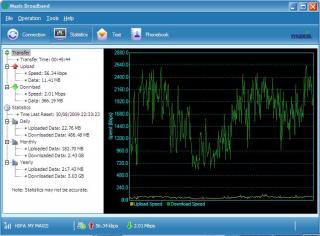
welcome to the land of throttled speed~ haha

user posted image

still can surf kaw kaw syiok coz the ping is very very low~ biggrin.gif
luckily my billing date is 23 of the month... just 1week to go tongue.gif

This post has been edited by cruxidex: Sep 16 2009, 05:14 AM
KKW
post Sep 16 2009, 07:27 AM

Look at all my stars!!
*******
Senior Member
2,954 posts

Joined: Apr 2008


QUOTE(cruxidex @ Sep 15 2009, 11:54 AM)
using the new usb stick maxis broadband huawei e1762
current firmware support 7.2mbps down 2.0mbps up
but the modem capable to go 7.2mbps down 5.4mbps up (when the firmware is available)

im in my office right now... depan TM Seksyen 16 Bandar Baru Bangi...
also HSPA  whistling.gif
*
oh.. icic..
haiz... I think my modem cant support HSPA.. doh.gif
cruxidex
post Sep 16 2009, 11:50 AM

Enthusiast
*****
Senior Member
898 posts

Joined: Aug 2006
From: Kajang, Selangor


its ok... althou ur modem cannot support HSPA, u still can achieve upto HSDPA standard PLUS LOWER PING time...~!

since HSPA capable tower has much2 lower ping than HSDPA tower (based on experience and wikipedia)

based on my speed test... HSDPA maxis around 170ms HSPA maxis around 80ms

208 Pages « < 107 108 109 110 111 > » Top
Topic ClosedOptions
 

Change to:
| Lo-Fi Version
0.0313sec    0.92    6 queries    GZIP Disabled
Time is now: 19th December 2025 - 11:59 PM