

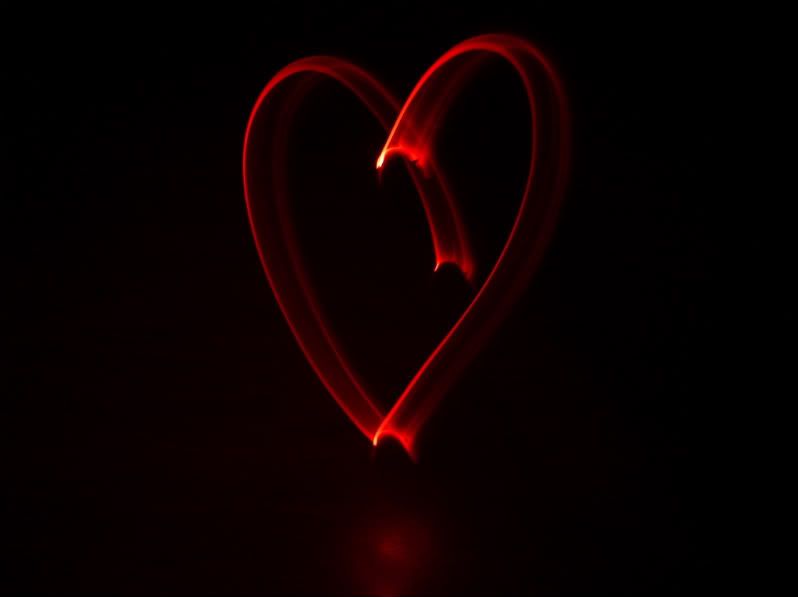
Love this trick..
Gonna playout other trick later on with my frens..
This is my first attempt...

This post has been edited by convicted_knight: Mar 17 2008, 11:06 PM
Play with lights.., DCM Style...
|
|
 Mar 17 2008, 11:05 PM, updated 18y ago Mar 17 2008, 11:05 PM, updated 18y ago
Show posts by this member only | Post
#1
|
 
Junior Member
506 posts Joined: Mar 2006 From: New Eden 
|
Read this month DCM..
Love this trick.. Gonna playout other trick later on with my frens.. This is my first attempt... This post has been edited by convicted_knight: Mar 17 2008, 11:06 PM |
|
|
|
|
|
Mar 17 2008, 11:25 PM
Show posts by this member only | Post
#2
|

Senior Member
1,866 posts Joined: Dec 2006 From: Klang  
|
QUOTE(convicted_knight @ Mar 17 2008, 11:05 PM) Read this month DCM.. what is DCM?Love this trick.. Gonna playout other trick later on with my frens.. This is my first attempt...  |
|
|
Mar 17 2008, 11:27 PM
Show posts by this member only | Post
#3
|

Junior Member
298 posts Joined: Jan 2007 From: Shah Alam 
|
lol, i edi played this during valentine n CNY...
hahaha... try draw something, not ez...  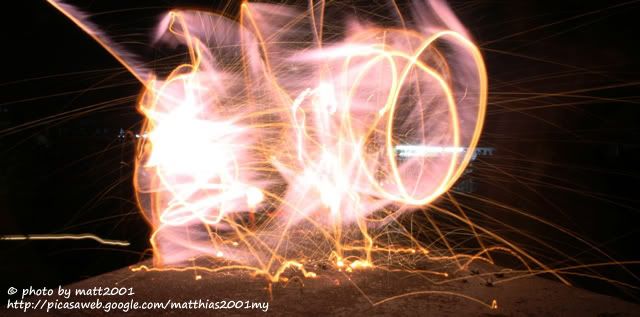 |
|
|
Mar 17 2008, 11:30 PM
Show posts by this member only | Post
#4
|
|
Junior Member
506 posts Joined: Mar 2006 From: New Eden
|
heehe... nice love shape you got there matt...
DCM-Digital Camera Magazine |
|
|
Mar 17 2008, 11:37 PM
Show posts by this member only | Post
#5
|

All Stars
21,256 posts Joined: Jan 2003 From: Pekopon
|
TS i think u do it outdoor better than in ur dorm
|
|
|
Mar 17 2008, 11:47 PM
Show posts by this member only | Post
#6
|
|
Junior Member
506 posts Joined: Mar 2006 From: New Eden
|
yeah.. i tried outside.. but the pic are in my fren's cam..
tomorrow gonna play somemore... btw.. is not dorm.. my own room actually.. bahahhah.. |
|
|
|
|
|
Mar 18 2008, 12:47 AM
Show posts by this member only | Post
#7
|

Senior Member
1,161 posts Joined: Dec 2006 From: http://www.vincentpang.ws
|
my one, if u don't mind me posting
 of course the the watermark is put on using photoshop it's a cool trick, i remember seeing a youtube video wehre some ppl draw animated video with lights... yes frame by frame  it's crazy it's crazy |
|
|
Mar 18 2008, 12:50 AM
Show posts by this member only | Post
#8
|

Senior Member
907 posts Joined: Nov 2005 
|
how u do it?
|
|
|
Mar 18 2008, 01:06 AM
Show posts by this member only | Post
#9
|
|
Junior Member
506 posts Joined: Mar 2006 From: New Eden
|
How to do it..? hhmm...
Dark place + Bulb/very slow shutter + Torchlight or LED light + Skills Try to get March issue DCM... Inside they will guide you how... |
|
|
Mar 18 2008, 01:58 AM
|

Senior Member
6,410 posts Joined: Jan 2003 From: MLK
|
Lol this is what i did just now, using my memory card reader LOL. Need to find torchlight later. XD Don't have a remote shutter yet. Will get one soon. :3
 |
|
|
Mar 18 2008, 02:27 AM
|

Senior Member
1,109 posts Joined: Oct 2007
|
low shutter speed? long exposure ?
 This post has been edited by fcbarcelona-my: Mar 18 2008, 02:28 AM |
|
|
Mar 18 2008, 03:10 AM
|

Senior Member
2,477 posts Joined: Feb 2005
|
i did this last time with my s3is,
with the leds light made by myself..   This post has been edited by mindkiller6610: Mar 18 2008, 03:10 AM |
|
|
Mar 18 2008, 09:56 AM
|
|
Senior Member
540 posts Joined: Dec 2004 From: Kuala Lumpur
|
I see you bought DCM, good read no
|
|
|
|
|
|
Mar 18 2008, 10:04 AM
|

Senior Member
541 posts Joined: Jan 2008
|
you all very creative mah!
 |
|
|
Mar 18 2008, 04:13 PM
|
|
Senior Member
6,410 posts Joined: Jan 2003 From: MLK
|
QUOTE(fcbarcelona-my @ Mar 18 2008, 02:27 AM) low shutter speed? long exposure ? 30 seconds hehe. Need remote shutter so can use bulb mode. Then can open the shutter as long as needed to draw things. XD |
|
|
Mar 18 2008, 04:57 PM
|

Senior Member
628 posts Joined: Aug 2007 
|
wah really nice leh,but i dont understand how to do it leh??
|
|
|
Mar 18 2008, 06:20 PM
|
|
Senior Member
2,477 posts Joined: Feb 2005
|
QUOTE(carcraze66 @ Mar 18 2008, 04:57 PM) wah really nice leh,but i dont understand how to do it leh?? lowest ISO,long exposure, small aperture, hold the torch lights and start moving around. |
|
|
Mar 18 2008, 06:42 PM
|
|
Junior Member
298 posts Joined: Jan 2007 From: Shah Alam
|
QUOTE(mindkiller6610 @ Mar 18 2008, 03:10 AM) i did this last time with my s3is, let me guess...with the leds light made by myself.. eye on malaysia n KLCC?? |
|
|
Mar 18 2008, 07:19 PM
|

Junior Member
73 posts Joined: Jan 2006
|
lol, this is my pair of electric pants
  |
|
|
Mar 18 2008, 11:53 PM
|

Senior Member
1,567 posts Joined: Aug 2007
|
QUOTE(convicted_knight @ Mar 18 2008, 12:05 AM) Read this month DCM.. i don't understand what do the DCM mean about the drawing...how you manage to get away the image of youtself(although your room is litted up)??where were you standing btw??Love this trick.. Gonna playout other trick later on with my frens.. This is my first attempt... This post has been edited by Victor3010: Mar 18 2008, 11:54 PM |
|
|
Mar 19 2008, 12:05 AM
|
|
Junior Member
506 posts Joined: Mar 2006 From: New Eden
|
any camera that can control shutter speed can do this trick..
-set slow shutter.. mine @ 30 sec.. use timer control if dont have remote trigger.. -my aparture set to f.11.. can go to bigger number aparture/smaller aparture size.. -shutter open start drawing at moderate speed, remember you must keep your moving so that you wont be in the picture.. -then voila.. you get light trail effect.. btw, my room was pitch black.. my xenon flashlite seems to light up my room abit.. will post some picture i do with my fren just now.. This post has been edited by convicted_knight: Mar 19 2008, 12:08 AM |
|
|
Mar 19 2008, 12:37 AM
|
|
Junior Member
506 posts Joined: Mar 2006 From: New Eden
|
       |
|
|
Mar 19 2008, 09:00 AM
|

Senior Member
648 posts Joined: Apr 2006 From: Shah Alam
|
Nice series there. I like #4 and #6 of your new series. How long did you guys practice with the drawing before the shoot? How about some interaction with the surrounding as suggested in the article?
|
|
|
Mar 19 2008, 11:15 AM
|

All Stars
10,261 posts Joined: Jan 2003
|
Thumbs up!
 |
|
|
Mar 19 2008, 11:38 AM
|
 
VIP
5,938 posts Joined: Jan 2003 From: Now In The City of Merlion
|
this technic is called light painting, http://en.wikipedia.org/wiki/Light_painting
|
|
|
Mar 19 2008, 03:12 PM
|
Senior Member
2,475 posts Joined: Nov 2005 From: kopitiam
|
sometimes u need to turn on and off the lights to paint.. check my flickr album
|
|
|
Mar 19 2008, 07:46 PM
|
|
Junior Member
506 posts Joined: Mar 2006 From: New Eden
|
QUOTE(hornetEJ @ Mar 19 2008, 09:00 AM) Nice series there. I like #4 and #6 of your new series. How long did you guys practice with the drawing before the shoot? How about some interaction with the surrounding as suggested in the article? hehe.. Practice abit only.. some interaction with surrounding would be great but have tp find a sweet dark spot first..QUOTE(calvin_gsc @ Mar 19 2008, 11:15 AM) Thumbs up! TQ TQ... still new to this light painting... QUOTE(dgrebel @ Mar 19 2008, 03:12 PM) sometimes u need to turn on and off the lights to paint.. check my flickr album we do turn on n off the light.. will check you flickr out.. |
|
|
Mar 19 2008, 09:56 PM
|

Senior Member
686 posts Joined: Jan 2003
|
good job!! very creative
|
|
|
Mar 19 2008, 09:57 PM
|
|
Senior Member
2,475 posts Joined: Nov 2005 From: kopitiam
|
when u see this, u'll shit brix.
  while cornering on the 360 freeway.  writing names.. maiming love.   This post has been edited by dgrebel: Mar 19 2008, 10:12 PM |
|
|
Mar 19 2008, 10:01 PM
|
|
Senior Member
686 posts Joined: Jan 2003
|
QUOTE(dgrebel @ Mar 19 2008, 09:57 PM) when u see this, u'll shit brix. tarak polis meh?  |
|
|
Mar 19 2008, 10:03 PM
|
|
Senior Member
2,475 posts Joined: Nov 2005 From: kopitiam
|
QUOTE(tongyam @ Mar 19 2008, 10:01 PM) tarak polis meh? from uniten to putrajaya where got police.. rarely lor.. huhu |
|
|
Mar 20 2008, 03:56 AM
|
|
Senior Member
907 posts Joined: Nov 2005
|
QUOTE(convicted_knight @ Mar 19 2008, 12:37 AM) |
|
|
Mar 20 2008, 10:19 AM
|
|
Senior Member
2,475 posts Joined: Nov 2005 From: kopitiam
|
when the lens was pointed forward while driving 120kmph on the freeway.
 4-colour combo speed+light trail  This post has been edited by dgrebel: Mar 20 2008, 10:22 AM |
|
|
Mar 21 2008, 03:24 PM
|

Junior Member
207 posts Joined: Jun 2006
|
brother minkillers...
how u do it with your canon S3??? i thought only slr can o this effect?? teach me please...... |
|
|
Mar 21 2008, 11:21 PM
|
Senior Member
2,171 posts Joined: Jun 2006 From: With the Geordies
|
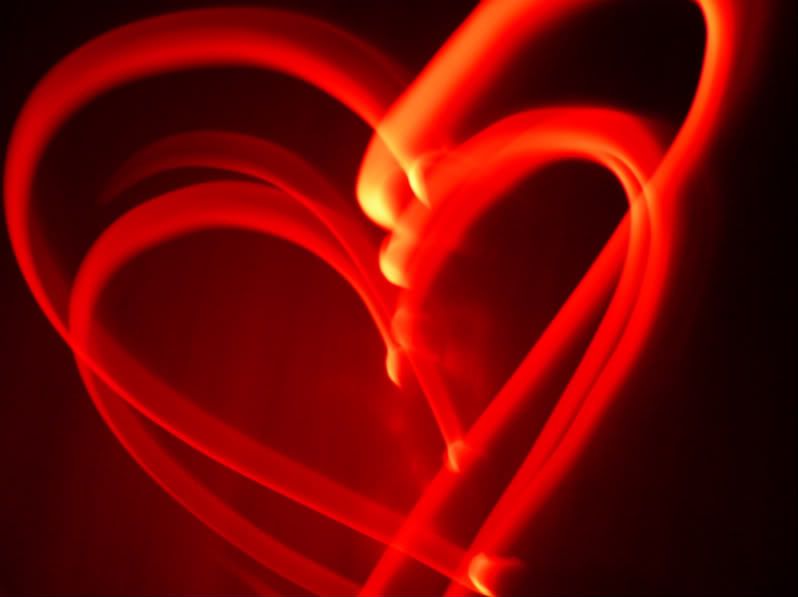
my first attempt of this trick
  This post has been edited by Grajindo: Mar 21 2008, 11:37 PM |
|
|
Mar 21 2008, 11:35 PM
|
|
Junior Member
207 posts Joined: Jun 2006
|
brothers....how to do it??? i tried it didnt work???? sigh......canon s3 is my camera
|
|
|
Mar 21 2008, 11:40 PM
|
|
Senior Member
2,171 posts Joined: Jun 2006 From: With the Geordies
|
QUOTE(NSkyline @ Mar 21 2008, 11:35 PM) brothers....how to do it??? i tried it didnt work???? sigh......canon s3 is my camera i don't know how to function your camera. but for me, i use scene mode, starry sky. then 15secs. |
|
|
Mar 24 2008, 05:26 AM
|
|
Senior Member
2,477 posts Joined: Feb 2005
|
QUOTE(NSkyline @ Mar 21 2008, 03:24 PM) brother minkillers... find a dark place, example like ur room with light switched off.how u do it with your canon S3??? i thought only slr can o this effect?? teach me please...... first, u need to set the focus of ur camera first, just roughly focus on the place that u are going to "light paint", and lock the focus. due to the limitation of s3is, max exposure time is only 15 secs, and if u light source is not bright enough, you might need to set to higher ISO. like ISO 100 or 200. set the camera timer, 5 seconds or so, switch off the room light, wait the camera's timer, when the shutter opens, start drawing with your torch.. you should see some light trails.. |
|
|
Mar 25 2008, 11:35 AM
|

Senior Member
544 posts Joined: Jan 2007 From: PJ / Puchong
|
hehe
my self.=P  This post has been edited by faiz92: Mar 25 2008, 11:35 AM |
|
|
Mar 25 2008, 05:30 PM
|
|
Junior Member
298 posts Joined: Jan 2007 From: Shah Alam
|
QUOTE(faiz92 @ Mar 25 2008, 11:35 AM) hehe dont scare ppl la~» Click to show Spoiler - click again to hide... « later cant sleep... |
|
|
Mar 25 2008, 06:27 PM
|
|
Senior Member
6,410 posts Joined: Jan 2003 From: MLK
|
Multiple exposure ?
|
|
|
Mar 26 2008, 02:19 PM
|

Senior Member
1,220 posts Joined: Jun 2005 From: Slavestate
|
QUOTE(mindkiller6610 @ Mar 24 2008, 05:26 AM) find a dark place, example like ur room with light switched off. what do you mean by "lock the focus"?first, u need to set the focus of ur camera first, just roughly focus on the place that u are going to "light paint", and lock the focus. due to the limitation of s3is, max exposure time is only 15 secs, and if u light source is not bright enough, you might need to set to higher ISO. like ISO 100 or 200. set the camera timer, 5 seconds or so, switch off the room light, wait the camera's timer, when the shutter opens, start drawing with your torch.. you should see some light trails.. does it mean that i have to opt for manual focussing? |
|
|
Apr 3 2008, 08:08 PM
|
|
Senior Member
2,477 posts Joined: Feb 2005
|
QUOTE(xnobys @ Mar 26 2008, 02:19 PM) what do you mean by "lock the focus"? autofocus the place,does it mean that i have to opt for manual focussing? switch to manual focus to lock the focus, if ur focus is not in that area, ur light trails maybe not that nice.. This post has been edited by mindkiller6610: Apr 3 2008, 08:08 PM |
| Change to: |  0.0274sec 0.0274sec
 0.39 0.39
 5 queries 5 queries
 GZIP Disabled GZIP Disabled
Time is now: 24th December 2025 - 01:53 AM |
 Quote
Quote