

Is the iphone can't forward the sms??? is it true??? or need any sw to forward the sms ?? Thanks
iPhone iPhone Club Version6
iPhone iPhone Club Version6
|
|
 Mar 6 2008, 05:28 PM Mar 6 2008, 05:28 PM
Return to original view | Post
#1
|
 
Junior Member
90 posts Joined: Dec 2005 From: Kuala Lumpur  
|
Is the iphone can't forward the sms??? is it true??? or need any sw to forward the sms ?? Thanks
|
|
|
|
|
|
Mar 6 2008, 06:33 PM
Return to original view | Post
#2
|
|
Junior Member
90 posts Joined: Dec 2005 From: Kuala Lumpur
|
QUOTE(futobuta @ Mar 6 2008, 05:33 PM) iPhone now can send to multiple numbers at one go.. but still cannot forward THanks... Then what is the 3rd party app name?sms on its own. You can install 3rd party app to help u do that.  |
|
|
Mar 6 2008, 07:15 PM
Return to original view | Post
#3
|
|
Junior Member
90 posts Joined: Dec 2005 From: Kuala Lumpur
|
Sifu, can i know which one is better? and how can i get it? is it need the URL to download and install it on iphone?? Thanks...
|
|
|
Mar 6 2008, 08:34 PM
Return to original view | Post
#4
|
|
Junior Member
90 posts Joined: Dec 2005 From: Kuala Lumpur
|
can i ask all Sifu some questions:
1)when i upgaded to 1.1.4 by itune and unlocked using ziphone 2.5c with " Do IT All", do i need to install the BSD subsystem and appsupport ?? 2)Without install the BSD subsystem after using the ziphone 2.5c, can i just use the Installer /Sourse URL to download 3rd party software like isms ??? Thankssss This post has been edited by erictanyh: Mar 6 2008, 08:39 PM |
|
|
Mar 6 2008, 09:46 PM
Return to original view | Post
#5
|
|
Junior Member
90 posts Joined: Dec 2005 From: Kuala Lumpur
|
can i ask all Sifu some questions:
1)when i upgaded to 1.1.4 by itune and unlocked using ziphone 2.5c with " Do IT All", do i need to install the BSD subsystem and appsupport ?? 2)Without install the BSD subsystem after using the ziphone 2.5c, can i just use the Installer /Sourse URL to download 3rd party software like isms ??? Thankssss |
|
|
Mar 9 2008, 01:08 PM
Return to original view | Post
#6
|
|
Junior Member
90 posts Joined: Dec 2005 From: Kuala Lumpur
|
All Sifu, i will get my new 16gb iphone this evening later, can i know how can i sync my all contacts and calender to my i phone?? Now i'm using My HTC Touch and sync all my contact and calender via mirosoft outlook... and i would like to sync all these contact and calender to my new iphone later...Please advise....and help.....Thanks!!!!
|
|
|
|
|
|
 Mar 9 2008, 01:34 PM Mar 9 2008, 01:34 PM
Return to original view | Post
#7
|
|
Junior Member
90 posts Joined: Dec 2005 From: Kuala Lumpur
|
QUOTE(terencetoo @ Mar 9 2008, 01:21 PM) Congrat of getting new 16GB bro what a fast reply!!! i will try to do it once i do all the unlocks. Thankssssssssssssssss!!! u can plug your iPhone via the Dock connected to iTunes (http://www.apple.com/itunes/) the procudure is the same as PPC...u plug the phone in iTuens will auto recognize your phone and ask u to upgrade to 1.1.4 skip tat is u r 1.1.4 go to "Info" and sync "contact with outlook" If u 1 2 comfirm your contact is being sync...open outlook contact before sync so u can see your contact is looded in it Hope this help.  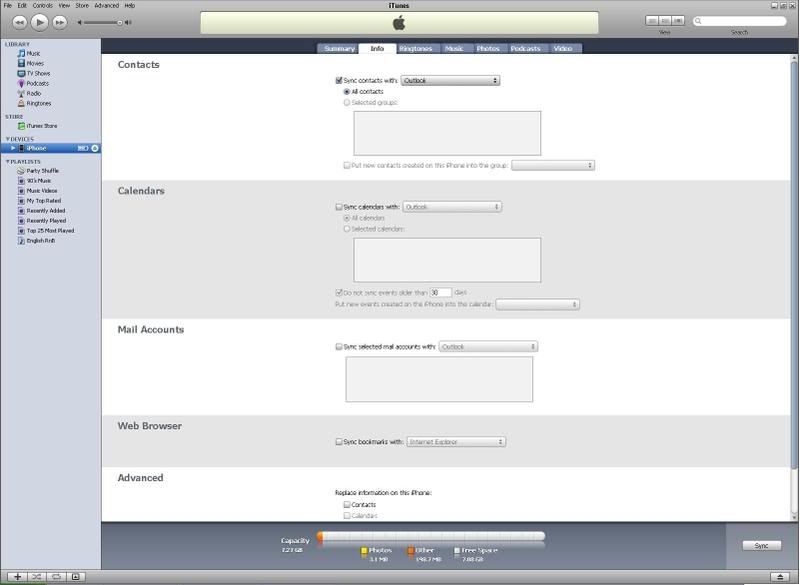 |
|
|
Mar 9 2008, 03:09 PM
Return to original view | Post
#8
|
|
Junior Member
90 posts Joined: Dec 2005 From: Kuala Lumpur
|
hi all Sifu, after i do all the unlock via ziphone v2.5c, as i know what my next step is download BDS and Appsupport, right?? As forwarding the sms, i need to download the isms,but one of my friend did so,but he couldn't use this isms, is it because he didn't install the BDS and Appsupport so he can't use the isms?? and what is the proper way to install 3rd party software(etc..isms and chinese read/write) into my new unlock iphone after i download the install BDS and Appsupport?? Thanks in advance.....!!
|
|
|
Mar 10 2008, 09:27 PM
Return to original view | Post
#9
|
|
Junior Member
90 posts Joined: Dec 2005 From: Kuala Lumpur
|
All sifu, I have download and install the swirlymms, can i know what is the Maxis MMS setting in my new iphone?? Do i need to press *133# to activate my GPRS 1st? Before that i have did it on my HTC Touch in the same sim card.
|
|
|
Mar 10 2008, 10:58 PM
Return to original view | Post
#10
|
|
Junior Member
90 posts Joined: Dec 2005 From: Kuala Lumpur
|
QUOTE(sixfooter @ Mar 10 2008, 09:33 PM) You can find the settings for DiGi, Maxis and Celcom here: http://www.activexperts.com/mmstoolkit/mmsclist/ I have key in all the setting, but still failed to send!! Please help.... |
|
|
Mar 11 2008, 01:31 PM
Return to original view | Post
#11
|
|
Junior Member
90 posts Joined: Dec 2005 From: Kuala Lumpur
|
this mornig my new iphone can't call out but can receive call only?? why ah?? what can cause this problem?? please help?? Or do i need to do restore via itune?? if i use itune's restore, will my data of 3rd party softwares will lost too??
This post has been edited by erictanyh: Mar 11 2008, 01:47 PM |
|
|
Mar 13 2008, 05:24 PM
Return to original view | Post
#12
|
|
Junior Member
90 posts Joined: Dec 2005 From: Kuala Lumpur
|
QUOTE(soundstream @ Mar 11 2008, 02:35 PM) try to perform Ziphone again and it should work after that. Ya, i think i have installed some unstable software and cos my Maxis line can't make call..... no choice... just do the restore and unlock via Ziphone. after unlock, everything go fine! Thanks all Sifu anyway!!!you're in 1.1.4 ?  |
|
|
Mar 15 2008, 07:32 PM
Return to original view | Post
#13
|
|
Junior Member
90 posts Joined: Dec 2005 From: Kuala Lumpur
|
i installed Mobile Chat and Apollo to run my MSN Messenger, but both can't connected?? it keep show conneting....... any advise??
|
|
|
|
|
|
Mar 18 2008, 05:16 PM
Return to original view | Post
#14
|
|
Junior Member
90 posts Joined: Dec 2005 From: Kuala Lumpur
|
QUOTE(kiasunkiasi @ Mar 17 2008, 05:15 AM) Yes!!! Managed to start the Customize 1.21 on my 1.1.4 iPhone. Here's what I did... Bro, what isAdd repo.ispazio.net into your Installer sources and you should be able to install 1.1.4 Compatibility Patch under Tweaks(1.1.4) category. The patch will fool apps that require 1.1.3 to think that your 1.1.4 is running on 1.1.3. You should be able to install Customize 1.21 now. IMPORTANT : Remember to uninstall 1.1.4 Compatibility Patch immediately after you finish installing the 1.1.3 compatible app. I'm not sure what will happen if you did not uninstall the patch but I suspect that your iPhone will crash. Now I'm gonna see whether the changes that I'm gonna make in Customize take effect or not... EDIT : Changes made by launching Customize is not taking effect. So I try launching Customize using Terminal by entering the following - su /Applications/Customize.app/Customize This time, the customization is effective...   su /Applications/Customize.app/Customize ?? how am i to do this?? |
|
|
Mar 18 2008, 07:19 PM
Return to original view | Post
#15
|
|
Junior Member
90 posts Joined: Dec 2005 From: Kuala Lumpur
|
QUOTE(kiasunkiasi @ Mar 18 2008, 05:54 PM) You can either use Terminal or Putty or Commands-OpenTerminal function of WinSCP to enter the Unix commands in order to lauch Customize using super user ID so that any changes will be from "real" root, i.e. enable Customize to register your customization. This is Unix commands??Edit: Typo su /Applications/Customize.app/Customize And what is super user ID?? Thanks!!! |
|
|
Mar 21 2008, 04:59 PM
Return to original view | Post
#16
|
|
Junior Member
90 posts Joined: Dec 2005 From: Kuala Lumpur
|
all Sifu, can i know what is TimeCapsule url source?? can't fine it..... Thanks!!!!
I found it: TimeCapsule is in repository: http://repo.databinge.com This post has been edited by erictanyh: Mar 21 2008, 05:21 PM |
|
|
Mar 21 2008, 05:21 PM
Return to original view | Post
#17
|
|
Junior Member
90 posts Joined: Dec 2005 From: Kuala Lumpur
|
QUOTE(kiasunkiasi @ Mar 21 2008, 05:20 PM) repo.databinge.com Thanks!!! |
|
|
Mar 27 2008, 05:28 PM
Return to original view | Post
#18
|
|
Junior Member
90 posts Joined: Dec 2005 From: Kuala Lumpur
|
today i go check update for my iphone via itune, it show current latest version is 1.13!! i though the latest version now is 1.1.4 right?? why ah?? apple withdraw back the 1.1.4 version??
|
|
|
Mar 27 2008, 06:15 PM
Return to original view | Post
#19
|
|
Junior Member
90 posts Joined: Dec 2005 From: Kuala Lumpur
|
QUOTE(kiasunkiasi @ Mar 27 2008, 03:26 PM) I've managed to change the name of SMS ringtones... Bro, can i know what is the sms ringtone format?? is it same with the iphone ringtown format??Here's how... 1. SSH into /private/var/Applications/Preferences.app/English.lproj and copy the Sounds.string file to your PC 2. convert the Sounds.string file using http://140.124.181.188/~khchung/cgi-bin/plutil.cgi 3. open the converted Sounds.string file using WordPad or any other editor 4. change the SMS ringtone names into your preference and save changes 5. copy back the amended Sounds.string file back to your phone (make a copy of your original Sounds.string file, e.g. rename it into Sounds.string.original) 6. done! All 6 SMS ringtones are located at /System/Library/Audio/UISounds with names from sms-received1.caf to sms-received6.caf [with corresponding name Tri-Tone etc.], Google for ways to create SMS ringtones if you have no idea how to do it... And what do u mean :change the SMS ringtone names into your preference and save changes This post has been edited by erictanyh: Mar 27 2008, 06:16 PM |
|
|
Mar 27 2008, 06:51 PM
Return to original view | Post
#20
|
|
Junior Member
90 posts Joined: Dec 2005 From: Kuala Lumpur
|
QUOTE(kiasunkiasi @ Mar 27 2008, 06:31 PM) iPhone's SMS ringtones are xxx.caf, you need to convert your file to caf (search for that). i have changed the name but the new name file still play with the same old tone....and i have converted the the new ringtone file to caf, but then where should i copy this new caf file to?? Thanks....Simply type what you want your SMS ringtone to appear in your phone, e.g. I replaced Horn with Sheep / Announcement with Electronic This post has been edited by erictanyh: Mar 27 2008, 07:00 PM |
|
Topic ClosedOptions
|
| Change to: |  0.0370sec 0.0370sec
 0.40 0.40
 7 queries 7 queries
 GZIP Disabled GZIP Disabled
Time is now: 7th December 2025 - 08:17 AM |
 Quote
Quote