


AMDŽ Socket-AM2/AM2+ Overclocking thread (V6), Will AMD alive??
AMDŽ Socket-AM2/AM2+ Overclocking thread (V6), Will AMD alive??
|
|
 Feb 18 2008, 01:07 AM Feb 18 2008, 01:07 AM
Return to original view | Post
#1
|
 
Senior Member
1,302 posts Joined: Oct 2006 From: Long Murum, Sarawak  
|
this might help u all..
|
|
|
|
|
|
Feb 18 2008, 01:07 AM
Return to original view | Post
#2
|
|
Senior Member
1,302 posts Joined: Oct 2006 From: Long Murum, Sarawak
|
this might help u all..
0/04: Matlab and AMD Athlon 64 issue This issue has been bugging me from the start of my current semester at NIIT (NUST Institute of IT). I have a 6 months old AMD Athlon64 processor (Winchester) based PC running Windows XP Professional and wanted to use Matlab 7 Release 14 (7.0.0.19920) on it for my Numerical Analysis course. The software installed fine. However, on clicking the desktop shortcut, the program showed the splash screen but then suddenly quit. I wasn't sure as to what was causing it. I have been struggling with this issue for some months and have finally found a solution. At least, this solution worked on my PC. Follow the steps below: 1 - Open %MATLAB7%\bin\win32 in Windows Explorer or through My Computer. '%MATLAB7%' here is the path where you installed MATLAB. 2 - Find the file named 'blas.spec'. Open this file in Wordpad. You will see a listing like this: GenuineIntel Family 5 Model * atlas_PPro.dll # Pentium GenuineIntel Family 6 Model 1 atlas_PPro.dll # Pentium Pro GenuineIntel Family 6 Model 3 atlas_PII.dll # Pentium II (Klamath) GenuineIntel Family 6 Model 5 atlas_PII.dll # Pentium II (Deschutes) GenuineIntel Family 6 Model 6 atlas_PII.dll # Celeron GenuineIntel Family 6 Model 7 atlas_PIII.dll # Pentium III (Katmai) GenuineIntel Family 6 Model 8 atlas_PIII.dll # Pentium III (Coppermine) GenuineIntel Family 6 Model 9 atlas_PIII.dll # Pentium M GenuineIntel Family 6 Model 10 atlas_PIII.dll # Pentium III (Cascades) GenuineIntel Family 6 Model 11 atlas_PIII.dll # Pentium III (Mobile) GenuineIntel Family 6 Model * atlas_PIII.dll # Pentium III GenuineIntel Family 15 Model * atlas_P4.dll # Pentium 4 AuthenticAMD Family 5 Model * atlas_PII.dll # AMD-K6 AuthenticAMD Family 6 Model * atlas_Athlon.dll # Athlon/Duron AuthenticAMD Family 15 Model 4 atlas_Athlon.dll # Athlon 64 AuthenticAMD Family 15 Model 5 atlas_Athlon.dll # Opteron 3 - Scroll down and add the following two lines at the end: AuthenticAMD Family 15 Model 12 atlas_Athlon.dll # Athlon 64 (Newcastle) AuthenticAMD Family 15 Model * atlas_Athlon.dll # AMD64 4 - Save the file (Ctrl+S). 5 -Start Matlab. I hope this solution works for you. I have read about setting the environment variable 'blas_version' to some other value but I didn't need to find and/or modify it. My copy of Matlab worked fine after the above mentioned changes. Good luck with your Matlab programming! (23-08-06) - Edit: I am now using Matlab R2006a. This version has no issues with running on AMD processors and is working perfectly on my PC. Attached File(s)  matlabAMDsolution.txt ( 2.52k )
Number of downloads: 3
matlabAMDsolution.txt ( 2.52k )
Number of downloads: 2
matlabAMDsolution.txt ( 2.52k )
Number of downloads: 3
matlabAMDsolution.txt ( 2.52k )
Number of downloads: 2 |
|
|
Feb 20 2008, 02:04 PM
Return to original view | Post
#3
|
|
Senior Member
1,302 posts Joined: Oct 2006 From: Long Murum, Sarawak
|
i dont really think corsair can go over 1000
|
|
|
Feb 22 2008, 05:55 PM
Return to original view | Post
#4
|
|
Senior Member
1,302 posts Joined: Oct 2006 From: Long Murum, Sarawak
|
urm...i dont know there are so many people want F3...
 i might joining the dark side in coming month  This post has been edited by nik0ns: Feb 22 2008, 06:13 PM |
|
|
Feb 23 2008, 10:29 PM
Return to original view | Post
#5
|
|
Senior Member
1,302 posts Joined: Oct 2006 From: Long Murum, Sarawak
|
QUOTE(digswell @ Feb 23 2008, 10:27 PM) still anny is the best one.... now it's cheap already....unfortunately i bought it a few days before kiong reduce the price    too bad i no hv too bad i no hv    |
|
|
Feb 23 2008, 10:31 PM
Return to original view | Post
#6
|
|
Senior Member
1,302 posts Joined: Oct 2006 From: Long Murum, Sarawak
|
QUOTE(xixo_12 @ Feb 23 2008, 10:28 PM) anny is not the best.. but among the best.. i will get the ta690g back i thought you are joining the darkside after sell ur f3 + ta690g  swap+topup with sum1 swap+topup with sum1 |
|
|
|
|
|
Feb 24 2008, 09:53 AM
Return to original view | Post
#7
|
|
Senior Member
1,302 posts Joined: Oct 2006 From: Long Murum, Sarawak
|
QUOTE(mois @ Feb 24 2008, 09:11 AM) eh need some tips to oc my amd and ram... did u use lower ram divider and lower HT??using 4200+ and crucial pc6400..i pump the vcore until 1.376V..and set the proc speed at 11X223=2453MHz..ram speed 408MHz.. after that, i tried 11x230 but it cant boot..how? noob oc here.. edited: do i need to pump vcore higher? |
|
|
Feb 24 2008, 11:23 AM
Return to original view | Post
#8
|
|
Senior Member
1,302 posts Joined: Oct 2006 From: Long Murum, Sarawak
|
QUOTE(mois @ Feb 24 2008, 11:15 AM) screenshot... try reduce HT multiplier first....btw,it's hard to find 'org sarikei' here havent test the system yet... |
|
|
Mar 2 2008, 12:01 AM
Return to original view | Post
#9
|
|
Senior Member
1,302 posts Joined: Oct 2006 From: Long Murum, Sarawak
|
bro -pWs-
update mine AMD X2 3800+(F3) | nik0ns | Biostar Tforce TA690G | Crucial 10th Anniversary | PC5300@550Mhz | 5-5-5-15-21 | Tuniq Tower 120 Attached thumbnail(s) 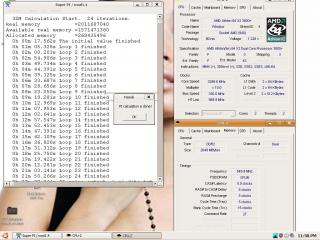
|
|
|
Mar 3 2008, 12:47 AM
Return to original view | Post
#10
|
|
Senior Member
1,302 posts Joined: Oct 2006 From: Long Murum, Sarawak
|
QUOTE(digswell @ Mar 2 2008, 10:54 PM) Agreed where's asus??..........  high end DFI Lower end biostar medium end gigabyte high end DFI Lower end biostar medium end gigabyte |
|
|
Mar 3 2008, 11:29 PM
Return to original view | Post
#11
|
|
Senior Member
1,302 posts Joined: Oct 2006 From: Long Murum, Sarawak
|
QUOTE(ocz @ Mar 3 2008, 11:25 PM) Can you give me some reasons?? abit fan??? |
|
|
Mar 4 2008, 11:44 PM
Return to original view | Post
#12
|
|
Senior Member
1,302 posts Joined: Oct 2006 From: Long Murum, Sarawak
|
QUOTE(ask8900 @ Mar 4 2008, 11:42 PM) hehe see my pc nice....but what's ur point??? just now just buy my new psu st56f 560w   |
|
Topic ClosedOptions
|
| Change to: |  0.0221sec 0.0221sec
 0.68 0.68
 7 queries 7 queries
 GZIP Disabled GZIP Disabled
Time is now: 7th December 2025 - 07:35 AM |
 Quote
Quote