Outline ·
[ Standard ] ·
Linear+
AMDŽ Socket-AM2/AM2+ Overclocking thread (V6), Will AMD alive??
|
mr_habuk
|
 Feb 22 2008, 04:47 PM Feb 22 2008, 04:47 PM
|

|
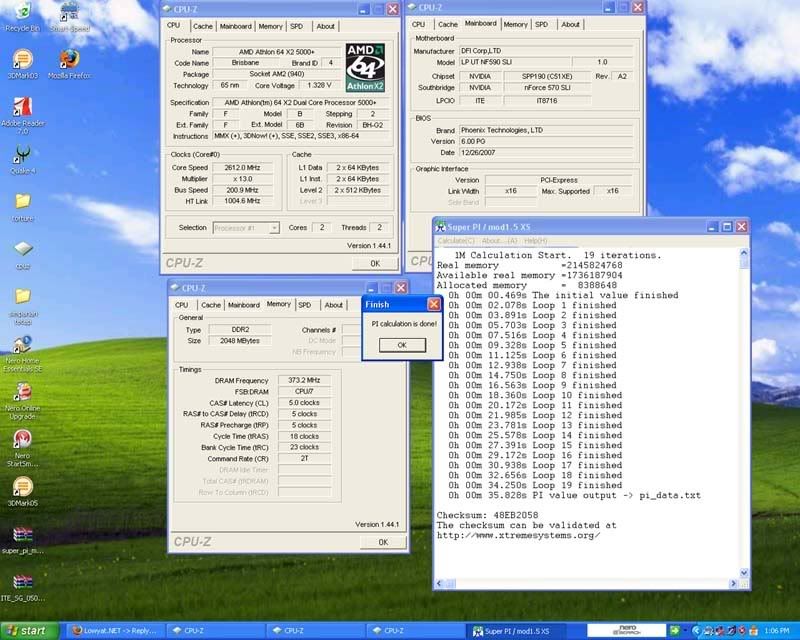
 CODE BE 5000+ | mrhabuk | Dfi LP UT nf590 SLI-M2R | Corsair XMS2 | 6400 | 5-5-5-18-23 | Noctua NF-U12F just want to update my setup... later i'll post oc result after finish playing crysis.. need to go back to Fundamentals of Overclocking thread again.  dah lupa arr...to many feature with this not so new board..  P/S: perghh...long time didn't been here..ver 7 already arr?? |
|
|
|
|
|
mr_habuk
|
Feb 23 2008, 02:58 PM
|
|
|
update minor clocking...TQ.  CODE BE 5000+ brisbane @ 2995.1mhz | mrhabuk | Dfi LP UT nf590 SLI-M2R | Corsair XMS2 | 6400 | 5-5-5-18-23 | Noctua NF-U12F |
|
|
|
|
|
mr_habuk
|
Feb 23 2008, 03:39 PM
|
|
|
QUOTE(digswell @ Feb 23 2008, 03:14 PM) 1t fast then 2 t .....but 2t stable then 1t yup, trying to find how far this corsair can go with 1T at the moment.. later i go with 2T pulak..  |
|
|
|
|
|
mr_habuk
|
Mar 11 2008, 08:40 AM
|
|
|
guys...need help here, is anyone here can tell me how to set my command rate from 1T to 2T..seem like my DFI only have 'enable' , 'disable' and 'auto' options only lorr...not like my previous infinity..
|
|
|
|
|
|
mr_habuk
|
Mar 11 2008, 09:11 AM
|
|
|
QUOTE(digswell @ Mar 11 2008, 08:42 AM)
Added on March 11, 2008, 8:46 amif command rate function show at bios is 2T ...enable is to 2T...disbale is to 1T hmmm...but it something like this..but mine showing 1 CLK n i've already tried all the options but the value still 1 CLK..  This post has been edited by mr_habuk: Mar 11 2008, 09:15 AM This post has been edited by mr_habuk: Mar 11 2008, 09:15 AM |
|
|
|
|
|
mr_habuk
|
Mar 11 2008, 11:19 AM
|
|
|
QUOTE(ah_khoo @ Mar 11 2008, 09:24 AM) command per clock = command rate. set it to 2t.  yup mr khoo...note it..but the problem is... its only 'enable, disable and auto'... so how am i going to set it..??? |
|
|
|
|
|
mr_habuk
|
Mar 11 2008, 01:44 PM
|
|
|
QUOTE(ah_khoo @ Mar 11 2008, 12:52 PM) enable = 1t, disable = 2t, dfi's bios is abit tricky but it's fun to play with...  hmmm..i'll double check the bios again later tonight...thanks bro..  |
|
|
|
|
|
mr_habuk
|
Mar 13 2008, 09:15 AM
|
|
|
manage sometime this morning..  CODE
X2 BE 5000+ | mr_habuk | DFI LANPARTY NF590 SLI-M2R | CRUCIAL BALLISTIX | 6400 | 5-5-5-24-2T | TUNIQ TOWER 120
|
|
|
|
|
|
mr_habuk
|
Mar 13 2008, 11:18 AM
|
|
|
QUOTE(ah_khoo @ Mar 13 2008, 09:53 AM) try to play w d ram speed bro... u can get better result even w lower cpu clock... [attachmentid=416293] will try my best later...but need learn more.. » Click to show Spoiler - click again to hide... « QUOTE(xixo_12 @ Mar 13 2008, 09:54 AM) latest news from AMD incrementing the 1mhz in HTT bring this new super PI result :23.047s with tighten up the 5-5-4-3-2T with 2.55V in bios PIC1 [attachmentid=416291] i'm not the person that can wait for better result this is the breaking zone session :22.953s entering the 22s area with 296 x 12 : 3552Mhz PIC2 [attachmentid=416292] FYI, my daily oced system at the 1.6V in bios which have the team with 2.15V 5-5-5-5-11-2T just doing the increment in HTT and the result pop-up as above no vcore added from daily rig (293 x 12) to the SPI test (296 x 12) just the Vdimm~~~~~~~~~~ :cheer: nice...   This post has been edited by mr_habuk: Mar 13 2008, 11:26 AM This post has been edited by mr_habuk: Mar 13 2008, 11:26 AM |
|
|
|
|
|
mr_habuk
|
Mar 14 2008, 08:44 AM
|
|
|
QUOTE(casperito @ Mar 14 2008, 08:38 AM) asus = crappy price.... gigabyte = hmm.. i dun like their board.. dunno why... last time used gigabyte not satisfied... if solid caps, better go for DFI... DFI but in term of OC.... |
|
|
|
|
|
mr_habuk
|
Mar 14 2008, 09:30 AM
|
|
|
QUOTE(casperito @ Mar 14 2008, 08:46 AM) but in OC term?? DFI 790FX is one of the best OC mobo for AMD... google for review.... then u'll know... sorry dude, what i mean is... its so very2 pening when u're not a good ocer like me...  |
|
|
|
|



 Quote
Quote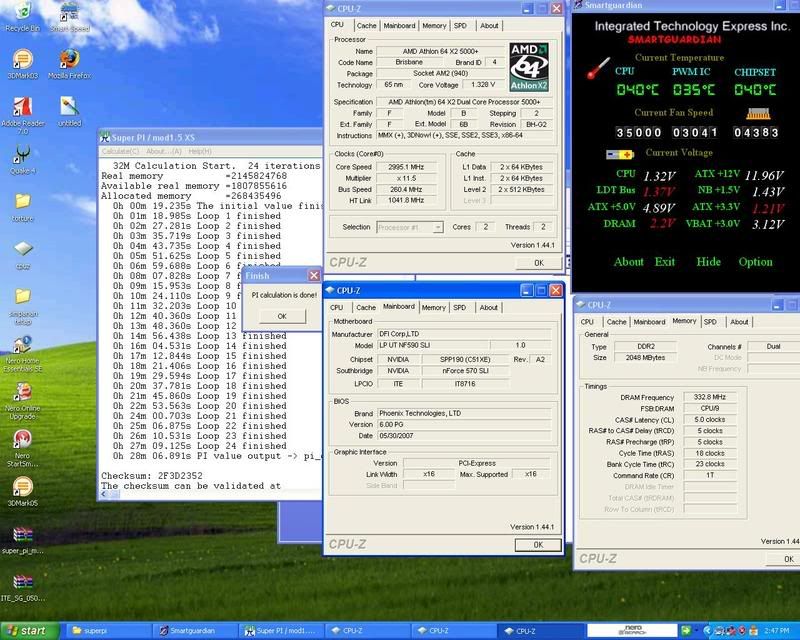


 0.0308sec
 0.60
0.60
 7 queries
 GZIP Disabled