Any pros can assist me in searching for a nice 32" or 40" LCD TV?? Wanna use for gaming on Xbox 360 and PS3.... I dun mind the price but don't need to go overboard la.... Thx...
HDTV FAQ, Discussion relating to gaming on a HDTV
HDTV FAQ, Discussion relating to gaming on a HDTV
|
|
 Jul 3 2008, 02:02 PM Jul 3 2008, 02:02 PM
Return to original view | Post
#1
|
 
Senior Member
1,937 posts Joined: Jun 2006 From: Petaling Jaya  
|
Any pros can assist me in searching for a nice 32" or 40" LCD TV?? Wanna use for gaming on Xbox 360 and PS3.... I dun mind the price but don't need to go overboard la.... Thx...
|
|
|
|
|
|
Jul 3 2008, 05:43 PM
Return to original view | Post
#2
|
|
Senior Member
1,937 posts Joined: Jun 2006 From: Petaling Jaya
|
QUOTE(Evirober @ Jul 3 2008, 04:04 PM) Aura: Dude u should set a budget man...else recommendations will be difficult My max budget is RM5k... Preferably, around 3k range if for 32".... If for small room, which one is better, 32" or 40"??? The best would be 40" Full HD.... If 32", no need full HD also can liao.... I'm currently looking at Sony or Samsung.... This post has been edited by Aura: Jul 3 2008, 05:47 PM |
|
|
Jul 4 2008, 12:41 AM
Return to original view | Post
#3
|
|
Senior Member
1,937 posts Joined: Jun 2006 From: Petaling Jaya
|
QUOTE(nders @ Jul 3 2008, 11:31 PM) hi people. I need suggestions too... I need a 32 inch tv for x360. full 1080i is not a must. Just came back from LCD TV shopping... Bought myself the 32" Bravia V-Series (BE2 is nice... my primary limiting factor here I think is budget (or i'd like to call it "value")... I don't have a set budget, BUT, just give me your opinion on the most "value buy", meaning it has the best price/quality ratio. thanks in advance!  ) for RM2,799.... Now waiting for the TV to come coz need to order for other colours.... Btw, I chose white.... ) for RM2,799.... Now waiting for the TV to come coz need to order for other colours.... Btw, I chose white....  I'll upload a pic if I got everything set up.... I'll upload a pic if I got everything set up....If u dun mind other brands, I saw the Toshiba Regza 32" (I think is AV500) selling for RM1,999 at BEST in MV.....  As for picture quality, not bad for the price but the sound is stereo lor..... Other than that, the other alternative is Sony Bravia 32" S-Series with BE2 for RM2,499 but I guess u can ask for best price coz I did ask for best price and they gave me RM200 discount.....  |
|
|
Jul 4 2008, 11:14 AM
Return to original view | Post
#4
|
|
Senior Member
1,937 posts Joined: Jun 2006 From: Petaling Jaya
|
QUOTE(nders @ Jul 4 2008, 10:48 AM) Thanks Aura. I was also looking at the Bravia one at 2499 on sonystyle.com.my cos it has 0% instalment scheme. Just wondering if the quality of the tv is compromised or not? since it is the cheapest in Sony's 32inch bravia range. Aquos to me, some models are very good but I hav to c which one issit bcoz I dunno what's the model no. but after seeing some demos from some models, it kinda turn me off bcoz some displayed kinda nicely and some are just horribly poor (IMO onli la).....I also heard friends saying samsung got 32inch tv for 1800-1900, how does it compare with bravia or toshiba, or the much hyped Aquos? The Bravia that u r looking at is the S-Series 32" with BE2.... That one overall is not bad but if compared to mine, u really can't see the difference and the specs are the same coz the difference can't be seen by the naked eye.... But one thing I notice is that the S-Series is kinda too bright for me and after staring at it for quite some time, I got headaches..... I bought the V-Series bcoz it doesn't hurt my eyes and also my gf's eyes and also can choose between 4 colours which is a bonus and also the sound quality is much better than other LCD TVs I've seen so far bcoz of the technology they use..... I can't say much more coz I hav to wait till next week to get the colour I wan..... So, if it arrives, then I'll post some pics for the picture quality for u to judge.....As for Samsung, design is no. 1 but for quality is not that good (as what I heard from the sales person la)..... For Toshiba, the model that I posted earlier about is new model and they are doing promotion for that so that's why the price is RM1,999 (ori price is RM2,499)...... From what I observed, Toshiba's Regza has nice colours but the onli thing that is poor is its stereo sound, which kinda avoid me from buying although the price is a lot cheaper..... I also dun hav much experience in buying TVs.... To be honest, this is my first time that I bought my own TV so, if got any misleading comments, pls correct me....  0% installment kicks arse btw.... One question I wanna ask, if I use HDMI input, can I actually route the audio to another device for output?? |
|
|
Jul 4 2008, 01:29 PM
Return to original view | Post
#5
|
|
Senior Member
1,937 posts Joined: Jun 2006 From: Petaling Jaya
|
QUOTE(TheUndead @ Jul 4 2008, 11:18 AM) Aura, you bought a good TV. Congrats on your recent purchase bro! TQ TQ.....  Btw, if use HDMI input, can output the audio to other medium??? If yes, pls advise..... |
|
|
Jul 4 2008, 04:08 PM
Return to original view | Post
#6
|
|
Senior Member
1,937 posts Joined: Jun 2006 From: Petaling Jaya
|
QUOTE(htkaki @ Jul 4 2008, 03:41 PM) Hi, all 720p panel support 720p and 1080i. Only for 1080p signal, you need FULL HD; 1920 x 1080p to appreciate its 'beauty' True true.... at that reso, it is darn nice to look at....QUOTE(cscheat @ Jul 4 2008, 03:46 PM) guys, if want buy 32" bravia, wait for the new S series Bravia which is 40" with 1080p FULL HD !!! If I hav more space then I would consider waiting for that cos the new 40" price will be a bargain.....  |
|
|
|
|
|
Jul 13 2008, 11:59 AM
Return to original view | Post
#7
|
|
Senior Member
1,937 posts Joined: Jun 2006 From: Petaling Jaya
|
QUOTE(barney @ Jul 13 2008, 12:21 AM) Hello all, Actually, in terms of specs, V-Series and S-Series has no difference.... It's just that S-Series seems to be brighter than V-Series (at that time I was browsing).... V-Series is a bit sharper but can't be noticed by the human eye.... I dunno about S-Series, if u dun mind forking out a bit more for V-Series, I suggest u go for V-Series.... Coz now I'm currently using one and V-Series has Full HD capability.... Native resolution is 1080p but if u wanna use as PC display, then u hav to set to 720p resolution coz it's sharper.... But when u play games on PC, u can set to 1080p resolution..... As for PS3, it can go up to 1080p.... I've tried RR7 and it's 1080p..... Very nice..... Normally, u can't get this feature on 32" unless u hav to fork out RM4k++.... So, as a budget LCD TV, I suggest this one is a better choice than S-Series....I am planning to get a Sony 32" LCD for my brand new LCD. I went to carrefour today just to look see look see. I saw a 32" S series which cost 2499 which was pretty nice. Does anyone here has the 32" S series playing on a ps3? I was wondering hows the picture quality? I want something that can be as near to a full HD quality when playing my GTA4, MGS4 and GT5(future game). I think the 32" S series model was KLV-32S400A How about the 32" V series? Does it has lot of difference S vs V series? I just want a Sony 32" LCD that u can be happy with the display quality. Let me know... p/s: the reason why i choose Sony over so many other brand was because my PS3 is Sony, so to Sony PS3 with a Sony LCD = perfect match brand  Summary, pic quality = excellent, 1080p supported, S-Force surround sound, can choose from 4 colours (mine is white  ), sound quality very clear for TV speakers, price won't break the bank.... That's all I hav to say for now.... If I hav some pics, I'll upload it for u guys to c.... Oh ya, btw, V-Series costs RM2999... ), sound quality very clear for TV speakers, price won't break the bank.... That's all I hav to say for now.... If I hav some pics, I'll upload it for u guys to c.... Oh ya, btw, V-Series costs RM2999... |
|
|
Jul 13 2008, 02:07 PM
Return to original view | Post
#8
|
|
Senior Member
1,937 posts Joined: Jun 2006 From: Petaling Jaya
|
QUOTE(pspfan @ Jul 13 2008, 01:57 PM) hmm since when vseries 32 inch supports 1080p? only the latest 40 inch s and v series is 1080p.. u must be high... j/k I'm already using 1080p to play Ridge Racer 7.... At 1st, I thought it doesn't support... But after looking at the brochure, it's stated that it does support... And when I get my TV, I've seen the max settings on the PS3 is 1080p.... Although it doesn't state that it is Full HD 1080p, but it does hav the capability..... S-Series I dunno, but for V-Series 32", it does support.... U can go check the specs............ |
|
|
Jul 13 2008, 08:19 PM
Return to original view | Post
#9
|
|
Senior Member
1,937 posts Joined: Jun 2006 From: Petaling Jaya
|
QUOTE(pspfan @ Jul 13 2008, 06:28 PM) It does state that it supports 1080p.... Check the part where it states what video signal it supports..... |
|
|
Jul 13 2008, 10:00 PM
Return to original view | Post
#10
|
|
Senior Member
1,937 posts Joined: Jun 2006 From: Petaling Jaya
|
QUOTE(welwitchia @ Jul 13 2008, 09:05 PM) ^ Your LCD accepts a 1080p signal but the output is still 720p simply because your screen has a native res of 1366 x 768. Full HD screens runs at 1920 * 1080. Then again, i doubt there's any "visual" difference between a 720p and 1080p Ridge Racer The thing is that even my PC detects 1920x1080 resolution and also output 1080p resolution.... I din say that there's any significant difference between 720p and 1080p.... I'm just implying that my LCD TV can output 1080p resolution..... And yes, I know Full HD runs at that reso.... |
|
|
Jul 14 2008, 10:29 AM
Return to original view | Post
#11
|
|
Senior Member
1,937 posts Joined: Jun 2006 From: Petaling Jaya
|
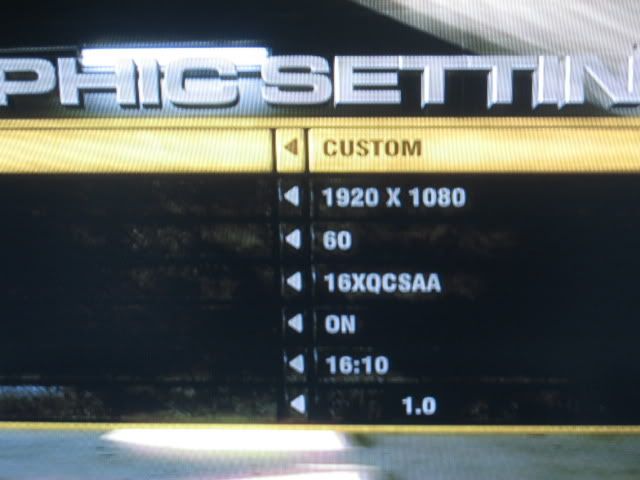
QUOTE(BeastX @ Jul 14 2008, 03:51 AM) If your tv is a 32 incher v-series..The output is not 1080p nor 720p... it is whatever resolution (which includes 1080p/i,720p) scaled to 1366x768... Full HD usually refers that the panel has 1920x1080 (2.07 Million) pixels. If possible it is best to run at the native 1366x768 res with your PC. Thx for the facts.... For desktop display, I'm using that resolution... As for games, I'm using 1920x1080.... But just wanna know one thing... I have a screenshot for my PC regarding reso selection.... It includes 1920x1080 resolution (it is included in the spoiler).... Also, when I went into nvidia cp, it states my native reso is 1920x1080 (sry, I din take any screenies).... I know my panel is HD ready panel so, even though I hav this reso, doesn't mean is Full HD, right?? Just confused why is like that.... need some tech knowledge on LCD TV..... This is my 1st LCD TV so wanna know more.....FullHD V-series is limited to 40 and 46 inch models (new v400 and the v2500 [JP] and above) The 32 incher of the W-series is a 1920x1080 8-bit panel... the 40 and 46 incher of the W and V series should be 10 bit panels » Click to show Spoiler - click again to hide... «
|
|
|
Jul 14 2008, 11:05 AM
Return to original view | Post
#12
|
|
Senior Member
1,937 posts Joined: Jun 2006 From: Petaling Jaya
|
QUOTE(barney @ Jul 14 2008, 10:33 AM) Hi Aura, This is the link to my current setup: My SetupWhat model are you using? Is it KLV-32V400A/B? Don't forget to show us your LCD. I don't mind putting extra 500 to get something im satisfied with. Where did you bought your LCD? I was thinking of bringing my PS3 to shops like Harvey Norman and tell them im interested in getting a 32" LCD but would like to to test with my PS3 for the picture quality. Do you think they would let me test? Because i seriously don't want to end up something that im not happy with. Mine is KLV32V400A.... U can see some screenies for GRID on PC as well.... |
|
|
Jul 14 2008, 11:48 AM
Return to original view | Post
#13
|
|
Senior Member
1,937 posts Joined: Jun 2006 From: Petaling Jaya
|
QUOTE(BeastX @ Jul 14 2008, 11:37 AM) It means the controller receiver on your TV accepts 1080p signal and scale it to your screen res. which is 1366x768... (an in-between 720p and 1080p res.) All the HD sources from PS3/X-box360/Blu-ray/broadcast are either up-scaled slightly or downscaled. Only through PC or PS3 linux can you get the native 1:1 or pixel to pixel res.... Thx for the info.... Will bear it in mind..... |
|
|
Sep 30 2008, 04:43 PM
Return to original view | Post
#14
|
|
Senior Member
1,937 posts Joined: Jun 2006 From: Petaling Jaya
|
QUOTE(advocado @ Sep 30 2008, 03:29 PM) Exact numbers are easy. I'm using a 32" LCD TV for a monitor and I'm sitting close as if I'm using like a normal computer.... No problems so far.... Played both PC games and consoles as well on same display..... Very satisfied so far.... The onli thing different between LCD TV and computer monitor is the resolution.... If u dun intend to push for higher resolutions on ur PC and still wan a bigger screen, then go for LCD TV.... If not, go for monitor.... As for me, I got the LCD TV just to play consoles..... Later might think of getting a 30" monitor if I got the money to replace it coz of resolution.....As close as 50cm for monitor use As far as 300cm for TV use. Good enough for an answer? |
| Change to: |  0.0390sec 0.0390sec
 0.47 0.47
 7 queries 7 queries
 GZIP Disabled GZIP Disabled
Time is now: 9th December 2025 - 07:47 PM |
 Quote
Quote