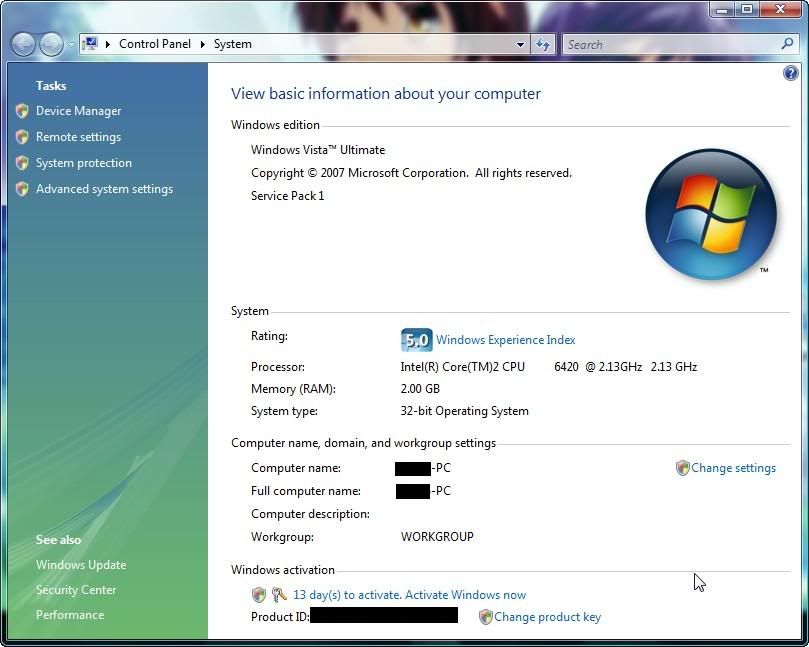
sorry for the noob question, is there any significant different between sp1 and non-sp1.... im using sp1 and i really dont see changes... loading for me is still the same with my previous vista...
Windows VISTA Service Pack 1 Discussion
Windows VISTA Service Pack 1 Discussion
|
|
 Mar 28 2008, 06:20 PM Mar 28 2008, 06:20 PM
Return to original view | Post
#1
|
 
Senior Member
6,583 posts Joined: Feb 2008  
|
sorry for the noob question, is there any significant different between sp1 and non-sp1.... im using sp1 and i really dont see changes... loading for me is still the same with my previous vista...
|
|
|
|
|
|
Mar 28 2008, 06:45 PM
Return to original view | Post
#2
|
|
Senior Member
6,583 posts Joined: Feb 2008
|
QUOTE(hussam_o_r @ Mar 28 2008, 06:26 PM) Internet explorer much better stopped hagging up by the way since i install vista with my others program, my IE7 went haywire and wont even connect to the internet but im not sure if this is cause by vista but i have really try alot of ways to get it connected back and at last i got piss off and use firefox since i always been using it and dont really like use IE7.....  btw, just after installing sp1, i couldnt use my printer but luckily went google and found the solution... its something about the "printer spooler service"... wonder if anyone faced this kind of problem before...  |
|
|
Mar 28 2008, 08:13 PM
Return to original view | Post
#3
|
|
Senior Member
6,583 posts Joined: Feb 2008
|
QUOTE
that is what it said from the website gave by shady... great website though..  This post has been edited by ham_revilo: Mar 28 2008, 08:14 PM |
|
|
Mar 28 2008, 08:27 PM
Return to original view | Post
#4
|
|
Senior Member
6,583 posts Joined: Feb 2008
|
QUOTE(defaultname365 @ Mar 28 2008, 08:19 PM) The WoW starts with then good news for u... actually there is still a lil problems with sp1 for some user like me.... Vista SP1. Why? Because my computer is AS RESPONSIVE as it was with Windows XP.  but most of it can be solve if go google... but most of it can be solve if go google...  so all and all, vista rocks and i really prefer vista more than any other OS...  |
|
|
Mar 29 2008, 03:00 AM
Return to original view | Post
#5
|
|
Senior Member
6,583 posts Joined: Feb 2008
|
thanks for the tips but in the mean while i have nothing wrong with my sp1 but my friend said his pc happens to bsod.... lucky me...:haha:
btw the youtube is lag and there isnt sound on it... is it me or what?? |
|
|
Mar 29 2008, 05:44 PM
Return to original view | Post
#6
|
|
Senior Member
6,583 posts Joined: Feb 2008
|
QUOTE(loselegend @ Mar 29 2008, 03:20 PM) I using sp1 right now. hopefully u dont bump into any trouble later.... my pc starts to show a lil problem starting from my printer then just only i have difficulties logging into windows and have to restart a few times before getting into windows... then now one of my core going 100% on idle... Actually I can see little difference between sp1 and previous version... boot a bit faster and the responce time also faster.   now dare not restart as it may not boot into windows... now dare not restart as it may not boot into windows...  |
|
|
|
|
|
Mar 29 2008, 07:09 PM
Return to original view | Post
#7
|
|
Senior Member
6,583 posts Joined: Feb 2008
|
really sorry for the noob question... it is so hard for me to surf around to search around coz its too laggy....
so how do i uninstall the SP1.... that damn thing has cause me nothing problems and really suffering from lagging and all sort of shit... cant even go into windows without restating my pc several times... |
|
|
Mar 30 2008, 02:41 AM
Return to original view | Post
#8
|
|
Senior Member
6,583 posts Joined: Feb 2008
|
QUOTE(sagittaru @ Mar 30 2008, 12:26 AM) so far so good leh my sp1 yeah i know performance has been improve but this sh*t came to me not often... it happens once in a while and i really cant stand it and im sure that it is not virus or anything... it keeps on hang and i need to restart it for around 5-8 times before it goes back to normal...damn frustrating  improved faster copying files  too bad i didnt create a restore point when i update to sp1... anyone knows how to roll back to normal vista?? |
|
|
Mar 30 2008, 11:02 PM
Return to original view | Post
#9
|
|
Senior Member
6,583 posts Joined: Feb 2008
|
QUOTE(aidlover @ Mar 30 2008, 09:40 PM) i know why i cant install sp1 already. i have other language pack and they still havent have the language pack files.. slow Msoft bro i really dont think its a good move to SP1... imo its still not mature and it cause some problems... although it cant be fix by ur own but still its really troublesome and its not only me that is having problems with SP1... |
|
|
Mar 31 2008, 12:03 AM
Return to original view | Post
#10
|
|
Senior Member
6,583 posts Joined: Feb 2008
|
QUOTE(Darkmage12 @ Mar 30 2008, 11:41 PM) so far so good im hoping nothing serious happens to my laptop let together hope so... for me, the problem doesnt comes just after i update sp1 ... use it for few days and problems starts to pop out and really hope no problem anymore... |
|
|
Mar 31 2008, 02:09 AM
Return to original view | Post
#11
|
|
Senior Member
6,583 posts Joined: Feb 2008
|
QUOTE(Phantom3301 @ Mar 31 2008, 01:25 AM) I am using the original version of window Vista homeEdition... trying to update to SP1.... can some1 giv me the link to download it? try checking for updates from ur windows update... that better and easier too...Or any other way to settle it? |
|
|
Mar 31 2008, 02:02 PM
Return to original view | Post
#12
|
|
Senior Member
6,583 posts Joined: Feb 2008
|
QUOTE(shogun_125 @ Mar 31 2008, 02:13 AM) updating just now.. but i don't know what a benefit updating this?.. Added on March 31, 2008, 2:13 amupdating just now.. but i don't know what a benefit updating this?.. QUOTE(shady @ Mar 28 2008, 06:24 PM) It's a colletion of bug fixes since RTM and the OS core has gone through some changes. Performance difference wise, you will notice file copy or HDD related activities become faster. to know what is the benefit then look at those websites....Core Performance Game performance The two articles above is quite informative. |
|
|
Apr 2 2008, 04:19 AM
Return to original view | Post
#13
|
|
Senior Member
6,583 posts Joined: Feb 2008
|
QUOTE(RegentCid @ Apr 1 2008, 08:18 PM) I think only Ultimate only got show SP1 ...my home premium does't show it...but i am very sure i got update it to SP1...coz this downlaod is very long ...after install it need restart and during resatrt got configuration got 3 step and it take very long time...hehe i doubt that u r in sp1 now... usually they will show that ur system is sp1... its not for ultimate only... its for all vista... maybe u should try checking for updates or install the standalone... |
|
|
|
|
|
Apr 4 2008, 01:29 AM
Return to original view | Post
#14
|
|
Senior Member
6,583 posts Joined: Feb 2008
|
QUOTE(vandechrome @ Apr 4 2008, 12:09 AM) anyone faced problem cant update to SP1?anybody can help me with this problem? bro, read through the guide given by JoesephKoo... then u will know y u cant update sp1... great tips there... |
|
|
Apr 4 2008, 01:13 PM
Return to original view | Post
#15
|
|
Senior Member
6,583 posts Joined: Feb 2008
|
how is the message like??
if can pls post screen shot... Added on April 4, 2008, 1:13 pm QUOTE(vandechrome @ Apr 4 2008, 06:12 AM) can give me the link to the guide..im dowloading the SP1 n try to install,but got error message.. how is the message like??if can pls post screen shot... This post has been edited by ham_revilo: Apr 4 2008, 01:13 PM |
|
|
Apr 4 2008, 11:40 PM
Return to original view | Post
#16
|
|
Senior Member
6,583 posts Joined: Feb 2008
|
QUOTE(vandechrome @ Apr 4 2008, 10:36 PM) this is the error msg poup in my windows while installing SP1 bro, here is ur solution... i cant promise anything but just hope its works.. good luck...[attachmentid=434090] This post has been edited by ham_revilo: Apr 5 2008, 12:25 AM |
|
|
Apr 5 2008, 01:58 PM
Return to original view | Post
#17
|
|
Senior Member
6,583 posts Joined: Feb 2008
|
QUOTE(awang @ Apr 5 2008, 10:28 AM) i guess its a lot better now after installing SP1 right after a fresh installation..everything is smooth comparing without SP1, no more lags in transferring files which i hate the most.. after installing all ur software still the same?afaik SP1 is often clash with the current software for some ppl... so maybe installing SP1 after install a fresh copy of vista is a good move...  |
|
|
Apr 5 2008, 08:00 PM
Return to original view | Post
#18
|
|
Senior Member
6,583 posts Joined: Feb 2008
|
normal software la... like msn, firefox, adobe, office and so on....
i read it some where in the papers saying if u upgrade SP1 from normal vista there may have a slight conflict with the current software for some ppl only... so not all... but if u have a fresh copy of vista and upgrade it to SP1 then it will be a diff story... |
|
|
Apr 7 2008, 02:22 AM
Return to original view | Post
#19
|
|
Senior Member
6,583 posts Joined: Feb 2008
|
QUOTE(TYK @ Apr 7 2008, 12:29 AM) Windows Vista SP1 published already? yes is out edi... and afaik its for all vista user so that include business...Anybody knows if our original copy of Windows Vista which comes with our laptop will automatically update itself? Or do we have do something manually ourselves first? I own Windows Vista Business btw. try using windows update to check whether u can update to SP1 or not.... if cant then i think u need to update using the standalone... btw, my advise is stick to windows update rather than the standalone... |
|
|
Apr 9 2008, 01:33 AM
Return to original view | Post
#20
|
|
Senior Member
6,583 posts Joined: Feb 2008
|
QUOTE(fariz @ Apr 8 2008, 09:06 PM) let me crack your warning bar first.. wow... thats something... didnt know u could find out something like that.. haha... next time takut to duplicate acc edi... btw, I found your dupe account too.. bumping your own thread  QUOTE(CZero @ Apr 9 2008, 12:49 AM) » Click to show Spoiler - click again to hide... « Uh oh... And I notice something. There's lagging every time I close IE7... Sometimes have to open task manager to close it.. anyway i have one .exe files that will cause my oc to lag when i just click on it only... i mean a single click.... then my whole pc will go lagging for a few minute before it goes back into normal... then have to delete it and dl another version only can use... but apparently that doesnt happen before i have SP1... btw, my IE is working fine... so i maybe it is something else... |
| Change to: |  0.0397sec 0.0397sec
 0.44 0.44
 7 queries 7 queries
 GZIP Disabled GZIP Disabled
Time is now: 22nd December 2025 - 09:56 AM |
 Quote
Quote