Welcome Guest ( Log In | Register )

56 Pages « < 2 3 4 5 6 > » Bottom

Outline · [ Standard ] · Linear+

Modems [WTS] HUAWEI E3276 E398 E392 E372 from RM80 +++, USB LTE 4G 3G Modem 150Mbps 100 43 28 21

views
     
kiuko
post Apr 28 2008, 09:54 PM

Getting Started
**
Junior Member
145 posts

Joined: Jan 2007
From: Cat's City, Hornbill State


QUOTE(andrewdavid @ Jan 28 2008, 11:30 AM)
[attachmentid=388841] [attachmentid=388842]

Comes with Huawei's latest firmware to support downlink capabilities up to 7.2Mbps which is not implemented in Malaysia yet !!!

Tested... Original packaging with everything as new...

Comes with the item, 1 short & 1 long USB cable, manual and software installation CD...

View to appreciate...

Vodem connects your computer over the 3G broadband network, so you can access the Web or collect emails at broadband speeds...

Its USB cable connects to any laptop or desktop, giving you total plug-and-play simplicity...

Its super-small, super-fast, and super-simple...

At just 89x43x14 millimetres and weighing less than 50 grams its the ultimate in portable connectivity...

You can carry vodem around in your pocket...

It comes in cool white, in a super sleek design...

Vodem installs itself in just three clicks of the mouse... It's never been so simple to get connected...

Main Features
HSDPA / UMTS / EDGE / GPRS / GSM

HSDPA packet data service with a maximum transmission rate of 7.2Mbps
UMTS packet data service with a maximum transmission rate of 384kbps
EDGE packet data service with a maximum transmission rate of 236.8kbps
SMS service

Auto installation, convenient for use
Windows 2000, Windows XP and Windows Vista Operating system


CELCOM    HSDPA / UMTS (3G) / GPRS 
MAXIS      HSDPA / UMTS (3G) / GPRS 
DiGi          EDGE / GPRS 

1 year warranty on manufacturing defects only...

Originally using Vodafone Mobile Connect Software which only enables Vodafone Sim Card!!!

Now it has been unlocked and updated with the latest Huawei Firmware & Software...

You can even use your prepaid sim card to connect...every 10kb download 10sen...

So simply get connected where ever there is coverage...

I highly recommend Maxis or Celcom's RM98 (HSDPA) or RM68 (3G) monthy unlimited plan...

If any warranty claim occurs it will be a one to one change between the warranty period so you dont need to wait like any other deals...

Postage via Pos Laju will be done on the same day if payment is made before 5pm from Monday to Friday excluding weekends and Public Holidays...

Testing of device is available for customer who is willing to travel to Klang Valley areas only...

Any questions or problems feel free to e-mail me at : andrewdavid1983@gmail.com

                                                                  or call : 016-3844533

Thank You...

P/S : Self collect preferred unless courier via Pos Laju (RM10 for Peninsular Malaysia) or (RM15 for Sabah & Sarawak)...

Banking can be done via Maybank2U or Public Bank...

Andrew...

Keywords = internet 3g modem hsdpa wireless data card broadband


[attachmentid=388843] [attachmentid=388845]
*
Are you confirm it is 7.2mbps? how u prove it run to that speed? i got friend bought it only up to 3.6mbps....

TSandrewdavid
post Apr 28 2008, 10:05 PM

Getting Started
**
Junior Member
78 posts

Joined: Nov 2007
From: Bandar Sunway, Subang, Petaling Jaya, Kuala Lumpur


QUOTE(kiuko @ Apr 28 2008, 09:54 PM)
Are you confirm it is 7.2mbps? how u prove it run to that speed? i got friend bought it only up to 3.6mbps....
*
Hi there

Yes i can confirm that this device is 7.2mbps ready... Probably your friend bought the older version or with the older firmware...
Well if you read the listing again there is a line
"Comes with Huawei's latest firmware to support downlink capabilities up to 7.2Mbps which is not implemented in Malaysia yet !!!"

Hope that helps...

Thank you

Andrew
megat_johan
post Apr 29 2008, 12:22 AM

Getting Started
**
Junior Member
134 posts

Joined: Jan 2007

hey i just bought the usb modem from andrew
and yeah..i recommend u guys to buy from him
really really recommend!!!

thanks again dude
bear300
post May 4 2008, 11:20 AM

Getting Started
**
Junior Member
79 posts

Joined: Oct 2005
hi,
pls pm me the price of the device and the delivery to kedah. thank you
dokidoki
post May 5 2008, 11:25 PM

I am not War machine~
*******
Senior Member
4,630 posts

Joined: Jul 2005
From: PJ somewhere~


QUOTE(andrewdavid @ Apr 28 2008, 10:05 PM)
Hi there

Yes i can confirm that this device is 7.2mbps ready... Probably your friend bought the older version or with the older firmware...
Well if you read the listing again there is a line
"Comes with Huawei's latest firmware to support downlink capabilities up to 7.2Mbps which is not implemented in Malaysia yet !!!"

Hope that helps...

Thank you

Andrew
*
andrew..do u provide receipt?
TSandrewdavid
post May 5 2008, 11:46 PM

Getting Started
**
Junior Member
78 posts

Joined: Nov 2007
From: Bandar Sunway, Subang, Petaling Jaya, Kuala Lumpur


QUOTE(dokidoki @ May 5 2008, 11:25 PM)
andrew..do u provide receipt?
*
Hi there,

Yes i do provide a receipt for your reference or warranty purposes in future...

Thank you

Andrew
dokidoki
post May 6 2008, 12:14 AM

I am not War machine~
*******
Senior Member
4,630 posts

Joined: Jul 2005
From: PJ somewhere~


QUOTE(andrewdavid @ May 5 2008, 11:46 PM)
Hi there,

Yes i do provide a receipt for your reference or warranty purposes in future...

Thank you

Andrew
*
i need it to claim company..can pm me what kind of receipt u provide?
bocah_04
post May 11 2008, 06:05 PM

New Member
*
Junior Member
7 posts

Joined: May 2008


QUOTE(andrewdavid @ Jan 28 2008, 11:30 AM)
[attachmentid=388841] [attachmentid=388842]

Comes with Huawei's latest firmware to support downlink capabilities up to 7.2Mbps which is not implemented in Malaysia yet !!!

Tested... Original packaging with everything as new...

Comes with the item, 1 short & 1 long USB cable, manual and software installation CD...

View to appreciate...

Vodem connects your computer over the 3G broadband network, so you can access the Web or collect emails at broadband speeds...

Its USB cable connects to any laptop or desktop, giving you total plug-and-play simplicity...

Its super-small, super-fast, and super-simple...

At just 89x43x14 millimetres and weighing less than 50 grams its the ultimate in portable connectivity...

You can carry vodem around in your pocket...

It comes in cool white, in a super sleek design...

Vodem installs itself in just three clicks of the mouse... It's never been so simple to get connected...

Main Features
HSDPA / UMTS / EDGE / GPRS / GSM

HSDPA packet data service with a maximum transmission rate of 7.2Mbps
UMTS packet data service with a maximum transmission rate of 384kbps
EDGE packet data service with a maximum transmission rate of 236.8kbps
SMS service

Auto installation, convenient for use
Windows 2000, Windows XP and Windows Vista Operating system


CELCOM    HSDPA / UMTS (3G) / GPRS 
MAXIS      HSDPA / UMTS (3G) / GPRS 
DiGi          EDGE / GPRS 

1 year warranty on manufacturing defects only...

Originally using Vodafone Mobile Connect Software which only enables Vodafone Sim Card!!!

Now it has been unlocked and updated with the latest Huawei Firmware & Software...

You can even use your prepaid sim card to connect...every 10kb download 10sen...

So simply get connected where ever there is coverage...

I highly recommend Maxis or Celcom's RM98 (HSDPA) or RM68 (3G) monthy unlimited plan...

If any warranty claim occurs it will be a one to one change between the warranty period so you dont need to wait like any other deals...

Postage via Pos Laju will be done on the same day if payment is made before 5pm from Monday to Friday excluding weekends and Public Holidays...

Testing of device is available for customer who is willing to travel to Klang Valley areas only...

Any questions or problems feel free to e-mail me at : andrewdavid1983@gmail.com

                                                                  or call : 016-3844533

Thank You...

P/S : Self collect preferred unless courier via Pos Laju (RM10 for Peninsular Malaysia) or (RM15 for Sabah & Sarawak)...

Banking can be done via Maybank2U or Public Bank...

Andrew...

Keywords = internet 3g modem hsdpa wireless data card broadband


[attachmentid=388843] [attachmentid=388845]

user posted image

The best result ever obtained via Celcom D98 package...
*
hai, can i get the price for 1 pcs, please
thank's

sukhoi35mk
post May 12 2008, 10:05 AM

Casual
***
Junior Member
420 posts

Joined: Feb 2007
I bought my E220 from andrew, very fast seller....so far no overheating problem with my modem even online more than 6 hrs....happy with it. rclxms.gif
chteh0721
post Jun 6 2008, 11:06 AM

You'll Never Walk Alone
******
Senior Member
1,065 posts

Joined: Aug 2005
From: Anfield>>>Stanley Park
hi may i know where's your location?
interested to have one unit to be tested at sabah..
i'm in cheras now..
by the way, i'm going to subscribe with celcom ... which package can be use with this modem?
nextweek i'll be travelling to sabah and that area only have gprs only..

This post has been edited by chteh0721: Jun 6 2008, 11:10 AM
TSandrewdavid
post Jun 6 2008, 11:50 AM

Getting Started
**
Junior Member
78 posts

Joined: Nov 2007
From: Bandar Sunway, Subang, Petaling Jaya, Kuala Lumpur


QUOTE(chteh0721 @ Jun 6 2008, 11:06 AM)
hi may i know where's your location?
interested to have one unit to be tested at sabah..
i'm in cheras now..
by the way, i'm going to subscribe with celcom ... which package can be use with this modem?
nextweek i'll be travelling to sabah and that area only have gprs only..
*
Hi there

I am from Bandar Sunway...
If you are going to subscribe with Celcom, you can choose either D68 (3G up to 384kbps) or D98 (HSDPA up to 3.6mbps)... Reception for data packages are being improved on daily basis by service providers... So its just matter of time...

Andrew
xSean
post Jun 6 2008, 03:00 PM

Look at all my stars!!
*******
Senior Member
2,767 posts

Joined: Oct 2006
just meet andrew and bought from him this afternoon. recommend seller, he very helpful and provide detail information.
chteh0721
post Jun 7 2008, 11:58 AM

You'll Never Walk Alone
******
Senior Member
1,065 posts

Joined: Aug 2005
From: Anfield>>>Stanley Park
hi andrew nice to deal with you lastnight.
the modem is working fine and quite easy to install.
TSandrewdavid
post Jun 7 2008, 03:26 PM

Getting Started
**
Junior Member
78 posts

Joined: Nov 2007
From: Bandar Sunway, Subang, Petaling Jaya, Kuala Lumpur


QUOTE(xSean @ Jun 6 2008, 03:00 PM)
just meet andrew and bought from him this afternoon. recommend seller, he very helpful and provide detail information.
*
Appreciate for your feedback bro... Thank you...


Added on June 7, 2008, 3:28 pm
QUOTE(chteh0721 @ Jun 7 2008, 11:58 AM)
hi andrew nice to deal with you lastnight.
the modem is working fine and quite easy to install.
*
Hi Teh

I'm glad everything went perfectly...
Do contact me if you have any queries...

Thank you...

Have a great weekend...

This post has been edited by andrewdavid: Jun 7 2008, 03:28 PM
chteh0721
post Jun 10 2008, 05:34 PM

You'll Never Walk Alone
******
Senior Member
1,065 posts

Joined: Aug 2005
From: Anfield>>>Stanley Park
hi andrew...i wish to purchase another unit of E220.
can we COD at the same place same time again this Friday night?


This post has been edited by chteh0721: Jun 10 2008, 05:35 PM
helo
post Jun 14 2008, 03:12 PM

Casual
***
Junior Member
354 posts

Joined: May 2008
pm me the best price to seremban
TSandrewdavid
post Jun 14 2008, 03:25 PM

Getting Started
**
Junior Member
78 posts

Joined: Nov 2007
From: Bandar Sunway, Subang, Petaling Jaya, Kuala Lumpur


QUOTE(chteh0721 @ Jun 10 2008, 05:34 PM)
hi andrew...i wish to purchase another unit of E220.
can we COD at the same place same time again this Friday night?
*
Hi Teh... Thank you for continuous support...
Nice knowing and dealing with you...
Jerrylim
post Jun 14 2008, 03:50 PM

Getting Started
**
Junior Member
56 posts

Joined: May 2005
From: Klang


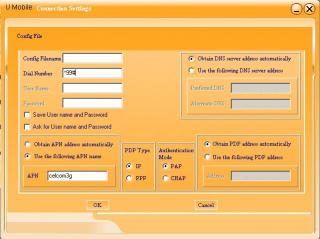
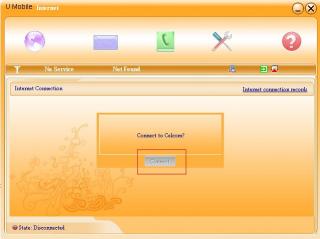
i attached the below pic... izzit correct? mean once i done it, the connect button will enable coz sensed d connectivity?
n i can dial up d?


Attached thumbnail(s)
Attached Image Attached Image Attached Image
TSandrewdavid
post Jun 14 2008, 03:53 PM

Getting Started
**
Junior Member
78 posts

Joined: Nov 2007
From: Bandar Sunway, Subang, Petaling Jaya, Kuala Lumpur


QUOTE(Jerrylim @ Jun 14 2008, 03:50 PM)
i attached the below pic... izzit correct? mean once i done it, the connect button will enable coz sensed d connectivity?
n i can dial up d?
*
Yep, you got that right... Just pop in your sim card and you can connect already...
emelia
post Jun 15 2008, 12:46 AM

New Member
*
Junior Member
21 posts

Joined: Feb 2007


COD with seller today. Got my new modem already!!!

56 Pages « < 2 3 4 5 6 > » Top
 

Change to:
| Lo-Fi Version
0.0285sec    0.68    6 queries    GZIP Disabled
Time is now: 4th December 2025 - 02:17 PM