Outline ·
[ Standard ] ·
Linear+
Using XBOX 360 on HDMI enable LCD, Dell SP2208WFP
|
TShuys3
|
 Jan 14 2008, 06:33 PM, updated 18y ago Jan 14 2008, 06:33 PM, updated 18y ago
|
New Member


|
May I clarify something with you guys? I intend to buy that LCD: Dell SP2208WFP http://www1.ap.dell.com/content/products/p...dhs1&l=en&s=dhsfor my XBOX 360 This LCD have a HDMI port, but without internal speaker like TV. Since HDMI have audio included, if I plug a HDMI to HDMI cable from my XBOX to the LCD, will the audio come out if I use the LCD speaker jack to connect a pair of speaker in? One other thing make me confuse is when I look at the HDMI cable from MS for XBOX, the output actually have two more jack for audio. If i use that cable in this case, where should I plug these two jacks in? |
|
|
|
|
|
Administrator
|
Jan 14 2008, 08:10 PM
|
|
|
I also had similar problem with my HP 24 lcd monitor. When i connect the HDMI to the monitor, i can only use the built in monitor speaker which is of course not satisfying enough. Thus, i can only opt for the VGA cable.Is there any special cables or converters for me to use the HDMI for video output and use coaxial or optical for the auio?  |
|
|
|
|
|
yhsiau
|
Jan 14 2008, 08:32 PM
|
|
|
does your LCD support analog input? There is a MS official VGA cable which connects xb360 to PC Monitor which has 2 audio output cables.
|
|
|
|
|
|
jackal_x2005
|
Jan 14 2008, 08:51 PM
|
Getting Started
|
I use HDMI cable with my 22" LCD Dell E228WFP. if u have x360 elite, u should get HDMI cable and audio input cable(where u plug the RCA (red and white audio cable) separately- but not sure about xbox360 premium -I use those two to connect to my LCD monitor-
|
|
|
|
|
|
SihamZhai
|
Jan 14 2008, 09:34 PM
|
|
|
Buy external speakers...probably sound nicer...and LCD donno whether clear o not. I know my plasma freakingly nice la
|
|
|
|
|
|
Administrator
|
Jan 14 2008, 11:55 PM
|
|
|
QUOTE(yhsiau @ Jan 14 2008, 08:32 PM) does your LCD support analog input? There is a MS official VGA cable which connects xb360 to PC Monitor which has 2 audio output cables. Hi, I'm using the official VGA cable with the optical output for the audio...Everything works well..just figuring on how to have an audio output when using HDMI as the video output as currently if use the HDMI video out, then then i cant use other audio output at all. Currently having an XBOX 360 premium.  |
|
|
|
|
|
ron4
|
Jan 15 2008, 01:43 PM
|
|
|
QUOTE(jackal_x2005 @ Jan 14 2008, 08:51 PM) I use HDMI cable with my 22" LCD Dell E228WFP. if u have x360 elite, u should get HDMI cable and audio input cable(where u plug the RCA (red and white audio cable) separately- but not sure about xbox360 premium -I use those two to connect to my LCD monitor- Xbox 360 Elite and new Premium Pro have no different, because both have hdmi port, the different only the color and harddisk size. I also having the same dilema like u all. Want to connect my Premium Pro (hdmi) to my Lcd Monitor (Dvi-D), but the cable itself (Hdmi-Dvi cable) dont support for sound speaker port (red & white). How can i resolve this? |
|
|
|
|
|
mypetridish
|
Jan 18 2008, 02:35 PM
|
|
|
QUOTE(Thrust @ Jan 15 2008, 02:35 AM) No need to get another speaker. You can get a cable with 1/4 jack at both ends. 1 end connect the the green hole from the DELL monitor and the other to your soundcard (sound-in) hole. Thus your XBOX360 will output sound via your PC speakers just like mine (A PS3 though but it should work the same). Your PC has to be on in order to have sound output. Another option is get an AEGO M, it can support sound in via 1/4 jack  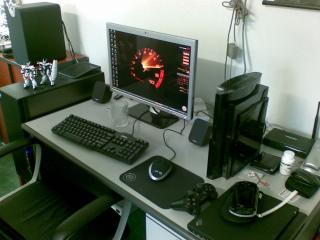
Hey, HI-5 bro  Attached thumbnail(s) Attached thumbnail(s)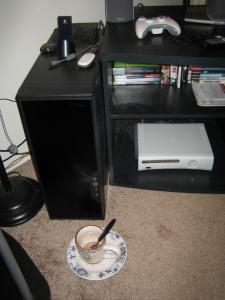
|
|
|
|
|
|
Thrust
|
Jan 18 2008, 10:41 PM
|
|
|
Mypetridish, ada taste wo using ANTEC P182B. Kekeke!! not many ppl willing to spend RM600 bucks for a casing |
|
|
|
|
|
Kusa
|
Jan 19 2008, 09:35 AM
|
|
|
QUOTE(Thrust @ Jan 15 2008, 03:35 PM) No need to get another speaker. You can get a cable with 1/4 jack at both ends. 1 end connect the the green hole from the DELL monitor and the other to your soundcard (sound-in) hole. Thus your XBOX360 will output sound via your PC speakers just like mine (A PS3 though but it should work the same). Your PC has to be on in order to have sound output. Another option is get an AEGO M, it can support sound in via 1/4 jack
Patlabors! NICE! edit: i see a NanoVX also.. This post has been edited by Kusa: Jan 19 2008, 09:40 AM |
|
|
|
|



 Quote
Quote




 0.0174sec
 0.40
0.40
 6 queries
 GZIP Disabled