Welcome Guest ( Log In | Register )

Bump Topic Topic Closed RSS Feed
128 Pages « < 10 11 12 13 14 > » Bottom

Outline · [ Standard ] · Linear+

Sony-Ericsson ☼ SONY Ericsson P1i ☼ V2, The Ultimate Smartphone

views
     
G-Izzat
post Jan 16 2008, 09:30 AM

Hey Ho!
******
Senior Member
1,173 posts

Joined: Aug 2006
From: Kuala Lumpur


QUOTE(nira_110 @ Jan 16 2008, 09:10 AM)
I got P1i as my anniversary present last month. So happy with it and now my hubby and brother also changed to P1i.
*
Wow! 3 person using the same phone?

Congratulations on getting your P1i and also your anniversary. smile.gif
Seaedge
post Jan 16 2008, 09:36 AM

Safe Trader since 2005.
*******
Senior Member
5,172 posts

Joined: Jan 2003
From: Equine Park


wah... same same use same phone sweat.gif abit boring for me... if i see my family use the same phone, tmr straight away sell it out... tak boleh tahan la... hehehehhe for me oni...

i wish i got phone for aniversary cry.gif
na.tech
post Jan 16 2008, 11:20 AM

Getting Started
**
Junior Member
150 posts

Joined: May 2006
From: beachside


finally im getting my phone after repairing 1 months plus sad.gif
so any advice wat ever to check when taking it !
TQ
shawnloong
post Jan 16 2008, 01:15 PM

Getting Started
**
Junior Member
184 posts

Joined: Jul 2006


What's the deal with this iPhone-like theme for SE P1i?

http://www.youtube.com/watch?v=Q1Ysc5SSGQM&feature=related

I'm getting my P1i (hopefully) somewhere this week...
and i soooo want that iPhone theme! drool.gif

anyone know where i can get it for free?
they say you have to buy it, but i heard you can get it for free. brows.gif

But, looking thru all your problems... i'm having doubts. is it worth while in the end?

This post has been edited by shawnloong: Jan 16 2008, 01:32 PM
shockk
post Jan 16 2008, 01:22 PM

[ T A R G E T - L 0 C K E D ]
Group Icon
VIP
11,883 posts

Joined: Jan 2003
QUOTE(Ravenkean @ Jan 15 2008, 08:22 PM)
at times da phone would get hang, after hang up especially if u dial numbers where got operator ask to key in selected number for selected menu.

even i try to press "return" button oso no use... end up, i found da trick by pressing "camera", then onli press "return" then onli become normal...

There's another thing.... sometimes my phone will get hang,
lets say there's a miss call, i click more and click view to view miss call rite?
if u quickly touch screen return, the call log will stay there....even watever button u press oso no use.... except u press camera button then press return button, then onli ok.... End up, after view the miss call log...wait abit while then press "return" then onli ok....

izit all this normal?
*
wah. your prob sounds serious. sweat.gif
anybody else experience this too?
spoonkin
post Jan 16 2008, 02:21 PM

The CF Man
******
Senior Member
1,460 posts

Joined: Jan 2003


the worst problem i had was when i was in 1u last weekend, my phone suddenly receive a option pop up by itself asking me to update

but it didnt specify wat update, so i click cancel
then voila, msg come out again, keep on popping
as i worried is a way to hack my phone or something,

then i remove batt n restart, now is working fine
maybe my phone(AP) cant go 1u tongue.gif

nira_110
post Jan 16 2008, 04:57 PM

Getting Started
**
Junior Member
147 posts

Joined: May 2005
From: Cheras, Bangi, Batam


QUOTE(Seaedge @ Jan 16 2008, 09:36 AM)
wah... same same use same phone sweat.gif abit boring for me... if i see my family use the same phone, tmr straight away sell it out... tak boleh tahan la... hehehehhe for me oni...

i wish i got phone for aniversary cry.gif
*
yar lohh...a bit boring...all the same. But lucky, i dont have to browse and explore the phone...let them tell me brows.gif
numerical
post Jan 16 2008, 05:22 PM

Casual
***
Junior Member
462 posts

Joined: Nov 2006
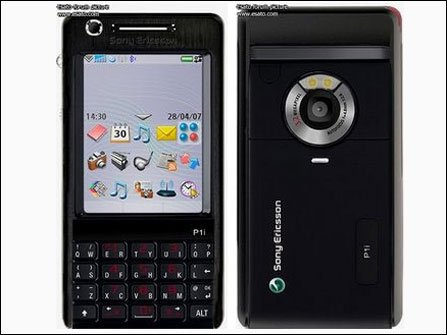
user posted image


what do u guys think?
shockk
post Jan 16 2008, 05:49 PM

[ T A R G E T - L 0 C K E D ]
Group Icon
VIP
11,883 posts

Joined: Jan 2003
QUOTE(numerical @ Jan 16 2008, 05:22 PM)
» Click to show Spoiler - click again to hide... «

what do u guys think?
*
wow. sweet. how to do that? paint black? tongue.gif
chengkiat
post Jan 16 2008, 05:53 PM

New Member
*
Newbie
1 posts

Joined: Jan 2008


i had jz bougt my p1i but i got problem to download theme and some games... how to download the theme and games????pls help... thanks...
lowyatguy
post Jan 16 2008, 06:47 PM

=Certified Counter-Striker=
*******
Senior Member
3,144 posts

Joined: Nov 2005


QUOTE(shockk @ Jan 16 2008, 05:49 PM)
wow. sweet. how to do that? paint black? tongue.gif
*
Thats the black color p1i as rumoured


Added on January 16, 2008, 6:50 pm
QUOTE(shawnloong @ Jan 16 2008, 01:15 PM)
What's the deal with this iPhone-like theme for SE P1i?

http://www.youtube.com/watch?v=Q1Ysc5SSGQM&feature=related

I'm getting my P1i (hopefully) somewhere this week...
and i soooo want that iPhone theme!  drool.gif

anyone know where i can get it for free?
they say you have to buy it, but i heard you can get it for free.  brows.gif

But, looking thru all your problems... i'm having doubts. is it worth while in the end?
*
Nothing special bro...
1) The iphone screen lock thing can be downloaded, google it .
2) The iphone icons can be replaced by downloading the png file.
3) The Wallpaper, u should know where u can get it from smile.gif

This post has been edited by lowyatguy: Jan 16 2008, 06:50 PM
yuheng
post Jan 16 2008, 07:10 PM

Audio=Enjoy
*******
Senior Member
2,753 posts

Joined: Jul 2006
From: Metropolitan College(KL) or JB Johor Bahru


omg...the seller no stock again...really canot wait ald...cry.gif
btw, do p1i able to use google map?
numerical
post Jan 16 2008, 07:48 PM

Casual
***
Junior Member
462 posts

Joined: Nov 2006
Just wana share wit my fellow "P1ians" rolleyes.gif

It might seem like a trivial subject, but keeping your P1i battery in tip-top condition is quite important for those who need the extra juice to survive for the half-day outing. Or simply put, you just want to maximise the life span of the battery you currently own. In any case, this is one guide worth reading.

1. Memory Effect
You might have heard before that you should fully drain the battery before recharging it, as this would allow one to completely fill up the battery to its capacity as opposed to charging it when there is still 50% left in the battery. This is good advice for Nickel based batteries, which suffers from the so called "memory effect". However, since Lithium batteries do not suffer from this problem, there is no reason to fully discharge the battery before recharging.

In any case, it could even be harmful for your Lithium battery, as constantly discharging your Lithium battery may leave it short of its capacity or even render it unusable if you do it enough times.

2. Calibration
Okay, fine. In order to get accurate battery readings from your phone, you might want to discharge your phone once in a while, i.e. once every two months. This allows the system to get the readings accurate again. Don't you ever have that situation where you wonder why the battery meter keeps jumping around?

3. Temperature
Heat is the enemy of Lithium batteries - try not to overcharge your batteries. What I mean here is to get it off the charger after it says "Full Charge" or when its "99%".

4. Proper Storage
Let's say you're going on a hiking trip and you can't bring your P1i along. Or something of that sort. If you don't use the smart phone for a prolonged period of time, try keeping the charge in the battery at about 50%. Why? Because if you keep it at full charge, the battery has unnecessary stress and may cause internal corrosion. On the other hand, if you keep it at too low a charge, it may render it completely unusable because of the battery self discharge. Yes. This means you should keep eating away at the battery until is 50% - play games, put the music to maximum, show a slideshow. That will bring the battery down.

lowyatguy
post Jan 16 2008, 09:17 PM

=Certified Counter-Striker=
*******
Senior Member
3,144 posts

Joined: Nov 2005


QUOTE(numerical @ Jan 16 2008, 07:48 PM)
Just wana share wit my fellow "P1ians" rolleyes.gif

It might seem like a trivial subject, but keeping your P1i battery in tip-top condition is quite important for those who need the extra juice to survive for the half-day outing. Or simply put, you just want to maximise the life span of the battery you currently own. In any case, this is one guide worth reading.

  1. Memory Effect
      You might have heard before that you should fully drain the battery before recharging it, as this would allow one to completely fill up the battery to its capacity as opposed to charging it when there is still 50% left in the battery. This is good advice for Nickel based batteries, which suffers from the so called "memory effect". However, since Lithium batteries do not suffer from this problem, there is no reason to fully discharge the battery before recharging.

      In any case, it could even be harmful for your Lithium battery, as constantly discharging your Lithium battery may leave it short of its capacity or even render it unusable if you do it enough times.

  2. Calibration
      Okay, fine. In order to get accurate battery readings from your phone, you might want to discharge your phone once in a while, i.e. once every two months. This allows the system to get the readings accurate again. Don't you ever have that situation where you wonder why the battery meter keeps jumping around?

  3. Temperature
      Heat is the enemy of Lithium batteries - try not to overcharge your batteries. What I mean here is to get it off the charger after it says "Full Charge" or when its "99%".

  4. Proper Storage
      Let's say you're going on a hiking trip and you can't bring your P1i along. Or something of that sort. If you don't use the smart phone for a prolonged period of time, try keeping the charge in the battery at about 50%. Why? Because if you keep it at full charge, the battery has unnecessary stress and may cause internal corrosion. On the other hand, if you keep it at too low a charge, it may render it completely unusable because of the battery self discharge. Yes. This means you should keep eating away at the battery until is 50% - play games, put the music to maximum, show a slideshow. That will bring the battery down.
*
Please at least give some credits to the P1i blog owner as u r directly COPIED over from his blog, will ya?
joshua_chin
post Jan 16 2008, 09:42 PM

Getting Started
**
Junior Member
60 posts

Joined: Jan 2006


QUOTE(numerical @ Jan 16 2008, 05:22 PM)
user posted image
what do u guys think?
*
hmmm.....i seen this in the net somewhere else (forgot where dee.... tongue.gif ), but i still think that the silver version looks more classy.....this black phone looks like a coy cat from m600 or w960.
j0ann3
post Jan 16 2008, 10:13 PM

Casual
***
Junior Member
378 posts

Joined: Sep 2005
From: PJ


QUOTE(lilredridinghood @ Jan 15 2008, 09:10 AM)
Got myself a P1i d....but my sim card unreadable, changing my sim card later. This phone is a little bit of a sensitive one ain't it? I have no problem with my k700i or other phones
*
heys...
same issue i had.. doesnt read the contacts rite?
dont know why.. but i transferred all my numbers to the fon and deleted all from the sim..
then re-transferred back to the sim...
the fon actually reads the sim contacts after..
but i guess its better to change the sim anyways.... =)
aH wAi
post Jan 16 2008, 10:18 PM

roar! who care?
*****
Senior Member
838 posts

Joined: Feb 2006
From: Nowhere


QUOTE(numerical @ Jan 16 2008, 07:48 PM)
Just wana share wit my fellow "P1ians" rolleyes.gif

It might seem like a trivial subject, but keeping your P1i battery in tip-top condition is quite important for those who need the extra juice to survive for the half-day outing. Or simply put, you just want to maximise the life span of the battery you currently own. In any case, this is one guide worth reading.

  1. Memory Effect
      You might have heard before that you should fully drain the battery before recharging it, as this would allow one to completely fill up the battery to its capacity as opposed to charging it when there is still 50% left in the battery. This is good advice for Nickel based batteries, which suffers from the so called "memory effect". However, since Lithium batteries do not suffer from this problem, there is no reason to fully discharge the battery before recharging.

      In any case, it could even be harmful for your Lithium battery, as constantly discharging your Lithium battery may leave it short of its capacity or even render it unusable if you do it enough times.

  2. Calibration
      Okay, fine. In order to get accurate battery readings from your phone, you might want to discharge your phone once in a while, i.e. once every two months. This allows the system to get the readings accurate again. Don't you ever have that situation where you wonder why the battery meter keeps jumping around?

  3. Temperature
      Heat is the enemy of Lithium batteries - try not to overcharge your batteries. What I mean here is to get it off the charger after it says "Full Charge" or when its "99%".

  4. Proper Storage
      Let's say you're going on a hiking trip and you can't bring your P1i along. Or something of that sort. If you don't use the smart phone for a prolonged period of time, try keeping the charge in the battery at about 50%. Why? Because if you keep it at full charge, the battery has unnecessary stress and may cause internal corrosion. On the other hand, if you keep it at too low a charge, it may render it completely unusable because of the battery self discharge. Yes. This means you should keep eating away at the battery until is 50% - play games, put the music to maximum, show a slideshow. That will bring the battery down.
*
oh, credit to p1iblog owner smile.gif
at least give the blog owner credit after u cut and paste la shakehead.gif

This post has been edited by aH wAi: Jan 16 2008, 10:29 PM
numerical
post Jan 16 2008, 10:27 PM

Casual
***
Junior Member
462 posts

Joined: Nov 2006
ok..but i didnt cut n paste..i copy n paste..nevermind..wont post anythn anymore..
NIckLJF
post Jan 16 2008, 10:46 PM

Lost Stars
*****
Senior Member
923 posts

Joined: Nov 2006
From: KL


Just placed my order and getting it tomorrow from Renee =)
lowyatguy
post Jan 17 2008, 08:26 AM

=Certified Counter-Striker=
*******
Senior Member
3,144 posts

Joined: Nov 2005


Awww...it has been 8 days, my phone still havent come back to me sad.gif

128 Pages « < 10 11 12 13 14 > » Top
Topic ClosedOptions
 

Change to:
| Lo-Fi Version
0.0268sec    0.91    6 queries    GZIP Disabled
Time is now: 9th December 2025 - 06:24 PM