Welcome Guest ( Log In | Register )

Bump Topic Topic Closed RSS Feed
12 Pages « < 7 8 9 10 11 > » Bottom

Outline · [ Standard ] · Linear+

Sony-Ericsson ☼ SONY Ericsson P1i ☼ V2, The Ultimate Smartphone

views
     
TSfx_53_xt
post Feb 28 2008, 02:43 PM

Look at all my stars!!
*******
Senior Member
2,048 posts

Joined: Oct 2004


QUOTE(uhlaw @ Feb 27 2008, 08:08 PM)
LOL! Luckily i never think of using mortar to smash my P1i  tongue.gif
*
in case that idea really come across ur mind, do let me know
i'll get u a dummy set for u to crush
in exchange, u'll gimme ur p1i tongue.gif

QUOTE(Pogostik @ Feb 28 2008, 12:42 AM)
My very first Sony Ericsson phone, the sexy T68i:
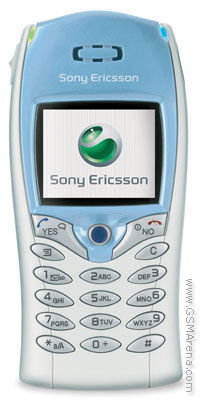
user posted image
thumbup.gif  thumbup.gif

Have been using Sony Ericsson phones ever since.
*
wow, classic one.
first phone since SONY and Ericsson merged
first mass production consumer COLOR screen phone available in malaysia if i'm not mistaken.
first phone that has a camera, although its external one

damn, back then these 256 and 4096 colors screen were so advanced.

QUOTE(RacingTech @ Feb 28 2008, 01:42 PM)
Hello all!!!... i am very interested in P1, i gonna get one this weekend, i need the chinese character input so i guess i need a HK or SG FW phone right? Please let me know wat is the latest FW for SG phone n wat should i notice when i buy the phone, i gonna get an AP set because no money to buy the ori set. hhehe... wat warranty should i ask for? last week got a seller telling me that his waranty for the lcd only one month, phone 1 year, charger n battery i think 3 month or wat... please give advice here all the sifu smile.gif
*
you were quoted for how much?
imho, there's better AP deal out there that offer a lil bit longer warranty on LCD. try browse through the sales thread in garage sales. imho, by browsing there you can get a rough idea what is the best they could offer out there in the shop.
TSfx_53_xt
post Feb 29 2008, 04:49 AM

Look at all my stars!!
*******
Senior Member
2,048 posts

Joined: Oct 2004


QUOTE(cuz @ Feb 28 2008, 11:56 PM)
help!!!
just got my p1 last week..my firmware is the ori p1 one (r6d23 and r6e30). CDA was CDA is CDA162024/66 R2A, CDA162024/95 R5A...got 2 CDA, i oso dunou y..but based on the second CDA, it's a sg FW rite?.i wanna update it to the newest firmware ,..but the thing is my firmware had already chinese recognition installed, and i wan it to continue havin chinese in after i update it.

Shufflerz told me in page 51 that updating my p1 will not erase away the chinese..

so...i've updated my phone last nite and now the chinese recognition and writing is gone... my CDA now is CDA 162024/66 R5A, phone is CXC 162037 R9005...

can anyone help me to get back my chinese language?????????actually i wanna update it to this version: R6G04 for CDA 95 (Singapore Chinese)

one more thing...if i cant get back my chinese language...anyway to DEGRADE it back to my older version? like erasing the new updates n keeping the previous one?
*
QUOTE(cuz @ Feb 29 2008, 03:08 AM)
How to change to Singapore /95 chinese CDA/firmware
» Click to show Spoiler - click again to hide... «

i tried to update my p1i to sg chinese but cant. only the triangle during msg came out but no chinese recognition, writing or reading...

pros pls help!!
*
can you quote your new CDA now?
because ur previous CDA /66 is UK O2 branded set and it should never has any chinese input by default.
it might be the shop who added up the input system for you and upgrading the firmware using CDA 66 will definitely kill of the chinese input.

post more details about ur current firmware/CDA version so we can know more about ur phone
TSfx_53_xt
post Feb 29 2008, 11:54 AM

Look at all my stars!!
*******
Senior Member
2,048 posts

Joined: Oct 2004


QUOTE(cuz @ Feb 29 2008, 06:38 AM)
thanks for replying me.. my previous CDA got 2. my current system info is
phone: CXC 162037 R9J005,
BT: CXC 162143 R1D,
organizer: CXC 162108 R6F41,
CDA: CDA 162024/66 R5A.

how do i install chinese FW now? just now i used the tips on "How to change to Singapore /95 chinese CDA/firmware" but only the black arrow or triangle came out during texting, but no chinese input or output. any tips on how to get back the chinese input n output is really appreciated...
i've got an idea..if like u said the shop added the input system for me, meaning adding another CDA making it 2, how to do tat?
*
your firmware upgrade is not successful, you're still in /66 CDA
if u've successfully gotten the s'pore firmwre ur CDA should be /95
redo the whole process of the step by step guide again, if u need any help, just ask here or pm/msn me.
TSfx_53_xt
post Feb 29 2008, 07:11 PM

Look at all my stars!!
*******
Senior Member
2,048 posts

Joined: Oct 2004


QUOTE(aprisis @ Feb 29 2008, 06:27 PM)
err..wats IM? instant messenger?
*
the all in one messenger, but without skype
TSfx_53_xt
post Mar 1 2008, 01:31 PM

Look at all my stars!!
*******
Senior Member
2,048 posts

Joined: Oct 2004


QUOTE(cuz @ Mar 1 2008, 01:43 AM)
bro..thanks for the tip..but i've redo the whole process for 5 times now....really dunou y the CDA still /66.

i wanna ask..bt the instructions..

i)Download XS++ from http://forums.se-nse.net/index.php?showtopic=16338
ii) tick smartphone connect
iii) press connect
iv) turn off your phone, remove and put back the battery, connect the USB cable while holding C button.
v) select GDFS and press backup GDFS
vi) unplug the USB cable
vii) restart XS++ (not necessarily but i found my XS++ to be error without restarting it)
viii) turn off your phone, remove and put back the battery, connect the USB cable while holding C button.
ix) download the "cda95.zip" and unzip it into the text file [attachmentid=374258]
x) open XS++ and reconnect the phone as mentioned above
xi) go to GDFS section and load the txt file as script
xii) Run the script
xiii) Disconnect and run SEUS
xiv) Update your phone as usual and voila
at VIII, it says turn off ur phone, does this mean after i unplug the phone at VI, i'v eto turn on the phone then turn it off again so i can continue for VIII?

but after i unplug the phone from the usb cable, the phone will auto turn on, load for a bit then shut down again..why does this happen?

after that i tried for the HK FW /74 CDA, tried the first time , updating SEUS time abt 60+% dc, then i unplug the phone n tried to turn on...but cant on ledi...now the phone like flashing flashing the back light only...help!
*
okay, rule of thumb, never disconnect your phone during a flashing session. if you do that you might as well throw away the phone.
since u are able to flash to GW1, i suspect that you have mistaken something during loading the CDA95 script into the phone.
you have to download the CDA95.zip, unzip it into .txt file, then load it from XS++ and RUN it.

as for the turn off part, after XS++ says disconnect the phone, you just simply disconnect the USB cable and unplug the battery.

QUOTE(Shufflerz @ Mar 1 2008, 10:45 AM)
Which CDA you on?
R6F is for World Generic 1, which is CDA /1.
While for CDA /95, aka Singapore firmware, the latest is R9K009. smile.gif
*
there's no difference in firmware version for SG /95 and GW /1 firmware as for now
they are both the same R6G04 for PDA firmware and R9K for phone communication
TSfx_53_xt
post Mar 1 2008, 02:14 PM

Look at all my stars!!
*******
Senior Member
2,048 posts

Joined: Oct 2004


QUOTE(ys_neo86 @ Mar 1 2008, 02:05 PM)
may i know how to set the timing for keypad autolock?
*
sadly, p1i lack of this setting sweat.gif
TSfx_53_xt
post Mar 1 2008, 03:02 PM

Look at all my stars!!
*******
Senior Member
2,048 posts

Joined: Oct 2004


QUOTE(squall_kay @ Mar 1 2008, 02:33 PM)
i dont its a big prob here...those type of battery is more for old skool phone..where lithium still not widely use...remember at 3310 time. there are two types of battery, normal n lithium one..
the lithum one have some sort of memory built inside it to remember when its gonna stop charging (when its full)..n memory for its capacity..
nway this for ori battery..

to make sure the battery can last longer (longer lifespan) the good way only charge when the battery less than 9%..if u do like, every time charge n charge...ur battery will dead faster...this i compare my old w810 n my fren one, my battery although more 1.5+ years..still can last up to 1.5-2days with very heavy usage where as my fren only a day...
bro, there's some misleading info here.

generally the reachargeable batteries for mobile devices out there is divided into two main categories : Lithium based and Nickel based.

Nickel Based :
~Most of the time comes in Nickel Metal Hydride forms (NiMH).
~This kind of battery has memory effect. which means the optimum capacity will only be achieved if you fully charge it everytime and ,or else the crystal build up will shorten the battery capacity and lifetime drastically.
~Overcharging is very damaging but most of the modern charger comes with charging protection circuit
~Fast charging
~low energy density

Lithium Based :
~mostly comes in Lithium Ion (Li-Ion) or Lithium Polymer.
~Do not have memory effect
~Fully depleted charging is not encouraged as it SHORTEN the battery life.
~random charging DOES NOT affect battery performance as opposed to Nickel based batteries
~Battery meter will become unaccurate after some time of usage. To eliminate the battery meter problem, completely discharge the battery and charge it to full again. As completely discharging is not encouraged as it might reduce battery life, it is often recommended that you do this once every few months to keep the battery meter reading correct.
~slow charging
~high energy density

And since our P1i comes with Lithium Polymer battery, we should adhere to the Lithium Battery's respond, completely discharging everytime is not recommended

This post has been edited by fx_53_xt: Mar 1 2008, 03:10 PM
TSfx_53_xt
post Mar 1 2008, 04:03 PM

Look at all my stars!!
*******
Senior Member
2,048 posts

Joined: Oct 2004


QUOTE(mizandude @ Mar 1 2008, 03:30 PM)
Anyone has any problem upgrading the sw using SEUS.  When I tried using it SEUS to update my P1i go thru the cycle, connect to laptop turn off phone, pull out battery and press switch it on while pressing the "C" button.  Wait for a while but nothing happen?????  Am I doing it wrong?  Anybody can advise?  What happen when u press the "C" button while switchig on the phone?
*
just press c and connect the USB cable only, no need to switch the phone on

QUOTE(ys_neo86 @ Mar 1 2008, 03:41 PM)
tat's mean we have stop charging once the battery is fully charge?how long it takes for a full charge?2hrs?
*
full charge when u see ur phone showing battery is full. there's no fixed timing as different capacity battery and charger gives different results
TSfx_53_xt
post Mar 1 2008, 04:10 PM

Look at all my stars!!
*******
Senior Member
2,048 posts

Joined: Oct 2004


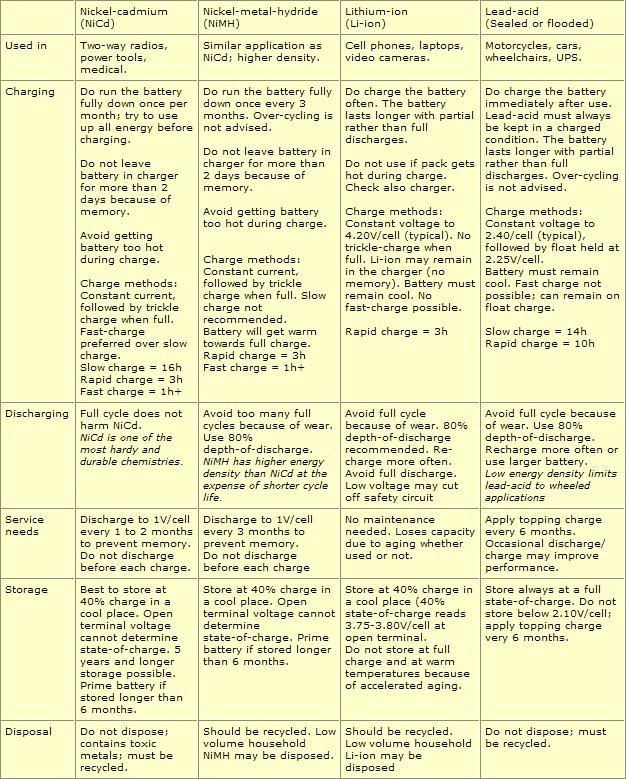
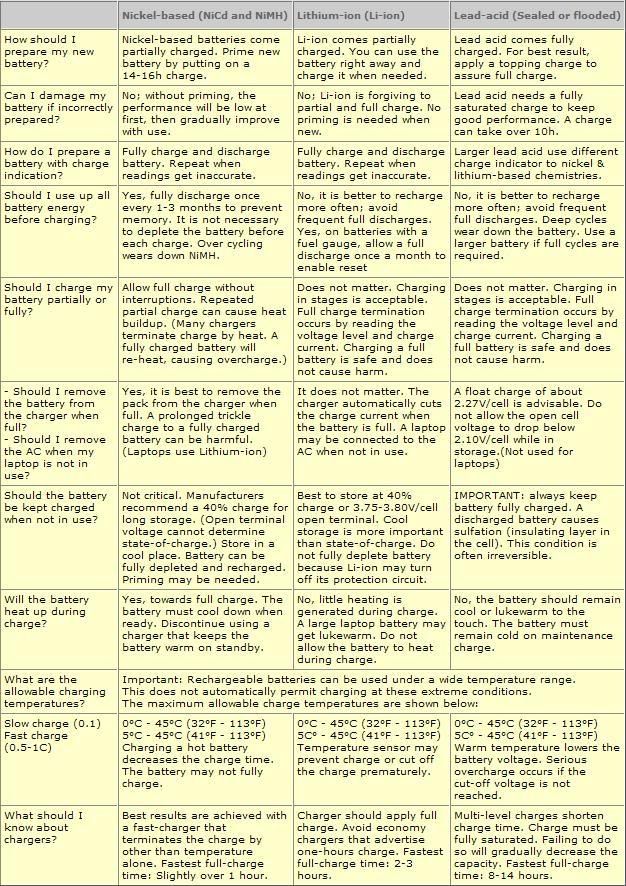
here's a lil guideline taken from www.batteryuniversity.com of how to maintain your batteries

user posted image
user posted image
TSfx_53_xt
post Mar 1 2008, 05:27 PM

Look at all my stars!!
*******
Senior Member
2,048 posts

Joined: Oct 2004


http://www.fring.com/download/

download, connect ur phone and double click
TSfx_53_xt
post Mar 1 2008, 09:37 PM

Look at all my stars!!
*******
Senior Member
2,048 posts

Joined: Oct 2004


QUOTE(Bujerona @ Mar 1 2008, 09:26 PM)
I just updated the firmware to latest one, using SEUS. It's the singapore one. I didn't do the GW part. Is it the same?
*
yup, singapore has now updated to R6G as well.
welcome !
TSfx_53_xt
post Mar 1 2008, 11:21 PM

Look at all my stars!!
*******
Senior Member
2,048 posts

Joined: Oct 2004


QUOTE(aprisis @ Mar 1 2008, 11:11 PM)
wow this phone battery can tahan damn lama.

today i talk+game+music non stop come back 57% laugh.gif
*
it is especially strong when fully charge.
my battery only dropped to 96 % from 100% for 12hours

i at first thought something wrong with the reading.lol
TSfx_53_xt
post Mar 2 2008, 01:18 AM

Look at all my stars!!
*******
Senior Member
2,048 posts

Joined: Oct 2004


QUOTE(mizandude @ Mar 2 2008, 12:38 AM)
I have tried again following the instruction in SEUS to update my sw.  First I turn on the SEUS when reach to the menu follow the intructions I follow thru turn off phone, pull out battery and put back, press C button while connecting the USB.  I can only see a light flicking then its just blank screen on the phone and the SEUS remain at the same page......anyone face this same problem or is my phone having problem.  My phone has been resetting a few times and I hope to put in the new sw........ sifus and gurus please help....
*
after u hold the C button and connect ur USB cable, ur phone should be flicker a blue screen for like a second, then you will see SEUS ask you to release the C button and then you can click next and proceed. the phone will remain as blank during the whole process.

at least mine one is like this
TSfx_53_xt
post Mar 2 2008, 01:51 AM

Look at all my stars!!
*******
Senior Member
2,048 posts

Joined: Oct 2004


QUOTE(Bujerona @ Mar 2 2008, 01:32 AM)
I released the C button before the it prompted me to do so. My battery level was not 100%. And it still got through. But i have to wait for quite a while lah. I managed to get some sleep while updating.... smile.gif

Now i know lah my set was a singapore version since it went straight to singapore update...am i right?
*
i once flashed my firmware when my battery was around 20% cuz i thought by connecting using the dock, it would charge my phone since the charger is connected but apparently i'm wrong and my phone did not get charged but nothing went wrong anyway.

so my assumption was battery level has nothing to do with the flashing procedure but you must at least maintain enough battery power to run the phone through the flashing.

the updating would take around 20 to 40 minutes depending on your connection speed.

and if it shows Singapore APAC, then you're getting the chinese firmware.
if it shows Singapore Latin, then you're getting the english firmware

This post has been edited by fx_53_xt: Mar 2 2008, 01:52 AM
TSfx_53_xt
post Mar 3 2008, 02:15 AM

Look at all my stars!!
*******
Senior Member
2,048 posts

Joined: Oct 2004


QUOTE(RacingTech @ Mar 2 2008, 08:51 PM)
i mean how to check on the phone whether it is the new phone n not those been recycle... some un ethical seller out there change the sticker or change the casing so that the phone look new n sell it as new phone, so how should i check to make sure it is a new phone or not stollen set?
*
QUOTE(RacingTech @ Mar 2 2008, 08:58 PM)
hehe... tat day see the news on the tv, they even print the sticker n put the sirim n stuff.... for the IMEI, is it possible they change it through flashing the phone?
*
there's no definite way of how to check a phone whether it is used or not.
a few basic steps would be check and see if the phone got sms sent, photo captured or non factory default software installed, then check for physical damage and finally, check the IMEI behind the phone to match the *#06# IMEI.

because most of the time AP set wont have matched IMEI of box and set, but the IMEI of the sticker behind the phone should match with the phone itself or else most probably the phone is tampered.

as of the phone info and sirim sticker, they do exist. during my 2 years experience of dealing with mobile phones, i've seen numerous of those sticker, comes in bulk like your kid's regular sticker album biggrin.gif

QUOTE(ccc8910 @ Mar 3 2008, 12:38 AM)
hi all, i check my p1i firmware n it  shows R6F41 ...izizt the latest firmware or i need to flash it again?
*
latest is R6G04
check and see if it is released for ur CDA
TSfx_53_xt
post Mar 4 2008, 12:34 PM

Look at all my stars!!
*******
Senior Member
2,048 posts

Joined: Oct 2004


QUOTE(hushymushy @ Mar 4 2008, 10:36 AM)
I found out that our P1i requires 700mA to charge as per the charger output requirement

I use the P1i as a modem connected to my laptop, the batt drains faster than being charged because the usb is only 500mA.

so far this is the setback of the phone
*
i never succeed in getting my p1i as modem.
i'm confused on how to set it up via win XP
TSfx_53_xt
post Mar 5 2008, 01:36 AM

Look at all my stars!!
*******
Senior Member
2,048 posts

Joined: Oct 2004


QUOTE(milky @ Mar 4 2008, 11:42 PM)
does tis phone same like PDA can store alot of incoming calls & outgoing calls??
*
it can store so freaking a lot in fact everytime before i re-flash my phone, the phone records from months ago still exist
TSfx_53_xt
post Mar 5 2008, 07:34 AM

Look at all my stars!!
*******
Senior Member
2,048 posts

Joined: Oct 2004


QUOTE(squall_kay @ Mar 5 2008, 07:23 AM)
bro, how to clear the call log?


Added on March 5, 2008, 7:25 am

sori bro..smlm ak tido awal arr.. sad.gif
*
go to more, switch to extended mode.
then highlight the one u wanna delete and select more->edit->delete entry
TSfx_53_xt
post Mar 5 2008, 03:17 PM

Look at all my stars!!
*******
Senior Member
2,048 posts

Joined: Oct 2004


QUOTE(bluehippy @ Mar 5 2008, 09:15 AM)
Hi folks,

Just got my P1i yesterday and immediately upgraded to GW1 CDA. Followed all the steps provided on page 1. Thanks a lot for the help. However, once I checked the organizer version, it was only R6F41 and not the latest R6G04. Why is that? Would it be ok to just keep the R6F41 firmware?
*
did u update through SEUS?

QUOTE(Dannyl @ Mar 5 2008, 09:28 AM)
Wanna ask something about this phone.  If I have a contact with 2 mobile phones, can I enter both in the address book under the same contact?  I mean really 2 "mobile phone" categories instead of putting 1 under mobile phone and 1 under home phone.  Meaning we can add as many categories as we like (2 mobile, 3 email, 2 office, 2 fax, etc).

Thanks.
*
yes, you have virtually unlimited entry as u can add ur own custom field

QUOTE(Elvinyew @ Mar 5 2008, 09:42 AM)
Hi guys, received my P1i yesterday. Got it from ambank credit card promotion. It does come with bluetooth DS 970... freee..... biggrin.gif

anyway, i've checked through the package... it does not have the P1i-choice voucher (to redeem software).... I've called thorus... they told me there is no voucher included in the pakcage... is it true?

btw, been playing around with it for only 1 night.... still getting use to it... but can i ask ... when using Excel, i couldnt find a the command of "insert row " or "insert column"....  can anyone help?

thank you!
*
wow, congrats. that's really a good deal.
btw, i have no idea with the excel as most of the time i only use it to view documents but not edit.
even viewing on such small screen is a pain in the ass
TSfx_53_xt
post Mar 5 2008, 04:11 PM

Look at all my stars!!
*******
Senior Member
2,048 posts

Joined: Oct 2004


QUOTE(Elvinyew @ Mar 5 2008, 03:35 PM)
ehhhh.... not really....  i called Thorus & was told that the reason they are giving away free bluetooth was bcos they are not giving P1 Choice vouchers anymore.... so, meaning to say, no free software. cry.gif

hmm.gif  wonder if it's true)

i guess, give & take ?  sweat.gif
*
have no worries about those free software.
i will trade my p1 choice voucher over DS970 anytime

12 Pages « < 7 8 9 10 11 > » Top
Topic ClosedOptions
 

Change to:
| Lo-Fi Version
0.0541sec    0.34    7 queries    GZIP Disabled
Time is now: 7th December 2025 - 01:45 PM