Welcome Guest ( Log In | Register )

Outline · [ Standard ] · Linear+

 26 movies in 1 Dvd. How did they do it?

views
     
ulala2
post Jan 3 2008, 03:50 PM

Getting Started
**
Junior Member
245 posts

Joined: Jul 2007
i think that is KDVD version, i personal trying to convert it to KDVD version, i only managed to put around 15~18 episod drama in 1 DVD disc, just like i convert prison break episod 2 in a single disc.

the method is take a lot of times.......

1) convert RMVB file to KDVD mpeg files using TMPEG, but sometimes after convert, the video file will without audio output. So the best way will be extract out the audio file using TTPayer, so when u convert RMVB to MPEG, choose video = rmvb, audio=wmv, then u sure will get a perfect video mpeg.

2) using TMPEG DVD AUthor (if i not misstaken the software name), and now u can keep add in the video file until the 4.3GB.

Base on my experience, if the RMVB file size = 200MB, KDVD format mpeg = 200~210MB, so if u get the DVD version of drama, after u convert it, it will like a DVD version also.

Back to your question, if 28 movies in a single DVD 4.3GB disc, means around 150mb / movie, it will be low rate video file, i guess pasar malam disc is better than that. But if that is 8GB disc then it can be DVD version video. Hope this can help u

here a the link for KDVD parameters
Here, Click Me

This post has been edited by ulala2: Jan 4 2008, 01:29 PM
ulala2
post Jan 4 2008, 01:27 PM

Getting Started
**
Junior Member
245 posts

Joined: Jul 2007
QUOTE(Ryeeson @ Jan 4 2008, 11:58 AM)
nice topic we discuss here. Ulala2, after you compress them in single DVD, can it be played on Player? i still remember back in year of 2002 where i burn 1 episod of Lost into 1 disk. (Which mean i am  dumb?) 

How long it takes to convert 40 minutes movie?
*
Ya, it can be play on normal DVD player, and the quality as same as the DVD version rmvb file.


how long to takes... it all depends on ur pc....and spec

for P4 2.0 7xx MB ram, i convert 1 episod around 1 hour, in P4 3.0 is around 40min, so if latest pc i would guess around 30 min times or less...
ulala2
post Jan 5 2008, 11:02 AM

Getting Started
**
Junior Member
245 posts

Joined: Jul 2007
QUOTE(tokmisai @ Jan 4 2008, 10:19 PM)
Sorry guys. been busy with kids going to school. Am I the only one here with kids? LOL. Anyway could not get hold of the dvd yet. Will try to get ASAp and get the infos. Anyway thanks for the infos tho' I'm bit blur with ulala2's.  guess  i'm not too techie...
*
Step 1
go to HERE to download the KDVD parameters, either NTSC or PAL

TMPGEnc Templates optimized with KDVD parameters
KDVD Half D1
NTSC 352x480
PAL 352x576


Step 2
Go to TTPLAyer, load the RMVB video in playlist, convert the file to WMV 48000 format as shown in picture.
user posted image
user posted image


Step 3
user posted image
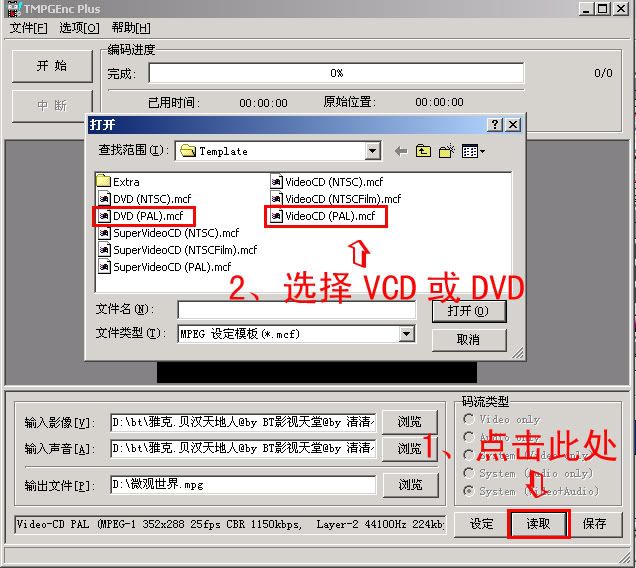
Open ur TMPGenc Plus, load the KDVD parameter u just download.
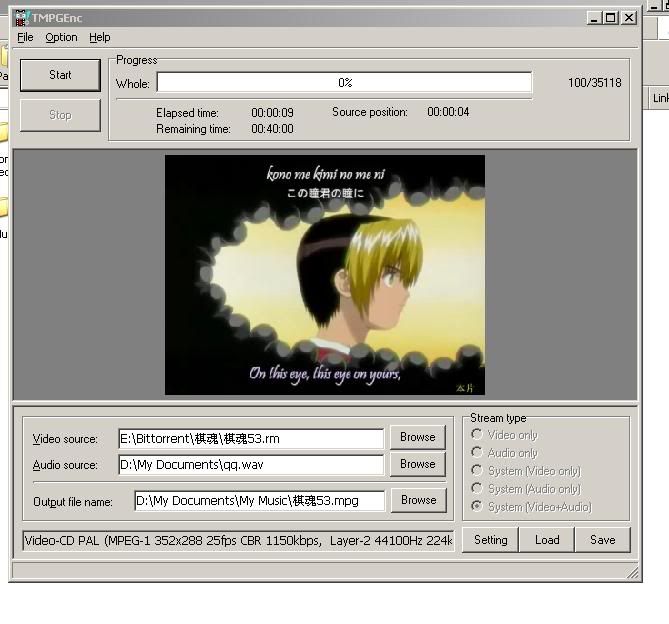
Load the video file u want to convert, load the wmv file u just converted using ttplayer
user posted image
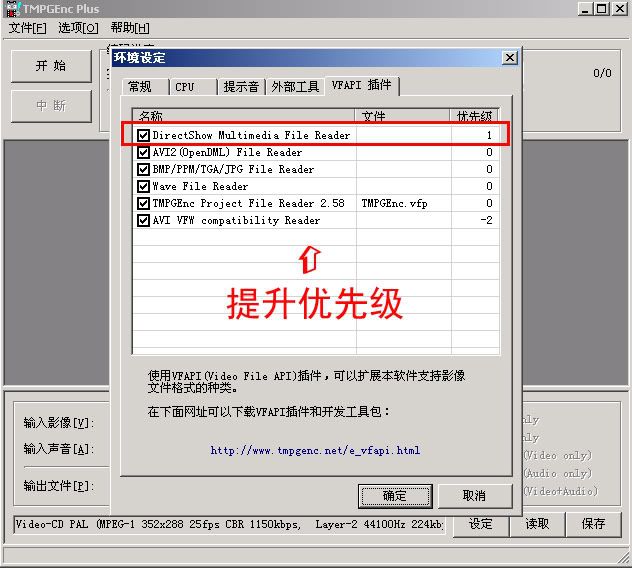
go to do some setting in TMPGenc Plus as follows:-
user posted image
user posted image

Here u go start converting.....hope this will make u more clear about the process
ulala2
post Jan 6 2008, 10:17 AM

Getting Started
**
Junior Member
245 posts

Joined: Jul 2007
QUOTE(super macgyver @ Jan 5 2008, 08:46 PM)
support TMPGEnc ekpress too?
*
not sure, coz never use the TMPEnc ekpress, may be u cna have a try

This post has been edited by ulala2: Jan 6 2008, 10:23 AM
ulala2
post Jan 15 2008, 09:03 AM

Getting Started
**
Junior Member
245 posts

Joined: Jul 2007
QUOTE(steellusion @ Jan 13 2008, 12:40 PM)
26 movies in 1 dvd..arrgghhh..the quality of the video is very2 worse....dont have it...even 5 movies in 1 dvd also has a bad quality of movies.... sad.gif
*
that's why u need to dl the DVD version of movie, then after burn only can get back dvd version movie....


Change to:
| Lo-Fi Version
0.0178sec    0.31    6 queries    GZIP Disabled
Time is now: 15th December 2025 - 08:41 AM