*****************************
Welcome to Nokia™ Nseries - N81 Official Thread *****************************
Finally, the
Official Thread for N81...Welcome owner of N81 (both standard-2GB card & 8GB versions)

Come and lets us counting on the N81 owners and also discuss more n share more informations together.

 Nokia N81
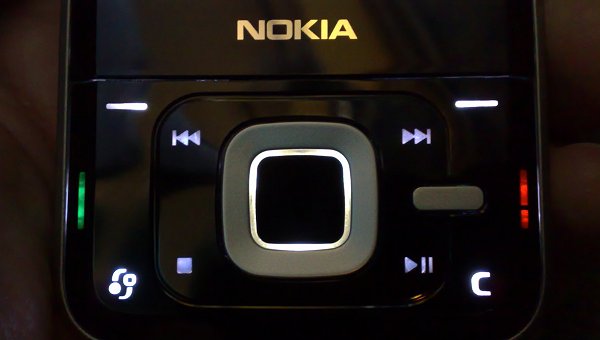
 is a truly exciting smartphone combining the power of Symbian 9.2 OS spiced up with the new N-Gage platform. It is a multimedia phone that comes with dedicated music and gaming keys, 3.5 mm headphone connector and 3G and WLAN connectivity, the Nokia N81 multimedia computer is a true mobile entertainment powerhouse. With a sleek, polished surface and keys that light up when you activate them, accessing content on the 3D multimedia menu is fast and intuitive.
There are two versions of the handset - standard and 8GB. The standard version features a memory card slot, the other has none but offers the exciting 8GB of onboard memory. The Nokia N81 (standard) will be available in Cobalt blue or Graphite grey color while the N81 8GB is available only in Cocoa brown color.
The N81 (standard - 2GB card, comes with the phone) supports MicroSD cards up to 4GB while the N81 8GB is using 8GB internal flash memory. Dedicated music keys provide for instant access to music. Use the built-in 2 megapixel camera with flash for taking pictures or videos and second camera (QCIF) for video calls or pictures. The Nokia N81 has a 2,4" color QVGA (240 x 320 pixels) 16 million color screen, built-in stereo speakers, Bluetooth stereo headphone support, USB 2.0, and support for Java MIDP 2.0 & CLDC1.1.
Technical Specifications:
» Click to show Spoiler - click again to hide... «
General
Network >UMTS / GSM 850 / 900 / 1800 / 1900
Announced >2007, August
Size
Dimensions >102 x 50 x 17.9 mm, 86 cc
Weight >140 g
Display
Type >TFT, 16M colors
Size >240 x 320 pixels, 2.4 inches
>Navi wheel interface
Ringtones
Type >Polyphonic (64 channels), Monophonic, True Tones, MP3
Vibration >Yes
Memory
Phonebook >Practically unlimited entries and fields, Photocall
Call records >Detailed, max 30 days
Card slot >microSD (TransFlash), hotswap, 2 GB card included, buy memory
- 12 MB user memory
- 96 MB SDRAM memory
- ARM 11 369 MHz processor
<8GB version>
Card slot >No
- 8 GB internal flash memory
- 96 MB SDRAM memory
- ARM 11 369 MHz processor
Data
GPRS >Class 10 (4+1/3+2 slots), 32 - 48 kbps
HSCSD >Yes
EDGE >Yes
3G >Yes, 384 kbps
WLAN >Wi-Fi 802.11b/g with UPnP
Bluetooth >Yes, v2.0 with A2DP
Infrared >No
USB >Yes, v2.0 microUSB
Features
OS >Symbian OS 9.2, Series 60 v3.1 UI
Messaging >SMS, MMS, Email, Instant Messaging
Browser >WAP 2.0/xHTML, HTML
Games >Yes + Java downloadable, order now
Colors >Cobalt blue, Graphite grey and Cocoa brown for 8GB version
Camera >2MP, 1600x1200 pixels, video(VGA 15fps), flash;secondary CIF videocall cam
- Java MIDP 2.0
- MP3/AAC/MPEG4 player
- Rotating gallery with Navi wheel
- Stereo FM Radio
- T9
- Push to talk
- Voice dial/memo
- PIM including calendar, to-do list
- 3.5 mm audio output jack
- Built-in handsfree
Battery
Standard battery, Li-Po 1050 mAh (BT-6MT)
Stand-by >Up to 410 h
Talk time >Up to 4
<<Info from gsmarena.com>>
Package Contents:» Click to show Spoiler - click again to hide... «
Standard Sales Package Contents*
. Nokia N81 8GB (For N81 standard- it comes with 2GB MicroSD card)
. Nokia Music Headset HS-45 with remote control AD-54
. Nokia Connectivity Cable CA-101
. Nokia Battery BP-6MT
. Nokia Compact Travel Charger AC-5
* Sales package content may vary by region.
Inbox colors available
. Cocoa brown (8GB version)
. Cobalt blue or Graphite grey (Standard version)
<<Info from www.nseries.com>>
More N81 pictures:» Click to show Spoiler - click again to hide... «
Latest Firmware Version:» Click to show Spoiler - click again to hide... «
v24.0.002
RM-179
Nokia N81 (14.01)
Guide on Updating N81 Phone Firmware:» Click to show Spoiler - click again to hide... «
Things to do before a firmware update:
1. Install
Nokia PC Suite, and backup all the files (contacts, msg, n etc.) from your phone to your computer or u can backup ur files into ur mass memory or memory card.
2. Charge your phone battery to its full level.
3. Beware that any hindrance (like power off, etc.) during the update process can damage your phone.
Let's get started.
1. In your N81 phone, type in *#0000#
Your N81 will now display the firmware version it's running.
2. Carefully open the back case of your phone, and also take away the battery.
3. Note the product code down.
4. Go
here and type the product code. You'll now know if a new version of firmware for your N81 phone is available.
5. Download the
Nokia Software Updater.
6. Install the Nokia Software Updater.
7. Connect your N81 phone via the USB port by CA-101 cable, and also make sure your computer is connected to the internet.
8. Open the Nokia Software Updater.
9. The Nokia Software Updater connects to the internet, checks for updates, and then detects your phone to start installing firmware updates for your Nokia phone
10. You might see some fuzzy things going on in your Nokia phone, and that's perfectly normal to happen during a firmware update.
11. When all is done, the updater gives a confirmation message and then the phone restarts.
12. You can now disconnect the phone from the computer.
If u wan to have Chinese language...(APAC Region)Then u need to make sure ur product code is Apac region pc.
1. Download
Nemesis Service Suite Beta 1.0.38.14 (zip file, 6.3 MB).
2. Install it...During the installation pick Virtual USB Device from the Hardware Selection page.
3. Find N81 APAC region product code
(at internet or get the product code from ORI set in M'sia or sg.)4. Open Nemesis Service Suite and click on Scan for new device in the upper right section of the application window.
5. Click on the Phone Info icon.
6. Click Scan in the middle of the application window.
7. Enter ur new product code in the Product Code text box. Click the Enable check box. Click Write to change your phone's product code.

8. Close the Nemesis Service Suite and open Nokia Software Updater application to update the firmware.
*If ur N81 is ORI, thn ur product code is APAC Region pc. So, no need to change..juz straight away update by Nokia software updater. As for AP set, i'm not sure...some r Apac region pc but some not.  Oh ya, dun forget change back to ur original product code ya coz it might void ur phone warranty.
Main disadvantages:
. Mediocre camera
. Awkward D-pad
. Hefty weight
. Uncomfortable keypad
. No HSDPA
Previous N81 unofficial thread >
New Nokia N81 This post has been edited by aarex: Apr 2 2010, 08:07 AM 

 Dec 29 2007, 03:49 PM, updated 16y ago



 Quote
Quote


 ..cannot copy and paste text ...dam*, but after discovered the phone thn I found the "Editing options" function in the menu where copy and paste are available.
 Beside that, the 3-D tones is dam* nice..


 So less N81 user meh?
  Whr is the N81 user?? come n join the club n share ur info here. For those who wan to buy tis hp or wan to know more bout tis phone, pls ask ur Q here.


 0.0322sec
 0.42
0.42
 6 queries
 GZIP Disabled