

couldn't boot up

will try to top up the clockspeed step by step later

if still cannot, wanna flash bios adi

p/s: boot up from bios takes damn long time
AMDŽ Socket-AM2/AM2+ Overclocking thread (V4), Cockcroach AMD :P
|
|
 Jan 17 2008, 12:00 AM Jan 17 2008, 12:00 AM
|
 
Senior Member
1,404 posts Joined: Apr 2006 From: ......   
|
from stock speed , tried 300HTT just now.
couldn't boot up will try to top up the clockspeed step by step later if still cannot, wanna flash bios adi p/s: boot up from bios takes damn long time |
|
|
|
|
|
Jan 17 2008, 12:53 AM
|
|
Senior Member
1,404 posts Joined: Apr 2006 From: ......
|
after flash to latest bios,
tried 250HTT , boot successful enter bios again, tot of top up the HTT to 300, mana tau saw this, what the ..... 
bios auto set multi to 9.5x pulak after boot into windows , it shows 3005MHz with 10x multiplier  in order to make sure that it is really 10x multiplier ( previously in bios it shows 9.5 x 300, now 10 x 300 ) i run everest memory and cache benchmark, if it is 9.5x , suppose the score will be very low ( i'm using 90nm proc now, IMC bug occurs if i use 9.5x multi ) and result shows that this is really 10x multiplier  
a snapshot of temperature and voltage monitor, 
stock vcore ==> 1.24v ( suppose VID for my proc is 1.21v , mobo add some extra juice for proc  ) )vdimm add to 2.4v in bios and it shows 2.4v in bios monitor ( no voltage drop )however, this is not finalized conclusion yet, will try to check again with DMM on tomolo as some guys don't really believe the accuracy of the hardware monitor  p/s: boot up from bios still slow though adi flash to latest bios will try higher clockspeed now, stay tune edited: just checked the vdimm option , after 2.7v straight away 2.9v again for this latest bios This post has been edited by dblooi: Jan 17 2008, 01:00 AM |
|
|
Jan 17 2008, 01:13 AM
|

Senior Member
857 posts Joined: Feb 2007
|
QUOTE(dblooi @ Jan 17 2008, 12:53 AM) after flash to latest bios, wow how u did it.I cant boot up at such low voltage.Izit any regulation?BTW did u add any n/b or s/b volt?tried 250HTT , boot successful enter bios again, tot of top up the HTT to 300, mana tau saw this, what the .....
bios auto set multi to 9.5x pulak after boot into windows , it shows 3005MHz with 10x multiplier in order to make sure that it is really 10x multiplier ( previously in bios it shows 9.5 x 300, now 10 x 300 ) i run everest memory and cache benchmark, if it is 9.5x , suppose the score will be very low ( i'm using 90nm proc now, IMC bug occurs if i use 9.5x multi ) and result shows that this is really 10x multiplier
a snapshot of temperature and voltage monitor,
stock vcore ==> 1.24v ( suppose VID for my proc is 1.21v , mobo add some extra juice for proc )vdimm add to 2.4v in bios and it shows 2.4v in bios monitor ( no voltage drop )however, this is not finalized conclusion yet, will try to check again with DMM on tomolo as some guys don't really believe the accuracy of the hardware monitor p/s: boot up from bios still slow though adi flash to latest bios will try higher clockspeed now, stay tune edited: just checked the vdimm option , after 2.7v straight away 2.9v again for this latest bios  |
|
|
Jan 17 2008, 01:16 AM
|
|
Senior Member
1,404 posts Joined: Apr 2006 From: ......
|
QUOTE(Oxburg @ Jan 17 2008, 01:13 AM) wow how u did it.I cant boot up at such low voltage.Izit any regulation?BTW did u add any n/b or s/b volt? wanna know why? buy F3 windsor from me  edited: other than vdimm, the rest of the voltages remain as default This post has been edited by dblooi: Jan 17 2008, 01:27 AM |
|
|
Jan 17 2008, 01:42 AM
|

Senior Member
1,083 posts Joined: Sep 2004
|
QUOTE(dblooi @ Jan 17 2008, 01:16 AM) wanna know why? woi bro db....dun poison ppl lah buy F3 windsor from me edited: other than vdimm, the rest of the voltages remain as default  bro oxburg, you may buy my used F3 Windsor as well  haha...just kidding... btw, bro db how to check the actual default Vcore? through stepping ka? |
|
|
Jan 17 2008, 01:46 AM
|

Junior Member
54 posts Joined: Aug 2006 From: Ipoh , Perak . 
|
Hello , somebody who can help me ? My Pc Spec is like below :
Abit KN9 Ultra Motherboard Athlon64 3500+ processor (AM2 Socket) Kingston 1GB DDRII 667MHZ Ram x2 (Run Dual Channel ) MSI 8600GT OC Edition Cooler Master extreme power 430w power supply Asus DVD-RW Sata Drive Seagate 160gb sata HDD Seagate 80gb ide HDD Stock Cooler My BIOS setting like that : My bios setting is like that FSB = 256MHZ Multiplier = x11 pcie clock =100MHZ cpu core voltage =1.550V Ram voltage = 2.10v HT speed = 4x cpu cool and quiet control = disabled DRAM setting is 533MHZ cas latency =5 clocks TRCD=5 clocks Trp =5 clocks Tras=15 clocks Trc = 21 clocks Trfc0 for dimm1= 127.5 ns Trfc1 for dimm2=127.5 ns Trfc2 for dimm3=127.5 ns Trfc3 for dimm4=127.5 ns command rate = 2T After that i got one question , now my cpu clock is 2816MHZ , but when i play game (Unreal Tournament ), cpu usage maintain 100% and cpu temp between 60c ~65c . I play not reach half and hour will BSOD (Begining of dump memory ) , i dont know is ram voltage problem or other reason caused BSOD .... Every sifu can give me some suggestion ! Thanks ! Attached thumbnail(s) 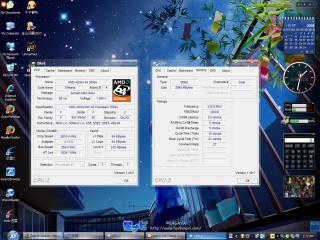
|
|
|
|
|
|
Jan 17 2008, 01:58 AM
|
|
Senior Member
1,083 posts Joined: Sep 2004
|
QUOTE(HMV DVD @ Jan 17 2008, 01:46 AM) Hello , somebody who can help me ? My Pc Spec is like below : Just 2 comments bro:Abit KN9 Ultra Motherboard Athlon64 3500+ processor (AM2 Socket) Kingston 1GB DDRII 667MHZ Ram x2 (Run Dual Channel ) MSI 8600GT OC Edition Cooler Master extreme power 430w power supply Asus DVD-RW Sata Drive Seagate 160gb sata HDD Seagate 80gb ide HDD Stock Cooler .................................. 1. Change to a better 3rd party cooler 2. Just doubt your PSU can supply enough juice for your OC rig This post has been edited by ongbs: Jan 17 2008, 01:58 AM |
|
|
Jan 17 2008, 02:09 AM
|
|
Senior Member
1,404 posts Joined: Apr 2006 From: ......
|
hi i'm back
just figure out that i cannot use AMD overdrive 2.10 wondering why come back with two results , 3.233MHz & 3.433MHz ( actually i set 320HTT& 340HTT in bios )vdimm is 2.4v for both results , the rest of the info such as vcore & temp you can obtain from the SS 

edited: wanna see higher? -3.6GHz is my last try, after that will proceed to ram overclock , then HT link overclock and software oc test -i realized that everytime after i reboot , the cpu multiplier will automatically change to 9.5x. Everytime i have to set it back to 10x manually - i believe that vcore and temperature reading in bios hardware monitor are inaccurate -to be continued This post has been edited by dblooi: Jan 17 2008, 02:18 AM |
|
|
Jan 17 2008, 02:25 AM
|

Senior Member
1,560 posts Joined: May 2005 From: Penang
|
QUOTE(HMV DVD @ Jan 17 2008, 01:46 AM) Hello , somebody who can help me ? My Pc Spec is like below : have u ever do prime or memory test for the system after the overclocking?Abit KN9 Ultra Motherboard Athlon64 3500+ processor (AM2 Socket) Kingston 1GB DDRII 667MHZ Ram x2 (Run Dual Channel ) MSI 8600GT OC Edition Cooler Master extreme power 430w power supply Asus DVD-RW Sata Drive Seagate 160gb sata HDD Seagate 80gb ide HDD Stock Cooler My BIOS setting like that : My bios setting is like that FSB = 256MHZ Multiplier = x11 pcie clock =100MHZ cpu core voltage =1.550V Ram voltage = 2.10v HT speed = 4x cpu cool and quiet control = disabled DRAM setting is 533MHZ cas latency =5 clocks TRCD=5 clocks Trp =5 clocks Tras=15 clocks Trc = 21 clocks Trfc0 for dimm1= 127.5 ns Trfc1 for dimm2=127.5 ns Trfc2 for dimm3=127.5 ns Trfc3 for dimm4=127.5 ns command rate = 2T After that i got one question , now my cpu clock is 2816MHZ , but when i play game (Unreal Tournament ), cpu usage maintain 100% and cpu temp between 60c ~65c . I play not reach half and hour will BSOD (Begining of dump memory ) , i dont know is ram voltage problem or other reason caused BSOD .... Every sifu can give me some suggestion ! Thanks ! |
|
|
Jan 17 2008, 02:31 AM
|

Senior Member
2,827 posts Joined: Mar 2007 From: MALAYSIA
|
@dblooi
Hows the mobo for you?? any comments for it so far?? |
|
|
Jan 17 2008, 02:38 AM
|

Junior Member
109 posts Joined: Apr 2006 From: klang
|
QUOTE(ah_khoo @ Jan 16 2008, 11:34 PM) 0605 is so far d best... ram setting i set to DDR 400 alr.i wan oc proc 1st.c it can go how far....but sigh..0605?ok i will find it.thanks.if can oc good result will post it here. ram settin in bios?  |
|
|
Jan 17 2008, 02:57 AM
|

Senior Member
1,038 posts Joined: Jan 2003 From: K . L . I . A
|
few questions here..
- is there any need to push ht voltage? i mean did u guys increase it for ur oc? - any limitation on HT link? i think i read somewhere to try to set it @ not more than 1000..or was i dreaming.. - already forgot few questions that i planned to ask..sigh.. |
|
|
Jan 17 2008, 03:18 AM
|
|
Senior Member
1,404 posts Joined: Apr 2006 From: ......
|
back again
tried 3.6GHz but failed to boot into windows , However i'm very sure that it is not because of mobo limitation. is the cooler adi reach its limit ( last time i did the same thing, but with air-conditioner on at 16C ) only have this, 3.5GHz 
i hope this is good enough to show that this mobo is an OC freak the rest of the tests, will continue after i wake up p/s: got bad feeling on the software oc part  so far clockgen and AMD overdrive cannot use on 1st trial Biostar oc tool II works but i dunno how to use it yet okla, continue later, good nite This post has been edited by dblooi: Jan 17 2008, 03:20 AM |
|
|
|
|
|
Jan 17 2008, 03:25 AM
|
|
Senior Member
1,083 posts Joined: Sep 2004
|
QUOTE(skod @ Jan 17 2008, 02:57 AM) few questions here.. depend on yr Proc too I belif...- is there any need to push ht voltage? i mean did u guys increase it for ur oc? - any limitation on HT link? i think i read somewhere to try to set it @ not more than 1000..or was i dreaming.. - already forgot few questions that i planned to ask..sigh.. me pushed close to 1800MHz b4, without adding V |
|
|
Jan 17 2008, 03:40 AM
|
|
Senior Member
1,560 posts Joined: May 2005 From: Penang
|
QUOTE(ongbs @ Jan 17 2008, 03:25 AM) depend on yr Proc too I belif... that is DFI nVidia 590 chipset?me pushed close to 1800MHz b4, without adding V true DFI can go higher hypertransport in nVidia .. almost all nvidia 590 chipset can go to 1650 Hypertransport... 570 .. too bad i didn't really try it... ATI chipset can go higher than nvidia chipset now... the limit can ask dblooi ... =) and older chipset... never go over 1000 hypertransport or board cannot boot... that's what i know This post has been edited by cyberloner: Jan 17 2008, 03:41 AM |
|
|
Jan 17 2008, 03:59 AM
|
|
Senior Member
1,083 posts Joined: Sep 2004
|
QUOTE(cyberloner @ Jan 17 2008, 03:40 AM) that is DFI nVidia 590 chipset? Nope, Nforce 4 chipset, DFI infinity UltraII-MIItrue DFI can go higher hypertransport in nVidia .. almost all nvidia 590 chipset can go to 1650 Hypertransport... 570 .. too bad i didn't really try it... ATI chipset can go higher than nvidia chipset now... the limit can ask dblooi ... =) and older chipset... never go over 1000 hypertransport or board cannot boot... that's what i know |
|
|
Jan 17 2008, 04:03 AM
|
|
Senior Member
1,560 posts Joined: May 2005 From: Penang
|
awesome....
|
|
|
Jan 17 2008, 04:12 AM
|
|
Senior Member
1,083 posts Joined: Sep 2004
|
QUOTE(cyberloner @ Jan 17 2008, 04:03 AM) awesome.... hah, check back the screenie, 1900MHz HTT link actually Attached thumbnail(s) 
|
|
|
Jan 17 2008, 04:35 AM
|
|
Senior Member
1,560 posts Joined: May 2005 From: Penang
|
holy clock.... salute
|
|
|
Jan 17 2008, 06:46 AM
|
|
Junior Member
109 posts Joined: Apr 2006 From: klang
|
hi,i m back,just break my ownself record.oc till 3040GHz.
 This post has been edited by ping86: Jan 17 2008, 06:48 AM |
|
Topic ClosedOptions
|
| Change to: |  0.0294sec 0.0294sec
 1.04 1.04
 6 queries 6 queries
 GZIP Disabled GZIP Disabled
Time is now: 9th December 2025 - 01:19 PM |
 Quote
Quote