

QUOTE(ongbs @ Jan 9 2008, 06:12 PM)
no prob, mang2 tang lah! 
Just wonder how many C drop after gasak away the IHS...

aiyo...wa ga lu lapping free ma...lai lai... Just wonder how many C drop after gasak away the IHS...
AMDŽ Socket-AM2/AM2+ Overclocking thread (V4), Cockcroach AMD :P
|
|
 Jan 9 2008, 07:57 PM Jan 9 2008, 07:57 PM
|
 
Senior Member
1,701 posts Joined: Jul 2006 From: Malaysia  
|
QUOTE(ongbs @ Jan 9 2008, 06:12 PM) no prob, mang2 tang lah! aiyo...wa ga lu lapping free ma...lai lai... Just wonder how many C drop after gasak away the IHS... |
|
|
|
|
|
Jan 9 2008, 08:33 PM
|

Senior Member
1,404 posts Joined: Apr 2006 From: ...... 
|
QUOTE(ongbs @ Jan 9 2008, 01:29 PM) huh bro, I tot only got bugs in 9.5x? You mean all x.5 multi got bugs? QUOTE(tachlio @ Jan 9 2008, 01:40 PM) if not mistaken, it all 0.5 multiple bug~ yaya... use any 0.5 multi on 90nm proc can cause this IMC buganother alternative way to detect it is use any memory benchmark program  u will notice that no matter how high u push ur proc, the memory benchmark still showing the same thing QUOTE(soulfly @ Jan 9 2008, 01:57 PM) Windsor and Brisbane are different entities. F2 and F3 are the same windsor. Or u mean Windsor have half multi since F3? due to most of the mobo bios support brisbane's 0.5 multi, hence we can use 0.5 multi for 90nm proc also  |
|
|
Jan 9 2008, 09:30 PM
|

Senior Member
1,051 posts Joined: Feb 2005 From: Somewhere Out There 
|
opps.. posted on the wrong thread
 This post has been edited by AoiNatsume: Jan 9 2008, 09:32 PM Attached thumbnail(s) 
|
|
|
Jan 9 2008, 09:32 PM
|

Senior Member
2,827 posts Joined: Mar 2007 From: MALAYSIA
|
I lapped my F3 today.
After doing wet sanding with 300 grit paper,theres a brown (like a copper) spot appear. What is that? Even after wet sanding with 400,600,800,1000,1200 and 1500,the brown spot still cant be removed. |
|
|
Jan 9 2008, 09:34 PM
|
|
Senior Member
1,051 posts Joined: Feb 2005 From: Somewhere Out There
|
dude.. that brown spot is the copper. You need to sand it more to remove all the nickel coat so that only the copper is exposed.
Look at mine after fully lapped. 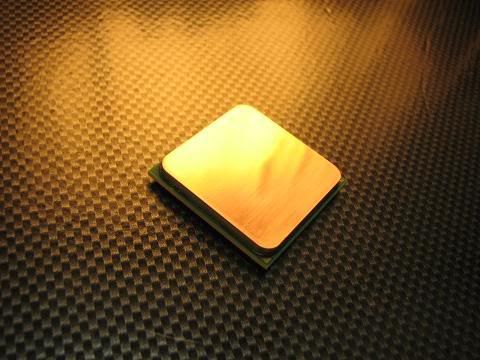 it should be copper already. This post has been edited by AoiNatsume: Jan 9 2008, 09:35 PM |
|
|
Jan 9 2008, 09:47 PM
|
|
Senior Member
2,827 posts Joined: Mar 2007 From: MALAYSIA
|
Thank you very much bro.After reading in some guides,it tells that its the nickel thingy.
Now i know. Its much harder than lapping a HSF. This post has been edited by ocz: Jan 9 2008, 09:48 PM |
|
|
|
|
|
Jan 9 2008, 09:56 PM
|

Junior Member
322 posts Joined: Sep 2006 From: Seri Kembangan; Equine Park
|
 sifus u all think like this ok ma?? or i should go more?? This post has been edited by skcs1985: Jan 9 2008, 10:06 PM |
|
|
Jan 9 2008, 10:03 PM
|
|
Senior Member
2,827 posts Joined: Mar 2007 From: MALAYSIA
|
QUOTE(skcs1985 @ Jan 9 2008, 09:56 PM)  sifus u all think like this ok ma?? or i should go more?? As for the TRC and TRAS,lower more. |
|
|
Jan 9 2008, 10:05 PM
|
 
Elite
8,545 posts Joined: Aug 2006 From: 224.0.0.6
|
@skcs1985
I think still can go if you want to. And how come your gc running @ 8x while your mobo support 16x  ?? ??-pWs- |
|
|
Jan 9 2008, 10:07 PM
|
|
Junior Member
322 posts Joined: Sep 2006 From: Seri Kembangan; Equine Park
|
QUOTE(-pWs- @ Jan 9 2008, 10:05 PM) @skcs1985 i dunoI think still can go if you want to. And how come your gc running @ 8x while your mobo support 16x ??-pWs- how to change it? |
|
|
Jan 9 2008, 10:09 PM
|
|
Elite
8,545 posts Joined: Aug 2006 From: 224.0.0.6
|
QUOTE(skcs1985 @ Jan 9 2008, 10:07 PM) i duno In BIOS I think. how to change it? -pWs- |
|
|
Jan 9 2008, 10:19 PM
|
|
Junior Member
322 posts Joined: Sep 2006 From: Seri Kembangan; Equine Park
|
QUOTE(-pWs- @ Jan 9 2008, 10:09 PM) In BIOS I think. i try d -pWs- duno which one to change |
|
|
Jan 9 2008, 10:21 PM
|

Elite
8,103 posts Joined: Jan 2003 From: Tanah Lot @ Dungun, Terengganu.
|
QUOTE(skcs1985 @ Jan 9 2008, 10:19 PM) i try d it's either jumper related or you placed it in non primary slot i guess... duno which one to change  |
|
|
|
|
|
Jan 9 2008, 10:23 PM
|
|
Junior Member
322 posts Joined: Sep 2006 From: Seri Kembangan; Equine Park
|
QUOTE(ah_khoo @ Jan 9 2008, 10:21 PM) it's either jumper related or you placed it in non primary slot i guess... i place on lower pci-e slotcos later my HR-03GT come, will block the heatsink how to solve this? This post has been edited by skcs1985: Jan 9 2008, 10:24 PM |
|
|
Jan 9 2008, 10:25 PM
|
|
Elite
8,545 posts Joined: Aug 2006 From: 224.0.0.6
|
QUOTE(skcs1985 @ Jan 9 2008, 10:23 PM) i place on lower pci-e slot Should place in highest ma. cos later my HR-03GT come, will block the heatsink how to solve this? If like that, i rather do not want the HR-03GT.  -pWs- |
|
|
Jan 9 2008, 10:30 PM
|
|
Elite
8,103 posts Joined: Jan 2003 From: Tanah Lot @ Dungun, Terengganu.
|
QUOTE(skcs1985 @ Jan 9 2008, 10:23 PM) i place on lower pci-e slot place d gc on d upper slot, dats d primary slot. it applies to nf4 ultra era as well... cos later my HR-03GT come, will block the heatsink how to solve this? p/s: if u want to placed it on lower slot & enjoy 16x bandwidth for ya gc, there's only one way - get d 590 chipset mobo which offers 2 full 16x pcie slot. This post has been edited by ah_khoo: Jan 9 2008, 10:33 PM |
|
|
Jan 9 2008, 10:43 PM
|
|
Junior Member
322 posts Joined: Sep 2006 From: Seri Kembangan; Equine Park
|
QUOTE(ah_khoo @ Jan 9 2008, 10:30 PM) place d gc on d upper slot, dats d primary slot. it applies to nf4 ultra era as well... yea tested itp/s: if u want to placed it on lower slot & enjoy 16x bandwidth for ya gc, there's only one way - get d 590 chipset mobo which offers 2 full 16x pcie slot. now 16x i think 3.08Ghz is the best it can go other clocking all hang at windows |
|
|
Jan 9 2008, 10:44 PM
|
|
Senior Member
1,404 posts Joined: Apr 2006 From: ......
|
QUOTE(skcs1985 @ Jan 9 2008, 09:56 PM) sifus u all think like this ok ma?? or i should go more?? use 2X 1GB sticks enough mar when oc anyway nice ram cooler u got there, how much you bought it? |
|
|
Jan 9 2008, 10:45 PM
|
|
Junior Member
322 posts Joined: Sep 2006 From: Seri Kembangan; Equine Park
|
QUOTE(dblooi @ Jan 9 2008, 10:44 PM) aiyoyo, 4GB ram all oc together ar? no mause 2X 1GB sticks enough mar when oc anyway nice ram cooler u got there, how much you bought it? i bought 4gb jor, dowan waste it so put inside also lo RM115 |
|
|
Jan 9 2008, 10:53 PM
|
|
Senior Member
1,404 posts Joined: Apr 2006 From: ......
|
QUOTE(skcs1985 @ Jan 9 2008, 10:45 PM) no ma haha ok ....i bought 4gb jor, dowan waste it so put inside also lo RM115 if you are planning to use that clock speed for 24/7 then it is ok  however, let's say you wanna try highest oc that u can go, 4 sticks of ram is not recommended as you can go much more further if u use 2 sticks only |
|
Topic ClosedOptions
|
| Change to: |  0.0347sec 0.0347sec
 0.74 0.74
 6 queries 6 queries
 GZIP Disabled GZIP Disabled
Time is now: 7th December 2025 - 04:09 PM |
 Quote
Quote