Welcome Guest ( Log In | Register )

Outline · [ Standard ] · Linear+

Queries QUERIES BOUT POSTING

views
     
TSveron399
post Dec 11 2007, 02:41 PM, updated 19y ago

New Member
*
Validating
1 posts

Joined: Oct 2007


hi..im newbie..need your help to teach me bout posting..i've already done a post..then when i manage to sell of some of my clothes..i want to edit the post and repost again..i've tried to click the edit button but it will no repost ..it will edit ot the original one..if i wan to repost, is it i should click a new topic and start all over again?

cos i saw others can repost their topic eg..at the topic title they add wording like - 1st batch closed or update news..

pls teach me...
TSveron399
post Dec 11 2007, 03:07 PM

New Member
*
Validating
1 posts

Joined: Oct 2007


i've tried to edit but the post does not appear at the latest page..btw what is thread? omg..im such a dummy

QUOTE(ataris @ Dec 11 2007, 02:59 PM)
u mean, u want to edit ur thread's title ? not ur post ? or u want to update both ? u dont need to repost, u can edit ur post together with ur title.
*
TSveron399
post Dec 12 2007, 09:02 AM

New Member
*
Validating
1 posts

Joined: Oct 2007


thks..will try out

QUOTE(punkyswat @ Dec 11 2007, 10:35 PM)
u can try to cancel the post.try this cancel
Done
*

Added on December 12, 2007, 9:03 amthks...will try


QUOTE(youngkies @ Dec 11 2007, 03:56 PM)
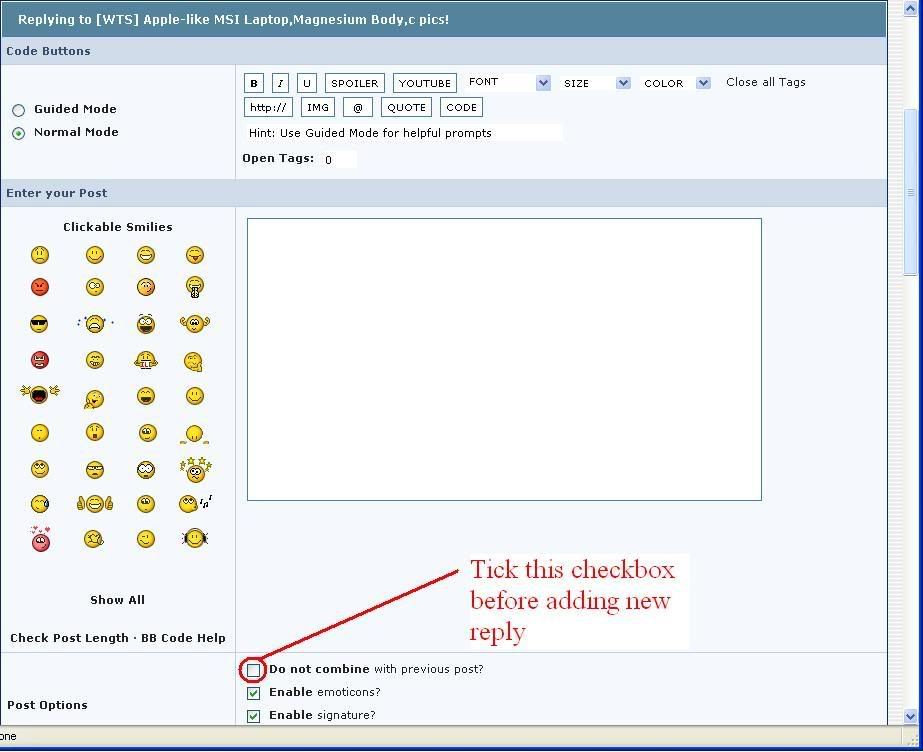
me think this is what you want, click 'add reply', tick the 'do not combine with previous post' to add a new reply.
*
This post has been edited by veron399: Dec 12 2007, 09:03 AM
TSveron399
post Dec 12 2007, 11:33 AM

New Member
*
Validating
1 posts

Joined: Oct 2007


QUOTE(TechnoDude94 @ Dec 12 2007, 10:42 AM)
You already tried it and does it work the way you want now?
*
hmm..tried to click edit..reply and add reply but it just does not appear at the latest page at the forum..anyway i just made a new post..hehe..will try work it out again..maybe im just dummy..well thanks to all of u who help me out..really appreciate it..u all r such nice guy..MUAKS!!
TSveron399
post Dec 13 2007, 11:28 AM

New Member
*
Validating
1 posts

Joined: Oct 2007


QUOTE(vikingw2k @ Dec 12 2007, 05:21 PM)
user posted image

Have you tried this?
*
dear Viking...tried already..it really appears on the latest page at the forum..but what if i want to edit the title or the thread itself? cos i've tried by clicking EDIT button..but after i submitted the edit post..it doesnt appear on latest page in the forum like add reply..sorry to ask so many question,,pai seh
TSveron399
post Dec 13 2007, 12:34 PM

New Member
*
Validating
1 posts

Joined: Oct 2007


QUOTE(feyhime @ Dec 13 2007, 11:50 AM)
Veron> If you are only editing the tittle of your thread, only your thread name will change. There's no new post being made, thus no new post will appear on the  last page.
*
dear Feyhime, then u mean i have to do a new post? cos others especially those preorders one always update their post ..in the title eg: 1st batch arrive then in the thread also they did add on something lah..if got to do a new post, then i'll have to type everything again loh..
TSveron399
post Dec 14 2007, 09:37 AM

New Member
*
Validating
1 posts

Joined: Oct 2007


QUOTE(stevanistelrooy @ Dec 13 2007, 03:01 PM)
Is the solution below answer your question?

Click on user posted image on your very first post(the one where all your item are being listed) in that topic. Edit the Topic Title and Topic Description as you want(You can edit hundreds and gazillions of time if you wants too either).

user posted image

Editing the Topic Title and Topic Description won't bring your topic to the front page of the forum. You can however use
user posted image to BUMP up your thread and it will be listed/jump to the front page(BUMP button only applicable in Trade Zones).

Use the user posted image if you wants to reply to all your customer in 1 shot(applicable up to 10 post if I not mistaken). You can also use user posted image if you want to reply to a particular post

As for this http://forum.lowyat.net/index.php?showtopi...post&p=14621373 , it will merge all your continuous subsequent post together rather than listing it as single post.Post merging would not bring your thread/topic to the first page listing as well. You will need to follow what vikingw2k have posted to separate it.

Also, you might need to read up Trade Zone rules and regulation, do's and don't HERE ,HERE and HERE
*
thks a lot your info..really appreciate it.. notworthy.gif rclxms.gif

TSveron399
post Dec 14 2007, 02:34 PM

New Member
*
Validating
1 posts

Joined: Oct 2007


QUOTE(vikingw2k @ Dec 14 2007, 12:01 PM)
I guess you are trying to say that, each time you edit your post, it doesn't "push" your thread to the first page of that sub forum?
Editing post won't "push" your thread to the first page unlike adding a new reply. Use the  user posted image button to "push" it to the first page.

More information on BUMP Rules and Regulations here
*
dear Viking..thks a lot for ur info..help me a lot..luckily got u guys at here to help me out.. wub.gif


Change to:
| Lo-Fi Version
0.0166sec    0.47    6 queries    GZIP Disabled
Time is now: 23rd December 2025 - 11:20 AM