Welcome Guest ( Log In | Register )

Outline · [ Standard ] · Linear+

 Using router to connect to LIVE, how to.....?

views
     
TSquackers
post Dec 9 2007, 06:47 PM, updated 18y ago

New Member
*
Junior Member
19 posts

Joined: Dec 2006


I have a Prolink H9200 modem/router and I don't know hot to configure it to connect to live (and to a wireless netgear router). I followed the instructions at portforward.com but I still cant 'pass' the IP address test. Need help.........

Thank you
DjiNn
post Dec 9 2007, 06:57 PM

~||Noob Game Console Advisor||~
*******
Store Representative
7,931 posts

Joined: Jan 2003
From: PJ, Malaysia


you can't pass the IP test?

anyway, is your router "auto connect" to streamyx ah?
jackal_x2005
post Dec 9 2007, 07:52 PM

Getting Started
**
Junior Member
236 posts

Joined: Mar 2007
From: Mutiara Damansara


u need to set IP and DNS static in 360 network settings-don forgot to add the 360 static IP in LAN clients in ur router page-and only after that u can set the port forwarding
-not really sure bout Prolink modem since I use Aztech router- check the manual anyway-
TSquackers
post Dec 10 2007, 07:42 PM

New Member
*
Junior Member
19 posts

Joined: Dec 2006


yes my router is auto connect to streamyx and I tried what jackal said but it still failed, dunno if i did it correctly.
msn83235502
post Dec 10 2007, 07:53 PM

ผู้นิยม
*******
Senior Member
2,862 posts

Joined: Jan 2003
From: アメリカ


if auto connect and dhcp enabled, i think it's done already.. mine dont use portforward can get through flawlessly.
cannavaro
post Dec 10 2007, 08:15 PM

CATTENACIO
*******
Senior Member
3,008 posts

Joined: Sep 2005
From: T.T.D.I, Bukit Damansara


What's your current settings? e.g. gateway, static ip, encryption, etc
TSquackers
post Dec 11 2007, 01:02 PM

New Member
*
Junior Member
19 posts

Joined: Dec 2006


no encryption (I think), but the rest set to automatic. But here's one thing, when I was running the test my internet light on the router wasn't on and my ADSL light was blinking.......should I do the test only when all lights are stable?
DarkSaviour
post Dec 11 2007, 02:01 PM

Casual
***
Junior Member
336 posts

Joined: Jan 2003


u just set ur wifi to no dhcp

and ur xbox must set to an ip
E.G.

IP Address: 192.168.0.88 ( the ip must be same grp with ur router)
Sub: 255.255.255.0
Gateway: (point to your router ip)

Dns 202.188.0.133
Alt : 202.188.1.5


and then ur router need to do this

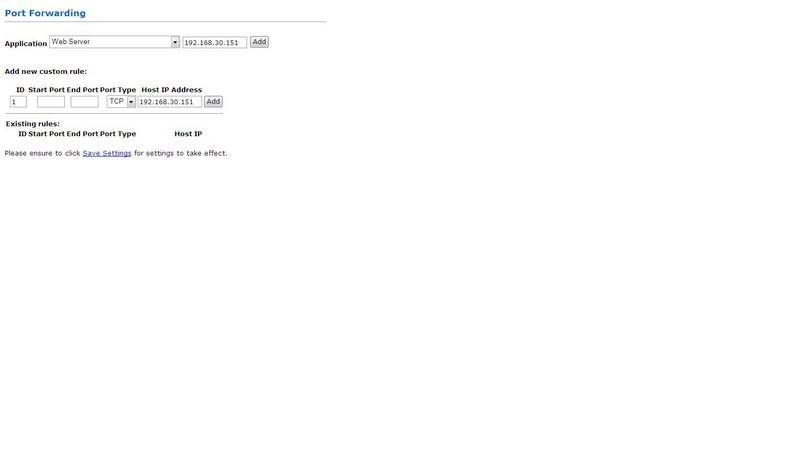
Port forwading

user posted image

(Each Router will be vary)

set ur xbox ip and the port u need to forward... (which i forgot... maybe someone can post it up or give me some time to check back)

Hope this help... smile.gif
TSquackers
post Dec 11 2007, 02:12 PM

New Member
*
Junior Member
19 posts

Joined: Dec 2006


ok thank you

"Gateway: (point to your router ip)"
Btw how to find out router IP????

This post has been edited by quackers: Dec 11 2007, 02:33 PM
nargoe
post Dec 11 2007, 02:37 PM

Getting Started
**
Junior Member
87 posts

Joined: Jan 2007


Port Forwarding for Prolink H9200 Router

Hope this helps smile.gif

This post has been edited by nargoe: Dec 11 2007, 02:38 PM
msn83235502
post Dec 11 2007, 02:45 PM

ผู้นิยม
*******
Senior Member
2,862 posts

Joined: Jan 2003
From: アメリカ


QUOTE(quackers @ Dec 11 2007, 02:12 PM)
ok thank you

"Gateway: (point to your router ip)"
Btw how to find out router IP????
*
your router ip is what u the ip u typed to get to the web based router configuration.ie 192.168.1.1..it depends actually..
dark lenanza
post Dec 11 2007, 03:16 PM

Probationary DDOSer
******
Senior Member
1,492 posts

Joined: Nov 2007
From: on top of mountain


ip fail??
how many pc connect to ur router??
maybe ip conflict
cannavaro
post Dec 11 2007, 05:22 PM

CATTENACIO
*******
Senior Member
3,008 posts

Joined: Sep 2005
From: T.T.D.I, Bukit Damansara


If you find port forwarding too troublesome, just use DMZ.

jackal_x2005
post Dec 11 2007, 07:57 PM

Getting Started
**
Junior Member
236 posts

Joined: Mar 2007
From: Mutiara Damansara


if use port forwarding:

name: XBox360Live01 - type:TCP port start:3074 port end 3074
name: XBox360Live02 - type: UDP port start:3074 port end 3074
name: XBox360Live03 - type: UDP port start:88 port end 88

hope this helps
TSquackers
post Dec 14 2007, 09:49 PM

New Member
*
Junior Member
19 posts

Joined: Dec 2006


thanks fellas. havent tried it out yet but I will pnce I have a stable connection from tmnut
shakiraa
post Dec 15 2007, 08:44 AM

hips dont lie
*****
Senior Member
785 posts

Joined: Mar 2007
From: Kuala Lumpur
QUOTE(DarkSaviour @ Dec 11 2007, 02:01 PM)
u just set ur wifi to no dhcp

and ur xbox must set to an ip
E.G.

IP Address: 192.168.0.88 ( the ip must be same grp with ur router)
Sub: 255.255.255.0
Gateway: (point to your router ip)

Dns 202.188.0.133
Alt : 202.188.1.5
and then ur router need to do this

Port forwading

user posted image

(Each Router will be vary)

set ur xbox ip and the port u need to forward... (which i forgot... maybe someone can post it up or give me some time to check back)

Hope this help... smile.gif
*
Hi Bro, cant connect XBOX 360 to live through wireless? Can guide me how to do that? Thanks.
DarkSaviour
post Dec 15 2007, 10:45 AM

Casual
***
Junior Member
336 posts

Joined: Jan 2003


yup u can....

Ur spec?

more details pls...


schrodinger_cat
post Dec 16 2007, 10:20 PM

Getting Started
**
Junior Member
85 posts

Joined: Oct 2006
There's one good tutorial about setting static IP and then portforwarding for ur xbox live at this site http://portforward.com/default.htm
primuslim
post Dec 22 2007, 12:39 PM

New Member
*
Junior Member
36 posts

Joined: Oct 2006
Guys i wonder if you can help me,

i'm using a LAN cable to connect to my Belkin wireless router
last night while playing GOW suddenly i got disconnected, my pcs in the house also got disc. Later a few secs later
all my pcs can connect back but my xbox360 everytime i try to connect to live its VERY slow. Like when i connect to live it takes 10 seconds
before it will list down that one of my friend is online, then another 5 seconds then another friend is online. Then about 1 min later the screen will stop loading and i can browse my xbox desktop. When i go to pages like xbox market place "Game Demos" the list of demos come out pretty fast, but the pictures takes FOREVER! like 1 minute for one picture to come out.

its weird because some stuff it happens like normal but other things like loading pictures of games is so slow (like looking at your friend list and their gamer tag pictures loads really slow one at a time)

I've tested my connection and everything pass. i can also msg myself and it works. its really weird. I've never did the portforwarding before this.

My router DHCP settings is on and its assigned one ip for my xbox all the while. I've tried the portforwarding thing except when i put the ports 88 it says collision with my wireless router web service.

i don't understand why suddenly this happened. Another thing is when i tried to connect my Xbox directly to my DSL modem, it cannot connect because the dns failed.

can anyone make sense of anything tha tis happening? sad.gif

Edit: i've used DMZ on my xbox ip and my NAT is now Open. but didn't solve the problem sad.gif

This post has been edited by primuslim: Dec 22 2007, 01:02 PM

TSquackers
post Jan 2 2008, 11:40 AM

New Member
*
Junior Member
19 posts

Joined: Dec 2006


QUOTE(DarkSaviour @ Dec 11 2007, 02:01 PM)
u just set ur wifi to no dhcp

and ur xbox must set to an ip
E.G.

IP Address: 192.168.0.88 ( the ip must be same grp with ur router)
Sub: 255.255.255.0
Gateway: (point to your router ip)

Dns 202.188.0.133
Alt : 202.188.1.5
and then ur router need to do this

Port forwading

user posted image

(Each Router will be vary)

set ur xbox ip and the port u need to forward... (which i forgot... maybe someone can post it up or give me some time to check back)

Hope this help... smile.gif
*
WHat do u mean by "the ip must be same grp with ur router"? How do I know if it's in the same grp? Help please??

2 Pages  1 2 >Top
 

Change to:
| Lo-Fi Version
0.0199sec    0.30    5 queries    GZIP Disabled
Time is now: 8th December 2025 - 07:17 PM