Outline ·
[ Standard ] ·
Linear+
Audio and Video Codec list and removal
|
TSfariz
|
 Jun 8 2004, 11:07 AM, updated 21y ago Jun 8 2004, 11:07 AM, updated 21y ago
|
Tan Sri F


|
Audio and Video Codec list and removalIf you've ever had issues with a codec and needed to remove it so that you could reinstall it to make it work again you'll want to know where you can find your codec list. In this same place you can usually change settings for the codec and it even has some limited troubleshooting capabilities. Start --> Settings --> Control Panel --> Sounds and Audio Devices will bring you to this first image: 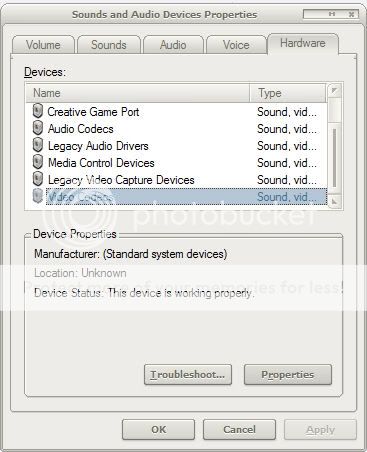 Here you can see both Audio and Video codecs along with some other things. In this case I'm selecting video codecs and hitting properties then selecting the properties tab: 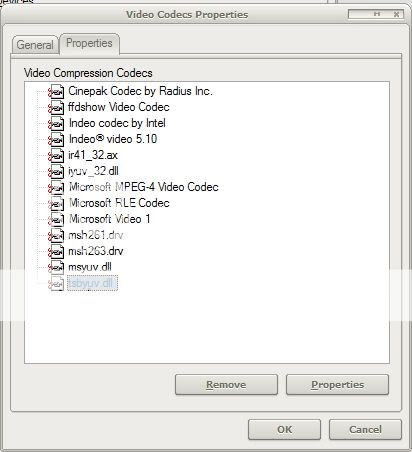 There's all of the codecs that I have installed. I can remove any that I don't want anymore by selecting the codec and hitting remove. By hitting properties I can usually get to additional codec settings if they're supported. Article: I Am Not A GeekScreenshots: my own system.
|
|
|
|
|
|
TSfariz
|
Jun 8 2004, 12:13 PM
|
Tan Sri F
|
|
|
|
|
|
|
TSfariz
|
Jun 11 2004, 04:38 PM
|
Tan Sri F
|
Codec SniperCodec Sniper is a tool that shows all of the Directshow, video and audio codecs on your system. There is a column that says whether the codec is "OK", or "Broken". You can delete any codecs that you know are old or that you don't need. Operating System: Windows 95/98/Me/NT/XP/2000 License: Freeware Download: http://www.utilidades-utiles.com/Download-...dec-Sniper.html
|
|
|
|
|
|
TSfariz
|
Apr 8 2005, 12:51 PM
|
Tan Sri F
|
here the most common audio tags and their corresponding codecs. - Audio Codec Tag 5376 may be requested when 3ivx is missing. - Audio Codec Tag 2000 may be requested when AC3 Filter is missing. - Audio Codec Tag 2001 may be requested when latest versions of AC3 Filter is missing. - Audio Codec Tag 8192 may be requested when AC3 Filter is missing. - Audio Codec Tag 130 may be requested when Acelp.net Codec is missing. - Audio Codec Tag 161 may be requested when DivX MPEG-4 Audio Compressor is missing. - Audio Codec Tag 353 may be requested when DivX MPEG-4 Audio Compressor is missing. - Audio Codec Tag 55 may be requested when Fraunhofer MPEG Layer-3 Audio Decoder is missing. - Audio Codec Tag 85 may be requested when Fraunhofer MPEG Layer-3 Audio Decoder is missing. - Audio Codec Tag 674F may be requested when Ogg Vorbis is missing. - Audio Codec Tag 26447 may be requested when Ogg Vorbis is missing. - Audio Codec Tag 26481 may be requested when Ogg Vorbis CODEC for MSACM is missing. - Audio Codec Tag 26479 may be requested when Vorbis Ogg ACM Codec is missing. - Audio Codec Tag 676F may be requested when Vorbis Ogg ACM Codec is missing. - Audio Codec Tag 75 may be requested when VoxWare MetaSound Audio CoDec is missing. |
|
|
|
|
|
TSfariz
|
Apr 8 2005, 12:54 PM
|
Tan Sri F
|
How to (re)install Default Codecs in Windows XP/2000
1. Choose Start > Control Panel and double click Add hardware, then click Next.
Click "Yes, I have already connected the hardware" and click Next.
2. Choose Add a new hardware device at the bottom of the list and click Next.
Select "Install the hardware that I manually select from a list (Advanced)", and click Next.
3. Select "Sound, video and game controllers" from "Common hardware types" list and click Next.
Select "(Standard system devices)" from "Manufacturer" and click Have Disk.
4. Click Browse in the "Install From Disk" dialog box and open the folder C:\Windows\System32
Find mmdriver.inf file, select it and click Open then click OK in the "Install From Disk" dialog box. If you see a warning about logo compatibility, just click "Continue Anyway".
5. Now you should finally see a list of audio codecs. Amongst the other items, you should find Microsoft ADPCM Audio Codec and IMA ADPCM Audio Codec. You need to install them one by one so select either of these and click Next. This should re-install the codec (take care, you may need your Windows XP CD).
6. Reboot
- All default audio codecs are in the same list with Microsoft ADPCM Audio Codec and IMA ADPCM Audio Codec; just go to step 5 and select them.
- If you want to (re)install video codecs go to step 3 Select "(Standard system devices)" from "Manufacturer" and "Video Codecs" from "Model" then follow the instructions.
The following table lists the codecs included with Windows:
TrueSpeech Software Audio Codec
Indeo R3.1 Video Codec
Indeo R3.2 Video Codec
ADPCM Audio Codec
CCITT G.711 A-Law and u-Law Audio Codec
GSM 6.10 Audio Codec
IMA ADPCM Audio Codec
RLE Video Codec
Video 1 Video Codec
Cinepak Video Codec
|
|
|
|
|
|
TSfariz
|
Aug 25 2005, 09:47 AM
|
Tan Sri F
|
If you have ffdshow or windvd or powerdvd installed, you can play it in any media player.. I would go for ffdshow.. I just hate codec pack..
|
|
|
|
|



 Quote
Quote
 0.0169sec
 0.64
0.64
 6 queries
 GZIP Disabled