

 Nov 9 2010, 12:00 AM


QUOTE(iRadiation @ Nov 8 2010, 06:39 PM)
Giveaway of the Day - Classic Start Menu Pro 3.8
November 8, 2010
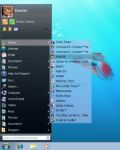
Are you missing the Classic Start Menu in Windows 7? If so, you are not alone. We have developed this Classic Start Menu for you, and now you can easily change the unusable menu of Windows 7 to the well known classic start menu with Aero skin. Actually, you can use other skins too, not just the Aero one. Yet, with Aero, you make the Classic Start Menu look like a real part of Windows 7.
Unique features:
* One-click launch helps you run programs faster.
* Use Classic Start menu as a starting point. You can add any folders to the menu, including special system folders, drives, or shortcuts, and get access to any point of your PC with few clicks from one single place.
* Power button timers. Now you don’t need to wait for when a long process will be completed. All you need is to turn on the timer and Classic Start Menu will turn off or reboot PC for you.
* Aero Skin and others help you to change the look of the menu.
* Quick un-install feature allows you to uninstall any program with a right-click, even if the program doesn’t come with an uninstall shortcut in menu.
Download @ http://www.giveawayoftheday.com/classic-start-menu-pro-3-8/

sry ,it jus doesn work for me ,can u briefly guide me after i install it?November 8, 2010
Are you missing the Classic Start Menu in Windows 7? If so, you are not alone. We have developed this Classic Start Menu for you, and now you can easily change the unusable menu of Windows 7 to the well known classic start menu with Aero skin. Actually, you can use other skins too, not just the Aero one. Yet, with Aero, you make the Classic Start Menu look like a real part of Windows 7.
Unique features:
* One-click launch helps you run programs faster.
* Use Classic Start menu as a starting point. You can add any folders to the menu, including special system folders, drives, or shortcuts, and get access to any point of your PC with few clicks from one single place.
* Power button timers. Now you don’t need to wait for when a long process will be completed. All you need is to turn on the timer and Classic Start Menu will turn off or reboot PC for you.
* Aero Skin and others help you to change the look of the menu.
* Quick un-install feature allows you to uninstall any program with a right-click, even if the program doesn’t come with an uninstall shortcut in menu.
Download @ http://www.giveawayoftheday.com/classic-start-menu-pro-3-8/
 Quote
Quote
 0.0358sec
 0.73
0.73
 7 queries
 GZIP Disabled