

lol sorry if i ask too many question? cos i'm a total noob

Technical PlayStation 3 FAQ For Beginners, anyone here like2maintain V2 FAQ thread?
|
|
 May 25 2008, 08:42 PM May 25 2008, 08:42 PM
Return to original view | Post
#1
|
 
Junior Member
417 posts Joined: May 2008  
|
just wondering guys, are they anyone playing their ps3 on a 19inch LCD monitor using a HDMI-DVI cable? whats the HD quality does it gives you? 720p? 1080p? is it satisfying? whats the max HD quality a 19incher can go? cos i'm planning to get a samsung 931BW <-- is it a good monitor for ps3?
lol sorry if i ask too many question? cos i'm a total noob |
|
|
|
|
|
May 26 2008, 06:44 PM
Return to original view | Post
#2
|
|
Junior Member
417 posts Joined: May 2008
|
ok just asking bout visuals on the ps3. does anyone knows the difference between when using the HDMI cable and the component cable (red, blue, green) is the picture quality the same when using the component cable rather then using the HDMI cable. cos my 40" plasma tv in the living room does not have HDMI input only have that red,blue,green input. so if i use the component cable does it give me 1080 HD quality
|
|
|
May 26 2008, 11:43 PM
Return to original view | Post
#3
|
|
Junior Member
417 posts Joined: May 2008
|
QUOTE Simple answer...no...you can only get up to 1080i... Compare with hdmi...hmmm...then I guess hdmi is better as ps3 output is in digital format...hdmi is digital..and the tv is digital..so no conversion needed hence minimal loss of data during transfer. But if component (red, blue, green) it's analog connectin...susecptible to loss of data when converting from digital to analog...then convert to digital again to the TV...there also the question of data loss while the analog data is transfered thru the cables if you use cheap cables... Unlike component...hdmi is not susecptible to data loss when data is moving thru the cables as it moves digitally so no such thing as cheap vs expensive cables... aight thanks for the heads up bro, appreciate it..so let me get this right: >> HDMI = non-data lost for HD quality, but >> component cable (red, blue, green) = data lost for HD quality...BUT still displaying in HD quality? just that it is not as good as the ooh so powerfull digital-to-digital transfer rate HDMI cable?? ...hayya susah man tv so big but no HDMI input  .....hehe .....hehe |
|
|
May 28 2008, 03:02 PM
Return to original view | Post
#4
|
|
Junior Member
417 posts Joined: May 2008
|
hi all!
does anyone here knows what is the minimum speed to play ps3 online? or maybe can list out their speed connection upload/download speed? which is more important the upload speed or the download speed i'm using celcom 3g. as a means to connect to the net, n i wondering if the speed is enough to play online? here's my connection speed 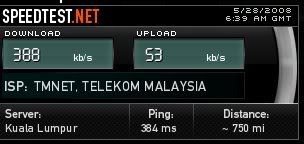 if its fast enough wat r the things i need to get? like wireless router and the usb modem thingy, which is the cheapest? thanks guys! |
|
|
Jul 24 2008, 01:56 PM
Return to original view | Post
#5
|
|
Junior Member
417 posts Joined: May 2008
|
QUOTE(rlyp @ Jul 24 2008, 12:44 PM) hello to all pros, same here bro i was thinking the same too, i was just wondering is it possible to connect an optical cable to a computer 5.1 speaker? cos i understand the Red and White AV cable can only produce 2.1 surround sound (correct me if i'm wrong)i have an inquiry im using HDMI as my video output to my lcd tv, but for audio, i wish to play 5.1 surround ... so my options are either get a surround amplifier + speaker (which is bloody expensive) ...as alternative, i was thinking whether i can use computer 5.1 speaker (altec,creative..etc) to play surround sound system? and my other concern is, is there any computer speaker comes with multiple chanel? like i wanna switch between PS3 and my computer. i understnad my problem can b resolved by getting an amplifier, but it'll cost me a lot  sorry, if my questions sounded dumb and unclear ><... just need a piece of advise here.  help us out guys, thanks!  |
|
|
Jul 24 2008, 02:19 PM
Return to original view | Post
#6
|
|
Junior Member
417 posts Joined: May 2008
|
thanks for the advice acougan, do u have any recommendation on a 5.1 pc speaker that has optical input and decode DD5.1 signal ?
|
|
|
|
|
|
Aug 1 2008, 01:59 AM
Return to original view | Post
#7
|
|
Junior Member
417 posts Joined: May 2008
|
hey guys, i was just wondering..
the RED & WHITE AV cable that the ps3 uses can only produce 2.1 surround sound? is this true?  |
|
|
Aug 1 2008, 02:08 AM
Return to original view | Post
#8
|
|
Junior Member
417 posts Joined: May 2008
|
ah, i see thanks! so its no use getting a 5.1 system that is connected to the AV cable?
|
|
|
Aug 4 2008, 11:49 AM
Return to original view | Post
#9
|
|
Junior Member
417 posts Joined: May 2008
|
greetings to all pros,
i just bought a 5.1 PC speakers which have the green, black, and orange cable output. now the thing is i'm using a Benq g2400w which only has the green input. which does not give out 5.1 surround sound. so i was just wondering is there any way to connect my ps3 to my speakers to make it play real 5.1 sounds? |
|
|
Aug 4 2008, 01:47 PM
Return to original view | Post
#10
|
|
Junior Member
417 posts Joined: May 2008
|
QUOTE(SSJBen @ Aug 4 2008, 01:30 PM) There is a way is to get 5.1, however you'll need to check at the back of your PC's I/O(or if you have a soundcard with optical input, all the more better). If it has optical in, you can purchase an optical cable and connect your PS3 to your PC directly using the optical input. Configure in Windows to use 5.1 speaker setup like normal, then configure 5.1 surround as well under the PS3 Audio Settings. thanks for the reply SSJBen....is there another way rather then connecting through the PC? any device? maybe a converter from an optical cable that has the 3 colors input? (if there is such a thing lah So when ever you play your PS3, the sound will come directly from your PC. The downside of course, is that your PC needs to be turned on when ever you play your PS3. ) my PC has sound card but no optical cable input, just those bunch of input colors, so are my speakers(no optical cable). how do u connect ps3 sound to the sound card and to the speakers? (Ps3> Sound card > Speakers) |
|
Topic ClosedOptions
|
| Change to: |  0.0422sec 0.0422sec
 0.33 0.33
 7 queries 7 queries
 GZIP Disabled GZIP Disabled
Time is now: 13th December 2025 - 04:12 AM |
 Quote
Quote