

it prompt login windows. and keep repeating after keyin id n password
all is ok on another 23h2 client.
has anyone face this issue and have solution?

Win11 24h2/25h2 looping credential, when accessing report server ssrs
|
|
 Yesterday, 08:31 AM, updated 2d ago Yesterday, 08:31 AM, updated 2d ago
Return to original view | Post
#1
|
 
Senior Member
2,539 posts Joined: Dec 2007 
|
after the update i face this issue cannot access ssrs report server.
it prompt login windows. and keep repeating after keyin id n password all is ok on another 23h2 client. has anyone face this issue and have solution? |
|
|
|
|
|
Yesterday, 10:30 AM
Return to original view | Post
#2
|
|
Senior Member
2,539 posts Joined: Dec 2007
|
QUOTE(empstar2 @ Dec 10 2025, 09:27 AM) Formet c:/ cannot do. policy.Install windows 10.  |
|
|
Yesterday, 10:46 AM
Return to original view | Post
#3
|
|
Senior Member
2,539 posts Joined: Dec 2007
|
QUOTE(juruteknikmuda89 @ Dec 10 2025, 10:33 AM) care to share SS of the error? i can access to the report folder by browser. but then cannot access to the reportserver folder to edit the report and connecting the db. the login popup (2nd image) keep looping after click ok. dont give me access to proceed 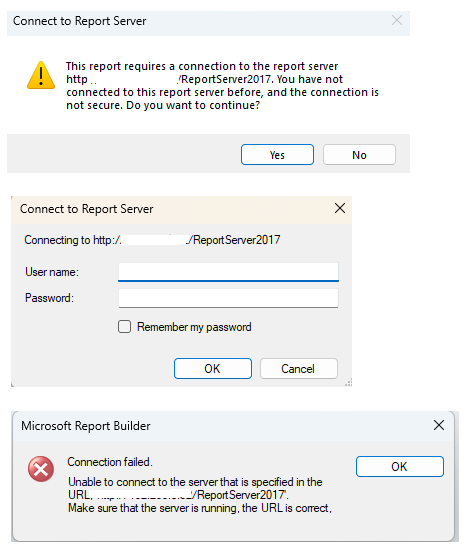 this not happen in win11 23h2 and below. tested few other PC also same issue.  |
|
|
Yesterday, 11:05 AM
Return to original view | Post
#4
|
|
Senior Member
2,539 posts Joined: Dec 2007
|
QUOTE(tvcat @ Dec 10 2025, 11:02 AM) Can you ping the server? yes can ping. can access remote folder etc.Disable firewall on the client PC temporary. only cannot access the report server. off firewall off AV. all same. |
|
|
Yesterday, 11:22 AM
Return to original view | Post
#5
|
|
Senior Member
2,539 posts Joined: Dec 2007
|
temporary solution now download the ssrs. edit without connecting database so cannot do any testing data.
then upload back only test... long way solution, if no problem. if problem then re download and re upload....  QUOTE(tvcat @ Dec 10 2025, 11:08 AM) Roll-back the update. no cant do.need use either 24h2 or 25h2. QUOTE(Exquisite @ Dec 10 2025, 11:09 AM) MS Windows doing MS Windows thing? maybe.posting here maybe some of us faced same issue and have solution. |
|
|
Yesterday, 11:24 AM
Return to original view | Post
#6
|
|
Senior Member
2,539 posts Joined: Dec 2007
|
QUOTE(juruteknikmuda89 @ Dec 10 2025, 11:22 AM) Recheck KB5065426 and KB5064081 in windows update to be remove.my office had this file sharing credentials identical just like your issue after update to 24H2 only have these. 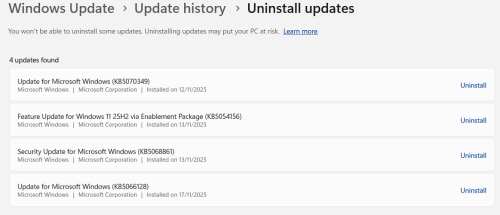 |
|
|
Yesterday, 01:02 PM
Return to original view | Post
#7
|
|
Senior Member
2,539 posts Joined: Dec 2007
|
QUOTE(juruteknikmuda89 @ Dec 10 2025, 11:35 AM) Try uninstall KB5068861 and restart. PC now allow me to remove that update.  |
|
|
Yesterday, 03:53 PM
Return to original view | Post
#8
|
|
Senior Member
2,539 posts Joined: Dec 2007
|
QUOTE(juruteknikmuda89 @ Dec 10 2025, 02:28 PM) allow or wouldn't allow? not.sorry. |
| Change to: |  0.0136sec 0.0136sec
 0.35 0.35
 6 queries 6 queries
 GZIP Disabled GZIP Disabled
Time is now: 11th December 2025 - 08:19 PM |
 Quote
Quote