Welcome Guest ( Log In | Register )

Outline · [ Standard ] · Linear+

 Corsair RM850e, B850M Aorus Elite wifi6e, RX9070xt, Connector layout from PSU to MOBO & GPU

views
     
TSweaponguy
post Nov 11 2025, 11:42 AM, updated 2 months ago

New Member
*
Junior Member
24 posts

Joined: May 2010
Hi Sifus and Pros.

I'm new to PC building. I would like your professional input on what would be the best layout for the connector.

I'm now currently using a B850M Aorus Elite wifi6e - one of the 8 pin connector is connected to the MOBO and one of the slot at PSU. The PSU I'm using is Corsair RM850e. The GPU I'm now using is GTX 1050 Ti. I'm planning to upgrade to AMD Aorus RX 9070 xt, which the question bags to me as this specific model requires 3 connector, 8-pin to power it up.

I'd be moving my GTX1050Ti to the 2nd PCIe slot gen 3 with the help of Riser Cable.

What's the best layout for the PSU to MOBO and GPU (RX9070xt).
4 8pin connector is needed (1 for MOBO and 3 for GPU) and there's only 3 8pin slot on the PSU. The manual for the GPU and some online pc builders says it's best to use 3 independent 8 pin connector as the card draws high on wattage/power under load and it's better not to use pigtail or daisy 8 pins as it may burn the cable and the gpu. (1 input split to 2 output)

Please advise.

Thanks.

This post has been edited by weaponguy: Nov 11 2025, 12:02 PM
stormaker
post Nov 11 2025, 12:01 PM

Look at all my stars!!
*******
Senior Member
3,130 posts

Joined: Jun 2006


Do not mistaken EPS/ATX12V Cable 8-PIN with PCIe 8-PIN, they are for different purpose.

EPS/ATX12V Cable 8-PIN can only connect to mobo, and PCIe 8-PIN only to GPU.

If you can afford, just replace the PSU with 3 separate 8-PIN PCIe cable.

This post has been edited by stormaker: Nov 11 2025, 12:05 PM
babylon52281
post Nov 11 2025, 12:39 PM

Look at all my stars!!
*******
Senior Member
2,706 posts

Joined: Apr 2017
QUOTE(weaponguy @ Nov 11 2025, 11:42 AM)
Hi Sifus and Pros.

I'm new to PC building. I would like your professional input on what would be the best layout for the connector.

I'm now currently using a B850M Aorus Elite wifi6e - one of the 8 pin connector is connected to the MOBO and one of the slot at PSU. The PSU I'm using is Corsair RM850e. The GPU I'm now using is GTX 1050 Ti. I'm planning to upgrade to AMD Aorus RX 9070 xt, which the question bags to me as this specific model requires 3 connector, 8-pin to power it up.

I'd be moving my GTX1050Ti to the 2nd PCIe slot gen 3 with the help of Riser Cable.

What's the best layout for the PSU to MOBO and GPU (RX9070xt).
4 8pin connector is needed (1 for MOBO and 3 for GPU) and there's only 3 8pin slot on the PSU. The manual for the GPU and some online pc builders says it's best to use 3 independent 8 pin connector as the card draws high on wattage/power under load and it's better not to use pigtail or daisy 8 pins as it may burn the cable and the gpu. (1 input split to 2 output)

Please advise.

Thanks.
*
user posted image

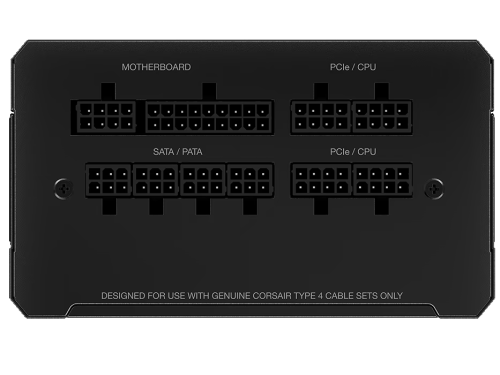
Seems like there is 4 PCIE/CPU outlets, so you can try 1 wire to CPU and the balance 3 others to 9070XT. Please check with Corsair if you can do that. And then there isnt any power supply left for that 1050Ti, if you need it you gotta to get a higher watt PSU with more outputs.
TSweaponguy
post Nov 11 2025, 11:51 PM

New Member
*
Junior Member
24 posts

Joined: May 2010
QUOTE(stormaker @ Nov 11 2025, 12:01 PM)
Do not mistaken EPS/ATX12V Cable 8-PIN with PCIe 8-PIN, they are for different purpose.

EPS/ATX12V Cable 8-PIN can only connect to mobo, and PCIe 8-PIN only to GPU.

If you can afford, just replace the PSU with 3 separate 8-PIN PCIe cable.
*
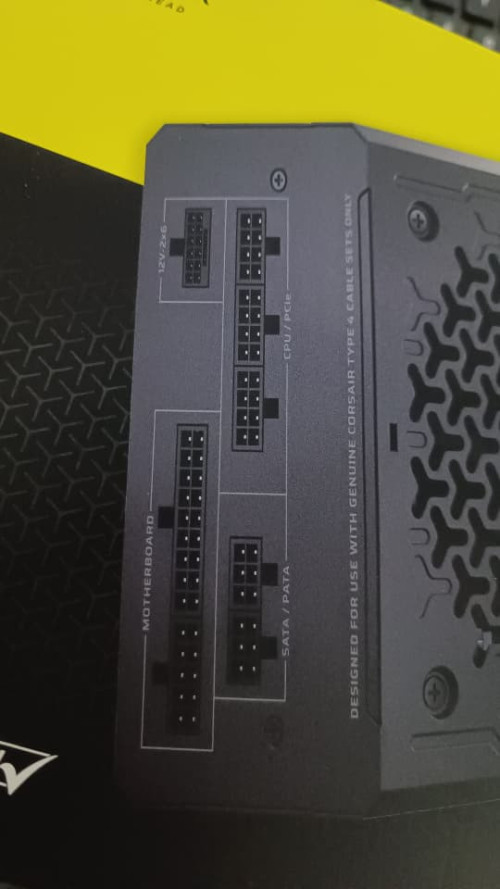
Yea, the PSU model (Nvidia 50 Series ready) I got is the one with 1 port EPS/ATX12V available, and 3 port CPU/PCIe available.

okay, i'm going to get those 3 8-pin PCIe cable.

Another question I have. From the Retailer - the installer used the port CPU/PCIe (PSU) to the motherboard using 8-pin. Can I change the current layout to the EPS/ATX12V port as I want to open up the CPU/PCIe ports for the GPU (3 ports CPU/PCIe).

QUOTE(babylon52281 @ Nov 11 2025, 12:39 PM)
user posted image

Seems like there is 4 PCIE/CPU outlets, so you can try 1 wire to CPU and the balance 3 others to 9070XT. Please check with Corsair if you can do that. And then there isnt any power supply left for that 1050Ti, if you need it you gotta to get a higher watt PSU with more outputs.
*
Great stuff mate. thumbup.gif The Corsair unit I got is different than the one in the picture. Mine's got 1 port EPS/ATX12V available, and 3 port CPU/PCIe. The installer got ready a cable on the EPS/ATX12V port as previously I was thinking of getting RTX 5070 Ti (Plan has changed! biggrin.gif)


as for the GTX 1050 Ti, it's drawing only 75 watt. From what I know, the PCIe lane gives a 75 watt power on its own. it's sufficient rclxms.gif.

user posted image

This post has been edited by weaponguy: Nov 11 2025, 11:54 PM
babylon52281
post Nov 12 2025, 08:44 AM

Look at all my stars!!
*******
Senior Member
2,706 posts

Joined: Apr 2017
QUOTE(weaponguy @ Nov 11 2025, 11:51 PM)
Yea, the PSU model (Nvidia 50 Series ready) I got is the one with 1 port EPS/ATX12V available, and 3 port CPU/PCIe available.

okay, i'm going to get those 3 8-pin PCIe cable.

Another question I have. From the Retailer - the installer used the port CPU/PCIe (PSU) to the motherboard using 8-pin. Can I change the current layout to the EPS/ATX12V port as I want to open up the CPU/PCIe ports for the GPU (3 ports CPU/PCIe).
Great stuff mate.  thumbup.gif  The Corsair unit I got is different than the one in the picture. Mine's got 1 port EPS/ATX12V available, and 3 port CPU/PCIe. The installer got ready a cable on the EPS/ATX12V port as previously I was thinking of getting RTX 5070 Ti (Plan has changed!  biggrin.gif)
as for the GTX 1050 Ti, it's drawing only 75 watt. From what I know, the PCIe lane gives a 75 watt power on its own. it's sufficient rclxms.gif.

*
So I see yours is the 2025 version of RM-e PSU and here is what I found
user posted image

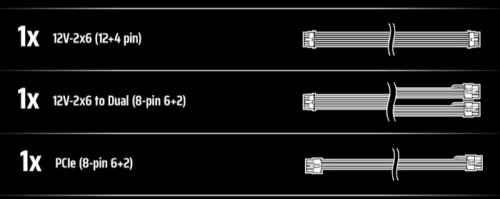
Theoretically you can use the 12V2X6 to 2x PCIE connectors plus one PCIE/CPU from PSU to power the 9070XT, that leaves you with 2 more. Then you use one of the PCIE/CPU for the EPS12V, which means you have the last one open.

In theory you can use this last power socket for that 1050TI however it doesnt appear your PSU includes another PCIE(8pin) wire harness, so you gotta buy it from Corsair. All these are theory of course, better confirm you can do that with Corsair before buying.

As for slot powering that 1050TI, I dont reco it, as recent Geforce GPU are wired to primarily draw power from PCIE wire, Im not sure if GTX 1000series have that tendency but you could try game benchmark runs with and without connecting the PCIE wire and see if it affects the results.

In any case, powering 2 GPUS from a 850W PSU is not comfy for me as I dunno the rest of your AM5 rig. Coz while in theory you could power it all with that PSU whether how well it will run with everything maxed I have no idea. I reco to get confirmation from Corsair chat agent (not the bot) for such setup.
stormaker
post Nov 12 2025, 02:01 PM

Look at all my stars!!
*******
Senior Member
3,130 posts

Joined: Jun 2006


QUOTE(weaponguy @ Nov 11 2025, 11:51 PM)
Another question I have. From the Retailer - the installer used the port CPU/PCIe (PSU) to the motherboard using 8-pin. Can I change the current layout to the EPS/ATX12V port as I want to open up the CPU/PCIe ports for the GPU (3 ports CPU/PCIe).
Yes, you can. In fact, that EPS/ATX12V port is dedicated for that purpose, connect it to the mobo then you will free up your CPU/PCIe port on PSU.


Change to:
| Lo-Fi Version
0.0165sec    1.27    5 queries    GZIP Disabled
Time is now: 19th December 2025 - 01:02 PM