Outline ·
[ Standard ] ·
Linear+
Error with crossdeviceresume.exe, Having error everytime I turn on/restar
|
TSwassap
|
 Nov 4 2025, 11:49 PM, updated 2 months ago Nov 4 2025, 11:49 PM, updated 2 months ago
|

|
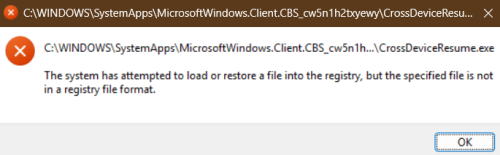 Everytime I turn on/restart I will have this error pop up. I've looked it up and somehow has to do with phone link app but I'm unable to resolve this issue. Happens when my profile got corrupted for no apparent reason and I manage to fix it using chkdsk /f and sfc /scannow. A few sites I've been to suggest using dism and I've done that with no success. Any help is greatly appreciated. Other than this error the system runs just fine. System details Windows 11 Home Intel Core i9 14900HX 32 gb Ram RTX4070 |
|
|
|
|
|
Xploit Machine
|
Nov 4 2025, 11:51 PM
|
|
|
» Click to show Spoiler - click again to hide... « QUOTE(wassap @ Nov 4 2025, 11:49 PM) Everytime I turn on/restart I will have this error pop up. I've looked it up and somehow has to do with phone link app but I'm unable to resolve this issue. Happens when my profile got corrupted for no apparent reason and I manage to fix it using chkdsk /f and sfc /scannow. A few sites I've been to suggest using dism and I've done that with no success. Any help is greatly appreciated. Other than this error the system runs just fine. System details Windows 11 Home Intel Core i9 14900HX 32 gb Ram RTX4070 do u use the feature? .. else want to get rid of it?  |
|
|
|
|
|
TSwassap
|
Nov 4 2025, 11:58 PM
|
|
|
QUOTE(Xploit Machine @ Nov 4 2025, 11:51 PM) » Click to show Spoiler - click again to hide... « do u use the feature? .. else want to get rid of it? That's the last resort. Phonelink is actually handy. Taking calls direct from laptop is just so convenient.  |
|
|
|
|
|
Xploit Machine
|
Nov 5 2025, 12:08 AM
|
|
|
QUOTE(wassap @ Nov 4 2025, 11:58 PM) That's the last resort. Phonelink is actually handy. Taking calls direct from laptop is just so convenient. use Powershell / Terminal (as Administrator) type winget repair 9NTXGKQ8P7N0 |
|
|
|
|
|
TSwassap
|
Nov 5 2025, 12:15 AM
|
|
|
QUOTE(Xploit Machine @ Nov 5 2025, 12:08 AM) use Powershell / Terminal (as Administrator) type winget repair 9NTXGKQ8P7N0Tried that one too. Doesn't work. |
|
|
|
|
|
Xploit Machine
|
Nov 5 2025, 12:17 AM
|
|
|
QUOTE(wassap @ Nov 5 2025, 12:15 AM) Tried that one too. Doesn't work. run Get-AppxPackage *crossdevice* | Remove-AppxPackagethen Get-AppxPackage -AllUsers Microsoft.Windows.CrossDevice | Foreach {Add-AppxPackage -DisableDevelopmentMode -Register "$($_.InstallLocation)\AppXManifest.xml"} |
|
|
|
|
|
TSwassap
|
Nov 5 2025, 08:16 AM
|
|
|
QUOTE(Xploit Machine @ Nov 5 2025, 12:17 AM) run Get-AppxPackage *crossdevice* | Remove-AppxPackagethen Get-AppxPackage -AllUsers Microsoft.Windows.CrossDevice | Foreach {Add-AppxPackage -DisableDevelopmentMode -Register "$($_.InstallLocation)\AppXManifest.xml"}Tried this. Should I be getting any message/prompt because I got nothing. I copied and paste the command as it is in powershell, restarted and still having the error. |
|
|
|
|
|
Xploit Machine
|
Nov 5 2025, 11:00 AM
|
|
|
QUOTE(wassap @ Nov 5 2025, 08:16 AM) Tried this. Should I be getting any message/prompt because I got nothing. I copied and paste the command as it is in powershell, restarted and still having the error. download and use this portable tool to uninstall Phone Link and Connected Devices related items .. https://www.upload.ee/files/18726008/IObit_...ortable.7z.htmlthose WindowsApps related are at bottom, use this application carefully .. after uninstallation restart the computer and see if the error message persists .. |
|
|
|
|
|
TSwassap
|
Nov 6 2025, 01:43 AM
|
|
|
QUOTE(Xploit Machine @ Nov 5 2025, 11:00 AM) download and use this portable tool to uninstall Phone Link and Connected Devices related items .. https://www.upload.ee/files/18726008/IObit_...ortable.7z.htmlthose WindowsApps related are at bottom, use this application carefully .. after uninstallation restart the computer and see if the error message persists .. weird uninstall it already but still getting error. |
|
|
|
|
|
sapien06
|
Nov 6 2025, 12:05 PM
|
New Member

|
dism /online /cleanup-image /restorehealth
sfc /scannow
Reboot
Get-AppxPackage -Name "MicrosoftWindows.Client.CBS" | Reset-AppxPackage
Reboot
Get-AppPackage -Name MicrosoftWindows.Client.CBS
Reboot
Reinstall Visual C++
Reboot
|
|
|
|
|
|
TSwassap
|
Nov 6 2025, 10:51 PM
|
|
|
QUOTE(sapien06 @ Nov 6 2025, 12:05 PM) dism /online /cleanup-image /restorehealth sfc /scannow Reboot Get-AppxPackage -Name "MicrosoftWindows.Client.CBS" | Reset-AppxPackage Reboot Get-AppPackage -Name MicrosoftWindows.Client.CBS Reboot Reinstall Visual C++ Reboot Thanks a lot bro. Solved it. |
|
|
|
|



 Quote
Quote


 0.0158sec
 1.13
1.13
 5 queries
 GZIP Disabled