Welcome Guest ( Log In | Register )

Outline · [ Standard ] · Linear+

 Illegear Ionic 15 can't turn on

views
     
TSGalaxyV
post Oct 20 2025, 08:35 PM, updated 2 months ago

Enthusiast
*****
Junior Member
792 posts

Joined: Apr 2018
If it is worth to repair? Initially thought the power adapter damaged and bought a compatible one from shopee but still can't turn on.

So it might due to motherboard. If so, can it be repaired if it is motherboard?

Although it is 5 years old, worth to repair?

One thing - I always heard the processor fan / some fan spinning all the time.

Bought in Oct 2020
AMD Ryzen 7 4800H Processor (8 Cores, 16 Threads) (FREE AC VALHALLA) (ETA End Oct 2020)

How can this processor is better than the recent notebook I bought with AMD Ryzen 5 PRO 7530U?

This post has been edited by GalaxyV: Oct 20 2025, 09:05 PM
metalfire
post Oct 20 2025, 08:41 PM

Regular
******
Senior Member
1,310 posts

Joined: Oct 2005


Can always send back to Illegear to check...need to pay for it and have to wait a bit.

IMO - not really worth to repair.
TSGalaxyV
post Oct 20 2025, 08:42 PM

Enthusiast
*****
Junior Member
792 posts

Joined: Apr 2018
QUOTE(metalfire @ Oct 20 2025, 08:41 PM)
Can always send back to Illegear to check...need to pay for it and have to wait a bit.

IMO - not really worth to repair.
*
Ya, that is why. But if didn't repair, like a waste since LCD is still very new.

HDD - my files how haha
TSGalaxyV
post Oct 20 2025, 09:22 PM

Enthusiast
*****
Junior Member
792 posts

Joined: Apr 2018
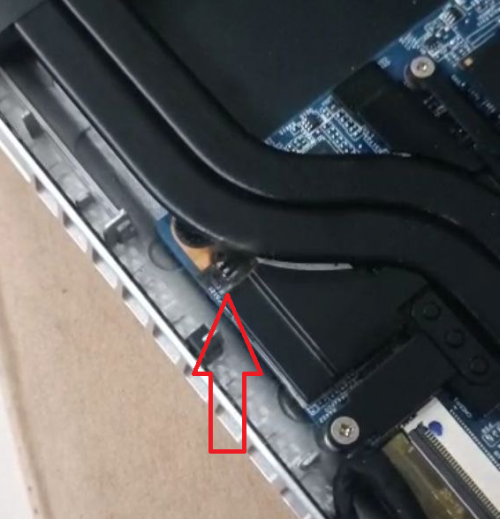
user posted image

I connected back the battery but saw something fire burn over there and then always seeing some blinking light there like firework.

So, motherboard is gone?


like fire spark?

This post has been edited by GalaxyV: Oct 20 2025, 09:56 PM
anakkk
post Oct 20 2025, 09:42 PM

Look at all my stars!!
*******
Senior Member
2,119 posts

Joined: Apr 2013
better send it back for diagnose, 5 years already not sure still got spare parts or not, I know dell keep spare parts for 5 years for business unit.
TSGalaxyV
post Oct 20 2025, 09:46 PM

Enthusiast
*****
Junior Member
792 posts

Joined: Apr 2018
QUOTE(anakkk @ Oct 20 2025, 09:42 PM)
better send it back for diagnose, 5 years already not sure still got spare parts or not, I know dell keep spare parts for 5 years for business unit.
*
I remember last time my LCD damaged and they quoted me RM600-700. I went to computer shop and only RM350. And the quality is same as original one.

If it is due to motherboard and to replace, definitely not worth at all - I know. But 5 yo has been using it and with love. Some more, it is wasted if just put it aside or can sell the components separately like the LCD, RAM, HDD etc?

This post has been edited by GalaxyV: Oct 20 2025, 09:48 PM
acbc
post Oct 20 2025, 09:48 PM

Look at all my stars!!
*******
Senior Member
9,050 posts

Joined: Jan 2003
Usually the MOSFETs or VRMs. Few hundred bucks. Below 200 bucks usually.
TSGalaxyV
post Oct 20 2025, 09:50 PM

Enthusiast
*****
Junior Member
792 posts

Joined: Apr 2018
QUOTE(acbc @ Oct 20 2025, 09:48 PM)
Usually the MOSFETs or VRMs. Few hundred bucks. Below 200 bucks usually.
*
You can guess it from my phone? I did take the video but dunno how to upload video here.

If it is the one you mentioned, can normal computer shop capable to repair or change?
acbc
post Oct 20 2025, 10:08 PM

Look at all my stars!!
*******
Senior Member
9,050 posts

Joined: Jan 2003
QUOTE(GalaxyV @ Oct 20 2025, 09:50 PM)
You can guess it from my phone? I did take the video but dunno how to upload video here.

If it is the one you mentioned, can normal computer shop capable to repair or change?
*
My Latitude E6540 also had the same problem. Paid 280 to a technician at Digital Mall to fix it. Been working since. Already 3 years and counting.

It seems some brands used poor quality MOSFETs.
TSGalaxyV
post Oct 20 2025, 10:10 PM

Enthusiast
*****
Junior Member
792 posts

Joined: Apr 2018
QUOTE(acbc @ Oct 20 2025, 10:08 PM)
My Latitude E6540 also had the same problem. Paid 280 to a technician at Digital Mall to fix it. Been working since. Already 3 years and counting.

It seems some brands used poor quality MOSFETs.
*
E6540 is quite old already woh... the price now about 899 selling in shopee.
acbc
post Oct 20 2025, 10:12 PM

Look at all my stars!!
*******
Senior Member
9,050 posts

Joined: Jan 2003
QUOTE(GalaxyV @ Oct 20 2025, 10:10 PM)
E6540 is quite old already woh... the price now about 899 selling in shopee.
*
Still a good laptop. Can mod 3 storage options.

I now have 2TB on 2.5 inch and another 2TB on the DVD caddy plus 500GB MSATA. All SSDs.
TSGalaxyV
post Oct 20 2025, 10:14 PM

Enthusiast
*****
Junior Member
792 posts

Joined: Apr 2018
QUOTE(acbc @ Oct 20 2025, 10:12 PM)
Still a good laptop. Can mod 3 storage options.

I now have 2TB on 2.5 inch and another 2TB on the DVD caddy plus 500GB MSATA. All SSDs.
*
ok, next time I bought business level laptop
acbc
post Oct 20 2025, 10:51 PM

Look at all my stars!!
*******
Senior Member
9,050 posts

Joined: Jan 2003
QUOTE(GalaxyV @ Oct 20 2025, 10:14 PM)
ok, next time I bought business level laptop
*
My recent get is the Precision 7530. Had 4K display, 64GB RAM and 3 x 2TB NVME storage. This will be my 4K movies laptop. The price? Less than 1.5k all in.

There is also the 7730 but too big and heavy.
metalfire
post Oct 20 2025, 11:03 PM

Regular
******
Senior Member
1,310 posts

Joined: Oct 2005


QUOTE(GalaxyV @ Oct 20 2025, 08:42 PM)
Ya, that is why. But if didn't repair, like a waste since LCD is still very new.

HDD - my files how haha
*
HDD is the easiest to salvage out no problem at all.

That spark now is a major concern. Better have it checked if you're planning to use it. Otherwise, new lappy.

For work, always go for business or workstation level laptops like Latitude, Precision, Probook, because definitely can find replacement parts easier.

Even preuse units that is just fresh out from lease is usable and wallet friendly.

Illegear is not friendly at all levels.

This post has been edited by metalfire: Oct 20 2025, 11:04 PM
TSGalaxyV
post Oct 20 2025, 11:07 PM

Enthusiast
*****
Junior Member
792 posts

Joined: Apr 2018
QUOTE(acbc @ Oct 20 2025, 10:51 PM)
My recent get is the Precision 7530. Had 4K display, 64GB RAM and 3 x 2TB NVME storage. This will be my 4K movies laptop. The price? Less than 1.5k all in.

There is also the 7730 but too big and heavy.
*
too big and heavy susah to bring for travelling.

QUOTE(metalfire @ Oct 20 2025, 11:03 PM)
HDD is the easiest to salvage out no problem at all.

That spark now is a major concern. Better have it checked if you're planning to use it. Otherwise, new lappy.

For work, always go for business or workstation level laptops like Latitude, Precision, Probook, because definitely can find replacement parts easier.

Even preuse units that is just fresh out from lease is usable and wallet friendly.

Illegear is not friendly at all levels.
*
Yes, i have been looking for business level laptop after than. That time was 2020 and never know about business level.

Will bring to computer shop to check and hopefully can be repaired. It is my bad to plug in the battery and seeing that area sparking. Else, it just can't be turned on.

Dunno what was burn when the battery was connected (before no battery one).

I sent the image to chatGPT and it told me this

The burned component is the fan power/header area (the small white header and its immediate power circuit). The visible silkscreen C5125 beside the burn is a decoupling capacitor on that fan power rail β€” either the connector pins, C5125, the fan-drive MOSFET/transistor, or the PCB trace itself is damaged. This matches typical Clevo/TongFang board layouts where the fan header + decoupling capacitor sit at the edge of the fan shroud.

TSGalaxyV
post Oct 20 2025, 11:18 PM

Enthusiast
*****
Junior Member
792 posts

Joined: Apr 2018
chatgpt told me this

Yes β€” in most cases this kind of damage can be repaired, especially by a technician who handles board-level (motherboard) repairs, not just general laptop servicing.

Here’s what to expect πŸ‘‡

🧰 What the technician will likely do

Inspect and clean the burnt area – remove soot and carbonized residue to prevent further shorting.

Test the nearby components – capacitor (C5125), resistors, and MOSFETs around the fan-power circuit.

Desolder and replace the damaged parts – the burnt fan connector and possibly the capacitor or small transistor/MOSFET.

Rebuild or jumper a burnt trace – if the copper trace under the connector is destroyed, they can patch it with a thin wire.

Verify no short to ground before powering on again.
metalfire
post Oct 20 2025, 11:51 PM

Regular
******
Senior Member
1,310 posts

Joined: Oct 2005


QUOTE(GalaxyV @ Oct 20 2025, 11:07 PM)
too big and heavy susah to bring for travelling.
Yes, i have been looking for business level laptop after than. That time was 2020 and never know about business level.

Will bring to computer shop to check and hopefully can be repaired. It is my bad to plug in the battery and seeing that area sparking. Else, it just can't be turned on.

Dunno what was burn when the battery was connected (before no battery one).

I sent the image to chatGPT and it told me this

The burned component is the fan power/header area (the small white header and its immediate power circuit). The visible silkscreen C5125 beside the burn is a decoupling capacitor on that fan power rail β€” either the connector pins, C5125, the fan-drive MOSFET/transistor, or the PCB trace itself is damaged. This matches typical Clevo/TongFang board layouts where the fan header + decoupling capacitor sit at the edge of the fan shroud.
*
good luck, do update later when got result...interested to know whether AI is accurate.
TSGalaxyV
post Oct 20 2025, 11:54 PM

Enthusiast
*****
Junior Member
792 posts

Joined: Apr 2018
QUOTE(metalfire @ Oct 20 2025, 11:51 PM)
good luck, do update later when got result...interested to know whether AI is accurate.
*
i think is not accurate. Nowadays, where got shop can repair motherboard's component?
TSGalaxyV
post Nov 6 2025, 09:20 PM

Enthusiast
*****
Junior Member
792 posts

Joined: Apr 2018
repaired.

cost of repair - RM450

anyone knows why the fan keeps on spinning?
PJng
post Nov 6 2025, 09:31 PM

10k Club
********
All Stars
12,056 posts

Joined: Oct 2017


QUOTE(GalaxyV @ Nov 6 2025, 09:20 PM)
repaired.

cost of repair - RM450

anyone knows why the fan keeps on spinning?
*
fan is comfirm spin all the time, unless too high speed, i dunno laptop but if desktop idle 1000-1300rpm, gaming can over 2000rpm

2 Pages  1 2 >Top
 

Change to:
| Lo-Fi Version
0.0174sec    0.29    5 queries    GZIP Disabled
Time is now: 20th December 2025 - 04:18 AM