Outline ·
[ Standard ] ·
Linear+
pls help me , leopard user, how to share files
|
jensen_tidus
|
 Nov 14 2007, 12:22 PM Nov 14 2007, 12:22 PM
|

|
1st, get urself into the workgroup tat other comp r in...
in network setting,
ur airport/ethernet, make a new location, like say 'home', dont use automatic becoz it doesnt work according to some sites
select airport/ethernet, go advance, under 'wins', enter ur workgroup.
in settings, go sharing, click file sharing, click option, make sure there is a tick in "share files n folder using SMB"
then ur pc comp should be able to see ur mac in their network
hope this works for u...
This post has been edited by jensen_tidus: Nov 14 2007, 12:26 PM
|
|
|
|
|
|
jensen_tidus
|
Nov 14 2007, 01:01 PM
|
|
|
err... sry but i didnt really get wat u mean,
but anyway...
this is how i set up my home network,
1. in windows, create a workgroup. eg: MyHome
2. then use ur mac to join the network, dont worry, i'm using wifi for my hse as well = )
u juz need to make a new location for ur mac with the airport/ethernet, eg: Home.
Then under the 'win' tab in "advance", type in the workgroup name (MyHome in this case)
In my neighbourhood in windows, u should be able to c ur mac n when u click it there will be a dropbox inside... if u see those... u successfully linked ur mac to ur network = )
dont forget to put a tick in Sharing setting. go sharing, click file sharing, click option, make sure there is a tick in "share files n folder using SMB" ^^
This post has been edited by jensen_tidus: Nov 14 2007, 01:12 PM
|
|
|
|
|
|
jensen_tidus
|
Nov 15 2007, 11:11 AM
|
|
|
QUOTE(verced @ Nov 14 2007, 06:56 PM) I just connect to my desktop via smb://computername and all the shared folder appear as expected. How nice.  If using this method, does it means we need to remember and type the thing everytime when need to connect to mac from windows? i'm sure settle things down in the network neighborhood will be better? anyway... does it work out good rx330 ?? This post has been edited by jensen_tidus: Nov 15 2007, 11:11 AM |
|
|
|
|
|
jensen_tidus
|
Nov 16 2007, 09:57 AM
|
|
|
verced, if i use the method u said, will windows pc able to see me as well in the neighborhood if my mac isnt in the windows network? and if my hsemate's pc at home r using DHCP? thax in advance... rx330, u cant see shared pc in ur finder? i thought it would come out on the finder side bar itself no matter ur mac r in the network or not.... btw... if u still need this.... In 'system pref', select 'network', on the left side bar, select ur connection type, click 'advance' 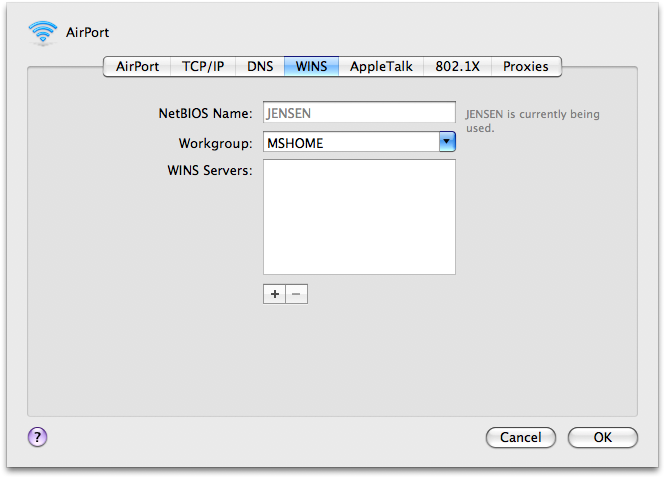 This post has been edited by jensen_tidus: Nov 16 2007, 10:06 AM This post has been edited by jensen_tidus: Nov 16 2007, 10:06 AM |
|
|
|
|
|
jensen_tidus
|
Nov 19 2007, 07:36 PM
|
|
|
i'm using DLink 54mbps wireless router... my max speed is 2mbps...
not sure the others... but, damn i wish i have the apple airport extreme base station wif N wireless XD.....
|
|
|
|
|
|
jensen_tidus
|
Nov 19 2007, 11:47 PM
|
|
|
yup... i'm doing on 2, sometime less... i tried to figure it out see if my router can work faster.... but still it doing the same..
anyway, hows it going rx330?
|
|
|
|
|
|
jensen_tidus
|
Nov 23 2007, 09:16 AM
|
|
|
haha... tats actually easier for osx user to get shared files from frens without actually doing all the hassle to join a workgroup everywhere u go...
u can also do pre-set location with different workgroup joined, so u wont need to change the network all the time when u r in a different place... tats the power of leopard XD...
my vista user fren always need to switch between network manually becoz his university uses different workgroup...
|
|
|
|
|



 Quote
Quote

 0.0154sec
 1.69
1.69
 6 queries
 GZIP Disabled