Welcome Guest ( Log In | Register )

Outline · [ Standard ] · Linear+

 Sonoff Mini External Switch Reversing Function

views
     
TSjianwei87
post Jul 26 2025, 12:42 PM, updated 5 months ago

Casual
***
Junior Member
481 posts

Joined: Jan 2007
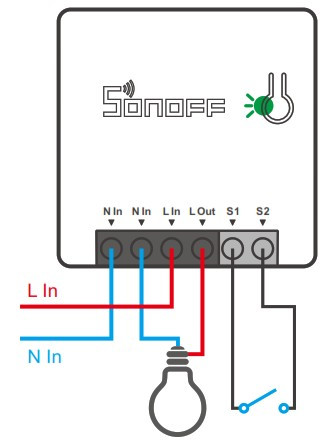
I’m using Sonoff Mini with external switch and followed this wire diagram to install it. I also have a Sonoff wireless button, SNZB-01P.

However, I’m facing an issue. When I turn on my Sonoff Mini’s external switch (which is supposed to turn off the water pump), the water pump doesn’t run. The function is reversed. I need to ensure that I turn off my external switch and use the Sonoff wireless button SNZB-01P to turn it off only works normally.

How can I resolve this issue? I need the external switch function to work normally regardless of whether the water pump is on or off. When I turn on or off the external switch, it should follow the state of the water pump.

This post has been edited by jianwei87: Jul 26 2025, 12:42 PM
TSjianwei87
post Jul 26 2025, 03:52 PM

Casual
***
Junior Member
481 posts

Joined: Jan 2007
QUOTE(aroyo @ Jul 26 2025, 12:57 PM)
where is the diagram?
*
I do similar like this

user posted image
TSjianwei87
post Jul 26 2025, 10:38 PM

Casual
***
Junior Member
481 posts

Joined: Jan 2007
QUOTE(aroyo @ Jul 26 2025, 07:52 PM)
the external switch can only function as a toggle. if the sonoff is on, it will toggle to off when you flip the switch. and vice versa, if sonoff is off flipping the switch will turn it on.
*
Is it possible to toggle the switch without flipping the switch function?
TSjianwei87
post Jul 27 2025, 08:57 AM

Casual
***
Junior Member
481 posts

Joined: Jan 2007
QUOTE(aroyo @ Jul 26 2025, 10:42 PM)
you can use sonoff app to toggle the switch. additionally since you have the wireless button, you could also create automation in sonoff app to toggle the switch upon click of the wireless button
*
This is the only way to do it without rewiring the Sonoff Mini?
TSjianwei87
post Jul 27 2025, 01:09 PM

Casual
***
Junior Member
481 posts

Joined: Jan 2007
QUOTE(aroyo @ Jul 27 2025, 10:05 AM)
rewiring the switch will not solve anything. the hard switch will always act as toggle switch.
*
But how can i toggle with external switch in app?
TSjianwei87
post Jul 28 2025, 02:51 PM

Casual
***
Junior Member
481 posts

Joined: Jan 2007
QUOTE(aroyo @ Jul 27 2025, 07:58 PM)
I'm assuming you have successfully configured both your sonoff mini and wireless button in ewelink apss.
1. Go to ewelink app, go to scene tab, click on the + button at upper right corner.
2. Add  new trigger, select smart device , then select your wireless button, and select single click, click save multiple times until you arrive back to adding actions.
3. Add new actions, select smart device and select your sonoff mini, then select reverse(toggle) , then click save multiple times until you save the automation.

Now when you single click the wireless button, it will toggle your sonoff mini switch.
As always, the physical switch on the sonoff mini will also toggle your sonoff mini switch.
*
What do you think I’m going to change in SONOFF MINIR4M MINI Extreme? I saw that it has a detach relay mode. Will this solve my problem?

This post has been edited by jianwei87: Jul 28 2025, 03:52 PM


Change to:
| Lo-Fi Version
0.0169sec    0.37    6 queries    GZIP Disabled
Time is now: 5th December 2025 - 02:13 PM