

Attached thumbnail(s)

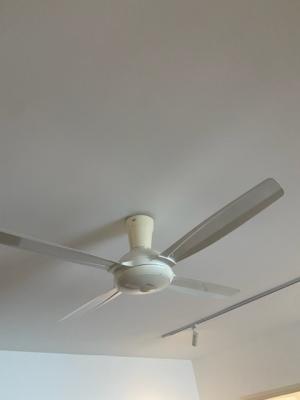
Panasonic fan stopped moving in speed 1
|
|
 Jul 11 2025, 03:47 PM, updated 4 months ago Jul 11 2025, 03:47 PM, updated 4 months ago
Return to original view | IPv6 | Post
#1
|
 
Junior Member
445 posts Joined: Oct 2008 
|
As per topic, recently when the fan was on speed 1, it’s slower than usual. Then a few days ago, now it’s completely stopped. Other speeds are ok. Is this something I can diy fix myself?
Attached thumbnail(s)
|
|
|
Jul 13 2025, 10:49 AM
Return to original view | Post
#2
|
|
Junior Member
445 posts Joined: Oct 2008
|
QUOTE(Zot @ Jul 11 2025, 04:01 PM) Most common is bad capacitor that provide second phase to rotate the motor. Looks like our fan is using remote control and the PCB is inside fan cover at the center there. Yup, uses a remote control QUOTE(Zot @ Jul 11 2025, 04:05 PM) Is this a DC fan or AC fan? Uhhhh, I have no idea 😅QUOTE(Autocountstick @ Jul 11 2025, 04:14 PM) same model, speed 1 really no wind. i never use speed 1. if can better change other model Lol you too? Well others have given tips, thanks guys, will checkout the capacitor on shopee..  |
|
|
Aug 13 2025, 04:23 PM
Return to original view | Post
#3
|
|
Junior Member
445 posts Joined: Oct 2008
|
QUOTE(ceo684 @ Jul 17 2025, 02:24 AM) PCB about 40 bucks only on shopee. Check the model sticker on the fan and buy a PCB that fits. This model easy to change the PCB plug n play. Unless you already have soldering equipment and flux, solder, etc then only bother to replace the caps but technically easier just save the time and replace whole board as the run cap also on its way out (similar lifespan) if speed control cap already kaput. Thanks for this! This solution worked best! Yeah found the PCB on Shopee. Replacing it was pretty straightforward. Fan working fine now and saved a bunch! Panasonic service was going to charge like 60 bucks just to come check/labour. Third party electrician also was going to charge 70 bucks. ceo684 liked this post
|
| Change to: |  0.0678sec 0.0678sec
 0.43 0.43
 7 queries 7 queries
 GZIP Disabled GZIP Disabled
Time is now: 3rd December 2025 - 08:04 AM |
 Quote
Quote