Welcome Guest ( Log In | Register )

Outline · [ Standard ] · Linear+

 Wifi Issues

views
     
blacktubi
post Aug 29 2025, 08:34 PM

-
Group Icon
Elite
8,418 posts

Joined: Jul 2008

QUOTE(xkaizoku @ Aug 29 2025, 08:27 PM)
I have the iPhone 16 and also bought the BE200 for my desktop. They seem ok but for other devices, I am connecting them to 5GHz.

I have been using the BE805 for a week now, I noticed there are random ping spikes every few seconds. Do you know what is going on? I also play games using wifi on previous TM stock router. Ping is around 20-30ms. But this new router is causing ping to be 40-100ms very unstable. (Nothing to do with LAN or not, not possible to use as well).

My parents have also been complaining that facebook videos (Only facebook!!) keep buffering (despite 300mbps connection) ever since I switched routers. Desperately need a solution for this. Or is this a unifi problem?
*
Just switch back to Unifi router and if issue is resolved, probably an issue with your new router
Xploit Machine
post Aug 29 2025, 08:35 PM

❤️ 孤独な旅行者 ❤️​
*******
Senior Member
7,257 posts

Joined: Nov 2008
From: SINGAPORE💃

hmm.gif hmm.gif hmm.gif

user posted image

user posted image
TSxkaizoku
post Aug 29 2025, 10:15 PM

Getting Started
**
Junior Member
220 posts

Joined: Sep 2021
QUOTE(blacktubi @ Aug 29 2025, 08:34 PM)
Just switch back to Unifi router and if issue is resolved, probably an issue with your new router
*
Is it just plug and play with the old router? Everyone in the house will complain if the wifi down for a while hahah.
TSxkaizoku
post Aug 29 2025, 10:16 PM

Getting Started
**
Junior Member
220 posts

Joined: Sep 2021
QUOTE(Xploit Machine @ Aug 29 2025, 08:35 PM)
hmm.gif  hmm.gif  hmm.gif

user posted image

user posted image
*
are you trying to say to change DNS? does this resolve ping spikes? currently DoH is enabled, using adguard.

This post has been edited by xkaizoku: Aug 29 2025, 10:17 PM
BenYeeHua
post Aug 29 2025, 10:25 PM

Regular
******
Senior Member
1,873 posts

Joined: Nov 2010


QUOTE(xkaizoku @ Aug 29 2025, 10:16 PM)
are you trying to say to change DNS? does this resolve ping spikes? currently DoH is enabled, using adguard.
*
It more likely WiFi interefence, change channel for 5Ghz, and put all of yout IoT at 2.4 Ghz.
If got WiFi fairness, enable it as well, else old device which enter power save mode(lock screen/off screen), will bite all the transfer time.

Secondly, you can think about set the old WiFi router by disable DHCP and choose another channel which don't crash with 5Ghz.
For example, WiFi 7 at new router with CH 36 160MHz, WiFi 5/6 at old router with 80 MHz CH 149.
Yes, just connect router 2 via LAN 2. tongue.gif

I don't think you are lacking money to pay 10-20 watt for another WiFi router, right? laugh.gif

If you think too complex, return the router, wait for newer WiFi 7 router.

This post has been edited by BenYeeHua: Aug 29 2025, 10:26 PM
TSxkaizoku
post Aug 29 2025, 10:39 PM

Getting Started
**
Junior Member
220 posts

Joined: Sep 2021
QUOTE(BenYeeHua @ Aug 29 2025, 10:25 PM)
It more likely WiFi interefence, change channel for 5Ghz, and put all of yout IoT at 2.4 Ghz.
If got WiFi fairness, enable it as well, else old device which enter power save mode(lock screen/off screen), will bite all the transfer time.

Secondly, you can think about set the old WiFi router by disable DHCP and choose another channel which don't crash with 5Ghz.
For example, WiFi 7 at new router with CH 36 160MHz, WiFi 5/6 at old router with 80 MHz CH 149.
Yes, just connect router 2 via LAN 2. tongue.gif

I don't think you are lacking money to pay 10-20 watt for another WiFi router, right? laugh.gif

If you think too complex, return the router, wait for newer WiFi 7 router.
*
Yes, all old devices and IoT using 2.4ghz only.

Damn, I don't find it complex but really kind of mahuan. Seems like getting new (and stronger) router doesnt always equal to better results.
I would do these if I am living alone but not really ideal with family.
Xploit Machine
post Aug 29 2025, 11:02 PM

❤️ 孤独な旅行者 ❤️​
*******
Senior Member
7,257 posts

Joined: Nov 2008
From: SINGAPORE💃

» Click to show Spoiler - click again to hide... «


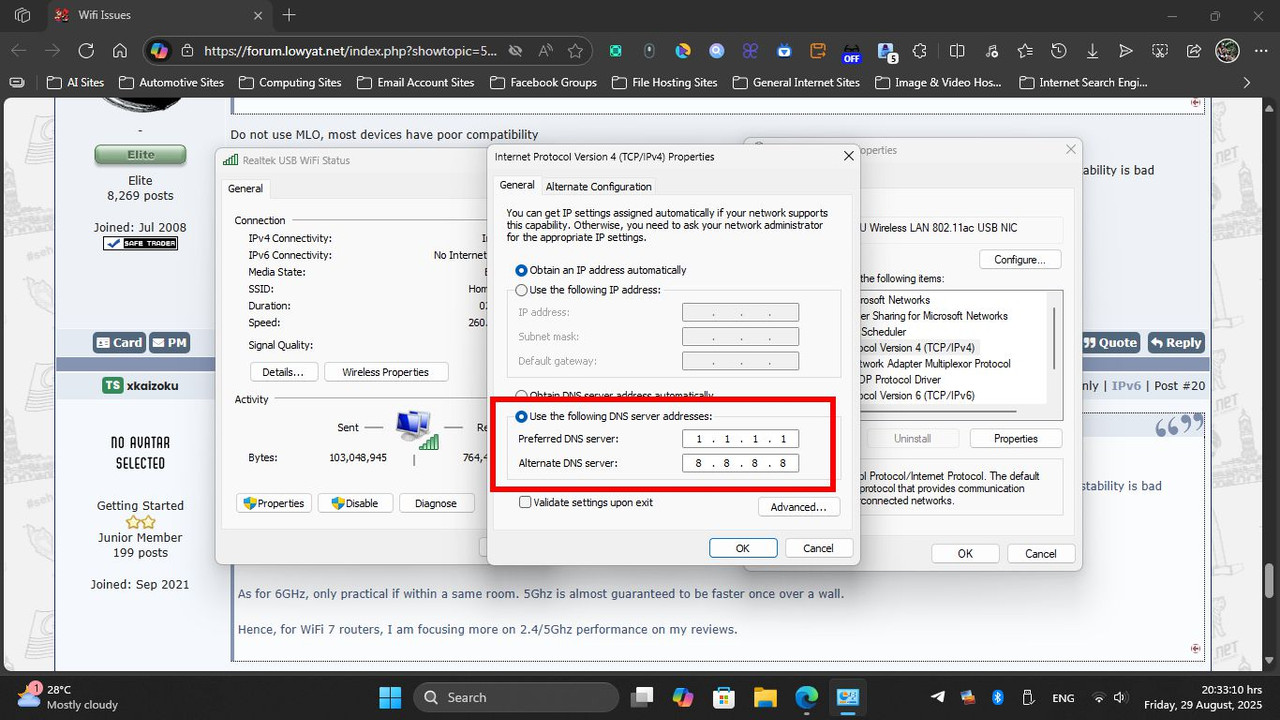
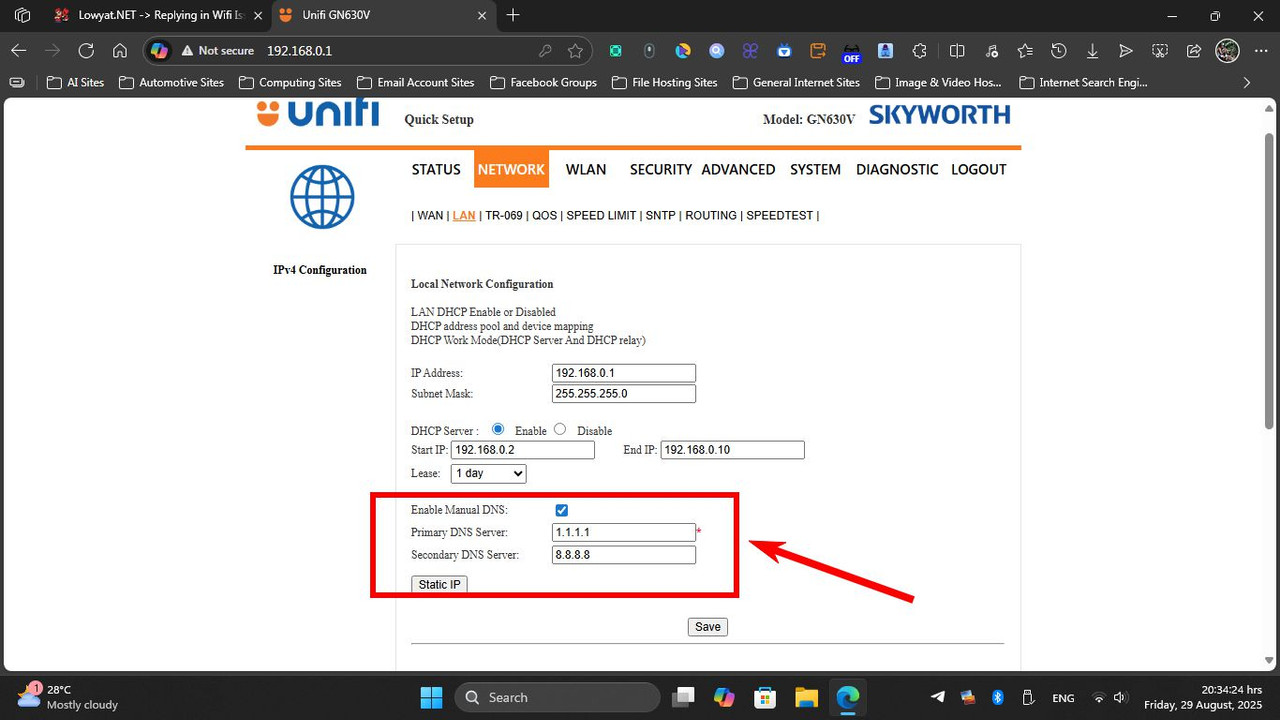
yes, only my laptop uses forced to 5GHz and both my fones is forced to 2.4GHz while at home to save battery .. I dont have issues on streaming medias or play games ..

my previous stock router and modem was separate device then I called TM and ask them to change SKYWORTH 2 in 1 router because my old stock router (dunno wat brand from) cannot use custom DNS ..

smile.gif
Xploit Machine
post Aug 29 2025, 11:08 PM

❤️ 孤独な旅行者 ❤️​
*******
Senior Member
7,257 posts

Joined: Nov 2008
From: SINGAPORE💃

» Click to show Spoiler - click again to hide... «


this configuration is fine too .. for my GN630V, I manually opened the 4th port to divert from UniFi TV (since they dont use the service anymore) so I can utilise all 4 ports simultaneously .. speed is fine and never lags, I found this GN630V is the best recent router they provide compared to those useless old routers ..

smile.gif
TSxkaizoku
post Aug 30 2025, 08:57 AM

Getting Started
**
Junior Member
220 posts

Joined: Sep 2021
QUOTE(Xploit Machine @ Aug 29 2025, 08:35 PM)
hmm.gif  hmm.gif  hmm.gif

user posted image

user posted image
*
so I played around with the settings in the morning when everyone was still asleep.

Changed the DNS to 9.9.9.9 and 1.0.0.1 with their respective ipv6 address. Now my game ping drop to 10-30ms which I consider quite good already. Will continue to monitor and hopefully it stays this way.
Xploit Machine
post Aug 30 2025, 11:06 AM

❤️ 孤独な旅行者 ❤️​
*******
Senior Member
7,257 posts

Joined: Nov 2008
From: SINGAPORE💃

QUOTE(xkaizoku @ Aug 30 2025, 08:57 AM)
so I played around with the settings in the morning when everyone was still asleep.

Changed the DNS to 9.9.9.9 and 1.0.0.1 with their respective ipv6 address. Now my game ping drop to 10-30ms which I consider quite good already. Will continue to monitor and hopefully it stays this way.
*
good to hear that .. below is my saved settings smile.gif

CloudFlare IPv4
1.1.1.1
1.0.0.1

Google DNS IPv4
8.8.8.8
8.8.4.4

CloudFlare IPv6
2606:4700:4700::1111
2606:4700:4700::1001

Google DNS IPv6
2001:4860:4860::8888
2001:4860:4860::8844

Quad9
IPv4 - 9.9.9.9 / 149.112.112.112
IPv6 - 2620:fe::fe / 2620:fe::9
HTTPS - https://dns.quad9.net/dns-query
TLS - tls://dns.quad9.net
laksamana
post Aug 30 2025, 11:14 AM

Regular
******
Senior Member
1,356 posts

Joined: Nov 2006
From: An Illuminati organization ..


Sounds like there is IP conflict. Try using 5GHz band, or get a new router with dual band.
BenYeeHua
post Aug 30 2025, 02:10 PM

Regular
******
Senior Member
1,873 posts

Joined: Nov 2010


QUOTE(Xploit Machine @ Aug 29 2025, 11:08 PM)
» Click to show Spoiler - click again to hide... «


this configuration is fine too .. for my GN630V, I manually opened the 4th port to divert from UniFi TV (since they dont use the service anymore) so I can utilise all 4 ports simultaneously .. speed is fine and never lags, I found this GN630V is the best recent router they provide compared to those useless old routers ..

smile.gif
*
The problems, slow boot + no DNS over TLS + unstable mesh with own model + lack of NAT Boost, others fine la.
Even NAT boost just lower like 1ms, unless you don't wannt to use the speed limit or QoS feature, can accept la. tongue.gif

PS: It only slow hang when there is DDoS happen by your own device, TV Box with abuse P2P apk, for example.

QUOTE(xkaizoku @ Aug 30 2025, 08:57 AM)
so I played around with the settings in the morning when everyone was still asleep.

Changed the DNS to 9.9.9.9 and 1.0.0.1 with their respective ipv6 address. Now my game ping drop to 10-30ms which I consider quite good already. Will continue to monitor and hopefully it stays this way.
*
Yup, you also need to set IPv6 DNS.
When you having both, it will prefer IPv6 DNS, then IPv4. thumbup.gif

And for me, I prefer this la, DoH. thumbsup.gif
https://www.elevenforum.com/t/enable-dns-ov...ndows-11.280/#6
https://www.howtogeek.com/765940/how-to-ena...-on-windows-11/

This post has been edited by BenYeeHua: Aug 30 2025, 02:11 PM
TSxkaizoku
post Aug 30 2025, 02:15 PM

Getting Started
**
Junior Member
220 posts

Joined: Sep 2021
QUOTE(laksamana @ Aug 30 2025, 11:14 AM)
Sounds like there is IP conflict. Try using 5GHz band, or get a new router with dual band.
*
The issue is happening on 5GHz band. I already got a new router.
TSxkaizoku
post Aug 30 2025, 02:17 PM

Getting Started
**
Junior Member
220 posts

Joined: Sep 2021
QUOTE(BenYeeHua @ Aug 30 2025, 02:10 PM)

Yup, you also need to set IPv6 DNS.
When you having both, it will prefer IPv6 DNS, then IPv4. thumbup.gif

And for me, I prefer this la, DoH. thumbsup.gif
https://www.elevenforum.com/t/enable-dns-ov...ndows-11.280/#6
https://www.howtogeek.com/765940/how-to-ena...-on-windows-11/
*
do you know if facebook videos buffering is due to unifi problem or facebook just succs? This only happens at specific times (mainly during noon). There is no issue with wifi speed or connection. I tried googling for solutions and found that many others are also facing this issue, so I don't think its related to my router.
Xploit Machine
post Aug 30 2025, 02:56 PM

❤️ 孤独な旅行者 ❤️​
*******
Senior Member
7,257 posts

Joined: Nov 2008
From: SINGAPORE💃

QUOTE(xkaizoku @ Aug 30 2025, 02:17 PM)
do you know if facebook videos buffering is due to unifi problem or facebook just succs? This only happens at specific times (mainly during noon). There is no issue with wifi speed or connection. I tried googling for solutions and found that many others are also facing this issue, so I don't think its related to my router.
*
do u use Samsung smartphone? or anyone at home? hmm.gif
BenYeeHua
post Aug 30 2025, 11:57 PM

Regular
******
Senior Member
1,873 posts

Joined: Nov 2010


QUOTE(xkaizoku @ Aug 30 2025, 02:17 PM)
do you know if facebook videos buffering is due to unifi problem or facebook just succs? This only happens at specific times (mainly during noon). There is no issue with wifi speed or connection. I tried googling for solutions and found that many others are also facing this issue, so I don't think its related to my router.
*
DNS, it is very likely connect you to SG instead of MY IPv6.
For example, my 1.1.1.1 kick me to 2a03:2880:f34c:1:face:b00c:0:25de, which is going to SG via HK with 66 ms latency lol.

» Click to show Spoiler - click again to hide... «


Secondly, it might be related to AV1 etc codec, like if there less ppl watching the type of video you watch, then sure more buffer required.
Unpopular new AV1 codec?
More, lol.

So it just depend on change the DNS so you connect to MY server, or VPN. tongue.gif
TSxkaizoku
post Aug 31 2025, 08:49 AM

Getting Started
**
Junior Member
220 posts

Joined: Sep 2021
QUOTE(Xploit Machine @ Aug 30 2025, 02:56 PM)
do u use Samsung smartphone? or anyone at home?  hmm.gif
*
Nope, we are in the apple ecosystem. Except for laptop/desktops.


TSxkaizoku
post Aug 31 2025, 08:56 AM

Getting Started
**
Junior Member
220 posts

Joined: Sep 2021
QUOTE(BenYeeHua @ Aug 30 2025, 11:57 PM)
DNS, it is very likely connect you to SG instead of MY IPv6.
For example, my 1.1.1.1 kick me to 2a03:2880:f34c:1:face:b00c:0:25de, which is going to SG via HK with 66 ms latency lol.

» Click to show Spoiler - click again to hide... «


Secondly, it might be related to AV1 etc codec, like if there less ppl watching the type of video you watch, then sure more buffer required.
Unpopular new AV1 codec?
More, lol.

So it just depend on change the DNS so you connect to MY server, or VPN. tongue.gif
*
hmmm, mine looks like total crap lol. I checked the DNS resolvers and its a mixed of SG and MY servers.

For the AV1, is it every video on facebook has different format and some using AV1? This can explain why only some videos have this issue while some loads fine. Only my parents watch so that is two users?

Tracing route to facebook.com [2a03:2880:f10c:83:face:b00c:0:25de]
over a maximum of 30 hops:

1 49 ms 2 ms 1 ms 2001:e68:5474:1d13:3268:93ff:fe58:5322
2 16 ms 5 ms 2 ms 2001:e68:402c:8001::56
3 131 ms 54 ms 147 ms fd7d:2c4f:bc9c:0:10:233:198:216
4 * 80 ms * hnk-b4-link.ip.twelve99.net [2001:2035:0:1cc5::1]
5 * 76 ms * sng-b7-link.ip.twelve99.net [2001:2035:0:eb7::1]
6 * 57 ms * facebook-ic-384586.ip.twelve99-cust.net [2001:2035:0:eb6::2]
7 56 ms 103 ms 68 ms po210.asw02.sin6.tfbnw.net [2620:0:1cff:dead:beef::4f10]
8 58 ms 54 ms * po141.psw01.sin6.tfbnw.net [2620:0:1cff:dead:beef::4f19]
9 57 ms 59 ms 56 ms be1.msw1aw.01.sin6.tfbnw.net [2a03:2880:f00c:ffff::42d]
10 61 ms 54 ms 55 ms edge-star-mini6-shv-01-sin6.facebook.com [2a03:2880:f10c:83:face:b00c:0:25de]

Trace complete.

BenYeeHua
post Aug 31 2025, 10:11 PM

Regular
******
Senior Member
1,873 posts

Joined: Nov 2010


QUOTE(xkaizoku @ Aug 31 2025, 08:56 AM)
hmmm, mine looks like total crap lol. I checked the DNS resolvers and its a mixed of SG and MY servers.

For the AV1, is it every video on facebook has different format and some using AV1? This can explain why only some videos have this issue while some loads fine. Only my parents watch so that is two users?

Tracing route to facebook.com [2a03:2880:f10c:83:face:b00c:0:25de]
over a maximum of 30 hops:

  1    49 ms    2 ms    1 ms  2001:e68:5474:1d13:3268:93ff:fe58:5322
  2    16 ms    5 ms    2 ms  2001:e68:402c:8001::56
  3  131 ms    54 ms  147 ms  fd7d:2c4f:bc9c:0:10:233:198:216
  4    *      80 ms    *    hnk-b4-link.ip.twelve99.net [2001:2035:0:1cc5::1]
  5    *      76 ms    *    sng-b7-link.ip.twelve99.net [2001:2035:0:eb7::1]
  6    *      57 ms    *    facebook-ic-384586.ip.twelve99-cust.net [2001:2035:0:eb6::2]
  7    56 ms  103 ms    68 ms  po210.asw02.sin6.tfbnw.net [2620:0:1cff:dead:beef::4f10]
  8    58 ms    54 ms    *    po141.psw01.sin6.tfbnw.net [2620:0:1cff:dead:beef::4f19]
  9    57 ms    59 ms    56 ms  be1.msw1aw.01.sin6.tfbnw.net [2a03:2880:f00c:ffff::42d]
10    61 ms    54 ms    55 ms  edge-star-mini6-shv-01-sin6.facebook.com [2a03:2880:f10c:83:face:b00c:0:25de]

Trace complete.
*
Ya, just having quick check, 1.1.1.1 give SG, 8.8.8.8 give MY, so depend on you la.
As me rare use Facebook, so I just go with 1.1.1.1, because Public Bank really hate the old orange router(broken DNS Relay) + Google DNS, lol.

Most of the time, 1.1.1.1 will be prefering SG instead of MY.
---
Just quick test, Google give MY based on your IP address, but it is located at SG.
While CloudFlare give you SG, while it is at MY, lol.

user posted image
user posted image

So as you can see, it really depend on how's DNS side being setup. sweat.gif

If you are using PC, you can kind of select DNS on fly by switching browser's DoH, lah.


-----
For AV1, it really depend, blame Qualcomm for bring AV1 late to market(MTK supported it early like 1 year), but it will still take another 5-7 years to becoming mainstream, depend on low end support.
Yes, for now, most mobile still using old 66x gen, which only changing the NM size with 5 years old chip design, then mix it with 5G modem support only, lol.

For your case, just ensure you are using MY server, and hope Meta give you Video link based on your IP and speed test on fly.
As YouTube during that for like 15 years(Yes, Google give video link based on your IP address, so DNS don't affect it), I guess Meta should already doing that. hmm.gif
---
Done quick check, Facebook did provide MY server based on your IP address.
I think you might need to check more on that?
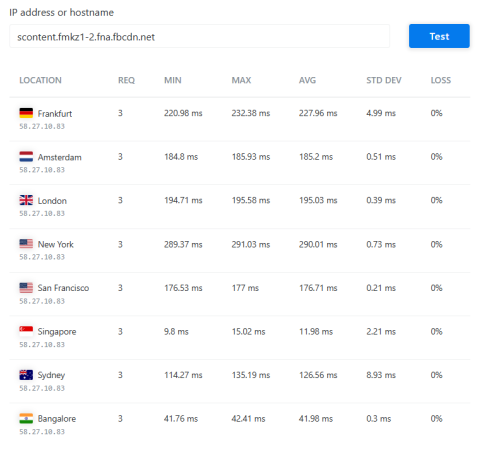
Just open F12, then click any video, check for the MP4 format, copy the domain and ping it.
user posted image

For me it is scontent.fmkz1-2.fna.fbcdn.net and scontent.fmkz1-1.fna.fbcdn.net, which by ping from golbally, it is static to MY server.
» Click to show Spoiler - click again to hide... «


user posted image

Ya, for quick check withoug ping, just check for the part "fmkz", then you know it is Melaka Zone? lol

 

Change to:
| Lo-Fi Version
0.0188sec    0.71    5 queries    GZIP Disabled
Time is now: 16th December 2025 - 03:40 PM