Outline ·
[ Standard ] ·
Linear+
TPLink Smart switch Vlan tagging(TL-SG108E) issue
|
TSyongtjunkit
|
 Jun 22 2025, 04:41 PM, updated 6 months ago Jun 22 2025, 04:41 PM, updated 6 months ago
|

|
Hi, I'm having an issue with my TL-SG108E where with the following configuration, I can't seem to get vlan 52 to work on selected port (Untagged) no IP from DHCP, the tagged port is the uplink(from asus router) 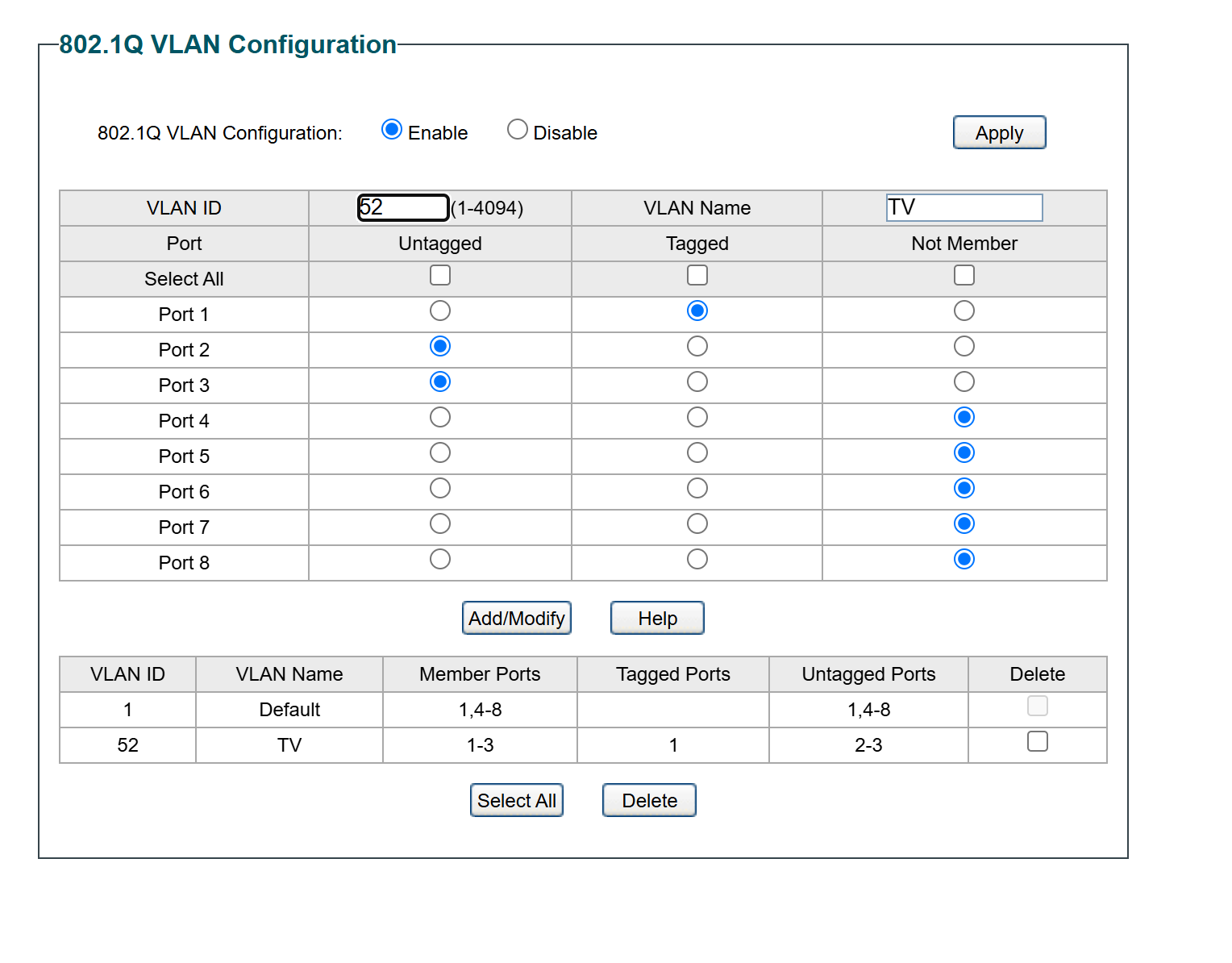 I've set up vlan tagging in asus guest network pro, connecting a laptop directly to the router with the vlan 52 tagged on the ethernet adapter works This post has been edited by yongtjunkit: Jun 22 2025, 04:44 PM |
|
|
|
|
|
jacktiew
|
Jun 22 2025, 08:39 PM
|
Getting Started

|
QUOTE(yongtjunkit @ Jun 22 2025, 04:41 PM) Hi, I'm having an issue with my TL-SG108E where with the following configuration, I can't seem to get vlan 52 to work on selected port (Untagged) no IP from DHCP, the tagged port is the uplink(from asus router) I've set up vlan tagging in asus guest network pro, connecting a laptop directly to the router with the vlan 52 tagged on the ethernet adapter works Are you missing the PVID part? (Article written by blacktubi, I'm not sure whether the thing will work or not) https://www.blacktubi.com/guide/make-any-ro...-work-on-unifi/ |
|
|
|
|
|
Quantum Geist
|
Jun 22 2025, 10:48 PM
|
Getting Started
|
As jacktiew above me said, you need to set the PVID for the ports, under the VLAN menu on the left, go to "802.1Q PVID Setting"
Judging from your settings, you need to set the PVID for port 2 & 3 to 52
|
|
|
|
|
|
TSyongtjunkit
|
Jun 23 2025, 01:49 PM
|
|
|
QUOTE(jacktiew @ Jun 22 2025, 08:39 PM) Are you missing the PVID part? (Article written by blacktubi, I'm not sure whether the thing will work or not) https://www.blacktubi.com/guide/make-any-ro...-work-on-unifi/QUOTE(Quantum Geist @ Jun 22 2025, 10:48 PM) As jacktiew above me said, you need to set the PVID for the ports, under the VLAN menu on the left, go to "802.1Q PVID Setting" Judging from your settings, you need to set the PVID for port 2 & 3 to 52 Setting PVID works, thanks |
|
|
|
|



 Quote
Quote



 0.0149sec
 1.22
1.22
 5 queries
 GZIP Disabled