Welcome Guest ( Log In | Register )

Bump Topic Topic Closed RSS Feed

Outline · [ Standard ] · Linear+

 [Reference] LAPTOP GAMING Performance + Benchmarks, ~all thing gaming on laptop discussions~

views
     
piskin
post Jun 6 2008, 09:35 PM

Getting Started
**
Junior Member
298 posts

Joined: Aug 2007
From: Port Dickson


Here is my spec
Brand: Dell XPS m1730
Processor: Intel Core 2 Duo T9300 @ 2.50GHz
Memory: 2GB 800MHz DDR2- SDRAM
Graphic: NVIDIA GeForce 8800M GTX 512MB SLI
Operating System: Microsoft Windows Home premium
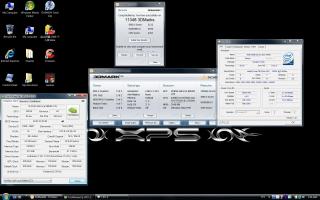
3dmark06 score:11348

can i know how to download the best nividia driver for my laptop ? i am new here. the www.laptopvideogo.com is so confusing.

This post has been edited by piskin: Jun 7 2008, 01:49 AM


Attached thumbnail(s)
Attached Image
piskin
post Jun 7 2008, 01:14 AM

Getting Started
**
Junior Member
298 posts

Joined: Aug 2007
From: Port Dickson


QUOTE(eclectice @ Jun 6 2008, 10:13 PM)
You can use NBF Nvidia driver installer from Notebookforums.com (NBF) which simplifies the clumsy setup that requires .INF file hack.

http://www.notebookforums.com/forum302.html
*

thank you

This post has been edited by piskin: Jun 7 2008, 05:48 PM
piskin
post Jun 17 2008, 08:41 PM

Getting Started
**
Junior Member
298 posts

Joined: Aug 2007
From: Port Dickson


I am using XPS M1730 and my have a good exprience on game especially on COD4 Full effect 1900x1200 with Fps >60 , Dell is better then alienware cause got good customer service support and It is not cheap . I got 3dmark06 more than 11k

This post has been edited by piskin: Jun 19 2008, 08:01 PM
piskin
post Jun 22 2008, 06:38 AM

Getting Started
**
Junior Member
298 posts

Joined: Aug 2007
From: Port Dickson


8600M GT Better according to notebookcheck
Read this from notebookcheck, its about grahic cards comparison
http://www.notebookcheck.net/Comparison-of...ards.130.0.html

This post has been edited by piskin: Jun 22 2008, 06:41 AM
piskin
post Jun 27 2008, 10:47 PM

Getting Started
**
Junior Member
298 posts

Joined: Aug 2007
From: Port Dickson


QUOTE(subrok007 @ Jun 27 2008, 09:55 PM)
did u know alienware is under dell?
*
I know , i thought they work separately
piskin
post Jul 6 2008, 11:36 PM

Getting Started
**
Junior Member
298 posts

Joined: Aug 2007
From: Port Dickson


QUOTE(JTxj @ Jul 6 2008, 02:06 PM)
Correct. pretty much summed up right there.
Dell & Alienware are the most dominating companies, especially where notebook gaming is involved.

*note* Alienware is the only company that has a notebook running 2 Graphic cards in SLI
It's your decision, 3DMark 06 is still the preferred choice since it is XP and Vista compatible while the new Vantage is Vista only.
*
Dell XPS have SLI too
piskin
post Jul 8 2008, 07:23 PM

Getting Started
**
Junior Member
298 posts

Joined: Aug 2007
From: Port Dickson


QUOTE(yuvster @ Jul 8 2008, 12:22 PM)
i just recently surfed the alienware website as i'm looking for a gaming notebook.. unbelievably, the price for the alienware notebook (minus certain upgrades i can do by myself) is pretty good... not to mention that its alienware... the only drawback from the entire deal is that i won't be able to get support in case anything goes wrong... which is a big drawback if you think about it...
*
This is the reason i choose XPS M1730 with 8800m GTX SLI. Dell have good support and it is not cheap than Allienware
piskin
post Jul 13 2008, 11:05 AM

Getting Started
**
Junior Member
298 posts

Joined: Aug 2007
From: Port Dickson


does my Notebook xps m1730 support 5.1 sound system plz reply me

This post has been edited by piskin: Jul 13 2008, 11:05 AM
piskin
post Aug 4 2008, 04:36 PM

Getting Started
**
Junior Member
298 posts

Joined: Aug 2007
From: Port Dickson


3DMark06 on M1730 8800M GTX SLI


Brand: Dell XPS m1730
Processor: Intel Core 2 Duo T9300 @ 2.50GHz
Memory: 2GB 800MHz DDR2- SDRAM
Graphic: NVIDIA GeForce 8800M GTX 512MB SLI
Operating System: Microsoft Windows Home premium

3DMARK06 Score=11427

This post has been edited by piskin: Aug 5 2008, 03:49 PM


Attached thumbnail(s)
Attached Image
piskin
post Aug 8 2008, 12:35 AM

Getting Started
**
Junior Member
298 posts

Joined: Aug 2007
From: Port Dickson


QUOTE(ExiM @ Aug 7 2008, 05:28 PM)
hi dude, can i know where do u get the benchmark thingy ?
maybe i can test mine also.. thks
*
Just dl form here, http://www.futuremark.com/products/3dmark06/


Added on August 8, 2008, 12:36 am
QUOTE(OlgaC4 @ Aug 7 2008, 12:52 PM)
I saw the power core so damn big weight like almost 1kg 5 Kg for the labtop total 6kg. My G1Sn also heavy like shit liau.
*
ya , but i dont mind heavy i want powerful and mobile only, how is our G1Sn, share with us, what is the weight

This post has been edited by piskin: Aug 8 2008, 12:38 AM
piskin
post Aug 8 2008, 05:21 AM

Getting Started
**
Junior Member
298 posts

Joined: Aug 2007
From: Port Dickson


QUOTE(bst dude @ Aug 8 2008, 01:56 AM)
SAME LAPPY,LOWER SPEC,DIFFERENT DRIVER=LOWER SCORE
*
u just bought it? It seem like nothing on your desktop
piskin
post Aug 13 2008, 12:22 PM

Getting Started
**
Junior Member
298 posts

Joined: Aug 2007
From: Port Dickson


My 3dscoremark06=11870

This is the best so far, good game performance, the best driver


Attached thumbnail(s)
Attached Image
piskin
post Aug 13 2008, 04:40 PM

Getting Started
**
Junior Member
298 posts

Joined: Aug 2007
From: Port Dickson


QUOTE(laughing_tomato @ Aug 13 2008, 03:34 PM)
Look properly on the attached pic.. its notebook
*
ya its notebook, how do you know
piskin
post Aug 13 2008, 11:03 PM

Getting Started
**
Junior Member
298 posts

Joined: Aug 2007
From: Port Dickson


QUOTE(vincentlaw @ Aug 13 2008, 06:05 PM)
1. intel processor Txxxx series = notebook
2. nvidia graphic card with "M" = mobile = notebook , which is 8800M GTX...
3. ur system tray have battery icon which (which u plug in AC adaptor when u take picture)
4. ur system tray have touchpad icon which is ur notebook touchpad software
*
lol pro, u explained so well
piskin
post Aug 13 2008, 11:06 PM

Getting Started
**
Junior Member
298 posts

Joined: Aug 2007
From: Port Dickson


QUOTE(jonuslee @ Aug 13 2008, 09:29 PM)
My laptop graphics is X700.So you can expect the performance .It already 2 years d.Dunno still can play what new game?
*
u still can play COD4 with 1024x178 resolution with lowsetting, with 20++ FPS, i use the mobile grahic card before. it was a great mobile card. U can play a lot of games even 2008 games but with low setting

This post has been edited by piskin: Aug 13 2008, 11:10 PM
piskin
post Aug 14 2008, 07:39 AM

Getting Started
**
Junior Member
298 posts

Joined: Aug 2007
From: Port Dickson


QUOTE(bst dude @ Aug 13 2008, 11:51 PM)
A QUICK RUN ON RACEDRIVER GRID ON DELL XPS 1730 (T8300 4GB NVIDIA 8800GTX SLI)

NON SLI MODE
RESOLUTION 1920 X 1200 WITH 4AA
AVERAGE FRAME BETWEEN 25-40

ON SLI MODE
THE GAME UNPLAYABLE
*
ur fps low, update ur driver, i face this problem b4. i have the same setting as u plus i on VSYNC mode , i use SLI mode with force alternative frame rendering 2 , i got 45-60 fps ,mostly 60 fps very smooth de, i enjoy the game very much , dont look down on XPS m1730, b4 i updated the driver i only get 25-40 like u , update ur driver pls. u can run grid with 60 fps no poblem in 1920x1200 andd 4xAA and VSYNC mode


Added on August 14, 2008, 7:51 am
QUOTE(bst dude @ Aug 14 2008, 01:08 AM)
no..lah.my friend 1

a quote from codemaster regarding grid

ix) Is ATI’s Crossfire or NVIDIA’s SLI supported?

Unfortunately, due to the working of GRID’s engine, systems which link two or more graphics cards (i.e. Crossfire or SLI) are not implicitly supported. This means you may not see a performance boost from having the second card, and you may even have trouble running the game. If GRID is failing to start properly and your system is SLI or Crossfire enabled, try disabling the technology in either NVIDIA’s or ATI’s control panel in Windows and see if this helps.
*
can play with SLI mode trust me very smooth de, only Warcraft3 cannot, i set to single cpu setting on war3 only by using nvidia setting,

this is the link http://laptopvideo2go.com/forum/index.php?showtopic=20088
dont use the stock driver very suck de, use v177.83

read the quick start guide before u install

This post has been edited by piskin: Aug 14 2008, 08:07 AM
piskin
post Aug 14 2008, 12:55 PM

Getting Started
**
Junior Member
298 posts

Joined: Aug 2007
From: Port Dickson


QUOTE(bst dude @ Aug 14 2008, 10:38 AM)
thanks bro for the advice.
i did try the the latest driver from laptopvideo(177.83)  and curently using 175.83 from tweakforce(extreme g)
actually 177.83 is far better from 175.83 except waiting for tweakforce to release their latest driver
*
can you play Grid with 60 fps ? can use SLi to play? change the SLI setting to Force alternate Frame rendering 2

This post has been edited by piskin: Aug 14 2008, 12:57 PM
piskin
post Aug 15 2008, 11:52 AM

Getting Started
**
Junior Member
298 posts

Joined: Aug 2007
From: Port Dickson


QUOTE(bst dude @ Aug 14 2008, 11:29 PM)
yep,put new driver.
now able to play in sli mode everything on high (1920 x 1200)
average frame 45-60
thanks
*
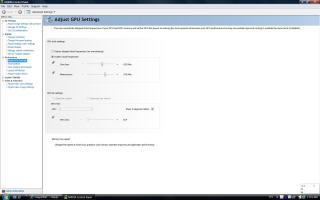
told u dont look down on XPS m1730, u can overlock the grahic card to core speed from 500 to 625, and memory speed from 799 to 975, very stable wont overheat by Nvtune, the plug in software u know that?

This post has been edited by piskin: Aug 15 2008, 11:58 AM


Attached thumbnail(s)
Attached Image
piskin
post Aug 27 2008, 02:27 PM

Getting Started
**
Junior Member
298 posts

Joined: Aug 2007
From: Port Dickson


M1730 with 8800GTX with SLI
Brand: Dell XPS m1730
Processor: Intel Core 2 Duo T9300 @ 2.50GHz
Memory: 2GB 667MHz DDR2- SDRAM
Graphic: NVIDIA GeForce 8800M GTX 512MB SLI
Ageia physics accelator
Operating System: Microsoft Windows Home premium

Quick benchmark on COD4

When I deactive and active SLI the performance increase by about 60%, this game really support SLI well same as crysis and grid

Setting:1920x1200 4AA MAX setting Fps from 70-130
» Click to show Spoiler - click again to hide... «


On Crysis 1920x1200 0xAA All high Fps 30-40

» Click to show Spoiler - click again to hide... «


This post has been edited by piskin: Aug 27 2008, 07:35 PM
piskin
post Aug 27 2008, 07:02 PM

Getting Started
**
Junior Member
298 posts

Joined: Aug 2007
From: Port Dickson


QUOTE(biew1986 @ Aug 27 2008, 06:43 PM)
Between Asus G70 and Dell XPS M1730, which consider a better choice? In terms of performance, warranty and services.  I'm trying to weight these two beasts.
The benchmarks here show good thing about XPS with dual 8800M GTX. However I'm not going for the dual 8800M, haha.
At least the two meets the condition between of mobility (not that much for 17 inchers but still movable) and high performance (I'm not expecting the best though).

People saying Dell has good warranty and customer service, how about Asus?

And yeah, any good and trustworthy places around KL to get any of them?

Thanks. smile.gif
*
SLI got improve like 50-60% if the game support it well, for example like crysis, COD4, GRID .

But for old game like war3 doesnt support SLI well and devil may cry 4 and assassin creed have no much improvement in SLI mode , i hardly see the diferrent when i active and deactive SLI mode, fear has a good support with SLI,


In conclusion, Dual 8800m GTX better
better than a single 8800mgtx by 50%, because i have try deactive and active the SLI mode in nvidia control panel

Nowadays nvidia release better driver support SLI, last time the drivers were suck
They dont support SLI well

This post has been edited by piskin: Aug 27 2008, 07:13 PM

2 Pages  1 2 >Top
Topic ClosedOptions
 

Change to:
| Lo-Fi Version
0.0379sec    0.41    7 queries    GZIP Disabled
Time is now: 8th December 2025 - 12:50 AM