Welcome Guest ( Log In | Register )

37 Pages « < 12 13 14 15 16 > » Bottom

Outline · [ Standard ] · Linear+

 Vivo X200 Ultra, Released Exclusively In China

views
     
chongkiatz
post Aug 13 2025, 01:40 PM

Look at all my stars!!
*******
Senior Member
6,745 posts

Joined: Sep 2008
From: Kuala Terengganu
QUOTE(ryder_78 @ Aug 13 2025, 01:04 PM)
Similarly I have the X90 Pro, I actually bought two units, one for my mum and one for myself. The main attraction is the large 1" type sensor. As a camera, it is already considered to be very good although there is better. The only minor gripe is the auto-focus mainly for macro shots, it may be not as sharp due to the large sensor. In other words, for close-up macro shots the image may appear slightly soft with blurred edges rather than razor-sharp lines if using the auto-focus. Hence, one needs to take the same photo several times and select the best image which is in focus (sharp lines). But for overall performance for photography there is very little to complain.

I have wondered, in 3 to 4 years down the line, what would be the next phone which is able to offer better camera performance than the X90 Pro.  Sure there is X100 Pro, X200 Pro and now upcoming X300 Pro. To me, if the difference is negligible, it won't make much difference to upgrade or pay a lot for the new phone, unless one is going for other upgraded features such as better CPU, screen or longer lasting battery etc.

I understand the size of sensor may not be the main factor that contributes to good camera performance but somehow, I hope the upcoming Vivo phones will offer larger sensor than the one that's currently provided in the X200 Pro or upcoming X300 Pro.
*
Recently i got see Dou Yin china got 1 video saying nowadays sensor are large , so to take like whole clear image especially wording imagine from book normally will cause edge out of focus , so to overcome this problem , open default Camera 1x , then click upper camera SuperMacro mode , then it will change to x3 macro mode , then click back x1 then snap the imagine , so your outcome picture wont have blur edge , it work for my vivo x200s , hope it work for your x90PRO.


Turn on camera and shoot , the chicken already bokehish
Attached Image


Turn on camera , tekan upper macro icon , then change back to x1 and shoot , whole screen is sharp
Attached Image

This post has been edited by chongkiatz: Aug 13 2025, 01:49 PM
ryder_78
post Aug 13 2025, 02:10 PM

Look at all my stars!!
*******
Senior Member
2,029 posts

Joined: Jul 2010


QUOTE(chongkiatz @ Aug 13 2025, 01:40 PM)
Recently i got see Dou Yin china got 1 video saying nowadays sensor are large , so to take like whole clear image especially wording imagine from book normally will cause edge out of focus  , so to overcome this problem , open default Camera 1x , then click upper camera SuperMacro mode , then it will change to x3 macro mode , then click back x1 then snap the imagine , so your outcome picture wont have blur edge , it work for my vivo x200s , hope it work for your x90PRO.
Turn on camera and shoot , the chicken already bokehish
Attached Image
Turn on camera , tekan upper macro icon , then change back to x1 and shoot , whole screen is sharp
Attached Image
*
Thanks. I'll try when I have the time.

These shots are truly close-up macro shots with the bokeh effect where the piece of chicken at the background will not be in focus and looks blurry. IT's good that the SuperMacro mode corrects this by producing an overall clear and sharp image with minimal blur edge. However, if looking at the rice, comparing both images the rice looks slightly clearer and more DSLR-like with the normal shoot mode than the one in macro mode.

It's not only with this close-up macro shots with X90 Pro. When taking pictures of people at say 2m or 3m away, I need to take several shots of the same image just to make sure there is a good clean and sharp image. With the normal auto-focus mode, sometimes the image will look blurry or not in focus. I have to tap the centre of the screen or object (person or people) then snap the photo to ensure it's a clear image and not blurry. Sometimes it will still look blurry so it is a standard practice for me to take few photos of the same image, say 4 or 5 photos, choose the clearest or best image and delete the rest.

I think this may be one disadvantage with cameras that come with large sensors. The phone with smaller sensor usually won't have this issue as all photos will usually look sharp and clear. It's just that the image quality of inferior phones usually with much smaller sensors will be not as good especially in low light conditions, either showing a lot of noise with broken lines, smearing or with reduced clarity and detail.

This post has been edited by ryder_78: Aug 13 2025, 02:15 PM
chongkiatz
post Aug 13 2025, 02:52 PM

Look at all my stars!!
*******
Senior Member
6,745 posts

Joined: Sep 2008
From: Kuala Terengganu
QUOTE(ryder_78 @ Aug 13 2025, 02:10 PM)
Thanks. I'll try when I have the time.

These shots are truly close-up macro shots with the bokeh effect where the piece of chicken at the background will not be in focus and looks blurry. IT's good that the SuperMacro mode corrects this by producing an overall clear and sharp image with minimal blur edge. However, if looking at the rice, comparing both images the rice looks slightly clearer and more DSLR-like with the normal shoot mode than the one in macro mode.

It's not only with this close-up macro shots with X90 Pro. When taking pictures of people at say 2m or 3m away, I need to take several shots of the same image just to make sure there is a good clean and sharp image. With the normal auto-focus mode, sometimes the image will look blurry or not in focus. I have to tap the centre of the screen or object (person or people) then snap the photo to ensure it's a clear image and not blurry. Sometimes it will still look blurry so it is a standard practice for me to take few photos  of the same image, say 4 or 5 photos, choose the clearest or best image and delete the rest.

I think this may be one disadvantage with cameras that come with large sensors. The phone with smaller sensor usually won't have this issue as all photos will usually look sharp and clear. It's just that the image quality of inferior phones usually with much smaller sensors will be not as good especially in low light conditions, either showing a lot of noise with broken lines, smearing or with reduced clarity and detail.
*
Actually i just use that trick for taking like document or book where main camera cause blur edge , if u can understand chinese , can click to tis douyin link , at the 2:17 it show the trick.

https://v.douyin.com/RIsqB0wmulY/


bigger sensor will easily cause shallow depth of field , but it will be superior when come to low light , seriously my iphone 16pm rarely use to take picture anymore biggrin.gif , keep for video purpose only , photo all taken by my vivo laugh.gif , and recently i also just figure out something , people always say android phone after snap picture , it will processing after few second (mean what u see from screen will be different after snap) , that is because vivo default setting was in "VIVID" mode and with HDR turn on , if u really want something look natural like the iphone , change the style to "Zeiss Natural" , turn off HDR , then your photo wont have any processing , it will look exactly what your screen show up and without any processing , this trick also show on the Douyin link i share on top.

Or just change to PRO mode , then turn on Zeiss Natural Style , it work the same too smile.gif , the more i use the more i like biggrin.gif But if u are lazy to re-edit the photo , VIVID also not a bad choice because vivo VIVID mode really great.

This post has been edited by chongkiatz: Aug 13 2025, 02:58 PM
sitescope
post Aug 13 2025, 05:13 PM

Look at all my stars!!
*******
Senior Member
4,493 posts

Joined: Oct 2013
QUOTE(chongkiatz @ Aug 13 2025, 01:40 PM)
Recently i got see Dou Yin china got 1 video saying nowadays sensor are large , so to take like whole clear image especially wording imagine from book normally will cause edge out of focus  , so to overcome this problem , open default Camera 1x , then click upper camera SuperMacro mode , then it will change to x3 macro mode , then click back x1 then snap the imagine , so your outcome picture wont have blur edge , it work for my vivo x200s , hope it work for your x90PRO.
*
Dont quite understand
1. Open camera
2. Click macro icon - on
3. Click macro icon - off
4. Take picture

Izit?
chongkiatz
post Aug 13 2025, 07:53 PM

Look at all my stars!!
*******
Senior Member
6,745 posts

Joined: Sep 2008
From: Kuala Terengganu
QUOTE(sitescope @ Aug 13 2025, 05:13 PM)
Dont quite understand
1. Open camera
2. Click macro icon - on
3. Click macro icon - off
4. Take picture

Izit?
*
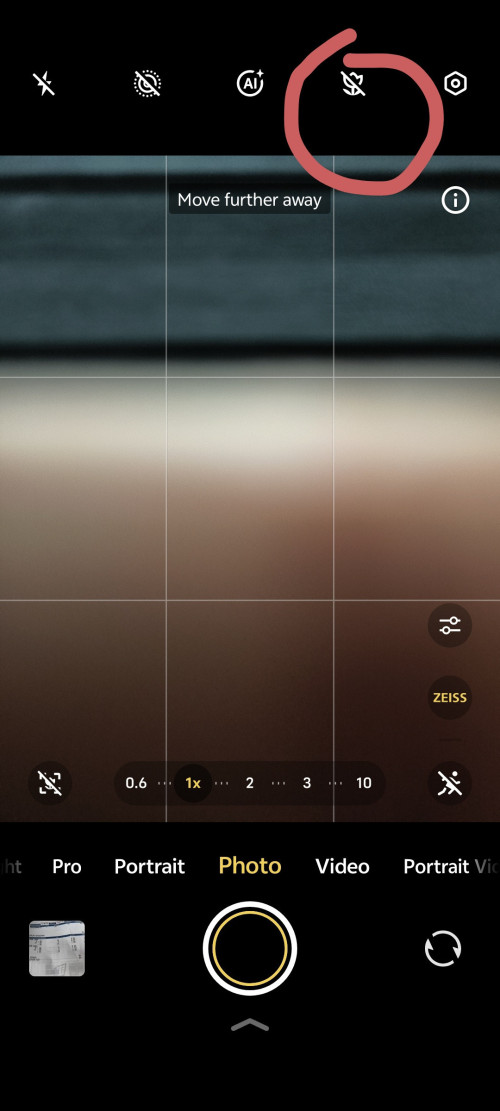
user posted image
Click on this upper to toggle Macro


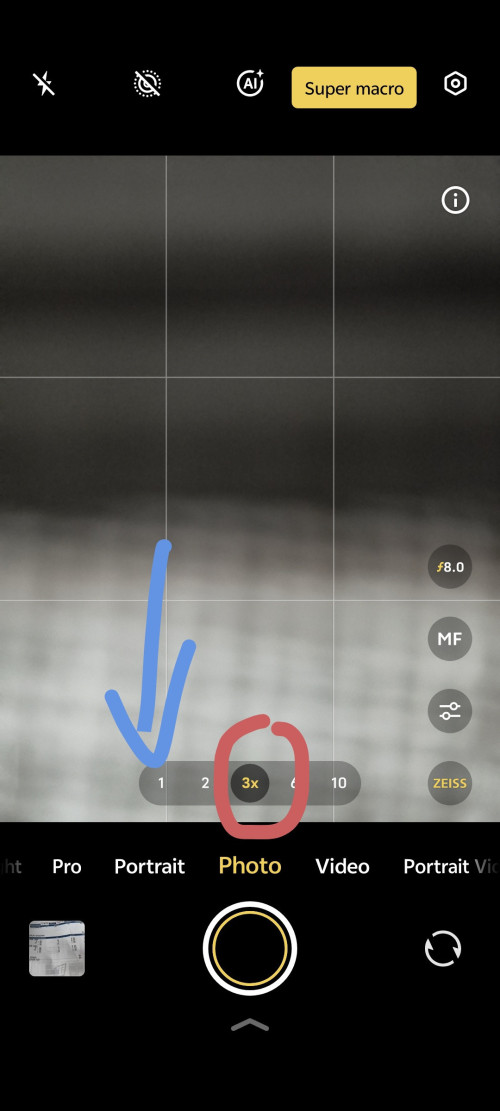
user posted image
Then it will automatic prompt to x3 right , so u can tekan back x1 to take the photo u want


This post has been edited by chongkiatz: Aug 13 2025, 07:55 PM
dwRK
post Aug 13 2025, 07:58 PM

the consummate chartist
*******
Senior Member
6,230 posts

Joined: Jun 2006


QUOTE(chongkiatz @ Aug 13 2025, 01:40 PM)
Recently i got see Dou Yin china got 1 video saying nowadays sensor are large , so to take like whole clear image especially wording imagine from book normally will cause edge out of focus  , so to overcome this problem , open default Camera 1x , then click upper camera SuperMacro mode , then it will change to x3 macro mode , then click back x1 then snap the imagine , so your outcome picture wont have blur edge , it work for my vivo x200s , hope it work for your x90PRO.
Turn on camera and shoot , the chicken already bokehish
Attached Image
Turn on camera , tekan upper macro icon , then change back to x1 and shoot , whole screen is sharp
Attached Image
*
he's trying to use the wideangle lens at 1x...

normal snaps x200s will use standard lens...

when select super macro... will swith to 3x tele macro... when swith to 1x... x200s will use wideangle macro...

chongkiatz
post Aug 13 2025, 08:02 PM

Look at all my stars!!
*******
Senior Member
6,745 posts

Joined: Sep 2008
From: Kuala Terengganu
QUOTE(dwRK @ Aug 13 2025, 07:58 PM)
he's trying to use the wideangle lens at 1x...

normal snaps x200s will use standard lens...

when select super macro... will swith to 3x tele macro... when swith to 1x... x200s will use wideangle macro...
*
Owh, so that the reason why it wont have shallow depth of field and can have 100% clear ! If directly shot then normally very easy to blur the background.
sitescope
post Aug 13 2025, 11:05 PM

Look at all my stars!!
*******
Senior Member
4,493 posts

Joined: Oct 2013
QUOTE(chongkiatz @ Aug 13 2025, 07:53 PM)
Then it will automatic prompt to x3 right , so u can tekan back x1 to take the photo u want
*
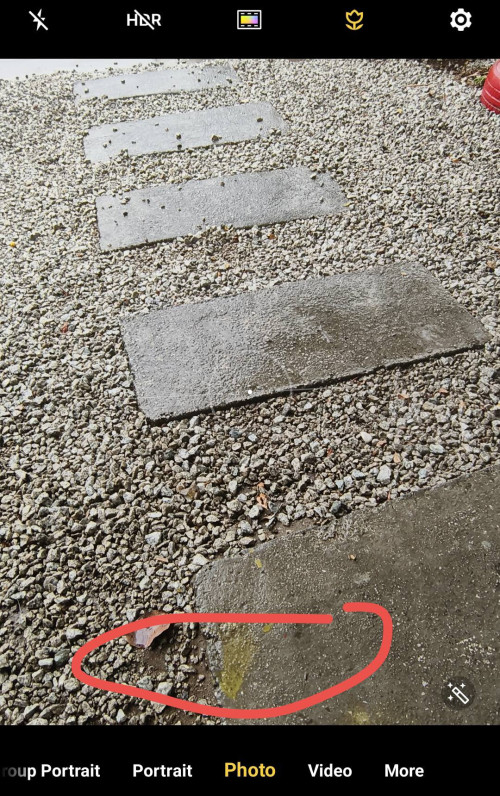
x90p doesnt has this menu to chg to 1
At the bottom just blank
Only got option super macro on/off/auto
chongkiatz
post Aug 14 2025, 06:03 AM

Look at all my stars!!
*******
Senior Member
6,745 posts

Joined: Sep 2008
From: Kuala Terengganu
QUOTE(sitescope @ Aug 13 2025, 11:05 PM)
x90p doesnt has this menu to chg to 1
At the bottom just blank
Only got option super macro on/off/auto
*
Might to screenshot? Ya my also after tekan was supermacro , but my is located on top , or x90pro doesnt have telescope macro?

This post has been edited by chongkiatz: Aug 14 2025, 06:03 AM
ryder_78
post Aug 14 2025, 07:38 AM

Look at all my stars!!
*******
Senior Member
2,029 posts

Joined: Jul 2010


QUOTE(chongkiatz @ Aug 13 2025, 02:52 PM)
Actually i just use that trick for taking like document or book where main camera cause blur edge , if u can understand chinese , can click to tis douyin link , at the 2:17 it show the trick.

https://v.douyin.com/RIsqB0wmulY/
bigger sensor will easily cause shallow depth of field  , but it will be superior when come to low light , seriously my iphone 16pm rarely use to take picture anymore  biggrin.gif  , keep for video purpose only , photo all taken by my vivo  laugh.gif  , and recently i also just figure out something , people always say android phone after snap picture , it will processing after few second (mean what u see from screen will be different after snap) , that is because vivo default setting was in "VIVID" mode and with HDR turn on , if u really want something look natural like the iphone , change the style to "Zeiss Natural"  , turn off HDR , then your photo wont have any processing , it will look exactly what your screen show up and without any processing , this trick also show on the Douyin link i share on top.

Or just change to PRO mode , then turn on Zeiss Natural Style , it work the same too smile.gif  , the more i use the more i like  biggrin.gif But if u are lazy to re-edit the photo , VIVID also not a bad choice because vivo VIVID mode really great.
*
Thanks for the tip. I will try when I have the time although not sure if it can be done with the X90Pro since someone above mentioned the feature is not available on the phone. Anyway, it's good to know this tip, though in the video it's with the X200 Pro mini instead of X90 Pro. Although I'm Chinese, my Mandarin is not good but can understand a little spoken, though written it's hopeless.

I've switched between Vivid and Zeiss Natural several times and in the end the phone was left in "Zeiss Natural" as I find the image quality to be more natural and to me, better due to less processing. biggrin.gif As for HDR I don't really focus too much on that but sometimes notice that it's automatically turned on. I'll switch it off next time. I rarely use PRO mode and mostly shoot in automatic "Photo" mode. Sometimes "Portrait" though I'm not too sure on the difference between "Photo" and "Portrait" as the picture quality in both modes looks almost the same. "Night" mode is rarely used.


chongkiatz
post Aug 14 2025, 07:58 AM

Look at all my stars!!
*******
Senior Member
6,745 posts

Joined: Sep 2008
From: Kuala Terengganu
QUOTE(ryder_78 @ Aug 14 2025, 07:38 AM)
Thanks for the tip. I will try when I have the time although not sure if it can be done with the X90Pro since someone above mentioned the feature is not available on the phone. Anyway, it's good to know this tip, though in the video it's with the X200 Pro mini instead of X90 Pro. Although I'm Chinese, my Mandarin is not good but can understand a little spoken, though written it's hopeless.

I've switched between Vivid and Zeiss Natural several times and in the end the phone was left in "Zeiss Natural" as I find the image quality to be more natural and to me, better due to less processing.  biggrin.gif As for HDR I don't really focus too much on that but sometimes notice that it's automatically turned on. I'll switch it off next time. I rarely use PRO mode and mostly shoot in automatic "Photo" mode. Sometimes "Portrait" though I'm not too sure on the difference between "Photo" and "Portrait" as the picture quality in both modes looks almost the same. "Night" mode is rarely used.
*
When i switch to Pro mode , i also using everything automatic, auto iso , auto shutter speed , the only reason in pro mode is to make sure the image is completely unprocessed so that it make me easier to do post-process after this.

I do agree that zeiss natural actually make the photo look natural which is my current default setting.

Now i only turn on HDR when taking scene , or very bright background, otherwise i just turn it off to get as natural as it can.

This post has been edited by chongkiatz: Aug 14 2025, 08:00 AM
sitescope
post Aug 14 2025, 03:50 PM

Look at all my stars!!
*******
Senior Member
4,493 posts

Joined: Oct 2013
QUOTE(chongkiatz @ Aug 14 2025, 06:03 AM)
Might to screenshot? Ya my also after tekan was supermacro , but my is located on top , or x90pro doesnt have telescope macro?
*
Here
user posted image
chongkiatz
post Aug 14 2025, 04:00 PM

Look at all my stars!!
*******
Senior Member
6,745 posts

Joined: Sep 2008
From: Kuala Terengganu
QUOTE(sitescope @ Aug 14 2025, 03:50 PM)
Here
user posted image
*
maybe x90pro cant be zoom and only have 1 length for macro shoot.
ryder_78
post Aug 15 2025, 12:38 PM

Look at all my stars!!
*******
Senior Member
2,029 posts

Joined: Jul 2010


QUOTE(chongkiatz @ Aug 14 2025, 07:58 AM)
When i switch to Pro mode , i also using everything automatic, auto iso , auto shutter speed , the only reason in pro mode is to make sure the image is completely unprocessed so that it make me easier to do post-process after this.

I do agree that zeiss natural actually make the photo look natural which is my current default setting.

Now i only turn on HDR when taking scene , or very bright background, otherwise i just turn it off to get as natural as it can.
*
As mentioned by Sitescope, just figured out the X90 Pro doesn't have the feature to use Macro mode at 1X zoom. Anyway, that's fine and not a big issue. Although the images from the X90 Pro may not be super defined with razor-sharp edges mainly due to the large 1-inch type sensor, I do like the slightly soft DSLR look to the photos. It's just that taking photos in auto-focus may produce some images which may be blurred (not-in-focus images with smeared edges) but this can be compensated by taking the same object several times, select one which is clear and in-focus and delete the rest which are out-of-focus or blurred.

Ok I guess that's all from me on this X200 Pro thread. I don't own the X200 Pro but am posting here as an X90 Pro owner. biggrin.gif

I actually haven't switched from my current phone to the X90 Pro as my main phone but will likely do that before end of this year. It's too early for me but I'm already planning on my next phone after this X90 Pro, and the camera of the new phone needs to be a noticeable if not significant improvement from the X90 Pro. I wonder if it's the X100 Pro, X200 Pro, X300 Pro or the newer model in the future. Haha. So far I don't see any other brands that interest me other than Vivo if mainly looking at the camera performance.
shanjeev
post Aug 19 2025, 06:49 PM

Casual
***
Junior Member
401 posts

Joined: Jan 2003
Hi all, need some advise. I'm planing to get a Vivo X200 Pro or maybe the 100 or 90. Yet to put my fingers on which yet. Damn the camera is to addictive.

Prior to that I need some advise on the following:

1.) I have been using Samsung with note features all this while as my work requires me to take notes all the time. I did read online that we can download 3rd party note app for the Vivo and get an after market stylus as well. Anyone here has done that?

2.) Would our Google Drive and One drive work with Vivo? And can we sync it to backup our pictures to One Drive same as Samsung.

3.) I suppose WhatsApp can be setup back as it was on our previous phone by copying all the media folders to where it was on Samsung. Or, are there any differences in it's architecture?

4.) Anything else one should be aware off before jumping to Vivo's platform.

This post has been edited by shanjeev: Aug 19 2025, 06:50 PM
BOTAK_WAI
post Aug 19 2025, 09:28 PM

Blow Water First Class
*******
Senior Member
4,147 posts

Joined: Jan 2003
From: Cheras, KL


QUOTE(shanjeev @ Aug 19 2025, 06:49 PM)
Hi all, need some advise. I'm planing to get a Vivo X200 Pro or maybe the 100 or 90. Yet to put my fingers on which yet. Damn the camera is to addictive.

Prior to that I need some advise on the following:

1.) I have been using Samsung with note features all this while as my work requires me to take notes all the time. I did read online that we can download 3rd party note app for the Vivo and get an after market stylus as well. Anyone here has done that?

2.) Would our Google Drive and One drive work with Vivo? And can we sync it to backup our pictures to One Drive same as Samsung.

3.) I suppose WhatsApp can be setup back as it was on our previous phone by copying all the media folders to where it was on Samsung. Or, are there any differences in it's architecture?

4.) Anything else one should be aware off before jumping to Vivo's platform.
*
4) wait for the rumour X300 Pro if u can wait.
the new sony sensor Lytia LYT-828 looks promising improvement in dynamic range

QUOTE
According to Sony’s specifications, this feature should result in a dynamic range of over 100dB, which would be the highest of all Sony sensors currently available in this category. For comparison, Sony advertises the preceding LYT-818 with 86dB, which is the sensor found in the Vivo X200 Pro and Vivo X200 Ultra. Simply put, Sony’s new sensor utilizes a combination of Single-Frame HDR, Dual-Conversion Gain (DCG) and Multi-Frame HDR in order to achieve this high dynamic range. HF-HDR technology also remains active when zooming in. Another new feature is Loss-Less-Exposure (LLE), which is designed to further optimize the signal-to-noise ratio. This should result in less noise in darker areas of pictures.


https://www.notebookcheck.net/Sony-launches....1047334.0.html

https://www.sony-semicon.com/en/info/2025/2025062601.html

shanjeev
post Aug 20 2025, 08:34 AM

Casual
***
Junior Member
401 posts

Joined: Jan 2003
QUOTE(BOTAK_WAI @ Aug 19 2025, 09:28 PM)
4) wait for the rumour X300 Pro if u can wait.
the new sony sensor Lytia LYT-828 looks promising improvement in dynamic range
https://www.notebookcheck.net/Sony-launches....1047334.0.html

https://www.sony-semicon.com/en/info/2025/2025062601.html
*
Good morning all. Have a great day.

Thanks for the reply but after getting a good advise from a CAT. I decided to go for an used S24U as a temporary solution. If anyone letting go of any at a reasonable price do drop me a PM at the soonest. Need to sort it out as my phone is damaged. Thanks.
chongkiatz
post Aug 20 2025, 09:19 AM

Look at all my stars!!
*******
Senior Member
6,745 posts

Joined: Sep 2008
From: Kuala Terengganu
QUOTE(ryder_78 @ Aug 15 2025, 12:38 PM)
As mentioned by Sitescope, just figured out the X90 Pro doesn't have the feature to use Macro mode at 1X zoom. Anyway, that's fine and not a big issue. Although the images from the X90 Pro may not be super defined with razor-sharp edges mainly due to the large 1-inch type sensor, I do like the slightly soft DSLR look to the photos. It's just that taking photos in auto-focus may produce some images which may be blurred (not-in-focus images with smeared edges) but this can be compensated by taking the same object several times, select one which is clear and in-focus and delete the rest which are out-of-focus or blurred.

Ok I guess that's all from me on this X200 Pro thread. I don't own the X200 Pro but am posting here as an X90 Pro owner.  biggrin.gif

I actually haven't switched from my current phone to the X90 Pro as my main phone but will likely do that before end of this year. It's too early for me but I'm already planning on my next phone after this X90 Pro, and the camera of the new phone needs to be a noticeable if not significant improvement from the X90 Pro. I wonder if it's the X100 Pro, X200 Pro, X300 Pro or the newer model in the future. Haha. So far I don't see any other brands that interest me other than Vivo if mainly looking at the camera performance.
*
No matter u using x90 or anything , we are all vivo family , just discuss and share anything related no matter u are on china rom or global rom , as long as its healthy discussion as we can know better and the different feature from previous device vs new device.

By the way if you are not telephoto guys, actually the x90pro with 1inch sensor stil very powerful.

And the main reason why vivo sacrifice the 1inch sensor and choose 818 was the 818 might be better on video , as we know vivo china now focusing on their LOG video , so they need make sure every sensor they use can be matching when shooting video especially when u are zooming while recording.

This post has been edited by chongkiatz: Aug 20 2025, 09:27 AM
ryder_78
post Aug 21 2025, 11:47 AM

Look at all my stars!!
*******
Senior Member
2,029 posts

Joined: Jul 2010


QUOTE(chongkiatz @ Aug 20 2025, 09:19 AM)
No matter u using x90 or anything , we are all vivo family , just discuss and share anything related no matter u are on china rom or global rom , as long as its healthy discussion as we can know better and the different feature from previous device vs new device.

By the way if you are not telephoto guys, actually the x90pro with 1inch sensor stil very powerful.

And the main reason why vivo sacrifice the 1inch sensor and choose 818 was the 818 might be better on video , as we know vivo china now focusing on their LOG video , so they need make sure every sensor they use can be matching when shooting video especially when u are zooming while recording.
*
The X90 Pro is already very good in both photo and video quality to me so I'm not sure how video quality can be improved. As for image quality for photos, I"m not sure how it can be improved, perhaps better colours and accuracy and sharpness with lower noise in low light conditions, I don't know. As it is, the quality of photos is already above average with the 1-inch type sensor. It's just the auto-focus issue which caused blurred images on the X90 Pro, and I presume this was already improved in the later models X100 Pro and eliminated completely with the X200 Pro due to the smaller sensor or other hardware with tweaks to the software.

Another weakness of the X90 Pro is with zoom flexibility where the X100 PRo and X200 Pro may have addressed. The X90 Pro's zoom features are limited as it can only do fixed 2X zoom. My older Huawei phone with inferior camera can do unlimited zoom just by using two fingers to pinch in and out on the screen.

It would be interesting to see how the upcoming X300 Pro's camera will have to offer as I believe the X100 Pro and X200 Pro have very good cameras already, since the camera in my X90 Pro has lived up to my expectations.

This post has been edited by ryder_78: Aug 21 2025, 11:48 AM
chongkiatz
post Aug 21 2025, 01:33 PM

Look at all my stars!!
*******
Senior Member
6,745 posts

Joined: Sep 2008
From: Kuala Terengganu
QUOTE(ryder_78 @ Aug 21 2025, 11:47 AM)
The X90 Pro is already very good in both photo and video quality to me so I'm not sure how video quality can be improved. As for image quality for photos, I"m not sure how it can be improved, perhaps better colours and accuracy and sharpness with lower noise in low light conditions, I don't know. As it is, the quality of photos is already above average with the 1-inch type sensor. It's just the auto-focus issue which caused blurred images on the X90 Pro, and I presume this was already improved in the later models X100 Pro and eliminated completely with the X200 Pro due to the smaller sensor or other hardware with tweaks to the software.

Another weakness of the X90 Pro is with zoom flexibility where the X100 PRo and X200 Pro may have addressed. The X90 Pro's zoom features are limited as it can only do fixed 2X zoom. My older Huawei phone with inferior camera can do unlimited zoom just by using two fingers to pinch in and out on the screen.

It would be interesting to see how the upcoming X300 Pro's camera will have to offer as I believe the X100 Pro and X200 Pro have very good cameras already, since the camera in my X90 Pro has lived up to my expectations.
*
The x200pro i think they mostly focus on the zoom lens , and for the x300 PRO rumor say might have two 200mp sensor which is main and telephoto, and also some china tech telling that next generation china flagship phone will be use new OLED technology with more battery saving.

If u using OriginOS plus the eco-system from Vivo Office kit , really man , u will never want to try other phone anymore laugh.gif OriginOS really stable. Hope one day it will be launching as global OS because i wish vivo fan can enjoy the OriginOS too.

37 Pages « < 12 13 14 15 16 > » Top
 

Change to:
| Lo-Fi Version
0.0191sec    0.45    6 queries    GZIP Disabled
Time is now: 2nd December 2025 - 06:31 PM