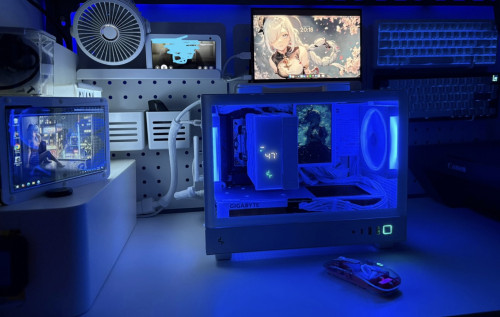
My dual monitor setup for desktop PC
My dual monitor setup for desktop PC
|
|
 May 27 2025, 06:45 PM May 27 2025, 06:45 PM
Show posts by this member only | IPv6 | Post
#81
|
 
Senior Member
3,965 posts Joined: Nov 2006 
|
Looking back at my desktop PC setup in 2021.
|
|
|
|
|
|
May 27 2025, 06:49 PM
Show posts by this member only | IPv6 | Post
#82
|
|
Senior Member
3,965 posts Joined: Nov 2006
|
QUOTE(6942nole @ May 27 2025, 06:41 PM) you need another monitor in potrait mode for optimum setup. no space for 3rd monitor.   |
|
|
May 27 2025, 08:20 PM
Show posts by this member only | IPv6 | Post
#83
|

Senior Member
1,924 posts Joined: May 2009 From: Yokohama, JP 
|
QUOTE(Quantum Geist @ May 27 2025, 06:49 PM) lol, fancy fan for desk use. previously I used it to cool my Mac mini..then sit in store room during the cold season..now going summer hot die, I repurposed it as desk fan  QUOTE(Randomization @ May 27 2025, 07:35 PM) But use Dell monitor Dell U and UP series not cheap yo  |
|
|
May 27 2025, 08:52 PM
|

Junior Member
223 posts Joined: Jun 2011 From: Hatfield. England 
|
QUOTE(Randomization @ May 27 2025, 06:35 PM) But use Dell monitor Shows how bad t10 buying power in klang valley |
|
|
May 27 2025, 08:55 PM
Show posts by this member only | IPv6 | Post
#85
|

All Stars
10,477 posts Joined: Jan 2003 From: Sarawak
|
QUOTE(PowerSlide @ May 27 2025, 11:46 AM) Dual monitor nice, once go dual cannot back to one hahaha my pc is 99% for gaming. my eyes can only concentrate on 1 display. |
|
|
May 27 2025, 08:56 PM
Show posts by this member only | IPv6 | Post
#86
|
|
All Stars
10,477 posts Joined: Jan 2003 From: Sarawak
|
QUOTE(piscesguy @ May 27 2025, 06:45 PM) Looking back at my desktop PC setup in 2021. no speaker now?  |
|
|
|
|
|
May 27 2025, 09:05 PM
Show posts by this member only | IPv6 | Post
#87
|

Senior Member
6,035 posts Joined: Jan 2003 From: Penang 
|
QUOTE(Skylinestar @ May 27 2025, 08:55 PM) my pc is 99% for gaming. my eyes can only concentrate on 1 display. game i play click once then can wait 20 to 30sec before click againgot time to watch movie lol |
|
|
May 27 2025, 09:08 PM
|

Senior Member
2,546 posts Joined: Jan 2005 From: far far away...
|
QUOTE(PowerSlide @ May 27 2025, 11:46 AM) Dual monitor nice, once go dual cannot back to one hahaha not when u use ultrawide 34 inchonce u go ultrawide u can never turn back |
|
|
May 27 2025, 09:16 PM
Show posts by this member only | IPv6 | Post
#89
|
|
Senior Member
6,035 posts Joined: Jan 2003 From: Penang
|
QUOTE(nelienuxe_sara @ May 27 2025, 09:08 PM) not when u use ultrawide 34 inch 207 already use ultrawide 34inch then add another 32 use side by side..face full of screens lolonce u go ultrawide u can never turn back |
|
|
May 27 2025, 10:52 PM
|
|
Senior Member
2,546 posts Joined: Jan 2005 From: far far away...
|
QUOTE(PowerSlide @ May 27 2025, 09:16 PM) 207 already use ultrawide 34inch then add another 32 use side by side..face full of screens lol 1 34 ultra wide or 49 cukup no need dual monitor unless u need the vertical to code bamkai liked this post
|
|
|
May 27 2025, 11:14 PM
|

Newbie
7 posts Joined: Oct 2018
|
Me: Can I get a dual-screen gaming setup?
Mom: No, we have one at home. At Home: 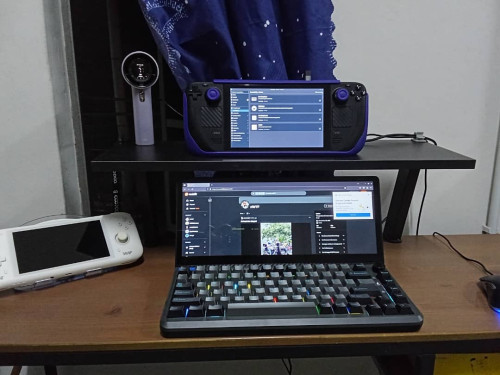 |
|
|
May 27 2025, 11:38 PM
|

Junior Member
107 posts Joined: Jul 2021
|
try triple screen bro. i cant live without triple screen now
|
|
|
May 28 2025, 06:34 AM
Show posts by this member only | IPv6 | Post
#93
|
|
Senior Member
3,965 posts Joined: Nov 2006
|
QUOTE(Skylinestar @ May 27 2025, 08:56 PM) no speaker now? speakers are behind the Dell monitor.  |
|
|
|
|
|
May 28 2025, 06:36 AM
Show posts by this member only | IPv6 | Post
#94
|
|
Senior Member
3,965 posts Joined: Nov 2006
|
QUOTE(accordvtec @ May 27 2025, 11:38 PM) try triple screen bro. i cant live without triple screen now show me your triple screen setup.  |
|
|
May 28 2025, 06:43 AM
Show posts by this member only | IPv6 | Post
#95
|
|
All Stars
10,477 posts Joined: Jan 2003 From: Sarawak
|
QUOTE(piscesguy @ May 28 2025, 06:34 AM) speakers are behind the Dell monitor. kesian |
|
|
May 28 2025, 11:45 AM
Show posts by this member only | IPv6 | Post
#96
|
 
Elite
2,725 posts Joined: Mar 2006
|
Here is my headless (no monitor) desktop setup in my store room.
Normally the mini monitors will be switched off. 2 pc there. Mini pc (hidden) function as a plex server. The other pc is for me to remote in and play games via a local cloud. » Click to show Spoiler - click again to hide... « |
|
|
May 28 2025, 12:46 PM
Show posts by this member only | IPv6 | Post
#97
|
|
Junior Member
107 posts Joined: Jul 2021
|
QUOTE(piscesguy @ May 28 2025, 06:36 AM) show me your triple screen setup. 
this my office. my home office also 3 screens. chaosneo liked this post
|
|
|
May 31 2025, 01:18 PM
Show posts by this member only | IPv6 | Post
#98
|
|
Senior Member
1,124 posts Joined: Oct 2004
|
how to display game in both screen ah?hackintosh in vmare okay ka
|
|
|
Jun 1 2025, 08:31 AM
Show posts by this member only | IPv6 | Post
#99
|
|
Senior Member
3,965 posts Joined: Nov 2006
|
QUOTE(chilskater @ May 31 2025, 01:18 PM) how to display game in both screen ah?hackintosh in vmare okay ka Yes, you **can display games on both monitors**, but how it's done depends on the game, your system setup, and what exactly you want to achieve. Here's a breakdown:--- ## 🎮 **Options for Displaying Games on Two Monitors** ### 1. **Extended Display (Spanning Game Across Two Monitors)** * **What it does:** The game stretches across both monitors, creating a wider field of view. * **How to do it:** * Go to **Display Settings** in Windows or macOS and set your monitors to **"Extend"**. * In games that support **ultrawide** or **multi-monitor setups** (e.g. *Flight Simulator*, *Project Cars*, *Civilization*, etc.), choose a **resolution that spans both monitors** (e.g. 3840x1080 for two 1080p screens). * Use tools like: * **NVIDIA Surround** (for NVIDIA GPUs) * **AMD Eyefinity** (for AMD GPUs) * **Note:** Be aware that this can cause distortion where the monitors meet, especially if the bezels are thick. --- ### 2. **Primary Game on One Monitor + Secondary App on Second Monitor** * **What it does:** You play the game on one monitor and use the second for something else (e.g. Discord, browser, OBS, maps). * **How to do it:** * Set your game to run in **borderless windowed mode** (or windowed). * Drag other apps to the second screen. * Your mouse can move between screens more easily in borderless mode. --- ### 3. **Custom Dual-Monitor Support in Some Games** * Some simulation or strategy games have **built-in support** for dual monitors (e.g. cockpit view on one screen, map on another). * Check the game's settings or mods community. --- ## 🛠️ Requirements * Two monitors with similar resolution for best results. * A powerful enough GPU to handle the larger combined resolution. * Proper GPU software installed (NVIDIA/AMD control panel). --- ## ❗Caveats * Not all games support ultra-wide or dual monitors. * Some games may stretch unnaturally or have UI issues. * Bezels can break immersion unless you have bezel-free kits or very thin borders. |
|
|
Jun 1 2025, 02:41 PM
|

Junior Member
847 posts Joined: Nov 2010
|
why got power brick...?
|
| Change to: |  0.0205sec 0.0205sec
 0.91 0.91
 6 queries 6 queries
 GZIP Disabled GZIP Disabled
Time is now: 17th December 2025 - 09:07 AM |
 Quote
Quote