



Official TM UniFi High Speed Broadband Thread V43, READ 1ST PAGE FOR RELEVANT WIFI INFO!
|
|
 Jun 30 2025, 10:11 PM Jun 30 2025, 10:11 PM
Return to original view | Post
#1
|
 
Senior Member
779 posts Joined: Oct 2004 From: OUG  
|
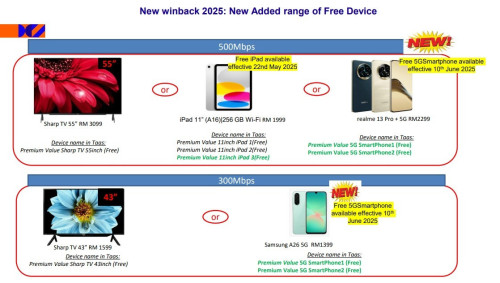
Has anyone heard of "Unifi Home 500Mbps Premium Value 6.0 (FreeDevice)(36M) RM149" plan? Someone called me and offered me this if Im willing to move from Maxis Fibre. Is this legit, I feel a little worried now because provided my IC and Maxis Fibre bill. The technician suppose to come today but nothing, tried to contact the person again but no answer but this was already after working hours. Have I been scammed?
|
|
|
|
|
|
Jun 30 2025, 11:25 PM
Return to original view | Post
#2
|
|
Senior Member
779 posts Joined: Oct 2004 From: OUG
|
QUOTE(hsbb @ Jun 30 2025, 11:06 PM) I was promised sharp 55in tv but retain same monthly sub as maxis which is rm157 with taxes. Hope i wasnt scammed. |
|
|
Jul 1 2025, 12:03 PM
Return to original view | Post
#3
|
|
Senior Member
779 posts Joined: Oct 2004 From: OUG
|
QUOTE(tng55 @ Jul 1 2025, 01:36 AM) why you did give IC agent online its not safety i think you scammed he can steal you IC Yeah, in hindsight, that was a dumb move from me. if you go center like TM Point or maxis center maxis = maxis center unifi = tm point and unifi store that is safety if you deal online agent saw facebook and contact whatsapp and give details and sending photo IC = you chance get to risk   |
|
|
Sep 13 2025, 11:16 PM
Return to original view | IPv6 | Post
#4
|
|
Senior Member
779 posts Joined: Oct 2004 From: OUG
|
Anyone else facing constant buffering on Disney Hotstar? Already few days still same. Restart router also same.
|
|
|
Oct 1 2025, 12:19 AM
Return to original view | IPv6 | Post
#5
|
|
Senior Member
779 posts Joined: Oct 2004 From: OUG
|
QUOTE(Cendol_Pulut90 @ Sep 29 2025, 07:51 PM) In my case the culprit actually 5Ghz wifi, all of sudden no internet but all devices connected to 2.4Ghz no issue at all. I really regret moving from Maxis to Unifi. Internet so unstable, sometimes pages load and sometimes dont. I usually turn on Cloudfare Warp to solve this issue but even then still got this issue at times. My sister also complain she cant WFH anymore because cant connect to her office VPN and her IT department said this problem can only be fixed by Unifi but they buat bodoh so far. Aiyo, macam2 laaa. My solution : login to skyworth go to Network > Wan and copy the PPPoe username password. Done copy, in same page, change the Router mode to Bridge mode, then save. Next switch on old fiberhome router and login. Go to Network> Wan, insert the user and pass, then save, reboot. Then connect the cable in Lan 1 Skyworth to Wan port router fiberhome. wait 2 - 4 min and the connection should be up like old setup. Also this Skyworth combo device really sucks, ever since change from my Tp-link AX55, all my IOT devices offline and online. I separated the 2.4 and 5ghz network yet still so unstable. Never had such issues before. Also past few days I notice my pc keeps getting only 100mbps instead of the full 1gbps. I have restart both my pc and the Skyworth to get back 1gbps. I plan to reuse my previous router. Does this method also works for Tp-link AX55 router? This post has been edited by darkcurves: Oct 1 2025, 12:22 AM |
| Change to: |  0.0184sec 0.0184sec
 0.31 0.31
 7 queries 7 queries
 GZIP Disabled GZIP Disabled
Time is now: 8th December 2025 - 12:35 AM |
 Quote
Quote