Outline ·
[ Standard ] ·
Linear+
Official TM UniFi High Speed Broadband Thread V43, READ 1ST PAGE FOR RELEVANT WIFI INFO!
|
MarcoFromTropoja
|
 Apr 28 2025, 12:46 PM Apr 28 2025, 12:46 PM
|
Getting Started


|
QUOTE(jiaen0509 @ Apr 26 2025, 08:41 AM) Right now, my D-Link DPN-FX3060V (set to bridge mode) is getting capped at 200/50 Mbps after a few days or about a week of use. I’ve looked through the history threads and found someone shared the firmware, versions v2.0.3 and v2.0.6. Which version is more stable for bridge mode? Also, is it safe to update the firmware ourselves? I’m concerned that the update might cause issues like losing network access, or if it might require a technician to reconfigure settings on their end. Can I know is either version can solve the drop speed issue? 2.0.3 already fixed the intermittent & speed capped when using bridge mode 2.0.6 same like 2.0.3 and fix wifi 2.4/5.0 unstable speed so just use the 2.0.6 as for now |
|
|
|
|
|
MarcoFromTropoja
|
May 1 2025, 10:02 PM
|
Getting Started
|
QUOTE(go626201 @ May 1 2025, 09:20 PM) WTF?  If 100M-1G plan all going to CGNAT confirm have congestion issue... I don't think the gateway can cope with it. sorry newb question how to know whether my ip is public or private cgnat |
|
|
|
|
|
MarcoFromTropoja
|
May 1 2025, 10:58 PM
|
Getting Started
|
QUOTE(SilentVampire @ May 1 2025, 10:49 PM) First, check your WAN IP address as seen on the Internet on ipchicken.com. Then, log into your router and check your WAN IP address as displayed in the router settings page, if it matches with the WAN IP address above, all good. If it is 100.x.x.x, then you’re CGNAT-ed. thanks a lot its the same at ipchicken.com & router vlan500 ppoe ip address |
|
|
|
|
|
MarcoFromTropoja
|
May 1 2025, 11:05 PM
|
Getting Started
|
QUOTE(Quantum Geist @ May 1 2025, 09:05 PM) getting 300 KB/s for my 800Mbps connection, guessing routing to singapore somehow?  malaysia & singapore download server jammed i change it to Japan-Tokyo getting full speed download |
|
|
|
|
|
MarcoFromTropoja
|
Aug 4 2025, 05:46 PM
|
Getting Started
|
Guys
Does anyone use ViewQwest ISP & How Was It Compare To Unifi ?
Just got a call from their representative offering RM159 for 1gbps and 6month free, 3 years contract
They just covered my area In Taman Ehsan, Kepong
|
|
|
|
|
|
MarcoFromTropoja
|
Aug 4 2025, 06:55 PM
|
Getting Started
|
QUOTE(blacktubi @ Aug 4 2025, 06:15 PM) Support is poor, it takes a very long time for restoration if there's a service fault But, their International routing is pretty good as almost everything international is routed through their SG gateway poor support...thats what i heard past 3 years when they 1st launch their 1gbps package still bad support now in 2025 ? interms of speed and stability, on par or better or worst than unifi ? |
|
|
|
|
|
MarcoFromTropoja
|
Aug 4 2025, 10:56 PM
|
Getting Started
|
QUOTE(kwss @ Aug 4 2025, 08:07 PM) No answer for you but just curious. Are you on landed or high rise? At your exact location, do they use someone else infra (from who) or own infra? If using someone else infra, do they use L2 or L3 services? landed terrace house not sure on infra just got whatsapp offering and when i check coverage at their website, its covered |
|
|
|
|
|
MarcoFromTropoja
|
Oct 6 2025, 06:29 PM
|
Getting Started
|
QUOTE(kokomon @ Oct 6 2025, 05:00 PM) Is this the temporary upgrade to 1Gbps for 24 months and after that back to 500Mbps yes exactly, but its worth it |
|
|
|
|
|
MarcoFromTropoja
|
Oct 6 2025, 06:32 PM
|
Getting Started
|
QUOTE(swanlover @ Sep 24 2025, 02:58 PM) Just got the 1Gbps at rm159 and 6 months waiver . Dem fast. (This deal not advertised) Unfortunately even for my great router (and many expensive router) only can reach wifi 920 speed at best . I think ok la Old unifi customer ought to check it out, totally pricing unmatched by anything in the market now just get the new GPON : https://www.dlink.com.my/product/ax3000-gpo...with-2-5g-voip/around 260+ only u need the 2.5gbe port to unlock the remaining speed This post has been edited by MarcoFromTropoja: Oct 6 2025, 06:33 PM |
|
|
|
|
|
MarcoFromTropoja
|
Oct 7 2025, 12:00 AM
|
Getting Started
|
QUOTE(tng55 @ Oct 6 2025, 10:56 PM) wont work GPON need OMCI AND PLOM PASSWORD AND SERIAL NUMBER AND MAC ADDRESS cannot due need OMCI AND PLOM PASSWORD AND Serial number and Mac address for TM didnt use this model yet.. currently using the same model TM provide... i just saw this product at DLINK website as it stated Exclusive for Unifi user |
|
|
|
|
|
MarcoFromTropoja
|
Oct 7 2025, 11:16 AM
|
Getting Started
|
QUOTE(Neptern @ Oct 7 2025, 07:16 AM) You can only use the gpon provided by TM. My old white gpon broke, luckily they gave me a spare which i replaced. Wonder if i can get another free one from them, in case it breaks again. wondering why stated Exclusive For Unifi at the Dlink Product |
|
|
|
|
|
MarcoFromTropoja
|
Oct 7 2025, 01:07 PM
|
Getting Started
|
QUOTE(Neptern @ Oct 7 2025, 12:19 PM) A cheapo version for TM. Too bad we cannot use our own gpon freely. i guess the 1 u refer is those dlink low spec provided by TM for customer the 1 i mention is this : https://www.dlink.com.my/product/ax3000-gpo...with-2-5g-voip/This post has been edited by MarcoFromTropoja: Oct 7 2025, 01:08 PM |
|
|
|
|
|
MarcoFromTropoja
|
Oct 7 2025, 05:04 PM
|
Getting Started
|
QUOTE(Neptern @ Oct 7 2025, 04:35 PM) This was the 2.5g gpon provided by TM. They just stick their sticker onto it. if like that should be no problem dlink has clarify just need the ploam password and i just contact TM elite team tech that always entertain my cases, he said can use, just copy back all the details for gpon & voip worst case if serial & mac bind, he can help change 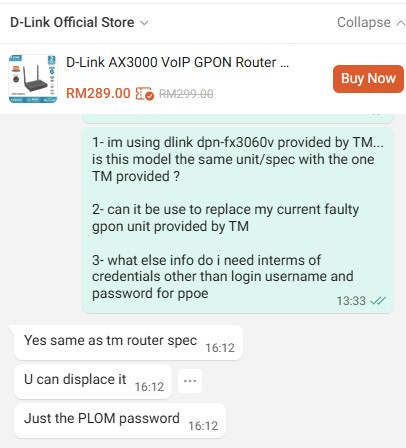 |
|
|
|
|
|
MarcoFromTropoja
|
Oct 7 2025, 06:16 PM
|
Getting Started
|
QUOTE(blacktubi @ Oct 7 2025, 05:12 PM) Why would you want to use this product? Plenty of forumers already reported that they face speed and stability issues with this That's why even TM discontinued and replaced this with the Skyworth GN630 black with 2.5G port been using this model for a year after free upgrade last year sept household of 6pax and full speed 1gbps all the time except during night prime time which everyone faced those laggy problem never have any issue with it ( disconnect intermittent etc ) longest uptime is 49days ( before blackout ) otherwise there wont be any issue somemore this the easiest and cheapest for a 2.5gbe support for me to setup (as a non tech guy ) 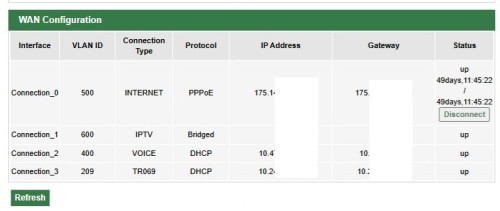 This post has been edited by MarcoFromTropoja: Oct 7 2025, 06:17 PM This post has been edited by MarcoFromTropoja: Oct 7 2025, 06:17 PM |
|
|
|
|



 Quote
Quote
 0.0234sec
 0.57
0.57
 7 queries
 GZIP Disabled