Welcome Guest ( Log In | Register )

250 Pages « < 185 186 187 188 189 > » Bottom

Outline · [ Standard ] · Linear+

 Official TM UniFi High Speed Broadband Thread V43, READ 1ST PAGE FOR RELEVANT WIFI INFO!

views
     
YoungMan
post Sep 26 2025, 09:38 PM

Look at all my stars!!
*******
Senior Member
6,804 posts

Joined: Oct 2008
From: Kuala Lumpur


QUOTE(RallyNight @ Sep 26 2025, 05:34 PM)
Sekian, i done installation the technician tell me check the speed after 2hrs, i check mah plan still 300mbps PRO but no swu plan changed mentioned. Speed vary, some stuck at 350 some at 500 depend equipment
*
You have to test using lan cable. If can reach 500mbps then it's the wifi problem and limitation of your device.
RallyNight
post Sep 26 2025, 10:00 PM

Regular
******
Senior Member
1,129 posts

Joined: Nov 2015
QUOTE(YoungMan @ Sep 26 2025, 10:38 PM)
You have to test using lan cable. If can reach 500mbps then it's the wifi problem and limitation of your device.
*
Test with my pc wifi 560-600, iphone 560, the rest of my household android phones all maxout at 350 🤣, pull out my pcable turnout to be a cat4 cable
blacktubi
post Sep 26 2025, 11:08 PM

-
Group Icon
Elite
8,413 posts

Joined: Jul 2008

QUOTE(ttmm2016 @ Sep 26 2025, 09:18 PM)
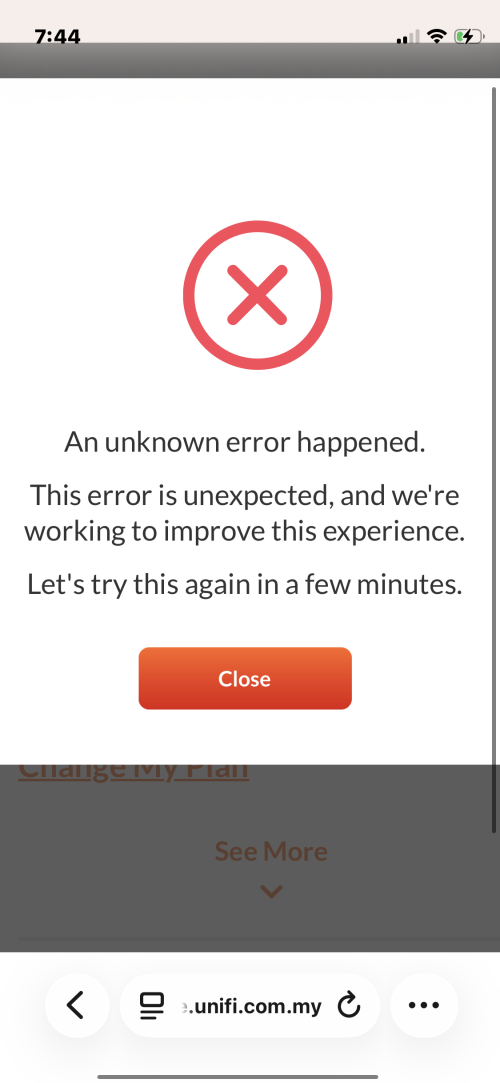
Hi guys, I have a question for the self portal. I was trying to terminate using self portal and it always comes out with this, it’s been a day and still the same, anyone experienced the same?

user posted image
*
Either call customer service or visit service center

TM's website is quite buggy
enixcv123
post Sep 26 2025, 11:20 PM

On my way
****
Junior Member
576 posts

Joined: Jul 2012
Just some sharing here.
For those who looking for swu5.0 RM90 deal, Instead of performing termination request, just submit a feedback within the myunifi app ->get in touch-> share feedback stating u have received other telcos offer for the same price etc and ask for someone to contact you from telemarketing team (provided your contract going to be end), then sit tight and wait for a few days for someone to call you back and offer you with the swu package.

I did that and it works.
BenYeeHua
post Sep 26 2025, 11:45 PM

Regular
******
Senior Member
1,873 posts

Joined: Nov 2010


Wow, so much hang now...
CODE
traceroute to 8.8.8.8, 30 hops max, 52 bytes payload, ICMP mode
1   *
2   100.89.191.254  *                         RFC6598
                                             45.65 ms / 13.11 ms / 63.61 ms
3   10.233.97.55    *                         RFC1918
                                             64.12 ms / 14.12 ms / 43.56 ms
4   *
5   72.14.197.66    AS15169                   马来西亚 吉隆坡联邦直辖区 吉隆坡  about.google
                                             125.34 ms / 85.59 ms / 101.06 ms
6   192.178.98.147  AS15169                   马来西亚 吉隆坡联邦直辖区 吉隆坡  about.google
                                             431.11 ms / 444.40 ms / 509.19 ms
7   142.251.224.21  AS15169  [GOOGLE]         马来西亚 吉隆坡联邦直辖区 吉隆坡  about.google
                                             101.62 ms / 167.75 ms / 165.82 ms
8   8.8.8.8         AS15169                   GOOGLE.COM    about.google
   dns.google                                171.50 ms / 147.57 ms / 146.01 ms

Welcome to the country where 8.8.8.8 can get bottleneak lol. laugh.gif

Including other links to SG, HK etc.
But funny, speedtest to fast and digi malaysia are fine, both <15ms, guess they are high priority connection. brows.gif
---
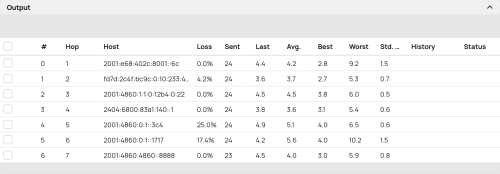
While IPv4 lagging, v6 fine, lol.
CODE
traceroute to 2001:4860:4860::8888, 30 hops max, 52 bytes payload, ICMP mode
1   *
2   [REMOVED]    AS4788   马来西亚  双文丹  tm.com.my
                                      7.62 ms / 7.02 ms / 9.06 ms
3   fd7d:2c4f:bc9c:0:10:233:44:25 *        RFC4193
                                      23.76 ms / 9.73 ms / 10.52 ms
4   2001:4860:1:1:0:12b4:0:22 AS15169  GOOGLE.COM GOOGLE.COM   about.google
                                      10.24 ms / 10.11 ms / 8.40 ms
5   2404:6800:83a1:40::1      AS15169  GOOGLE.COM GOOGLE.COM   about.google
                                      10.50 ms / 11.03 ms / 10.11 ms
6   2001:4860:4860::8888      AS15169  GOOGLE.COM GOOGLE.COM   about.google
   dns.google                         12.22 ms / 10.50 ms / 10.60 ms


This post has been edited by BenYeeHua: Sep 26 2025, 11:50 PM
kwss
post Sep 27 2025, 12:10 AM

Regular
******
Senior Member
1,208 posts

Joined: Aug 2018
Ok je...
user posted image

EDIT: Add IPv6
user posted image

This post has been edited by kwss: Sep 27 2025, 12:13 AM
sam240
post Sep 27 2025, 01:00 AM

Look at all my stars!!
*******
Senior Member
3,657 posts

Joined: Jan 2003


» Click to show Spoiler - click again to hide... «

If no good for 8.8.8.8, is meaning we should set to other DNS ?

This post has been edited by sam240: Sep 27 2025, 01:02 AM
BenYeeHua
post Sep 27 2025, 09:11 AM

Regular
******
Senior Member
1,873 posts

Joined: Nov 2010


QUOTE(sam240 @ Sep 27 2025, 01:00 AM)
» Click to show Spoiler - click again to hide... «

If no good for 8.8.8.8, is meaning we should set to other DNS ?
*
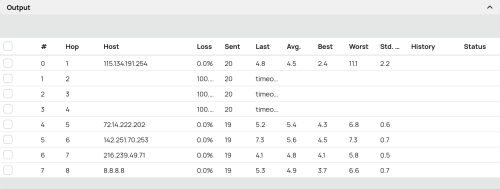
Not DNS issues, it is the IPv4 for my area bursted.
You can see the bottleneck is route #2 which is 100.89.191.254.

QUOTE(kwss @ Sep 27 2025, 12:10 AM)
Ok je...
user posted image

EDIT: Add IPv6
user posted image
*
Ya, yesterday night strange, only v4 bursted, v6 running like nothing happen, might be something happen at the CGNAT.

---
For DNS, it still depend.
Like Steam, using Google DNS bring me to server without throttled by TM, while 1.1.1.1 doing the reverse.

But, Google DNS kick me to HK IPv6 Aliyun, while 1.1.1.1 bring me to Malaysia IPv4 Aliyun(by not return any IPv6 address).
A lot of times Google DNS doing this, a far far away IPv6 server, so...

It is still kind of depend, like yesterday night, sure kick me to IPv6 solved the network issues. laugh.gif

This post has been edited by BenYeeHua: Sep 27 2025, 09:18 AM

QuantumEdge
post Sep 27 2025, 09:26 AM

Regular
******
Senior Member
1,597 posts

Joined: Jan 2016


QUOTE(BenYeeHua @ Sep 27 2025, 09:11 AM)
Not DNS issues, it is the IPv4 for my area bursted.
You can see the bottleneck is route #2 which is 100.89.191.254.
Ya, yesterday night strange, only v4 bursted, v6 running like nothing happen, might be something happen at the CGNAT.

---
For DNS, it still depend.
Like Steam, using Google DNS bring me to server without throttled by TM, while 1.1.1.1 doing the reverse.

But, Google DNS kick me to HK IPv6 Aliyun, while 1.1.1.1 bring me to Malaysia IPv4 Aliyun(by not return any IPv6 address).
A lot of times Google DNS doing this, a far far away IPv6 server, so...

It is still kind of depend, like yesterday night, sure kick me to IPv6 solved the network issues. laugh.gif
*
My side is different
Ipv6 severely throttles my speed in the night with 30-40% PL
The moment I switched to ipv4, full speed zero PL with normal ping(14ms...still horrible tbh)
Gave up trying to resolve this issue, going to rent a VPS
3nf0rc3r
post Sep 27 2025, 10:11 AM

Getting Started
**
Junior Member
209 posts

Joined: Aug 2014


QUOTE(apalexar @ Sep 11 2025, 06:35 PM)
Actually no need to do the termination step, I just live chat with Unifi ytd and request for marketing agent call for plan upgrade offer, today received call already.
*
I tried live chat, stuck with MAYA bot. So I ended the chat and write request for marketing agent call at the comment/rating of chat in the end.

How did you get live chat to note down your request for marketing agent?

Nevermind found the method using unify phone app.

This post has been edited by 3nf0rc3r: Sep 27 2025, 01:12 PM
kokomon
post Sep 27 2025, 11:19 AM

Getting Started
**
Junior Member
168 posts

Joined: Jan 2005
QUOTE(enixcv123 @ Sep 26 2025, 11:20 PM)
Just some sharing here.
For those who looking for swu5.0 RM90 deal, Instead of performing termination request, just submit a feedback within the myunifi app ->get in touch-> share feedback stating u have received other telcos offer for the same price etc and ask for someone to contact you from telemarketing team (provided your contract going to be end), then sit tight and wait for a few days for someone to call you back and offer you with the swu package.

I did that and it works.
*
I have just followed your example. Let's see if i get the SWU offer via phone.
BenYeeHua
post Sep 27 2025, 11:31 AM

Regular
******
Senior Member
1,873 posts

Joined: Nov 2010


QUOTE(QuantumEdge @ Sep 27 2025, 09:26 AM)
My side is different
Ipv6 severely throttles my speed in the night with 30-40% PL
The moment I switched to ipv4, full speed zero PL with normal ping(14ms...still horrible tbh)
Gave up trying to resolve this issue, going to rent a VPS
*
packet loss are same on my side, but yesterday night was, you wanna 90% packet loss at IPv4, or 30-40% packet loss at IPv6, bad or worst only 2 choice. doh.gif
cyberic
post Sep 27 2025, 11:58 AM

Regular
******
Senior Member
1,130 posts

Joined: Jan 2003


QUOTE(BenYeeHua @ Sep 27 2025, 11:31 AM)
packet loss are same on my side, but yesterday night was, you wanna 90% packet loss at IPv4, or 30-40% packet loss at IPv6, bad or worst only 2 choice. doh.gif
*
We only have the choose the lesser evil options. 😑
kwss
post Sep 27 2025, 12:51 PM

Regular
******
Senior Member
1,208 posts

Joined: Aug 2018
QUOTE(BenYeeHua @ Sep 27 2025, 11:31 AM)
packet loss are same on my side, but yesterday night was, you wanna 90% packet loss at IPv4, or 30-40% packet loss at IPv6, bad or worst only 2 choice. doh.gif
*
Can post your aliyun domain? It's a known issue with Aliyun DNS actually but just want to check it out myself. If the domain NS server is using Aliyun very high chance it's this problem.

IPv4 depends on your luck. TM use BGP AS pre-pending to load balance IPv4 prefix over different circuit. IPv6 don't have this issue.

So if your public / post-CGNAT IPv4 got load balanced to a congested path, you will have endless problem.

In a sense Maxis don't have this problem because they never do any of the prepending hack.
kwss
post Sep 27 2025, 12:56 PM

Regular
******
Senior Member
1,208 posts

Joined: Aug 2018
QUOTE(QuantumEdge @ Sep 27 2025, 09:26 AM)
My side is different
Ipv6 severely throttles my speed in the night with 30-40% PL
The moment I switched to ipv4, full speed zero PL with normal ping(14ms...still horrible tbh)
Gave up trying to resolve this issue, going to rent a VPS
*
Gonna come in handy when Fakmi is trying to make all social media companies use MyDigital ID for Malaysian.

In the future maybe all IP address from Malaysia will require this while other country's IP don't.
ahlong0180
post Sep 27 2025, 01:08 PM

Casual
***
Junior Member
305 posts

Joined: Aug 2019


QUOTE(enixcv123 @ Sep 26 2025, 11:20 PM)
Just some sharing here.
For those who looking for swu5.0 RM90 deal, Instead of performing termination request, just submit a feedback within the myunifi app ->get in touch-> share feedback stating u have received other telcos offer for the same price etc and ask for someone to contact you from telemarketing team (provided your contract going to be end), then sit tight and wait for a few days for someone to call you back and offer you with the swu package.

I did that and it works.
*
Just done submit feedback.
Did termination request 23 days ago but still no calls for offer yet.
3nf0rc3r
post Sep 27 2025, 01:19 PM

Getting Started
**
Junior Member
209 posts

Joined: Aug 2014


Currently still using TP-link C1200, originally turbo upgrade to 300mbps for free with hyptv. But after 24 month they revised to higher price, refused to let me stay at cheaper price so I downgraded to 100mbps without hyptv.

Now I wonder if they offer SWU 500mbps will they provide new router.

Also Disney hotstar is just an account or do they provide TV box as well?
3nf0rc3r
post Sep 27 2025, 01:21 PM

Getting Started
**
Junior Member
209 posts

Joined: Aug 2014


QUOTE(ahlong0180 @ Sep 27 2025, 01:08 PM)
Just done submit feedback.
Did termination request 23 days ago but still no calls for offer yet.
*
Just did submitted feedback as well through app. But a bit sot sot, end up the app submitted 3 times I think cause received confirmation email from noreply@tm.com.my 3 times.
QuantumEdge
post Sep 27 2025, 01:30 PM

Regular
******
Senior Member
1,597 posts

Joined: Jan 2016


QUOTE(BenYeeHua @ Sep 27 2025, 11:31 AM)
packet loss are same on my side, but yesterday night was, you wanna 90% packet loss at IPv4, or 30-40% packet loss at IPv6, bad or worst only 2 choice. doh.gif
*
QUOTE(kwss @ Sep 27 2025, 12:56 PM)
Gonna come in handy when Fakmi is trying to make all social media companies use MyDigital ID for Malaysian.

In the future maybe all IP address from Malaysia will require this while other country's IP don't.
*
user posted image

user posted image
heLL_bOy
post Sep 27 2025, 04:18 PM

Regular
******
Senior Member
1,350 posts

Joined: Nov 2004
From: HEAVEN & HELL


QUOTE(BenYeeHua @ Sep 27 2025, 09:11 AM)

But, Google DNS kick me to HK IPv6 Aliyun, while 1.1.1.1 bring me to Malaysia IPv4 Aliyun(by not return any IPv6 address).
A lot of times Google DNS doing this, a far far away IPv6 server, so...

It is still kind of depend, like yesterday night, sure kick me to IPv6 solved the network issues. laugh.gif
*
Alicloud MY/SG/HK is running TM PNI shouldn't be a problem, only certain time there is a spike.

I am not sure about v6, whether is PNI or not.

250 Pages « < 185 186 187 188 189 > » Top
 

Change to:
| Lo-Fi Version
0.0168sec    0.64    6 queries    GZIP Disabled
Time is now: 9th December 2025 - 05:23 PM