Welcome Guest ( Log In | Register )

Outline · [ Standard ] · Linear+

 Official TM UniFi High Speed Broadband Thread V43, READ 1ST PAGE FOR RELEVANT WIFI INFO!

views
     
xproc
post Jul 18 2025, 12:13 AM

free for all
*******
Senior Member
4,470 posts

Joined: Sep 2007
From: Kuala Lumpur


QUOTE(kwss @ Jul 18 2025, 12:10 AM)
There's no monthly licensing fee for Cisco. You either pay for DNA, SWSS, smartnet, and some other support option.
It sounds like you are paying for MSP instead of dealing directly with Cisco.

A lesser known thing about Cisco is this:
You don't need to pay them a cent to get security update. Call TAC and quote PSIRT. They will hand you a new version of IOS XE.

So sounds like someone is milking you.
*
someone need to pay their salary.. anyway we r their subsidiary so in the end is same....
xproc
post Jul 21 2025, 09:10 PM

free for all
*******
Senior Member
4,470 posts

Joined: Sep 2007
From: Kuala Lumpur


my fixed ip not yet solve even the tm technician come and acknowledge the issue

current progress


Attached thumbnail(s)
Attached Image
xproc
post Jul 22 2025, 11:49 AM

free for all
*******
Senior Member
4,470 posts

Joined: Sep 2007
From: Kuala Lumpur


QUOTE(tng55 @ Jul 21 2025, 09:46 PM)
wow CISCO Switch all port are 1GBPS right

do you have POE Switch for AP WIFI
*
the 24p is poe switch...
xproc
post Jul 22 2025, 12:05 PM

free for all
*******
Senior Member
4,470 posts

Joined: Sep 2007
From: Kuala Lumpur


QUOTE(kwss @ Jul 21 2025, 11:45 PM)
You gotta excuse me but I kind of lean towards skill issue on this one.
You cannot assign static IP directly on PPPoE interface. This is an issue specific to Malaysia telco for their insistence of using PPPoE.

To workaround it, the telco will add a route in their BNG to forward your static IP subnet to you. It is a very ugly hack.

On your side, you just need to dnat and snat the IP address and it should work.
I am not sure about Meraki but on Cisco you can assign it directly on your loopback interface if this is what you want.

Frankly I am not even sure if the Skyworth can do it. Maybe you post the instruction or the steps here?

Can you also give me a description on your invoice on what is the 30Mbps service for RM899?

Now come to the final horrible part. Did your Vietnam IT guy actually flew over? If he did and you got billed for it, ask for your money back!
In Meraki, everything is cloud managed and you do not need static IP at all. You don't even need public IP and it will still work.
He could have just setup everything and leave whatever services that requires the static IP to be configured later via the Meraki dashboard from Vietnam.
But in your picture, nothing is connected.
*
becoz my old router can set this... the technician come see and troubleshoot also cannot do it, he bring his own router also canot configure it i think its not solely the skyworth problem, maybe they need to route it as what you say..... maybe later when vietnam come he can set the mx67 and dial from there...

meanwhile the 2nd skyworth already connect to ux7 using bridge mode... wifi speed from 1300mbps drop to 500mbps, maybe not yet configure ux7 properly...later when the workstation finish assemble and people start moving in... i will add 2 more old ap (ubiquiti) along with 2 cisco ap (workstation)...

the rm899 is old biz 20 plan (10- 20 years ago) + 5 fixed ip + phone line is about 1k plus per month....

he come setup the meraki and decom my previous checkpoint that need to change ip and notify my france hq etc... previously i also push for cloud and remote configuration with my local IT sub help but rejected by HK it guy due to security 'con'-cern...

nothing is connected yet because the workstation still assembling and the 0.2m patch chord not yet bring by the contractor....

xproc
post Jul 22 2025, 12:25 PM

free for all
*******
Senior Member
4,470 posts

Joined: Sep 2007
From: Kuala Lumpur


QUOTE(tng55 @ Jul 22 2025, 12:23 PM)
24p is POE switch are 2.5GBPS OR 1GBPS what brand
*
ms130-24p

i later have 2 nos 48 port hpe 1000mbps poe switch... i think is old model but 10 years ago it is very expensive also....

Got it — that’s the *HP A3600-48-PoE+ v2 EI Switch (JG302B)*.

*Key specs:*
- *48 x 10/100/1000 Mbps Ethernet ports* (Gigabit, PoE+ supported)
- *4 dual-personality ports* (RJ45 or SFP)
- *All ports support up to 1 Gbps*
- *Managed Layer 3 switch* with CLI and web interface

Let me know if you need default IP, login method, or how to reset it.

This post has been edited by xproc: Jul 22 2025, 12:35 PM
xproc
post Jul 22 2025, 01:21 PM

free for all
*******
Senior Member
4,470 posts

Joined: Sep 2007
From: Kuala Lumpur


QUOTE(tng55 @ Jul 22 2025, 12:30 PM)
old router can be set Static IP right
confirmed 100% skyworth not suitable Static IP hmm
batter you report request UNIFI ELITE technician Come
i know UNIFI ELITE Team is technician Pro person
*
yes is skyworry problem, change to dlink no issue, what a joke router

they say they new using this router, use me to test their water

This post has been edited by xproc: Jul 22 2025, 01:22 PM


Attached thumbnail(s)
Attached Image
xproc
post Jul 22 2025, 02:57 PM

free for all
*******
Senior Member
4,470 posts

Joined: Sep 2007
From: Kuala Lumpur


QUOTE(tng55 @ Jul 22 2025, 02:42 PM)
i see DLINK Black Color Static IP works ???
then have you try set 5 IP Static ??? for Dlink
if works mean you may request TM 2x Dlink Black
*
he take the skyworth back to investigate... temporary i use his test unit dlink... he say dlink also stock limited and all unifi biz use dlink so far no complain....

he say my site is the first site use this skyworth and encounter this problem maybe...

the technician keep troubleshoot with another technician at backend...
xproc
post Jul 22 2025, 03:01 PM

free for all
*******
Senior Member
4,470 posts

Joined: Sep 2007
From: Kuala Lumpur


QUOTE(kwss @ Jul 22 2025, 02:43 PM)
But Meraki is 100% cloud. There is no on-prem for Meraki at all.

Login to all your ONR, set them to bridge mode and disable the WiFi to reduce interference.

Login to your Unifi Express and scan for the quietest channel. Verify if it's running 80 or 160 or 320 MHz.

But I personally don't have good experience with Ubiquiti product. They have a lot of compatibility issues / bugssss and took almost 2 years to solve them.
Never heard of them before but I'm surprised they have a product with 170Gbps firewall performance. Let's assume that's 1500 byte packet, you still have 56Gbps for 512 byte packet.
*
i only connect it to 2 more old ubi ap later then only configure it..
xproc
post Jul 26 2025, 11:25 AM

free for all
*******
Senior Member
4,470 posts

Joined: Sep 2007
From: Kuala Lumpur


QUOTE(night killer @ Jul 25 2025, 12:07 PM)
do anyone know how to set the wifi model SK-G7220?? i set all the wifi but device not able to connect.... still not sure which part is not right...
*
u can ask the technician to send u the manual
xproc
post Jul 26 2025, 12:19 PM

free for all
*******
Senior Member
4,470 posts

Joined: Sep 2007
From: Kuala Lumpur


hp cpu can keep for another 20 years or not?

This post has been edited by xproc: Jul 26 2025, 12:20 PM


Attached thumbnail(s)
Attached Image
xproc
post Jul 27 2025, 03:47 PM

free for all
*******
Senior Member
4,470 posts

Joined: Sep 2007
From: Kuala Lumpur


QUOTE(tng55 @ Jul 26 2025, 09:42 PM)
isee Dlink router his tm technical own right
you did request 2x Dlink router to settle replacement new set you own
*
no issue for dynamic ip... only fixed ip got issue... maybe i ask again next week what update...
xproc
post Aug 7 2025, 03:50 PM

free for all
*******
Senior Member
4,470 posts

Joined: Sep 2007
From: Kuala Lumpur


QUOTE(kwss @ Jul 28 2025, 10:42 PM)
Well if you are not a fan of low level network configuration, maybe give Ubiquiti Unifi Express 7 a try?
It is 2x the price of Mikrotik ax2 but you do get 2.5Gbps and WiFi 7. Their UI is kind of like Apple which is very user friendly.
Dimension wise they are quite similar. You can consider it if you never intent to use any wired LAN port.

Can xproc give a review?
*
ux7 maybe good for home use since contain all in one but the wifi not really that strong without ap, but if u add the ap then need add another switch for it... i think if let me choose again i will maybe buy the dm... anyway i start to feel the interface sometimes is buggy...

previously i use the unmanaged linksys switch now get the ubi switch also

This post has been edited by xproc: Aug 7 2025, 03:52 PM


Attached thumbnail(s)
Attached Image
xproc
post Aug 7 2025, 05:52 PM

free for all
*******
Senior Member
4,470 posts

Joined: Sep 2007
From: Kuala Lumpur


use ux7 cannot get the max speed i dont know why...


Attached thumbnail(s)
Attached Image

Attached image(s)
Attached Image
xproc
post Aug 7 2025, 07:08 PM

free for all
*******
Senior Member
4,470 posts

Joined: Sep 2007
From: Kuala Lumpur


QUOTE(yenchenje @ Aug 7 2025, 07:00 PM)
Turn off IDS/IPS, it severely hampers performance.

It even slows me down on my UDM SE. The tiny UX7 definitely needs all the headroom it can get to hit 2Gbps

Also are you using bridge on D-Link/Skyworth ONR? Your speed is definitely faster than my 2Gbps
*
yes bridge mode skyworth

another line is dialing on dlink for fixed ip that connect to mx67 (not dialing), this one we get 300-400 only on our workstation
xproc
post Aug 7 2025, 07:17 PM

free for all
*******
Senior Member
4,470 posts

Joined: Sep 2007
From: Kuala Lumpur


QUOTE(kwss @ Aug 7 2025, 06:38 PM)
Will performance increase if you disable IPS?
The thing with Ubiquiti is they quote favourable numbers in all their product.
With your model, the IPS performance is 2.3Gbps max. This is with 1500 bytes packet and probably by running speedtest on a laptop connected to 2.5gig port.

Since you are running speedtest on device, maybe disabling IPS will give you that additional headroom to get another 500M.

Once you can successfully get the speed, you can enable IPS again. You connect to your switch using 1gig or 2.5g adapter?

EDIT
Look up USW16 and its all 1gig only.
*
today only after change the usw16, i second thought maybe i should just get the promax version 😂

anyway i think my ips is off


xproc
post Aug 7 2025, 08:31 PM

free for all
*******
Senior Member
4,470 posts

Joined: Sep 2007
From: Kuala Lumpur


QUOTE(kwss @ Aug 7 2025, 07:34 PM)
If you double check your IPS is off, then perhaps try with a laptop using 2.5gig adapter, or a phone with 6GHz WiFi 7.
If still cannot, maybe time to try EA firmware.
*
sadly i dont have 2.5g adpater or phone with wifi 7

and iphone 16 pm is 160 mhz only maybe i can test it with my boss phone

This post has been edited by xproc: Aug 7 2025, 08:34 PM


Attached thumbnail(s)
Attached Image
xproc
post Aug 10 2025, 10:52 AM

free for all
*******
Senior Member
4,470 posts

Joined: Sep 2007
From: Kuala Lumpur


QUOTE(kwss @ Aug 7 2025, 09:58 PM)
They list site to site VPN at 300Mbps only.
With full features Unified Threat Management enabled, it's also rated at 300 Mbps.

The problem with this MX is that the rated UTM performance is big packet.

So you are already getting everything out of it. Maybe just downgrade your speed when contract end.

Reference:
https://meraki.cisco.com/product-collateral...ile&ref=1a0sAbk
*
maybe until that time they decide to change system again
xproc
post Aug 19 2025, 11:08 AM

free for all
*******
Senior Member
4,470 posts

Joined: Sep 2007
From: Kuala Lumpur


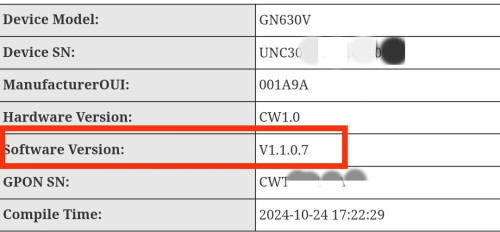
today tm people come test unofficial skyworth firmware on the router
xproc
post Aug 22 2025, 12:13 PM

free for all
*******
Senior Member
4,470 posts

Joined: Sep 2007
From: Kuala Lumpur


QUOTE(hsbb @ Aug 21 2025, 12:40 PM)
This version?

user posted image
*
no eh... they come here 3 days straight...... and china skyworth manual remote flash the fw ..... finally fixed the fixed ip issue... but i check inside the firmware version still 1.006... duno what they did
xproc
post Oct 31 2025, 10:27 AM

free for all
*******
Senior Member
4,470 posts

Joined: Sep 2007
From: Kuala Lumpur


im back again... the skyworth router really is shitty router... i will ask my coll to report unifi and ask them give the dlink router....

3 Pages < 1 2 3 >Top
 

Change to:
| Lo-Fi Version
0.0257sec    0.37    7 queries    GZIP Disabled
Time is now: 2nd December 2025 - 01:24 PM