Outline ·
[ Standard ] ·
Linear+
RTX5070ti, Macam not so oomph
|
TSLeoLilieno
|
 Mar 19 2025, 08:09 AM, updated 9 months ago Mar 19 2025, 08:09 AM, updated 9 months ago
|

|
I just bought a new PC with RTX5070ti and also Alienware AW3225QF but the graphic macam not oomph leh. When I turn on HDR, many games graphic looks like shit. DMC5, Sekiro, etc all look like shit until I turn off HDR and use SDR instead. A bit disappointing to be frank. Anything I left out in terms of setting?
|
|
|
|
|
|
babylon52281
|
Mar 19 2025, 08:15 AM
|
|
|
To which HDR are you using? https://www.techspot.com/article/2631-hdr-explained/"A quick glance shows us that a DisplayHDR rating of 400 is the lowest one you can get and, in general, any monitor with this rating isn't especially good at HDR" |
|
|
|
|
|
ukiya21
|
Mar 19 2025, 08:57 AM
|
|
|
TS like vivid profile is it? When hdr washed out?
|
|
|
|
|
|
TSLeoLilieno
|
Mar 19 2025, 09:48 AM
|
|
|
Yeah... Washed out. DMC5 graphic looks better in my old RTX2080ti comparing to RTX5070ti
|
|
|
|
|
|
pandera999
|
Mar 19 2025, 04:02 PM
|
|
|
planning to get 5070ti also.. which one you get?
|
|
|
|
|
|
TSLeoLilieno
|
Mar 19 2025, 04:38 PM
|
|
|
QUOTE(pandera999 @ Mar 19 2025, 04:02 PM) planning to get 5070ti also.. which one you get? MSI Vanguard |
|
|
|
|
|
pandera999
|
Mar 19 2025, 09:49 PM
|
|
|
QUOTE(LeoLilieno @ Mar 19 2025, 04:38 PM) ahh.. not fit in my q58.. lol... looking at asus prime then  |
|
|
|
|
|
myway1985
|
Mar 19 2025, 11:31 PM
|
|
|
QUOTE(pandera999 @ Mar 19 2025, 09:49 PM) ahh.. not fit in my q58.. lol... looking at asus prime then If u dint use latest processor... forget bout 5000 series.. worse than 4000 |
|
|
|
|
|
iZuDeeN
|
Mar 20 2025, 02:57 PM
|
|
|
HDR need match with right monitor... else don't bother turn on.. as of 5070Ti ; its more on you getting better FPS , and framegen.. which honestly better turned off
|
|
|
|
|
|
TSLeoLilieno
|
Mar 20 2025, 04:21 PM
|
|
|
QUOTE(iZuDeeN @ Mar 20 2025, 02:57 PM) HDR need match with right monitor... else don't bother turn on.. as of 5070Ti ; its more on you getting better FPS , and framegen.. which honestly better turned off I am using Alienware AW3225QF which is a 4K 32" QD-OLED monitor. Looks like its better to turn HDR off then. Sigh..... Whats the point of using good monitor and good graphic card IF we cant fully utilize it. Macam kena tipu. |
|
|
|
|
|
iZuDeeN
|
Mar 20 2025, 05:40 PM
|
|
|
QUOTE(LeoLilieno @ Mar 20 2025, 04:21 PM) I am using Alienware AW3225QF which is a 4K 32" QD-OLED monitor. Looks like its better to turn HDR off then. Sigh..... Whats the point of using good monitor and good graphic card IF we cant fully utilize it. Macam kena tipu. I never tested hdr on this monitor before..but should support full hdr.. maybe try the settings in game and update the monitor firmware |
|
|
|
|
|
xxboxx
|
Mar 20 2025, 11:37 PM
|
|
|
QUOTE(LeoLilieno @ Mar 19 2025, 09:48 AM) Yeah... Washed out. DMC5 graphic looks better in my old RTX2080ti comparing to RTX5070ti DMC5 on your RTX2080ti also running in HDR? I read online DMC5 and Sekiro have bad HDR implementation. Try running newer games, older games doesn't have good HDR support as back then it haven't been properly standardize. |
|
|
|
|
|
PJng
|
Mar 20 2025, 11:44 PM
|
|
|
how to know HDR level? i use AOC 24G4 that have HDR, but i don have those big game to test, only try Split Fiction demo HDR seem more bright that normal, but other SDR content color all washed out
youtube video show HDR, but i dunno how good is it
|
|
|
|
|
|
redza2k4
|
Mar 21 2025, 04:31 AM
|
New Member

|
Sometimes HDR on certain games and displays can be a pain.
|
|
|
|
|
|
xxboxx
|
Mar 21 2025, 08:51 AM
|
|
|
QUOTE(PJng @ Mar 20 2025, 11:44 PM) how to know HDR level? i use AOC 24G4 that have HDR, but i don have those big game to test, only try Split Fiction demo HDR seem more bright that normal, but other SDR content color all washed out youtube video show HDR, but i dunno how good is it It's an IPS panel? Not much difference than SDR. It's the panel limitation. If you got phone or tablet with OLED panel, you can compare youtube HDR video on the monitor vs phone/tablet to see yourself the difference OLED panel than can give peak and lowest luminance vs LCD panel. Higher brightness in IPS is not a good thing. Many displays achieve HDR by driving the backlight to maximum luminance. This technique, particularly on LCD panels, can compromise black levels, resulting in a noticeable graying effect. Without local dimming, the static contrast ratio remains constant. Because the backlight is globally controlled, the display effectively performs a tone-mapping operation, compressing the HDR input into an SDR dynamic range. For a genuine HDR experience with enhanced contrast, a display necessitates a local dimming solution with multiple independently controlled zones. This allows for simultaneous dimming of dark regions and boosting of bright regions. Only OLED and mini LED can achieve such contrast. |
|
|
|
|
|
PJng
|
Mar 21 2025, 12:32 PM
|
|
|
QUOTE(xxboxx @ Mar 21 2025, 08:51 AM) It's an IPS panel? Not much difference than SDR. It's the panel limitation. If you got phone or tablet with OLED panel, you can compare youtube HDR video on the monitor vs phone/tablet to see yourself the difference OLED panel than can give peak and lowest luminance vs LCD panel. Higher brightness in IPS is not a good thing. Many displays achieve HDR by driving the backlight to maximum luminance. This technique, particularly on LCD panels, can compromise black levels, resulting in a noticeable graying effect. Without local dimming, the static contrast ratio remains constant. Because the backlight is globally controlled, the display effectively performs a tone-mapping operation, compressing the HDR input into an SDR dynamic range. For a genuine HDR experience with enhanced contrast, a display necessitates a local dimming solution with multiple independently controlled zones. This allows for simultaneous dimming of dark regions and boosting of bright regions. Only OLED and mini LED can achieve such contrast. Yes is IPS, need some timeto understand what you mean |
|
|
|
|
|
xxboxx
|
Mar 21 2025, 05:28 PM
|
|
|
QUOTE(PJng @ Mar 21 2025, 12:32 PM) Yes is IPS, need some timeto understand what you mean When there's some bright area in the screen, OLED or mini LED panel will only make that area bright while other area remain dim/black, it can achieve this because the panel is light up by each pixel or by area. IPS/LCD panel doesn't such technology, when there's some bright area in the screen, the whole screen lit up including the dark area and this causes the dark area looked grey instead of black. |
|
|
|
|
|
Baconateer
|
Mar 21 2025, 05:32 PM
|
|
|
QUOTE(PJng @ Mar 20 2025, 11:44 PM) how to know HDR level? i use AOC 24G4 that have HDR, but i don have those big game to test, only try Split Fiction demo HDR seem more bright that normal, but other SDR content color all washed out youtube video show HDR, but i dunno how good is it what u have is a very basic HDR support dont bother using it only use HDR if ur monitor is OLED or Mini-LED or a monitor with high nits like 500 and above |
|
|
|
|
|
Haw92
|
Mar 23 2025, 11:03 PM
|
|
|
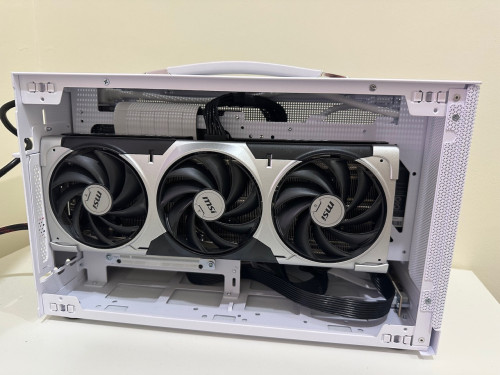
QUOTE(pandera999 @ Mar 19 2025, 09:49 PM) ahh.. not fit in my q58.. lol... looking at asus prime then I am using MSI RTX5070Ti Ventus 3X OC edition Able to fit inside ITX case with space to spare » Click to show Spoiler - click again to hide... « |
|
|
|
|
|
lolzcalvin
|
Mar 27 2025, 10:10 PM
|
|
|
QUOTE(LeoLilieno @ Mar 19 2025, 08:09 AM) I just bought a new PC with RTX5070ti and also Alienware AW3225QF but the graphic macam not oomph leh. When I turn on HDR, many games graphic looks like shit. DMC5, Sekiro, etc all look like shit until I turn off HDR and use SDR instead. A bit disappointing to be frank. Anything I left out in terms of setting? is not PC or GPU problem, is AW3225QF display problem. the problem is displaying HDR contents and SDR->HDR conversion + Dolby Vision itself probably causing issue when u say u turn on HDR: - check if ur AW3225QF has enabled HDR mode or not. it's a QD-OLED so can properly display HDR. iirc AW3225QF has a few modes including True Black 400 and Peak 1000. u can switch to True Black 400 because it's the most accurate one. - turn off Dolby Vision - go to ur windows settings and choose display, turn on HDR and then inside it, turn on AutoHDR. AutoHDR will convert SDR contents into HDR so that it will not look washed out on SDR contents. - install Windows HDR Calibration and calibrate the display. this one quite important for AutoHDR because it prevents overexposure for highlights. |
|
|
|
|
|
GHBZDK
|
Mar 31 2025, 09:29 AM
|
Getting Started
|
QUOTE(LeoLilieno @ Mar 19 2025, 08:09 AM) I just bought a new PC with RTX5070ti and also Alienware AW3225QF but the graphic macam not oomph leh. When I turn on HDR, many games graphic looks like shit. DMC5, Sekiro, etc all look like shit until I turn off HDR and use SDR instead. A bit disappointing to be frank. Anything I left out in terms of setting? Is it washed out in sekiro? There’s a hdr bug in all fromsoft games. Use the pnputil command in cmd administrator mode every time before launch a fromsoftwsre game. QUOTE PSA: If you're experiencing dull/dim and washed out colors with HDR passthrough on win10, restart your GPU display device
I had this issue when trying to play HDR content on my LG CX. I followed the setup guide on the wiki but my HDR content was just dull, dim, and had washed out colors unless I turned off windows HDR. Even after restarting my computer, the same issue persisted. I spent a few hours researching for a solution when I stumbled upon a comment here in the HTPC subreddit and a thread post on doom9 about restarting the GPU display device (not the whole computer). I restarted (not reinstalled) my GPU display device and voila, all is fixed. Just thought I would make a post about it since it wasn't exactly easy to find this solution. For reference, I'm using MPC-HC + MadVR installed through K-Lite.
I'll just quote the whole [doom9 post](https://forum.doom9.org/showthread.php?p=1981830#post1981830) below for how to do it.
>
I just found that restarting the nvidia display device after the HDR switching bug happens will also clear up the issue if you don't want to do a full reboot.
>
Unfortunately the Windows keyboard shotcut (win+ctrl+shift+b) doesn't clear it up, but if you restart the video card with the "pnputil" command line utility it will clear it up and HDR switching should work fine again for awhile without having to reboot.
>
If you want to try this workaround, first run this command to get the "Instance ID" of your nvidia display device:
>
pnputil /enum-devices /class Display
>
Then run the following command in a command prompt with admin rights, replacing <instance id> with your cards id, to restart it:
>
pnputil /restart-device "<instance id>"
>
Example:
pnputil /restart-device "PCI\VEN_10DE&DEV_1B80&SUBSYS_62863842&REV_A1\4&fa0c5&0&0008" Enjoy your oled display oomph now. This post has been edited by GHBZDK: Mar 31 2025, 09:32 AM |
|
|
|
|
|
TSLeoLilieno
|
Apr 8 2025, 02:29 PM
|
|
|
Will try.... Thanks for all the advice.
|
|
|
|
|



 Quote
Quote










 0.0245sec
 1.04
1.04
 5 queries
 GZIP Disabled