Welcome Guest ( Log In | Register )

Bump Topic Topic Closed RSS Feed

Outline · [ Standard ] · Linear+

 Laptop with easy upgradability, or desktop for home use

views
     
TSmystvearn
post Mar 6 2025, 04:49 PM, updated 10 months ago

...
*******
Senior Member
6,639 posts

Joined: Jan 2003
From: "New Castle"


Hi,

Currently using this Asus UX461A. A 2-in-1 laptop with touchscreen. I think I bought it in 2017. The laptop itself is still good actually.

Current specs are:

Intel core i5-8250U
Intel UHD graphics 620
8GB LPDDR3 RAM.

Drive upgraded to 500GB.

Ram soldered which is annoying-stuck at 8 GB ram, on Win11 Pro and Office 365.

RAM usage seems to be at 85% average. CPU at 35%. My wife has the same laptop specs , but lenovo, but the RAM is upgradable. Adding another 8 GB RAM seems just enough for Win11 and Office 365. Even now while I'm typing, sometimes, my typing is faster than what is displayed on screen. Formatted the laptop 6 months ago. Backgruond apps include onedrive, Eset AV, Snyology drive, Powertoys and rainmeter (ram, CPU load monitor).

At home, I hook the laptop to a monitor and use an external keyboard and mouse. Basically the laptop is just a secondary screen. On average, when I go outstation, (average once a month), I will need to use the laptop for work.

Any ideas on what laptop to get? Prefer something the size of 14inch (7kg flight restriction) but with lots of ports and good battery life and non-soldered parts. 32GB RAM is fine with me (or any option to go increase RAM in the future, better). I also noticed that all the laptops I had until now had Harman/Kardon speakers, so good speakers is ok. Don't care if it is 2-in-1 since I already have a tablet for that. Nice to have though, but not necessary since pen input and windows interface is awful.

SUSifourtos
post Mar 6 2025, 04:55 PM

Look at all my stars!!
*******
Senior Member
2,256 posts

Joined: Feb 2012


pointless to upgrade laptop

resell, buy used.


a Microsoft Surface Laptop 3, 10th Gen i5, 2.2k PixelSense Display, Touch

8|256

solid Microsoft Premium Build, Superior Design


RM1.3k in shopee. ( reminder, shopee take 10++% commission )


upgrade laptop...................................
chocobo7779
post Mar 6 2025, 08:19 PM

Power is nothing without control
********
All Stars
14,674 posts

Joined: Sep 2010
QUOTE(mystvearn @ Mar 6 2025, 04:49 PM)
Hi,

Currently using this Asus UX461A. A 2-in-1 laptop with touchscreen. I think I bought it in 2017. The laptop itself is still good actually.

Current specs are:

Intel core i5-8250U
Intel UHD graphics 620
8GB LPDDR3 RAM.

Drive upgraded to 500GB.

Ram soldered which is annoying-stuck at 8 GB ram, on Win11 Pro and Office 365.

RAM usage seems to be at 85% average. CPU at 35%. My wife has the same laptop specs , but lenovo, but the RAM is upgradable. Adding another 8 GB RAM seems just enough for Win11 and Office 365. Even now while I'm typing, sometimes, my typing is faster than what is displayed on screen. Formatted the laptop 6 months ago. Backgruond apps include onedrive, Eset AV, Snyology drive, Powertoys and rainmeter (ram, CPU load monitor).

At home, I hook the laptop to a monitor and use an external keyboard and mouse. Basically the laptop is just a secondary screen. On average, when I go outstation, (average once a month), I will need to use the laptop for work.

Any ideas on what laptop to get? Prefer something the size of 14inch (7kg flight restriction) but with lots of ports and good battery life and non-soldered parts. 32GB RAM is fine with me (or any option to go increase RAM in the future, better). I also noticed that all the laptops I had until now had Harman/Kardon speakers, so good speakers is ok. Don't care if it is 2-in-1 since I already have a tablet for that. Nice to have though, but not necessary since pen input and windows interface is awful.
*
Budget? hmm.gif

Might want to look at certain ThinkPad models (the L series are the easiest option out there), or HP Pro/EliteBook series as they often has fairly decent upgradability icon_idea.gif

This post has been edited by chocobo7779: Mar 6 2025, 08:21 PM
xxboxx
post Mar 6 2025, 11:07 PM

The mind is for having ideas, not holding them
*******
Senior Member
5,261 posts

Joined: Oct 2004
From: J@Y B33


I suggest look for laptop with Intel Core Ultra Series 2 or AMD Ryzen AI 300 Series. These give good processing performance while also battery efficient. Qualcomm Snapdragon X Series is the best in battery efficiency but being an ARM architecture some programs might not run or run poorly in emulation mode.

16GB RAM is a must, if can get 32GB will be even better. Unfortunately most laptop now comes with soldered RAM for better performance while also block it's upgradability.

Most new laptop now comes with thunderbolt or USB 4 so it's good for connecting to USB hub that you can connect HDMI, USB-type A port, charging, RJ45 port. So port should not be a big concern.

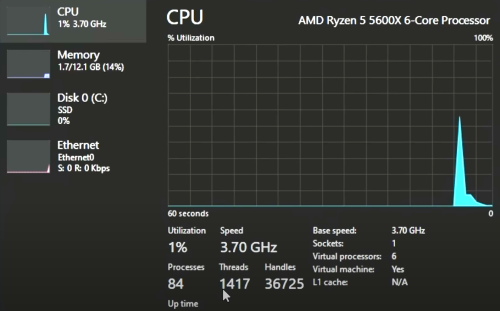
For now, you can try debloat your Windows so that all the unnecessary services will not run and used up the already limited resources. Can try this utility from Chris Titus Tech
https://github.com/ChrisTitusTech/winutil
https://www.youtube.com/watch?v=6UQZ5oQg8XA
user posted image
Only 1.7GB RAM usage and 84 processes. While my PC currently using 11.2GB RAM and 227 processes.
TSmystvearn
post Mar 7 2025, 05:11 AM

...
*******
Senior Member
6,639 posts

Joined: Jan 2003
From: "New Castle"


Already debloat laptop, running work related software. Opening Firefox, WhatsApp, telegram and outlook uses 6.9/8 gb ram.

Budget 5k ok?

Used surface is good?


babylon52281
post Mar 7 2025, 10:17 AM

Look at all my stars!!
*******
Senior Member
2,706 posts

Joined: Apr 2017
Portables are typically soldered RAM & even BGA CPU for that purpose.

If want best upgradability go with hulking gamer notebooks which allows upgrading nearly everything.
Omochao
post Mar 8 2025, 12:07 PM

Enthusiast
*****
Junior Member
835 posts

Joined: Nov 2007
From: Land of Forgotten
you should check out Acer Nitro V 14, 14.5 in screen with only approx. 1.7kg weight.

Ram is non soldered 16gb ddr5 and is on Ryzen 7 and RTX 4050, should be more than enough for your average use.

8Gb ram on Win11 is kinda low nowadays and totally not sufficient if you are running google chrome and any multitask.
babylon52281
post Mar 8 2025, 03:07 PM

Look at all my stars!!
*******
Senior Member
2,706 posts

Joined: Apr 2017
I would suggest Tiny11 for lightweight systems but theres risk in running customised Windows not endosed by Microsoft. So its your own risk.

Another is changing over to Linux.
asdasd
post Mar 8 2025, 03:23 PM

Casual
***
Junior Member
337 posts

Joined: Nov 2004


Thinkpad series allows for easier diy upgrade options, which is one of the reasons why it's more expensive than other similarly spec laptops. I once upgraded the SSD, RAM and Wi-fi card off my old Thinkpad easily with no special tools. Just need the normal screwdriver.
acbc
post Mar 8 2025, 03:29 PM

Look at all my stars!!
*******
Senior Member
9,050 posts

Joined: Jan 2003
My Latitude 5490 is highly modded.

1. LCD upgraded to FHD IPS.
2. RAM bumped to 32GB.
3. Storage now using 3 types. NVME, SATA and NGFF. For the SATA, need to discard the 2.5 inch case and shoved the SSD below the NVME and protected with kapton tape.
4. Keyboard is backlit.
5. Battery is high capacity from AliExpress.

With all 3 storage running, easily 6-7 hours.
chocobo7779
post Mar 8 2025, 04:01 PM

Power is nothing without control
********
All Stars
14,674 posts

Joined: Sep 2010
QUOTE(mystvearn @ Mar 7 2025, 05:11 AM)
Already debloat laptop, running work related software. Opening Firefox, WhatsApp, telegram and outlook uses 6.9/8 gb ram.

Budget 5k ok?

Used surface is good?
*
If you are willing to forgo Windows and upgradability, the base M4 Mac Air 13 is arguably the best choice out there icon_idea.gif
Extremely powerful single threaded performance and efficiency (we are talking about 14900K levels of S/T performance here, and unlike most Windows machines, Macs don't throttle its performance on battery), fanless design, class leading sound, display and touchpad. It's very well built too, much better than most Windows laptops at the same price tag icon_idea.gif

https://www.apple.com/my/shop/buy-mac/macbook-air

This post has been edited by chocobo7779: Mar 8 2025, 04:05 PM
TSmystvearn
post Mar 8 2025, 08:26 PM

...
*******
Senior Member
6,639 posts

Joined: Jan 2003
From: "New Castle"


For windows, my institution has an enterprise version, if that can lower cost.

For apple, can't do. Not all my work software will place nicely with apple.

I just found out that dell is refreshing it's lineup. No more xps, inspiron. Just standard Dell, pro, pro max.

I like the pro version. Very modular.

But pricing what I want is 6k with 32 gb ram. Now for that money, I'm now really thinking of just building a home pc, since this laptop is hooked at home with external peripherals and only used when I am on the move.


ticke
post Mar 9 2025, 03:08 AM

****E***y*u***i***@**
******
Senior Member
1,682 posts

Joined: Oct 2004
From: let there be rain

better off getting mini pc if for home.
SUSmrlive005
post Mar 9 2025, 03:26 AM

Getting Started
**
Junior Member
114 posts

Joined: Nov 2013
If you're not set on a specific brand, maybe check out some of the ThinkPads or Latitudes?
AEROZ
post Mar 9 2025, 01:17 PM

Getting Started
**
Junior Member
225 posts

Joined: Jan 2005
From: Penang


just get a desktop if you're not mobile.
TSmystvearn
post Mar 9 2025, 01:28 PM

...
*******
Senior Member
6,639 posts

Joined: Jan 2003
From: "New Castle"


QUOTE(AEROZ @ Mar 9 2025, 01:17 PM)
just get a desktop if you're not mobile.
*
After further reflecting on my use case, I've decided just that. Found a cheap used Dell RTX3060 and building a AM5 system around that.

Thanks all.

Topic ClosedOptions
 

Change to:
| Lo-Fi Version
0.0205sec    0.35    5 queries    GZIP Disabled
Time is now: 22nd December 2025 - 03:37 AM