dear sifu, need some help and advise how to solve this situation.
my Time fibre comes in to the DB Room. From here there are several LAN cables running to each of the rooms (embedded in the walls). Normally I placed my wifi router in the living room and I can get wifi everywhere except the study room. So now I am thinking to use the lan in the study room. But I still want the wifi router in the living room and I cant run another lan cable to the study room from the living room. And I cant place the wifi router in the DB room as well as its another dead spot. So summary is I want to run LAN in the study room and place the Wifi in the living room. How to go about doing this?
I have several old wifi routers, I wonder if I can set on up in the DB room but turn off the wireless section. Then run another wifi router in the living room as an access point. Are there better ways?
Another question I have, my line is 600Mbps, but speedtest using LAN cable is only about 300++ Mbps. Should I complain to TIME?
Does the LAN connect to your living room as well? If yes, then it's simple: get a 2-unit mesh WiFi router. Place the main router in your DB room, where it also acts as the DHCP server. Position and connect the second node in your living room using an Ethernet backbone as the mesh access point (AP).
You can choose whether to enable the WiFi access point in your DB room. Personally, I would leave it on if the DB room and living room are far apart—I’ve kept mine on and enabled AP Roaming.
You don't need to invest in high-end mesh routers with triple or quad-band WiFi if you're using an Ethernet backbone for the mesh units. Multi-band routers are typically required because some bands are reserved for wireless communication between mesh units. Without an Ethernet backbone, the access point would use the main band (shared with WiFi devices) for inter-mesh communication, which can degrade WiFi speeds. With Ethernet, these multi-bands become optional.
This post has been edited by Xaphier: Jan 10 2025, 10:33 AM
1. Put the router in DB Room, All Lan patch connect to the router. Buy AP to put which room you want or direct connect to the port. Fiber > (wan) Router (lan) > AP or direct computer
2. Put Manage switch in DB room. Configure Living room cable as trunk (carry both fiber and lan). This a bit complicated but manage switch a bit cheaper than AP but current Router might not be enterprise enough to configure like this. Fiber > Switch > Router / Lan
It is good that you have LAN cable to the rooms. Best if you can put main router/managed switch at the DB since all cables connected there. You can add AP at those wifi spot as you see fit. Those wifi AP that use the same mesh like Easymesh or others will be much simpler in management. Can add switch at those location if you need more LAN connection.
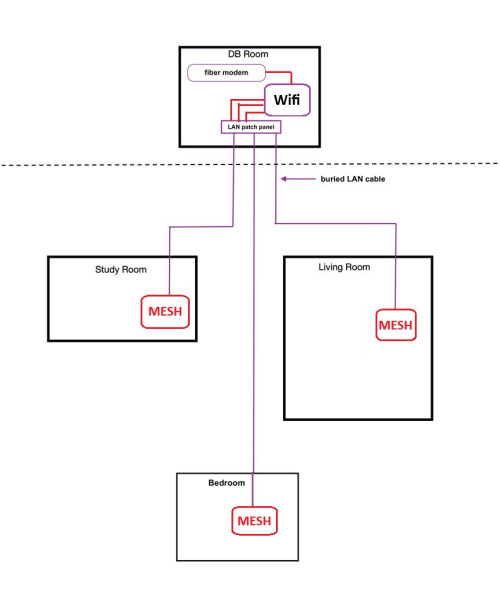
1. Move the existing router back to the DB Room, disable the Wifi on that router.
2. Connect all cables from the Patch Panel to the Wifi Router.
3. Buy a TP-Link Deco Mesh wifi to put at the Living room & configure it accordingly. You can add as much as you want to accommodate your needs.
Below are the modified diagram :-
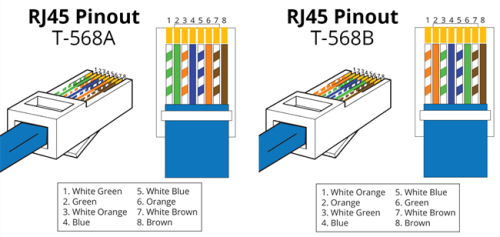
As for the speed of getting only 300Mbps, you should check the cable on the patch panel, they might wrongly punch to T568A type. Refer below photo:-
Hope this helps...
i also agree with this setup.
with the wired, you can hook it up to the tplink (deco? or omada?) to make a mesh with 2 or 3 units.
they have a wired backhaul which is better than wireless backhaul.
If only 2 room for example has wired, but the third room does not, that third room can setup a wireless backhaul, whereas the other 2 is wired.
Or you can just make do with a single AP (somewhere near the center to cover all of them), and hope it fully covers even through the walls. And have those existing wired, have wired to those other rooms where possible. Reason for this, because each mesh node consumes roughly 10watts. If you are not okay with that, then you may want to make do with 1 wireless ap. I only use 1 ap, but i get decent enough wifi for use, so i didn't splurge on multiple mesh nodes cause can't be bothered.
Also with the deco, they will sense each other and should auto adjust so they don't interfere with each other. There should be some sort of optimization when setting it up to adjust the radius for each mesh node afaik.
This post has been edited by Moogle Stiltzkin: Jan 13 2025, 06:13 PM
with the wired, you can hook it up to the tplink (deco? or omada?) to make a mesh with 2 or 3 units.
they have a wired backhaul which is better than wireless backhaul.
If only 2 room for example has wired, but the third room does not, that third room can setup a wireless backhaul, whereas the other 2 is wired. Or you can just make do with a single AP (somewhere near the center to cover all of them), and hope it fully covers even through the walls. And have those existing wired, have wired to those other rooms where possible. Reason for this, because each mesh node consumes roughly 10watts. If you are not okay with that, then you may want to make do with 1 wireless ap. I only use 1 ap, but i get decent enough wifi for use, so i didn't splurge on multiple mesh nodes cause can't be bothered. Also with the deco, they will sense each other and should auto adjust so they don't interfere with each other. There should be some sort of optimization when setting it up to adjust the radius for each mesh node afaik.
Omada is abit on the expensive side, and also you need OC200/300 device or a small PC with Omada SDN installed to manage it. Also kind of complicated for first time user with little or no knowledge in networking.
My home is running on Omada devices like APs, Switches & a Router plus a VM running Omada SDN software. Kind of overkill for some people but I run a small Home Lab doing tons of testing thus it makes sense to me.
Deco is more suitable for Home Users, no additional controller, mobile apps friendly. Very suitable for first time user, easy to learn, easy to understand & easy to setup.
Omada is abit on the expensive side, and also you need OC200/300 device or a small PC with Omada SDN installed to manage it.
depends where you source omada from and which model. i ordered my eap-773 from amazon.com it was cheaper than shopee. but that still doesn't change the fact that wifi6e tend to be cheaper than wifi7 (not sure if that changed or not). up to the user to investigate pricing on this.
QUOTE(dcheah @ Jan 14 2025, 11:53 AM)
Also kind of complicated for first time user with little or no knowledge in networking.
if you want easy, they got a mobile app (android). Just plug in the omada to your network switch, then it will enlist the wireless ap. From my own observation, using the mobile app to setup is probably easiest for newbie. If you use controller web ui, you may get a bit overwhelmed. But even then, if you do a quick search on youtube, raidowl introduces omada and how to configure. If following youtube instructions is too hard, i don't know what to say to that
QUOTE(dcheah @ Jan 14 2025, 11:53 AM)
My home is running on Omada devices like APs, Switches & a Router plus a VM running Omada SDN software. Kind of overkill for some people but I run a small Home Lab doing tons of testing thus it makes sense to me.
well deco is promoted to regular user. But reason why i opted for omada because i run a homelab. But thats not to say regular user can't use it. But one reason i didn't like deco, is have to register to use. Omada didn't have such requirement, was totally optional.
QUOTE(dcheah @ Jan 14 2025, 11:53 AM)
Deco is more suitable for Home Users, no additional controller, mobile apps friendly. Very suitable for first time user, easy to learn, easy to understand & easy to setup. Hope this helps...
omada can be setup WITHOUT controller. That said, i don't think the mesh features will work if you don't use a controller however. So yes, limited functionality for certain things. Check the tplink FAQ page and manual on this.
Also you said have to buy a hardware controller. They have both hardware controller (you buy), or software controller (there is one github. You self host on your own server e.g. NAS)
If i were to sum up the main difference
- omada makes use of controller (though can use without, features will be limited)
- deco can be used with it's satelite mesh nodes. Probably easiest to setup without worrying about controller of any sort.
- also omada is strictly wireless access point (can also use mesh technology, but is different than the deco), whereas deco is a router/wifi ap/mesh combo.
note: both omada and deco mesh are not interchangable (they use different mesh technology). so you have to decide if you going omada or deco, and stick to that (especially for planning to add more mesh nodes in future).
i don't use as router (i use pfsense). So my tplink is wifi ap only. so maybe is ok? no idea. also if you see isp already using china equipment (e.g. time broadband use huawei. tmnut? skyworth?), so probably too late to quibble on this at this point (other possible options, ubiquiti, asus...?)
hopefully this clarifies
This post has been edited by Moogle Stiltzkin: Jan 14 2025, 01:28 PM
depends where you source omada from and which model. i ordered my eap-773 from amazon.com it was cheaper than shopee. but that still doesn't change the fact that wifi6e tend to be cheaper than wifi7 (not sure if that changed or not). up to the user to investigate pricing on this. if you want easy, they got a mobile app (android). Just plug in the omada to your network switch, then it will enlist the wireless ap. From my own observation, using the mobile app to setup is probably easiest for newbie. If you use controller web ui, you may get a bit overwhelmed. But even then, if you do a quick search on youtube, raidowl introduces omada and how to configure. If following youtube instructions is too hard, i don't know what to say to that
well deco is promoted to regular user. But reason why i opted for omada because i run a homelab. But thats not to say regular user can't use it. But one reason i didn't like deco, is have to register to use. Omada didn't have such requirement, was totally optional. omada can be setup WITHOUT controller. That said, i don't think the mesh features will work if you don't use a controller however. So yes, limited functionality for certain things. Check the tplink FAQ page and manual on this.
Also you said have to buy a hardware controller. They have both hardware controller (you buy), or software controller (there is one github. You self host on your own server e.g. NAS) If i were to sum up the main difference
- omada makes use of controller (though can use without, features will be limited)
- deco can be used with it's satelite mesh nodes. Probably easiest to setup without worrying about controller of any sort.
- also omada is strictly wireless access point (can also use mesh technology, but is different than the deco), whereas deco is a router/wifi ap/mesh combo. note: both omada and deco mesh are not interchangable (they use different mesh technology). so you have to decide if you going omada or deco, and stick to that (especially for planning to add more mesh nodes in future). also may or may not concern you https://www.cnet.com/home/internet/possible...net-connection/
i don't use as router (i use pfsense). So my tplink is wifi ap only. so maybe is ok? no idea. also if you see isp already using china equipment (e.g. time broadband use huawei. tmnut? skyworth?), so probably too late to quibble on this at this point (other possible options, ubiquiti, asus...?) hopefully this clarifies
Yes, I agreed with you... it all depends of what the user wanted.
dear sifu, need some help and advise how to solve this situation.
my Time fibre comes in to the DB Room. From here there are several LAN cables running to each of the rooms (embedded in the walls). Normally I placed my wifi router in the living room and I can get wifi everywhere except the study room. So now I am thinking to use the lan in the study room. But I still want the wifi router in the living room and I cant run another lan cable to the study room from the living room. And I cant place the wifi router in the DB room as well as its another dead spot. So summary is I want to run LAN in the study room and place the Wifi in the living room. How to go about doing this?
I have several old wifi routers, I wonder if I can set on up in the DB room but turn off the wireless section. Then run another wifi router in the living room as an access point. Are there better ways?
Another question I have, my line is 600Mbps, but speedtest using LAN cable is only about 300++ Mbps. Should I complain to TIME?
Since you have the foundation of Lan cable built into the premises, you have a lot of options here,
1)wireless backhaul, but the DB room will be the biggest pain in the neck, as your wifi signal will definitely be blocked out by it and may impact all of your other nodes backhaul.
2) Ethernet backhaul, but you will have to get a very good and capable router/mesh main node that can help you to manage your entire network. Best to get at least AX rating of 3000, either TP link or ASUS.
3) Reuse whatever router that was given by Time for your DB room and turn off its wifi making it just as a bypass router, for your living room.study room and bedroom, just reuse the old wifi routers and plug into the LAN ports and set it as a wireless AP point, the roaming may or might not work even if you set the SSID as you have not mentioned about the model and make.
Speedtest coming directly from the DB room router?


 Jan 10 2025, 09:26 AM, updated 12 months ago


 Quote
Quote








 (other possible options, ubiquiti, asus...?)


 0.0216sec
 0.47
0.47
 5 queries
 GZIP Disabled