

Any sifus know what is happening to my screen?
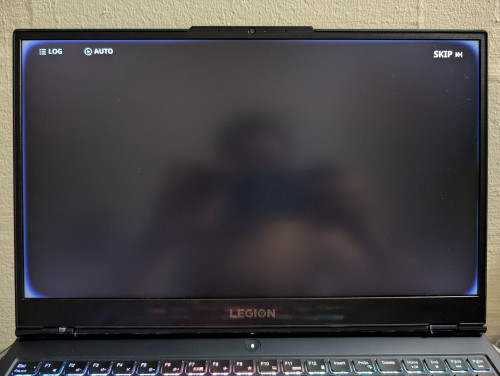
update:
had already did warranty claim with Lenovo two times
first time due to lines on screen
second time due to burn in
This post has been edited by ws0125: Jan 8 2025, 02:50 PM
Hardware What happen to my laptop's screen, abnormal white glow
|
|
 Jan 7 2025, 04:04 PM, updated 9 months ago Jan 7 2025, 04:04 PM, updated 9 months ago
Return to original view | Post
#1
|
 
Newbie
25 posts Joined: Jan 2011 
|
Nothing when laptop freshly boot but 30min into gaming, the white glow on the edges occur.
Any sifus know what is happening to my screen? update: had already did warranty claim with Lenovo two times first time due to lines on screen second time due to burn in This post has been edited by ws0125: Jan 8 2025, 02:50 PM |
|
|
|
|
|
Jan 8 2025, 08:29 AM
Return to original view | Post
#2
|
|
Newbie
25 posts Joined: Jan 2011
|
QUOTE(vince316 @ Jan 7 2025, 05:21 PM) screen bleeding bro experienced this? how will it become, total screen breakdown? |
|
|
Jan 8 2025, 08:31 AM
Return to original view | Post
#3
|
|
Newbie
25 posts Joined: Jan 2011
|
QUOTE(andrekua2 @ Jan 7 2025, 05:29 PM) Probably hang... because if screen problem, there should be no text in the black area. when the photo taken laptop not hang, I am trying to take photo with the dark background |
|
|
Jan 8 2025, 02:49 PM
Return to original view | Post
#4
|
|
Newbie
25 posts Joined: Jan 2011
|
QUOTE(andrekua2 @ Jan 8 2025, 12:09 PM) This fella update firmware and the white border gone... do you believe it? hmmmm.. sceptical about it.. anyway will try later if any update available..if software issue then relief a bit.. tbh already replace the display two times under warranty with Lenovo due to first time due to lines on screen and second time due to burn in |
|
|
Jan 10 2025, 09:23 AM
Return to original view | Post
#5
|
|
Newbie
25 posts Joined: Jan 2011
|
QUOTE(dcheah @ Jan 9 2025, 10:28 AM) I believe this more likely due to the backlight issue or the screen is leaking. If still under warranty, send in for replacement immediately. It will get worse & strain your eyes. If not, you still need to get it replace. If you are confident in replacing it yourself then Google the part number & buy it. Hope this helps...  QUOTE(Xploit Machine @ Jan 9 2025, 08:11 PM) replace the screen .. thats all do you guys know any trusted and skilled vendor for screen replacement? |
|
|
Jan 10 2025, 10:58 AM
Return to original view | Post
#6
|
|
Newbie
25 posts Joined: Jan 2011
|
QUOTE(acbc @ Jan 10 2025, 10:32 AM) But a new screen. i don't trust my own skill Check the specs online. I swapped out my E5550 screen after check online via Google and the seller on Shopee. Paid 200 bucks for it and I slowly dismantled the LCD bezel and 4 screws plus 1 cable. Done on the first try. No issues.  nervous af last time upgrade ram and ssd by myself PRSXFENG liked this post
|
|
|
Jan 14 2025, 08:47 AM
Return to original view | Post
#7
|
|
Newbie
25 posts Joined: Jan 2011
|
QUOTE(acbc @ Jan 10 2025, 12:16 PM) If u have shaky hands, don't try. The LCD cable is thin and delicate. One wrong move and it might break. watched some video, don't have the tool and the cable really delicate. Better let professional do it  QUOTE(dcheah @ Jan 13 2025, 06:03 PM) Most shops in Low Yat are very skillful, but may not have the LCD parts that suits your model. cool, thank you for your suggestion! Recommendation is to buy the parts online like Lazada or Shopee, then bring the laptop & the screen together to Low Yat. Look for those repair shops (easily recognizable as they mostly will have many spare parts on display), ask for their labour charges before confirm. Hope this helps...  |
|
|
Mar 18 2025, 11:30 AM
Return to original view | Post
#8
|
|
Newbie
25 posts Joined: Jan 2011
|
QUOTE(Dweller @ Feb 24 2025, 11:45 AM) It is quite weird that it did not happen immediately after boot up which was my case (LCD display kaput) last time. Maybe you can try to: thanks for suggestion, will try this later on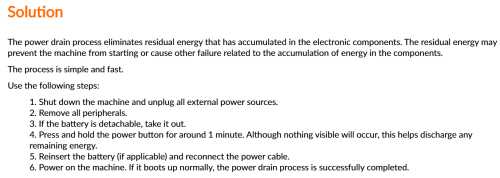 https://pcsupport.lenovo.com/my/en/products...ge-idea-laptops need to unplug my battery though |
| Change to: |  0.0165sec 0.0165sec
 0.94 0.94
 6 queries 6 queries
 GZIP Disabled GZIP Disabled
Time is now: 15th December 2025 - 05:33 PM |
 Quote
Quote