

want to know is there a way to block discord from router side?
the kid too addicted to discord already.....
using TM giv white router (fiberhome)
thanks
Block discord, from router
Block discord, from router
|
|
 Dec 19 2024, 11:35 PM, updated 10 months ago Dec 19 2024, 11:35 PM, updated 10 months ago
Show posts by this member only | Post
#1
|
 
Senior Member
3,217 posts Joined: Dec 2006 From: City of Neko~~Nyaa~ 
|
want to know is there a way to block discord from router side?
the kid too addicted to discord already..... using TM giv white router (fiberhome) thanks |
|
|
|
|
|
Dec 20 2024, 09:17 AM
Show posts by this member only | IPv6 | Post
#2
|

Senior Member
2,927 posts Joined: Nov 2004 
|
You can try OpenDNS/CleanBrowsing, but it can be bypassed, so talk to your kid is the best way.
|
|
|
Dec 20 2024, 09:30 AM
Show posts by this member only | Post
#3
|

All Stars
13,484 posts Joined: Jan 2012
|
Good luck with that... if you let your kids play game, expect them to be on discord.
Its just like if your parents trying to block you from IRC back in the days... just let them express themselves. |
|
|
Dec 20 2024, 10:24 PM
Show posts by this member only | IPv6 | Post
#4
|

All Stars
11,459 posts Joined: Oct 2007 From: KL
|
QUOTE(moiskyrie @ Dec 19 2024, 11:35 PM) want to know is there a way to block discord from router side? With a more feature-full router, you can do that quite easily but probably not with TM's default router. Another way is to block in the OS with parental controls.the kid too addicted to discord already..... using TM giv white router (fiberhome) thanks  |
|
|
Dec 20 2024, 10:32 PM
Show posts by this member only | Post
#5
|
|
Senior Member
3,217 posts Joined: Dec 2006 From: City of Neko~~Nyaa~
|
QUOTE(soonwai @ Dec 20 2024, 10:24 PM) With a more feature-full router, you can do that quite easily but probably not with TM's default router. Another way is to block in the OS with parental controls. i got another routertplink AX1500 wifi 6... but dont know how to block discord.... the kid mostly use phone/tab .... |
|
|
Jan 20 2025, 05:32 PM
Show posts by this member only | Post
#6
|

Senior Member
1,457 posts Joined: Jan 2005 From: Kajang
|
I believe now days the newer router have built-in "Parental" option, where you can specify the time or day they can be on the internet.
Also, there is MAC filtering & Web Filtering available, maybe you can try those settings too. MAC filtering works best with Parental control when you want to limit their internet time based on their devices, for example if you want to block/limit only their smartphone device when they are able to go internet but leave their laptop or Tab for school works. While Web filtering as the name implies, works by filtering which website can passthru, this also works best with MAC filtering where Smartphone not allowed to visit Game server but able to use WhatsApp. Explore around on the settings and you will get the idea on how to configure it correctly. The most important part is you don't accidentally lock yourself out from the router, the best is to use a LAN cable for all these configurations. Hope this helps...  |
|
|
|
|
|
Jan 20 2025, 06:32 PM
Show posts by this member only | Post
#7
|
|
Senior Member
3,217 posts Joined: Dec 2006 From: City of Neko~~Nyaa~
|
QUOTE(dcheah @ Jan 20 2025, 05:32 PM) I believe now days the newer router have built-in "Parental" option, where you can specify the time or day they can be on the internet. manage to block using url....Also, there is MAC filtering & Web Filtering available, maybe you can try those settings too. MAC filtering works best with Parental control when you want to limit their internet time based on their devices, for example if you want to block/limit only their smartphone device when they are able to go internet but leave their laptop or Tab for school works. While Web filtering as the name implies, works by filtering which website can passthru, this also works best with MAC filtering where Smartphone not allowed to visit Game server but able to use WhatsApp. Explore around on the settings and you will get the idea on how to configure it correctly. The most important part is you don't accidentally lock yourself out from the router, the best is to use a LAN cable for all these configurations. Hope this helps... the app still can open just the channel/chat cant load.... now is dont know how to block tiktok... try all the url from google, also still can access..... dont want to block on device cos later she will know... for now my reason is all those is block by TM.. |
|
|
Jan 21 2025, 09:36 AM
Show posts by this member only | IPv6 | Post
#8
|

Senior Member
2,613 posts Joined: Nov 2020
|
QUOTE(moiskyrie @ Jan 20 2025, 06:32 PM) manage to block using url.... tiktok app itself generally tries to bypass blocks, it doesn't respect dns settings and will directly ask Google DNS over HTTPS to askthe app still can open just the channel/chat cant load.... now is dont know how to block tiktok... try all the url from google, also still can access..... dont want to block on device cos later she will know... for now my reason is all those is block by TM.. |
|
|
Jan 21 2025, 02:07 PM
Show posts by this member only | Post
#9
|
|
Senior Member
1,457 posts Joined: Jan 2005 From: Kajang
|
QUOTE(moiskyrie @ Jan 20 2025, 06:32 PM) manage to block using url.... Great to hear that some URL is working, as for TikTok I'm not very sure but upon Googling... I found the following URL, maybe you want to add these in. the app still can open just the channel/chat cant load.... now is dont know how to block tiktok... try all the url from google, also still can access..... dont want to block on device cos later she will know... for now my reason is all those is block by TM..  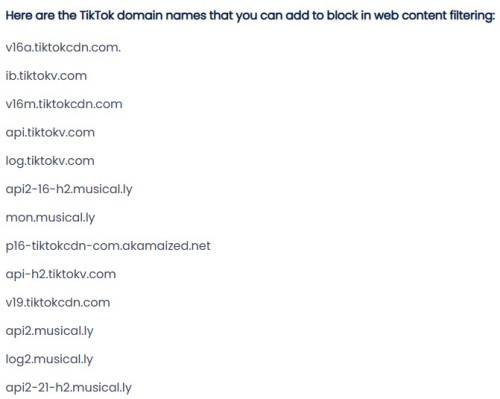 Hope this helps... |
|
|
Jan 21 2025, 02:54 PM
Show posts by this member only | IPv6 | Post
#10
|
|
Senior Member
3,217 posts Joined: Dec 2006 From: City of Neko~~Nyaa~
|
QUOTE(dcheah @ Jan 21 2025, 02:07 PM) Great to hear that some URL is working, as for TikTok I'm not very sure but upon Googling... I found the following URL, maybe you want to add these in. Already add those url.... Hope this helps... Tiktok still function like normal..... |
|
|
Jan 22 2025, 10:21 AM
|
|
Senior Member
1,457 posts Joined: Jan 2005 From: Kajang
|
QUOTE(moiskyrie @ Jan 21 2025, 02:54 PM) Already add those url.... Try block by IP Address, these are TikTok's servers :-Tiktok still function like normal..... 161.117.70.145 161.117.71.36 161.117.71.33 161.117.70.136 161.117.71.74 205.251.194.210 205.251.193.184 205.251.198.38 205.251.197.195 Below are the entire range, means anything coming from 216.58.207.1 ~ 254 will be blocked, use discretionally :- 216.58.207.0/24 47.89.136.0/24 47.252.50.0/24 185.127.16.0/24 182.176.156.0/24 Hope this helps... |
|
|
Jan 22 2025, 10:34 AM
Show posts by this member only | IPv6 | Post
#12
|
|
Senior Member
3,217 posts Joined: Dec 2006 From: City of Neko~~Nyaa~
|
QUOTE(dcheah @ Jan 22 2025, 10:21 AM) Try block by IP Address, these are TikTok's servers :- The router not accept ip address....161.117.70.145 161.117.71.36 161.117.71.33 161.117.70.136 161.117.71.74 205.251.194.210 205.251.193.184 205.251.198.38 205.251.197.195 Below are the entire range, means anything coming from 216.58.207.1 ~ 254 will be blocked, use discretionally :- 216.58.207.0/24 47.89.136.0/24 47.252.50.0/24 185.127.16.0/24 182.176.156.0/24 Hope this helps... Only url.... Thinking to change back to tplink... But all the setting.... |
|
|
Jan 22 2025, 11:17 AM
|

Junior Member
81 posts Joined: Apr 2015
|
QUOTE(moiskyrie @ Dec 20 2024, 10:32 PM) i got another router Technicially, you need high end router with application filtering feature. You block URL they only cannot open Discord in browser but the Discord app will still functioning.tplink AX1500 wifi 6... but dont know how to block discord.... the kid mostly use phone/tab .... QUOTE(dcheah @ Jan 21 2025, 02:07 PM) Great to hear that some URL is working, as for TikTok I'm not very sure but upon Googling... I found the following URL, maybe you want to add these in. Blocking URL won't help for application. Basic router don't allow you to block by IP. Unless is firewall or high end router with application filtering or IP blocking. Hope this helps... |
|
|
|
|
|
Jan 22 2025, 04:00 PM
|
|
Senior Member
1,457 posts Joined: Jan 2005 From: Kajang
|
QUOTE(moiskyrie @ Jan 22 2025, 10:34 AM) The router not accept ip address.... No choice then, but you check whether the TPLink have whatever function you need like the Web filtering or IP filtering.Only url.... Thinking to change back to tplink... But all the setting.... If yes, then only proceed to replace it. Else might as well get a new router with such functions. I'm using TP-Link Omada series, on the expensive side so I got tons of features with it. Google for it & understand more whether it suits your needs & budget. Hope this helps... |
|
|
Jan 22 2025, 04:03 PM
|
|
Senior Member
1,457 posts Joined: Jan 2005 From: Kajang
|
QUOTE(montaguespirit @ Jan 22 2025, 11:17 AM) Technicially, you need high end router with application filtering feature. You block URL they only cannot open Discord in browser but the Discord app will still functioning. Yes, I agreed with you that some basic router may not have such features available and the URL blocking mostly works on computer and not the mobile apps itself.Blocking URL won't help for application. Basic router don't allow you to block by IP. Unless is firewall or high end router with application filtering or IP blocking. Even if he managed to get the IP/Apps blocking to works, the mobile phone with its own 4G/5G data will still bypass it making the blocking being useless too. Eventually it all goes down on Parenting-hood...  Cheers... PRSXFENG liked this post
|
|
|
Feb 13 2025, 08:07 PM
|

All Stars
17,860 posts Joined: Dec 2007 From: Bandar Baru Bangi , Malaysia 
|
QUOTE(andrekua2 @ Dec 20 2024, 09:30 AM) Good luck with that... if you let your kids play game, expect them to be on discord. Right, completely stop thrm nope, just limit them playing it then yes, an hour per day maybeIts just like if your parents trying to block you from IRC back in the days... just let them express themselves. |
|
|
Feb 13 2025, 08:43 PM
Show posts by this member only | IPv6 | Post
#17
|
|
Senior Member
3,217 posts Joined: Dec 2006 From: City of Neko~~Nyaa~
|
problem was too addicted already...
everyday after school must chat in discord until midnight... all work dont want do... so need block from all type of social media... |
|
|
Feb 13 2025, 08:59 PM
Show posts by this member only | IPv6 | Post
#18
|
|
All Stars
13,484 posts Joined: Jan 2012
|
QUOTE(moiskyrie @ Feb 13 2025, 08:43 PM) problem was too addicted already... As if we ain't turning on the pc the first thing when we got home from school back then. Even after going to mamak to chat, back home still on pc to chat on icq.everyday after school must chat in discord until midnight... all work dont want do... so need block from all type of social media... Personally I dont try to restrict them. They are free to play games or discord whatever as long as they pass their exams or completed their schoolwork (less nowadays) and finish copying/reading 2 karangan everyday. I think getting connected is the big thing now and you'll never know what would come up from it. Just look at the bigger picture. Internet ain't used to be like what it is back then. It's now also an opportunity to pick up something new. Just look at crypto, influencer, youtuber, etc. Heck, I even start playing crypto games just to experience what's these kids are doing online that claimed as play to earn. Some of these kids are making huge amount of money. We always said gen z are crap but there's so much more in their world now that just wasnt present in our time. This post has been edited by andrekua2: Feb 13 2025, 09:00 PM |
|
|
Feb 17 2025, 05:13 PM
|
|
All Stars
17,860 posts Joined: Dec 2007 From: Bandar Baru Bangi , Malaysia
|
QUOTE(moiskyrie @ Feb 13 2025, 08:43 PM) problem was too addicted already... Too addicted also problem, just set a limit, an hour per day, try firsteveryday after school must chat in discord until midnight... all work dont want do... so need block from all type of social media... |
|
|
Feb 17 2025, 08:04 PM
Show posts by this member only | IPv6 | Post
#20
|
|
Senior Member
3,217 posts Joined: Dec 2006 From: City of Neko~~Nyaa~
|
QUOTE(GamersFamilia @ Feb 17 2025, 05:13 PM) Too addicted also problem, just set a limit, an hour per day, try first Already set...But too addicted until home work also no do... And keep don't want sleep.... Even when talk to her also can't hear.... For now I block the whole device from Internet.... But she know where to get Internet.... The mom and my phone... Keep secretly on the hot-spot... This post has been edited by moiskyrie: Feb 17 2025, 08:10 PM |
| Change to: |  0.0217sec 0.0217sec
 0.76 0.76
 5 queries 5 queries
 GZIP Disabled GZIP Disabled
Time is now: 19th December 2025 - 12:56 AM |
 Quote
Quote