


Microsoft 365 Excel Tab's Height
Microsoft 365 Excel Tab's Height
|
|
 Dec 12 2024, 12:33 PM, updated 2y ago Dec 12 2024, 12:33 PM, updated 2y ago
Show posts by this member only | IPv6 | Post
#1
|
 
All Stars
26,538 posts Joined: Jan 2003 
|
Hi, discovered today that the tab's at my Microsoft 365 Excel is reduced today. I didn't change any setting. Another laptop with the same Microsoft 365 account has no such issue. Anyknow know how to restore the height? Thanks
|
|
|
|
|
|
Dec 12 2024, 12:37 PM
Show posts by this member only | IPv6 | Post
#2
|

Junior Member
931 posts Joined: Jan 2017 From: Kuala Lumpur
|
Compare the tab height with other computers, how much different is it?
|
|
|
Dec 12 2024, 12:43 PM
Show posts by this member only | IPv6 | Post
#3
|
|
All Stars
26,538 posts Joined: Jan 2003
|
QUOTE(cassian948 @ Dec 12 2024, 12:37 PM) Compare the tab height with other computers, how much different is it? I compared it with another laptop. Can see this one, the top of the font is almost touching the top. |
|
|
Dec 13 2024, 12:57 PM
Show posts by this member only | Post
#4
|

Junior Member
194 posts Joined: Dec 2017
|
QUOTE(Human Nature @ Dec 12 2024, 12:33 PM) Hi, discovered today that the tab's at my Microsoft 365 Excel is reduced today. I didn't change any setting. Another laptop with the same Microsoft 365 account has no such issue. Anyknow know how to restore the height? Thanks Change to another screen resolution. |
|
|
Dec 13 2024, 01:38 PM
Show posts by this member only | IPv6 | Post
#5
|
|
All Stars
26,538 posts Joined: Jan 2003
|
QUOTE(Imbi Plaza Lot 1.28 @ Dec 13 2024, 12:57 PM) Change to another screen resolution. Hmm, I changed to 100% scale and it works but everything is smaller now. I was on 125% scale all this while so no idea why it suddenly cause this issue.My resolution is at 1920 x 1080. I tried several combo with scale 125% and couldn't get back to the previous display. Thanks |
|
|
Dec 13 2024, 02:45 PM
Show posts by this member only | Post
#6
|
|
Junior Member
194 posts Joined: Dec 2017
|
QUOTE(Human Nature @ Dec 13 2024, 01:38 PM) Hmm, I changed to 100% scale and it works but everything is smaller now. I was on 125% scale all this while so no idea why it suddenly cause this issue. Check and update the monitor and graphics card driver. Use manufacturer driver.My resolution is at 1920 x 1080. I tried several combo with scale 125% and couldn't get back to the previous display. Thanks |
|
|
|
|
|
Dec 13 2024, 03:35 PM
Show posts by this member only | IPv6 | Post
#7
|
|
All Stars
26,538 posts Joined: Jan 2003
|
QUOTE(Imbi Plaza Lot 1.28 @ Dec 13 2024, 02:45 PM) Check and update the monitor and graphics card driver. Use manufacturer driver. Checked and all drivers are updated. From Lenovo Vantage, it says there is one BIOS and Utility Firmware update but unable to install it after several attempts. |
|
|
Dec 13 2024, 03:43 PM
Show posts by this member only | Post
#8
|
|
Junior Member
194 posts Joined: Dec 2017
|
QUOTE(Human Nature @ Dec 13 2024, 03:35 PM) Checked and all drivers are updated. Open up Microsoft Excel. From Lenovo Vantage, it says there is one BIOS and Utility Firmware update but unable to install it after several attempts. Click on the "Tools" menu and then click "Customize.". Right-click the menu you want to restore and then click the "Reset" button. |
|
|
Dec 13 2024, 03:48 PM
Show posts by this member only | IPv6 | Post
#9
|
|
All Stars
26,538 posts Joined: Jan 2003
|
QUOTE(Imbi Plaza Lot 1.28 @ Dec 13 2024, 03:43 PM) Open up Microsoft Excel. Erm, my issue is on the tab height at the bottom. Not Menu Click on the "Tools" menu and then click "Customize.". Right-click the menu you want to restore and then click the "Reset" button.  |
|
|
Dec 13 2024, 03:49 PM
|
|
Junior Member
194 posts Joined: Dec 2017
|
QUOTE(Human Nature @ Dec 13 2024, 03:48 PM) Erm, my issue is on the tab height at the bottom. Not Menu https://www.minitool.com/news/how-to-reset-...t-settings.html |
|
|
Dec 13 2024, 03:52 PM
|
|
Junior Member
194 posts Joined: Dec 2017
|
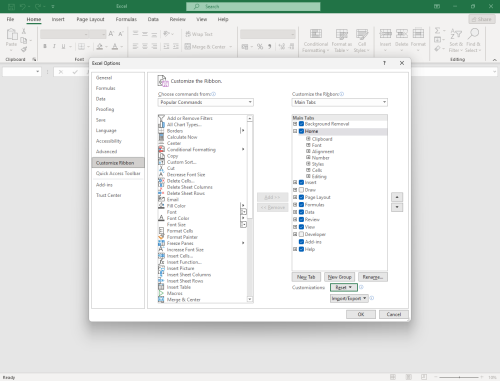 |
|
|
Dec 13 2024, 05:56 PM
Show posts by this member only | IPv6 | Post
#12
|
|
All Stars
26,538 posts Joined: Jan 2003
|
Still not solved..
|
|
|
Dec 13 2024, 08:35 PM
Show posts by this member only | IPv6 | Post
#13
|

Senior Member
6,735 posts Joined: Jan 2003 From: Zion 
|
Try this.
For Windows 10 https://answers.microsoft.com/en-us/windows...90-4083bbec30c9 For Windows 11 Start - Settings - Accessibility - Text Size. Adjust the slider to your desired size and Apply. |
|
|
|
|
|
Dec 13 2024, 09:32 PM
Show posts by this member only | IPv6 | Post
#14
|
|
All Stars
26,538 posts Joined: Jan 2003
|
QUOTE(netmatrix @ Dec 13 2024, 08:35 PM) Try this. Tried, cannot too. But thank youFor Windows 10 https://answers.microsoft.com/en-us/windows...90-4083bbec30c9 For Windows 11 Start - Settings - Accessibility - Text Size. Adjust the slider to your desired size and Apply. |
|
|
Dec 14 2024, 09:07 AM
Show posts by this member only | IPv6 | Post
#15
|
|
All Stars
26,538 posts Joined: Jan 2003
|
QUOTE(Human Nature @ Dec 12 2024, 12:33 PM) Hi, discovered today that the tab's at my Microsoft 365 Excel is reduced today. I didn't change any setting. Another laptop with the same Microsoft 365 account has no such issue. Anyknow know how to restore the height? Thanks Today it suddenly restore back to the original height. Thanks all who contributed   |
|
|
Dec 14 2024, 06:01 PM
|
|
Junior Member
194 posts Joined: Dec 2017
|
Now I know how you get all the stars.
|
|
|
Dec 14 2024, 07:59 PM
Show posts by this member only | IPv6 | Post
#17
|
|
All Stars
26,538 posts Joined: Jan 2003
|
QUOTE(Imbi Plaza Lot 1.28 @ Dec 14 2024, 06:01 PM) Now I know how you get all the stars. Haha but nope. You can see there’s a difference between the tab height. |
|
Topic ClosedOptions
|
| Change to: |  0.0139sec 0.0139sec
 1.15 1.15
 5 queries 5 queries
 GZIP Disabled GZIP Disabled
Time is now: 24th December 2025 - 11:38 PM |
 Quote
Quote