

 Nov 19 2024, 05:38 PM, updated 2y ago


So, this short article is going to demonstrate how to overwrite a variable value in memory of another program.
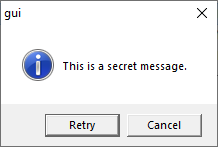
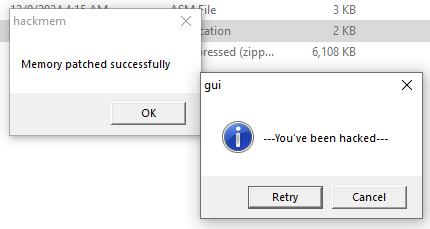
I have this gui.exe, which is popping up message box with default caption. But after I run hackmem.exe, the caption in the message box.... CHANGED! How this is even possible?
Well, with the help of such a dangerous API, WriteProcessMemory, this is possible, but the memory area to be written must be accessible.
Microsoft explains 'WriteProcessMemory' Win32 API function as:
QUOTE
Writes data to an area of memory in a specified process.
This is also called Process Injection, part of Offensive Security. I like to call it 'memory patch'.
So, let's see how it looks like:
Before:
After:
How to play:
1. Run gui.exe
2. Click Retry to repeat, or Cancel to quit, but don't click Cancel yet.
3. Run hackmem.exe
4. Now click Retry in gui.exe to see "new" message
5. Have fun!
In summary, the code flow of hackmem.exe is as below:
CODE
call [FindWindow]
call [GetWindowThreadProcessId]
call [OpenProcess]
call [WriteProcessMemory]
It will find a window by looking for its title called "gui" (the program to be hacked), then get process identifier from window handle, then open the process with PROCESS_ALL_ACCESS permission, and overwrite the beginning of data section of the EXE.
Let say my gui.exe gets loaded at 0x400000 (image base), and I put the data section (with variables) in the first section, the first section is going to be referenced at 0x401000, since memory alignment is 4KB (0x1000). If I put my data section after code section, then the memory area to overwrite is 0x402000, and so forth.
This is how WriteProcessMemory work, the function parameters:
CODE
BOOL WriteProcessMemory(
[in] HANDLE hProcess,
[in] LPVOID lpBaseAddress,
[in] LPCVOID lpBuffer,
[in] SIZE_T nSize,
[out] SIZE_T *lpNumberOfBytesWritten
);
I will need to put 0x401000 as 2nd parameter, or lpBaseAddress, with lpBuffer being the new data for the variable value of program running as hProcess.
I am not going to show the code, as you can find plenty of examples and tutorials online.
Shoot out to junyian, angch and flashang for keeping me in touch with IT.

 Quote
Quote


 0.0132sec
 1.88
1.88
 5 queries
 GZIP Disabled