Welcome Guest ( Log In | Register )

Outline · [ Standard ] · Linear+

Unifi TM Unifi Business 2 GBPS, More than GBE? Go or not?

views
     
TSnapster.real
post Nov 10 2024, 12:12 AM, updated 2y ago

Getting Started
**
Junior Member
59 posts

Joined: Sep 2010


Few days ago, a PIC from TM Unifi Business division rang up and info their latest offering on Unifi Business.

Current one :
- Unifi Business 800 Mbps (we have 2 acc)
- RM399/month/acc
- Out of contract

They offer :
- Unifi Business 2 Gbps + Unifi Mobile (for 2 acc)
- RM408/month/acc
- Contract renewal 24 mo (2 yrs)
- Free 75" TV & 2 units 5G phones.

We are small hotel with +-100 rooms with small meeting rooms and function halls. Using saperate Unifi lines for office and guest usage. However, our current infra is limited to GBE..

What do y'all think about this? Should we consider this? Future proof? Infra upgrade?

Opinions are welcome. :-)

blacktubi
post Nov 10 2024, 12:32 AM

-
Group Icon
Elite
8,424 posts

Joined: Jul 2008

The freebies itself is nice though. RM9/month for 24 months and you get a bunch of devices.

Only downside is 1 IP address instead of 2, but it wouldn't matter much.

You don't really need to do any infra upgrade to benefit from it unless your goal is to get 2GbE on a single device. You can just upgrade one of the switch to 2.5GbE for faster uplink.
TSnapster.real
post Nov 10 2024, 12:47 AM

Getting Started
**
Junior Member
59 posts

Joined: Sep 2010


QUOTE(blacktubi @ Nov 10 2024, 12:32 AM)
The freebies itself is nice though. RM9/month for 24 months and you get a bunch of devices.

Only downside is 1 IP address instead of 2, but it wouldn't matter much.

You don't really need to do any infra upgrade to benefit from it unless your goal is to get 2GbE on a single device. You can just upgrade one of the switch to 2.5GbE for faster uplink.
*
Ouh, still 1 IP eh? I tot 2 saperate public IP as there will be 2 fibre unit for each unifi lines.. (saperate network for office & guest)...
blacktubi
post Nov 10 2024, 09:22 AM

-
Group Icon
Elite
8,424 posts

Joined: Jul 2008

QUOTE(napster.real @ Nov 10 2024, 12:47 AM)
Ouh, still 1 IP eh? I tot 2 saperate public IP as there will be 2 fibre unit for each unifi lines.. (saperate network for office & guest)...
*
I think your new plan would combine under 1 account?

Check with them how many static IP they will give you
tng55
post Nov 10 2024, 10:42 AM

Regular
******
Senior Member
1,457 posts

Joined: Sep 2021


QUOTE(napster.real @ Nov 10 2024, 12:12 AM)
Few days ago, a PIC from TM Unifi Business division rang up and info their latest offering on Unifi Business.

Current one :
- Unifi Business 800 Mbps (we have 2 acc)
- RM399/month/acc
- Out of contract

They offer :
- Unifi Business 2 Gbps + Unifi Mobile (for 2 acc)
- RM408/month/acc
- Contract renewal 24 mo (2 yrs)
- Free 75" TV & 2 units 5G phones.

We are small hotel with +-100 rooms with small meeting rooms and function halls. Using saperate Unifi lines for office and guest usage. However, our current infra is limited to GBE..

What do y'all think about this? Should we consider this? Future proof? Infra upgrade?

Opinions are welcome. :-)
*
wow nice

you hotel rooms what u use AP wifi

can get details more please
hardware network devices list full setup please explain switch + POE WIFI AP + router + etc

This post has been edited by tng55: Nov 10 2024, 10:43 AM
TSnapster.real
post Nov 13 2024, 12:50 AM

Getting Started
**
Junior Member
59 posts

Joined: Sep 2010


Hi² guys.. sorry for late replying here..

Currently we using 2 saperate Unifi lines for our daily business (800Mbps each)

1) Admin office line

TM ONU >
Unifi Gateway >
TP Link Gigabit Managed Switch >
|
|---|-- Patch Panel
| |-- Front Counter x3 ports
| |-- Back Office x5 ports
| |-- F&B Outlet POS x2 ports
| |-- Kitchen x1 ports
| |-- Function Hall x2 ports
|
|--- Uplink to CSR Office
| (saperate building)
|
|--- Uplink to 2nd Floor
Gigabit Switch
|
|--- Management Office
| (18 ports)
|
|--- TPLink AP (MgmtOffice wifi)


B) Guest line

TM ONU > Unifi Gateway > Mikrotik Hotspot Server > TPLink Gigabit Unmanaged Switch > UBNT Unifi LR AP (18 Unit)


Hope this helps~

This post has been edited by napster.real: Nov 13 2024, 12:51 AM
Chengi
post Nov 13 2024, 12:55 AM

Getting Started
**
Junior Member
215 posts

Joined: Oct 2012
QUOTE(napster.real @ Nov 13 2024, 12:50 AM)
Hi² guys.. sorry for late replying here..

Currently we using 2 saperate Unifi lines for our daily business (800Mbps each)

1) Admin office line

TM ONU >
Unifi Gateway >
TP Link Gigabit Managed Switch >
|
|---|-- Patch Panel
|        |-- Front Counter x3 ports
|        |-- Back Office x5 ports
|        |-- F&B Outlet POS x2 ports
|        |-- Kitchen x1 ports
|        |-- Function Hall x2 ports
|
|--- Uplink to CSR Office
|    (saperate building)
|
|--- Uplink to 2nd Floor
      Gigabit Switch
          |
          |--- Management Office
          |    (18 ports)
          |
          |--- TPLink AP (MgmtOffice wifi)
B) Guest line

TM ONU > Unifi Gateway > Mikrotik Hotspot Server > TPLink Gigabit Unmanaged Switch > UBNT Unifi LR AP (18 Unit)
Hope this helps~
*
how to do track bandwidth utilization ?

TSnapster.real
post Nov 13 2024, 01:03 AM

Getting Started
**
Junior Member
59 posts

Joined: Sep 2010


QUOTE(Chengi @ Nov 13 2024, 12:55 AM)
how to do track bandwidth utilization ?
*
Only able to track usage on Guest line...Via Mikrotik hotspot server..

tng55
post Nov 13 2024, 11:48 AM

Regular
******
Senior Member
1,457 posts

Joined: Sep 2021


QUOTE(napster.real @ Nov 13 2024, 12:50 AM)
Hi² guys.. sorry for late replying here..

Currently we using 2 saperate Unifi lines for our daily business (800Mbps each)

1) Admin office line

TM ONU >
Unifi Gateway >
TP Link Gigabit Managed Switch >
|
|---|-- Patch Panel
|        |-- Front Counter x3 ports
|        |-- Back Office x5 ports
|        |-- F&B Outlet POS x2 ports
|        |-- Kitchen x1 ports
|        |-- Function Hall x2 ports
|
|--- Uplink to CSR Office
|    (saperate building)
|
|--- Uplink to 2nd Floor
      Gigabit Switch
          |
          |--- Management Office
          |    (18 ports)
          |
          |--- TPLink AP (MgmtOffice wifi)
B) Guest line

TM ONU > Unifi Gateway > Mikrotik Hotspot Server > TPLink Gigabit Unmanaged Switch > UBNT Unifi LR AP (18 Unit)
Hope this helps~
*
ahha UBNT Unifi LR AP crazy expensive i am correct

TPLink AP (MgmtOffice wifi) what model tp link AP

Mikrotik Hotspot Server = what router model for Mikrotik ???
TSnapster.real
post Nov 14 2024, 12:38 AM

Getting Started
**
Junior Member
59 posts

Joined: Sep 2010


QUOTE(tng55 @ Nov 13 2024, 11:48 AM)
ahha UBNT Unifi LR AP crazy expensive i am correct

TPLink AP (MgmtOffice wifi) what model tp link AP

Mikrotik Hotspot Server = what router model for Mikrotik ???
*
Hahah..Not sure on pricing..but my friend do say that UBNT products is hard to find nowadays.. Not all distributor carry that brand kut..

As for Mikrotik, we use RB2011..while TPLink AP, it' s just a normal TL-WA901N..Not fancy enterprise level AP~
Chengi
post Nov 14 2024, 02:05 AM

Getting Started
**
Junior Member
215 posts

Joined: Oct 2012
QUOTE(napster.real @ Nov 13 2024, 01:03 AM)
Only able to track usage on Guest line...Via Mikrotik hotspot server..
*
then you could see if the traffic is sufficient or requires upgrade.

you might then need to upgrade your mikrotik and your switch to support up to 2gbps
karenzayn
post Nov 14 2024, 10:07 AM

Getting Started
**
Junior Member
98 posts

Joined: Sep 2019
From: Kuching
QUOTE(napster.real @ Nov 13 2024, 12:50 AM)
Hi² guys.. sorry for late replying here..

Currently we using 2 saperate Unifi lines for our daily business (800Mbps each)

1) Admin office line

TM ONU >
Unifi Gateway >
TP Link Gigabit Managed Switch >
|
|---|-- Patch Panel
|        |-- Front Counter x3 ports
|        |-- Back Office x5 ports
|        |-- F&B Outlet POS x2 ports
|        |-- Kitchen x1 ports
|        |-- Function Hall x2 ports
|
|--- Uplink to CSR Office
|    (saperate building)
|
|--- Uplink to 2nd Floor
      Gigabit Switch
          |
          |--- Management Office
          |    (18 ports)
          |
          |--- TPLink AP (MgmtOffice wifi)
B) Guest line

TM ONU > Unifi Gateway > Mikrotik Hotspot Server > TPLink Gigabit Unmanaged Switch > UBNT Unifi LR AP (18 Unit)
Hope this helps~
*
I think, since you'll be upgrading to 2GBPS, put it on a single mikrotik or OPNSense and make separate VLANS tongue.gif


tng55
post Nov 14 2024, 11:13 AM

Regular
******
Senior Member
1,457 posts

Joined: Sep 2021


QUOTE(napster.real @ Nov 14 2024, 12:38 AM)
Hahah..Not sure on pricing..but my friend do say that UBNT products is hard to find nowadays.. Not all distributor carry that brand kut..

As for Mikrotik, we use RB2011..while TPLink AP, it' s just a normal TL-WA901N..Not fancy enterprise level AP~
*
ohh i know UBNT hard to find for malaysia due word unifi that tm fight so suspended lol

ohh Mikrotik hotspot server for using RB2011 hmm its tooo old you need upgrade RB5009 or wait new model coming

nice Mikrotik hotspot server because someone connect wifi then will auto open browser then can do ADS or Login hahaha or can sell wifi if someone paid then get password prepaid explain 1day id and password once expired can't access lol then need pay to get access nice
sHawTY
post Nov 14 2024, 11:20 AM

Frequent Reporter
********
All Stars
14,909 posts

Joined: Jul 2005

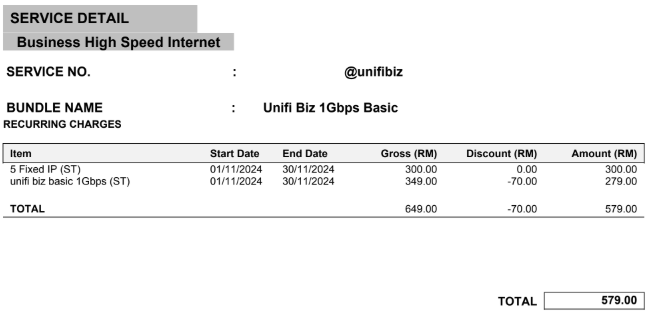
RM399 for 800Mb/s is definitely on the high side. We’re currently paying RM279 for 1Gb/s (and were on the same rate when we had 800Mb/s).
You might want to contact your TM account manager—they sometimes have discounts or special rates that aren't widely advertised

user posted image
TSnapster.real
post Nov 14 2024, 11:11 PM

Getting Started
**
Junior Member
59 posts

Joined: Sep 2010


QUOTE(Chengi @ Nov 14 2024, 02:05 AM)
then you could see if the traffic is sufficient or requires upgrade.

you might then need to upgrade your mikrotik and your switch to support up to 2gbps
*
It's really depends tho... Sometimes our Sales dept got enquiry from various client requesting specific network requirements for their functions.. for example, some "kementerian" system training session, require min 30mbps download speed on each devices (for total 30 devices)... That only for specific events/function, not include other guest devices will cuncurrently reside on the same network..

This post has been edited by napster.real: Nov 14 2024, 11:18 PM
TSnapster.real
post Nov 14 2024, 11:14 PM

Getting Started
**
Junior Member
59 posts

Joined: Sep 2010


QUOTE(karenzayn @ Nov 14 2024, 10:07 AM)
I think, since you'll be upgrading to 2GBPS, put it on a single mikrotik or OPNSense and make separate VLANS  tongue.gif
*
If can, i want to maintain a straight forward network... Current Mikrotik only set for guest hotspot server.. Less cluttered and easy to maintain summore~ :-p
dcheah
post Nov 18 2024, 10:36 AM

OldSkool
******
Senior Member
1,460 posts

Joined: Jan 2005
From: Kajang


Yeah... if you upgrade the Unifi to 2Gbps package, then you also need to upgrade the Infra to fully utilize the speed.

I would suggest to upgrade all Switches, Router with 2.5Gbps ready network. You might also need to add-on a 2.5Gbps NIC for each of your Endpoints. It will be a costly upgrades.

But also consider this, what is the existing Internet Bandwidth utilization ? 80% usage ?
If not, it doesn't make sense to upgrade as it will be under utilize albeit the package seems very attractive.

You can also consider to have a Multi-WAN instead, like a Load Balancer or similar. Means that in future if you run out of bandwidth on the existing 800Mbps, you can just add another 800Mbps or similar have it Load Balance the bandwidth so that all Endpoints have good internet connections.

This way, you doesn't need to change much on the existing Infra and still easy to maintain.


Hope this helps... cool2.gif


Change to:
| Lo-Fi Version
0.0204sec    2.29    5 queries    GZIP Disabled
Time is now: 23rd December 2025 - 10:17 AM