Outline ·
[ Standard ] ·
Linear+
PS3 with LCD Monitor, finding one lcd monitor
|
gr8fr8
|
 Feb 5 2008, 04:39 PM Feb 5 2008, 04:39 PM
|

|
ala better get the BENQ FP94VW. Cheap and have headphone jack...can connect either headphone or pc speaker...easy...has HDMI port...but only 720p...still ok to me for those with tight budget....19".
|
|
|
|
|
|
Thrust
|
Feb 5 2008, 07:21 PM
|
|
|
Just get DELL SP2208WFP with HDMI in, solve all your problem. This is how it looks like: 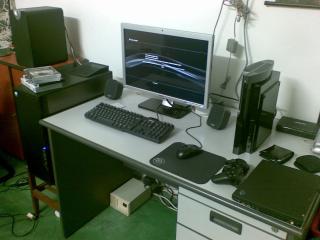 This post has been edited by Thrust: Feb 5 2008, 07:22 PM
 |
|
|
|
|
|
saiga
|
Feb 5 2008, 07:36 PM
|
|
|
QUOTE(gr8fr8 @ Feb 5 2008, 04:39 PM) ala better get the BENQ FP94VW. Cheap and have headphone jack...can connect either headphone or pc speaker...easy...has HDMI port...but only 720p...still ok to me for those with tight budget....19". bro, dis model have 22 inch one? |
|
|
|
|
|
wild_acasia2
|
Feb 5 2008, 09:02 PM
|
New Member

|
QUOTE(Thrust @ Feb 5 2008, 07:21 PM) Just get DELL SP2208WFP with HDMI in, solve all your problem. This is how it looks like:
are you by any chance from Intel? |
|
|
|
|
|
darkskies
|
Feb 5 2008, 10:15 PM
|
|
|
SP2208WFP is ur best budget wise option. The cheapest 22 inch HDMI lcd. If Money doesnt counts for u(too rich), juz buy X-FI elite pro. Solve the problem for Audio output and input. X-FI elite pro console kit got the audio jacks(red and white one) for u to direct the av cable splits signal into ur creative soundcard. But as i said , it being too spendthrift if u opted for this.
|
|
|
|
|
|
zeipher
|
Feb 5 2008, 10:18 PM
|
|
|
QUOTE(Thrust @ Feb 5 2008, 07:21 PM) Just get DELL SP2208WFP with HDMI in, solve all your problem. This is how it looks like:
hi... planning to get the SP2208WFP for ps3 also. been wondering the picture quality of the lcd output from the ps3 and also any ghosting issues when playing fast pace games ? |
|
|
|
|
|
gr8fr8
|
Feb 5 2008, 10:40 PM
|
|
|
QUOTE(saiga @ Feb 5 2008, 07:36 PM) bro, dis model have 22 inch one? as far as i know, only 19"  |
|
|
|
|
|
Rezuan78
|
Feb 5 2008, 10:48 PM
|
Getting Started
|
QUOTE(Thrust @ Feb 5 2008, 07:21 PM) Just get DELL SP2208WFP with HDMI in, solve all your problem. This is how it looks like:
hi bro, is this dell support up to 1080i resolution? noob question.  |
|
|
|
|
|
Microsuck_360
|
Feb 5 2008, 11:15 PM
|
Getting Started
|
QUOTE(Rezuan78 @ Feb 5 2008, 10:48 PM) hi bro, is this dell support up to 1080i resolution? noob question. bro, alang2 ambik 24" terus...sekarang dell ada offer...around 1.3++k... |
|
|
|
|
|
wild_acasia2
|
Feb 5 2008, 11:37 PM
|
New Member
|
QUOTE(Rezuan78 @ Feb 5 2008, 10:48 PM) hi bro, is this dell support up to 1080i resolution? noob question. no it doesn't , you will get 720 if i'm not mistaken all monitor on this price range won't get you full HD. It's good enough IMHO. This post has been edited by wild_acasia2: Feb 5 2008, 11:38 PM |
|
|
|
|
|
Thrust
|
Feb 5 2008, 11:51 PM
|
|
|
Ya, can go till 720p only. Most PS3 games are capable of 720p output only.
|
|
|
|
|
|
Rezuan78
|
Feb 5 2008, 11:58 PM
|
Getting Started
|
QUOTE(Thrust @ Feb 5 2008, 11:51 PM) Ya, can go till 720p only. Most PS3 games are capable of 720p output only. actually i have lcd tv philips 20" but it support up to 720p only. so when i play warhawk so i cant see full screen of the game. any idea what monitor can support up to 1080i or 1080p resolution? |
|
|
|
|
|
Fattyfei
|
Feb 6 2008, 09:15 AM
|
New Member
|
I'm using the HP 2207H - with HDMI input. Built in speakers sucks but I can live with it for the time being. On the info page it's stated that it's running at 1080p with my PS3. Maybe upscaled. Not sure why but as far as I know 22" normally support up to 720p. Weird
|
|
|
|
|
|
maxguy
|
Feb 6 2008, 09:20 AM
|
|
|
anyone try this for lcd monitor which support 1080i/p output
www.hdboxpro.com
|
|
|
|
|
|
Rezuan78
|
Feb 6 2008, 10:20 AM
|
Getting Started
|
QUOTE(Fattyfei @ Feb 6 2008, 09:15 AM) I'm using the HP 2207H - with HDMI input. Built in speakers sucks but I can live with it for the time being. On the info page it's stated that it's running at 1080p with my PS3. Maybe upscaled. Not sure why but as far as I know 22" normally support up to 720p. Weird bro may i know 720p normal screen is it the same as 720p wide screen? do u see full screen when play game on 720p wide screen? i ask this because my 720p normal screen cannot see a few inch of the image on the left and right. refer the picture below: 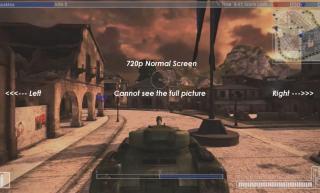
(720p normal screen) 
(720p wide screen)   or we only can get full screen when using 1080p? any idea? This post has been edited by Rezuan78: Feb 6 2008, 10:29 AM |
|
|
|
|
|
Thrust
|
Feb 6 2008, 10:47 AM
|
|
|
Bro, your Phillip LCD is it 4:3 aspect ratio?
|
|
|
|
|
|
Rezuan78
|
Feb 6 2008, 11:36 AM
|
Getting Started
|
QUOTE(Thrust @ Feb 6 2008, 10:47 AM) Bro, your Phillip LCD is it 4:3 aspect ratio? It has three screen format adjustment options: 4:3, 16:9 compressed, and 4:3 expand. My LCD TV spec >>> http://www.amazon.com/Philips-20PF5120-20-Flat-LCD/dp/B000AD09IU |
|
|
|
|
|
saiga
|
Feb 6 2008, 12:29 PM
|
|
|
QUOTE(Rezuan78 @ Feb 6 2008, 11:36 AM) It has three screen format adjustment options: 4:3, 16:9 compressed, and 4:3 expand. My LCD TV spec >>> http://www.amazon.com/Philips-20PF5120-20-Flat-LCD/dp/B000AD09IUit's your lcd problem. not actually problem but becoz af the aspect ratio. if wanna view full screen must get the 16:9 one.if use 4:3 (like your one) will have black bars. 720p normal (4:3) and 720p wide (16:9) not same. must depends on the source.no need 1080p to get fullscreen. maybe you can try change the screen format,but the image will no be like usual (maybe people will fatter n etc).like in your case you can view fullscreen but some details is missing (left and right) p/s: time to get wide lcd  This post has been edited by saiga: Feb 6 2008, 12:32 PM This post has been edited by saiga: Feb 6 2008, 12:32 PM |
|
|
|
|
|
Rezuan78
|
Feb 6 2008, 12:39 PM
|
Getting Started
|
QUOTE(saiga @ Feb 6 2008, 12:29 PM) it's your lcd problem. not actually problem but becoz af the aspect ratio. if wanna view full screen must get the 16:9 one.if use 4:3 (like your one) will have black bars. 720p normal (4:3) and 720p wide (16:9) not same. must depends on the source.no need 1080p to get fullscreen. maybe you can try change the screen format,but the image will no be like usual (maybe people will fatter n etc).like in your case you can view fullscreen but some details is missing (left and right) p/s: time to get wide lcd so now should i buy lcd monitor widescreen? if i buy lcd monitor widescreen it only support up to 720p also. so is the 720p lcd monitor widescreen can see full screen? p/s: not enough budget to buy one more lcd tv  This post has been edited by Rezuan78: Feb 6 2008, 12:42 PM This post has been edited by Rezuan78: Feb 6 2008, 12:42 PM |
|
|
|
|
|
Thrust
|
Feb 6 2008, 01:07 PM
|
|
|
I see your phillips LCD has square screen. I guess you should try to play your games @ 4:3 aspect ratio and see whether you can view the full screen of the game image. If you want to play widescreen (16:9), better get a true widescreen LCD.  Edit: Bro, it seems that it is your LCD limitations. You LCD has only 640 x 480-pixel resolution and not 1366x768 like those HD ready set. Best bet is to get a new LCD TV.  This post has been edited by Thrust: Feb 6 2008, 01:10 PM This post has been edited by Thrust: Feb 6 2008, 01:10 PM |
|
|
|
|



 Quote
Quote




 0.0206sec
 0.57
0.57
 6 queries
 GZIP Disabled