Outline ·
[ Standard ] ·
Linear+
[2024] Mac Mini with M4 / M4 Pro
|
jonthebaptist
|
 Dec 26 2024, 08:51 PM Dec 26 2024, 08:51 PM
|

|
QUOTE(hellfried @ Dec 26 2024, 05:12 PM) OK this is driving me mad. I am using my Mac Mini M4 with a M7 Samsung 4K monitor. The very first C-C cable that i use to connect them together works perfectly but I felt it was a bit short at 0.5 meters. BTW this is the description of this cable on the shopee page that I bought it from - USB C to USB C Cable 100W USB 3.2 Type C Gen2 20Gbps Data Transfer Cable PD Fast Charging 4K Video Monitor Thunderbolt 3. Since it was a bit too short I decided to buy a longer cable. This are the specs - 20Gbps USB 3.2 Gen 2 Type C to Type C Cable PD 100W Video 8K@60Hz. However when I try to connect it, there is no signal. So my conclusion is that it is not comaptible. I bought a 3rd cable - USB4 Cable with 240W Fast Charging 1m 8K Monitor 40Gbps Compatible with USB 4 Thunderbolt 4 Type C. It does not work! No signal! What specs should I be looking for in the cable? Is it really so difficult to find a compatible cable?? Please help. First of all, are you using the back 3 ports? The front 2 ports won't work as it cannot display out. So make sure on that first. Also on your monitor, make sure you plug it in the right port, some ports just don't allow display out. USB-C might look the same but they all have different specs. This post has been edited by jonthebaptist: Dec 26 2024, 08:57 PM |
|
|
|
|
|
yvliew
|
Dec 26 2024, 08:54 PM
|
|
|
QUOTE(jonthebaptist @ Dec 26 2024, 08:49 PM) Just curious, 2025 coming, will there be added tax on the Mac Mini M4? Does anyone here know or keep track? those americans and some countries are trembling over Trump's tariffs which will increase prices on goods. A lot on reddit sub like mac/pcgaming/pcmasterrace are all trying to get their hardware now rather than next year because of this. It will impact places like Canada and Mexico but I think it will also affect globally as it's also targeting China. |
|
|
|
|
|
jonthebaptist
|
Dec 26 2024, 08:56 PM
|
|
|
QUOTE(yvliew @ Dec 26 2024, 08:54 PM) those americans and some countries are trembling over Trump's tariffs which will increase prices on goods. A lot on reddit sub like mac/pcgaming/pcmasterrace are all trying to get their hardware now rather than next year because of this. It will impact places like Canada and Mexico but I think it will also affect globally as it's also targeting China. Thank you for the info, I didn't even consider that, very good to know. Thinking get a second unit. Not that I need, just don't want to have to pay more later on. This post has been edited by jonthebaptist: Dec 26 2024, 08:56 PM |
|
|
|
|
|
ericlaiys
|
Dec 26 2024, 09:19 PM
|
|
|
QUOTE(jonthebaptist @ Dec 26 2024, 08:49 PM) Just curious, 2025 coming, will there be added tax on the Mac Mini M4? Does anyone here know or keep track? no one will know. USD currency seem hard to predict. anytime price can go up as now already 4.4+ |
|
|
|
|
|
razkal
|
Dec 27 2024, 07:39 AM
|
|
|
QUOTE(hellfried @ Dec 26 2024, 05:12 PM) OK this is driving me mad. I am using my Mac Mini M4 with a M7 Samsung 4K monitor. The very first C-C cable that i use to connect them together works perfectly but I felt it was a bit short at 0.5 meters. BTW this is the description of this cable on the shopee page that I bought it from - USB C to USB C Cable 100W USB 3.2 Type C Gen2 20Gbps Data Transfer Cable PD Fast Charging 4K Video Monitor Thunderbolt 3. Since it was a bit too short I decided to buy a longer cable. This are the specs - 20Gbps USB 3.2 Gen 2 Type C to Type C Cable PD 100W Video 8K@60Hz. However when I try to connect it, there is no signal. So my conclusion is that it is not comaptible. I bought a 3rd cable - USB4 Cable with 240W Fast Charging 1m 8K Monitor 40Gbps Compatible with USB 4 Thunderbolt 4 Type C. It does not work! No signal! What specs should I be looking for in the cable? Is it really so difficult to find a compatible cable?? Please help. To be safe go for display port to usb c cable. U green have one from usb c to display port 1.4. Look for cable that support display port alt mode. If usb c to usb c find those that support Thunderbolt 4 from Orico. Used to buy one around RM89 longest is 2M long. |
|
|
|
|
|
hellfried
|
Dec 27 2024, 07:57 AM
|
|
|
QUOTE(razkal @ Dec 27 2024, 07:39 AM) To be safe go for display port to usb c cable. U green have one from usb c to display port 1.4. Look for cable that support display port alt mode. If usb c to usb c find those that support Thunderbolt 4 from Orico. Used to buy one around RM89 longest is 2M long. Just to be clear the usb c to display port cable has usb c on one end and hdmi on the other, right? |
|
|
|
|
|
razkal
|
Dec 27 2024, 08:51 AM
|
|
|
QUOTE(hellfried @ Dec 27 2024, 07:57 AM) Just to be clear the usb c to display port cable has usb c on one end and hdmi on the other, right? Sorry no. I mean to say display port to usb c. Meaning display port connected to your monitor while another end is usb c. Display port is not HDMI. Refer to the another post by another forummer. I bought this one for my 2k display. Ugreen cableEdited. Oh I did some search now your monitor doesn't have display port input. Nevermind just ignore my recommendation. This post has been edited by razkal: Dec 27 2024, 10:06 AM |
|
|
|
|
|
muman7
|
Dec 27 2024, 09:01 AM
|
Getting Started

|
QUOTE(hellfried @ Dec 27 2024, 07:57 AM) Just to be clear the usb c to display port cable has usb c on one end and hdmi on the other, right? 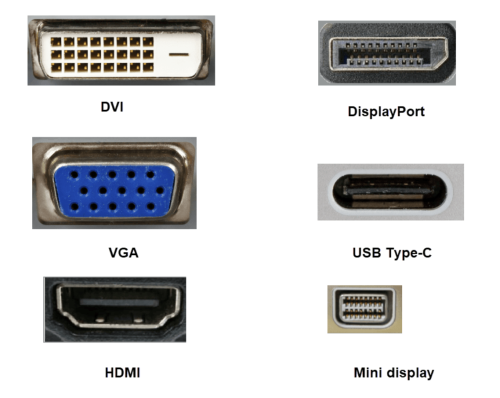 HDMI and display port are different, always go for display port first if both available. |
|
|
|
|
|
hellfried
|
Dec 27 2024, 10:27 AM
|
|
|
QUOTE(razkal @ Dec 27 2024, 08:51 AM) Sorry no. I mean to say display port to usb c. Meaning display port connected to your monitor while another end is usb c. Display port is not HDMI. Refer to the another post by another forummer. I bought this one for my 2k display. Ugreen cableEdited. Oh I did some search now your monitor doesn't have display port input. Nevermind just ignore my recommendation. My monitor only has 2 hdmi ports and one usb-c port. |
|
|
|
|
|
razkal
|
Dec 27 2024, 10:38 AM
|
|
|
QUOTE(hellfried @ Dec 27 2024, 10:27 AM) My monitor only has 2 hdmi ports and one usb-c port. Then you may have to find usb c to usb c route. the cable must be able to support display port alt mode meaning it can output display to your monitor. To be safe buy thunderbolt 3/4 certified cable. |
|
|
|
|
|
hellfried
|
Dec 27 2024, 10:45 AM
|
|
|
QUOTE(razkal @ Dec 27 2024, 10:38 AM) Then you may have to find usb c to usb c route. the cable must be able to support display port alt mode meaning it can output display to your monitor. To be safe buy thunderbolt 3/4 certified cable. For now, rather then going further down into the rabbit hole, I will just settle on the HDMI to HDMI route. |
|
|
|
|
|
razkal
|
Dec 27 2024, 10:49 AM
|
|
|
QUOTE(hellfried @ Dec 27 2024, 10:45 AM) For now, rather then going further down into the rabbit hole, I will just settle on the HDMI to HDMI route. Or you can go HDMI to usb c route. hdmi to usb c |
|
|
|
|
|
jonthebaptist
|
Dec 27 2024, 02:01 PM
|
|
|
QUOTE(hellfried @ Dec 27 2024, 10:45 AM) For now, rather then going further down into the rabbit hole, I will just settle on the HDMI to HDMI route. Sometimes you also need to go in setting and choose the correct "display source", I see your monitor has 3 ports that allow display. You might need to go in setting and toggle between HDMI1, HDMI2 or USBC |
|
|
|
|
|
hellfried
|
Dec 30 2024, 05:54 AM
|
|
|
QUOTE(razkal @ Dec 27 2024, 10:38 AM) Then you may have to find usb c to usb c route. the cable must be able to support display port alt mode meaning it can output display to your monitor. To be safe buy thunderbolt 3/4 certified cable. After weeks of buying cables online and finding out that they don't work, I may have finally found the one that actually does. The link to it : https://shopee.com.my/Thunderbolt-4-5-Cable...9c-a73bb897f07aIt is marked as TB 4 and as soon as I plugged it in, it works. In fact the display now looks better than the HDMI connection that I was using prior. Hope this is a lesson to someone and they find it useful. Always look for TB 4 when buying a cable to connect your base M4 Mac Mini to a non-retina, non-Apple monitor. Thanks to everyone who gave suggestions and input to my issue. This post has been edited by hellfried: Dec 30 2024, 05:56 AM |
|
|
|
|
|
axercr777
|
Dec 30 2024, 12:40 PM
|
New Member
|
Anyone using a Hagibis/Qwiizlab/Colorii MC40 40Gbps enclosure with a KC3000 1TB nvme ssd? Mine is running hot—the SSD temperature can reach 60–69 degrees under normal load. I applied thermal pads as per the instructions on both the chip and the ssd. I'm just wondering if the issue is with the enclosure or the ssd.
|
|
|
|
|
|
yvliew
|
Dec 30 2024, 03:47 PM
|
|
|
QUOTE(hellfried @ Dec 30 2024, 05:54 AM) After weeks of buying cables online and finding out that they don't work, I may have finally found the one that actually does. The link to it : https://shopee.com.my/Thunderbolt-4-5-Cable...9c-a73bb897f07aIt is marked as TB 4 and as soon as I plugged it in, it works. In fact the display now looks better than the HDMI connection that I was using prior. Hope this is a lesson to someone and they find it useful. Always look for TB 4 when buying a cable to connect your base M4 Mac Mini to a non-retina, non-Apple monitor. Thanks to everyone who gave suggestions and input to my issue. how many meter you buy? wanna know if 2M TB4 will still give full 40gbps or not. QUOTE(axercr777 @ Dec 30 2024, 12:40 PM) Anyone using a Hagibis/Qwiizlab/Colorii MC40 40Gbps enclosure with a KC3000 1TB nvme ssd? Mine is running hot—the SSD temperature can reach 60–69 degrees under normal load. I applied thermal pads as per the instructions on both the chip and the ssd. I'm just wondering if the issue is with the enclosure or the ssd. I just read abotu this enclosure I thought the design would be great for cooling eh. 60-69 is too hot for me liking. Now mine is able to keep under 50c with a block of heatsink. Maybe you might need add some heatsink on your enclosure also. Is the enclosure very hot? This case no fan right? Just passive cooling. Maybe all the heat is trapped inside. |
|
|
|
|
|
RacingTech
|
Dec 30 2024, 04:00 PM
|
|
|
Hi, wanna ask a simple question, can the sound been pass to the monitor through HDMI cable?
|
|
|
|
|
|
axercr777
|
Dec 30 2024, 04:00 PM
|
New Member
|
QUOTE(yvliew @ Dec 30 2024, 03:47 PM) I just read abotu this enclosure I thought the design would be great for cooling eh. 60-69 is too hot for me liking. Now mine is able to keep under 50c with a block of heatsink. Maybe you might need add some heatsink on your enclosure also. Is the enclosure very hot? This case no fan right? Just passive cooling. Maybe all the heat is trapped inside. Yup, I thought the design is great for passive cooling based on the reviews I’ve seen on youbube. That’s the main reason I purchased this model from AliExpress. The case feels very hot to the touch. The only difference is that none of the reviews used the KC3000; most of them used Crucial or WD ssd thus make me wonder if the issue coming from ssd. Are you currently using a heatsink? If so, can you recommend a heatsink model? |
|
|
|
|
|
yvliew
|
Dec 30 2024, 04:39 PM
|
|
|
QUOTE(axercr777 @ Dec 30 2024, 04:00 PM) Yup, I thought the design is great for passive cooling based on the reviews I’ve seen on youbube. That’s the main reason I purchased this model from AliExpress. The case feels very hot to the touch. The only difference is that none of the reviews used the KC3000; most of them used Crucial or WD ssd thus make me wonder if the issue coming from ssd. Are you currently using a heatsink? If so, can you recommend a heatsink model? 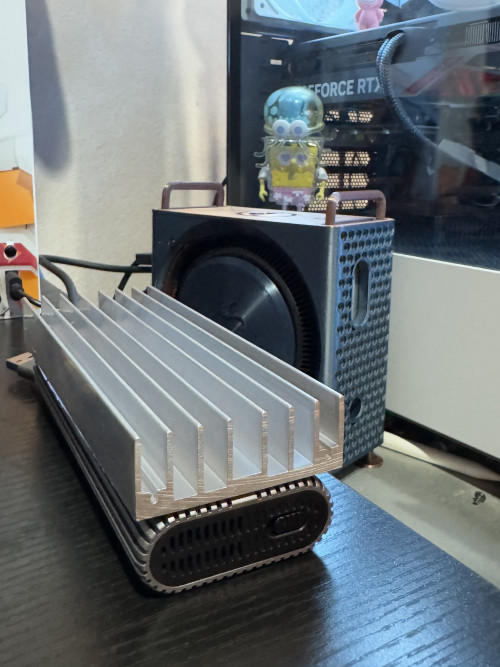 I’m doing it like this. You can try search shopee for one that suits your size. Remember to get thermal pad too. Definitely helps a lot. My friend is using KC30000 2TB drive with UGREEN USB4 enclosure with fan. But also very hot for the ssd. Around 50C ++. Had to use heatsink directly on the SSD with the enclosure cover off. Which I don’t think it’s a good permanent solution. I like mine just the heatsink outside the case and it’s still very portable. Try it first since those heatsink is not expensive. I also bought this thinking to use it with the enclosure case off, but decided not to because considering the portability. So this heatsink might go to my Windows PC nvme ssd.   This post has been edited by yvliew: Dec 30 2024, 04:43 PM This post has been edited by yvliew: Dec 30 2024, 04:43 PM |
|
|
|
|
|
axercr777
|
Dec 30 2024, 05:47 PM
|
New Member
|
QUOTE(yvliew @ Dec 30 2024, 04:39 PM) I’m doing it like this. You can try search shopee for one that suits your size. Remember to get thermal pad too. Definitely helps a lot. My friend is using KC30000 2TB drive with UGREEN USB4 enclosure with fan. But also very hot for the ssd. Around 50C ++. Had to use heatsink directly on the SSD with the enclosure cover off. Which I don’t think it’s a good permanent solution. I like mine just the heatsink outside the case and it’s still very portable. Try it first since those heatsink is not expensive. I also bought this thinking to use it with the enclosure case off, but decided not to because considering the portability. So this heatsink might go to my Windows PC nvme ssd. I will look into this. Did you use a thermal pad that is as large as the surface area between the case and the heatsink? |
|
|
|
|



 Quote
Quote


 0.0220sec
 0.50
0.50
 6 queries
 GZIP Disabled