

QUOTE(yvliew @ Dec 13 2024, 04:59 PM)
Anyone know what app can see the external ssd temp?

try dxdrive app. my ugreen around 48 C[2024] Mac Mini with M4 / M4 Pro
|
|
 Dec 13 2024, 05:14 PM Dec 13 2024, 05:14 PM
|
 
Senior Member
7,547 posts Joined: May 2012  
|
QUOTE(yvliew @ Dec 13 2024, 04:59 PM) Anyone know what app can see the external ssd temp? try dxdrive app. my ugreen around 48 C |
|
|
|
|
|
Dec 13 2024, 05:28 PM
|

Senior Member
3,918 posts Joined: Nov 2004
|
QUOTE(ericlaiys @ Dec 13 2024, 05:14 PM) try dxdrive app. my ugreen around 48 C DriveDX or DXDrive? Cannot find DXDrive but got DriveDX . Not in appstore right? |
|
|
Dec 13 2024, 05:45 PM
Show posts by this member only | IPv6 | Post
#743
|

Senior Member
1,036 posts Joined: Sep 2022
|
QUOTE(yvliew @ Dec 13 2024, 03:16 PM) wow finally here! Earlier than expected. Makes me want to buy a second unit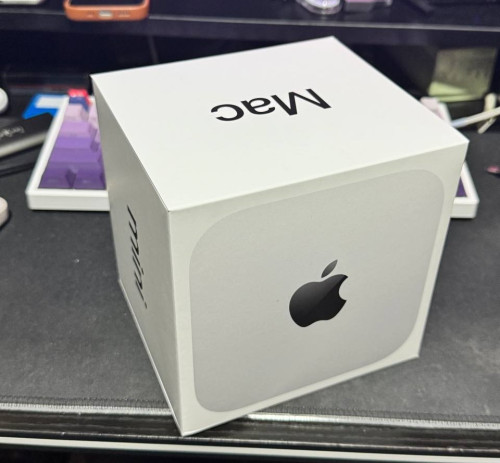 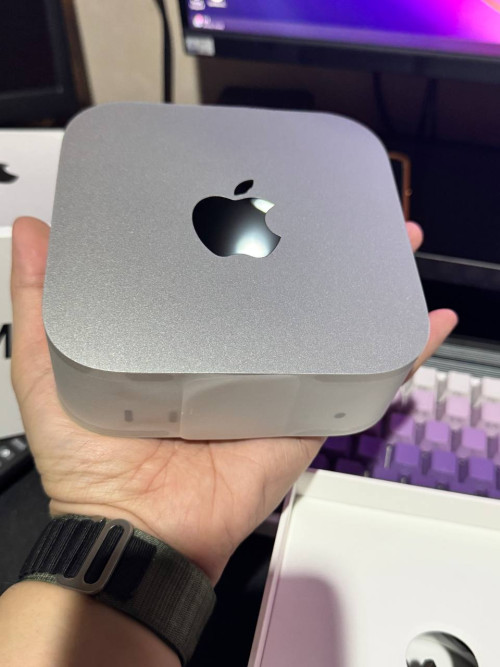 |
|
|
Dec 13 2024, 06:11 PM
|
|
Senior Member
7,547 posts Joined: May 2012
|
QUOTE(yvliew @ Dec 13 2024, 05:28 PM) DriveDX or DXDrive? yes. DriveDX. manual download and run it. 15 days trial. anyway, good to use for 1xCannot find DXDrive but got DriveDX . Not in appstore right? |
|
|
Dec 13 2024, 06:26 PM
|
|
Senior Member
3,918 posts Joined: Nov 2004
|
QUOTE(ericlaiys @ Dec 13 2024, 06:11 PM) yes. DriveDX. manual download and run it. 15 days trial. anyway, good to use for 1x see which one is accurate? |
|
|
Dec 13 2024, 06:35 PM
|
|
Senior Member
7,547 posts Joined: May 2012
|
QUOTE(yvliew @ Dec 13 2024, 06:26 PM) see which one is accurate? u should see like thisAttached thumbnail(s) 
|
|
|
|
|
|
Dec 13 2024, 06:37 PM
|
|
Senior Member
3,918 posts Joined: Nov 2004
|
QUOTE(ericlaiys @ Dec 13 2024, 06:35 PM) u should see like this i thought 70++ so hot..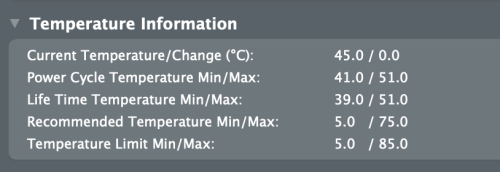 |
|
|
Dec 13 2024, 06:49 PM
|
|
Senior Member
7,547 posts Joined: May 2012
|
QUOTE(yvliew @ Dec 13 2024, 06:37 PM) i thought 70++ so hot.. your current temperature is 45C. Over 75% will kill your nvme fasterThis post has been edited by ericlaiys: Dec 13 2024, 06:50 PM |
|
|
Dec 13 2024, 07:09 PM
|
|
Senior Member
3,918 posts Joined: Nov 2004
|
QUOTE(ericlaiys @ Dec 13 2024, 06:49 PM) your current temperature is 45C. Over 75% will kill your nvme faster I try TG PRO. Not bad also can see more details of other components. |
|
|
Dec 14 2024, 01:01 AM
Show posts by this member only | IPv6 | Post
#750
|
|
Senior Member
1,036 posts Joined: Sep 2022
|
QUOTE(yvliew @ Dec 13 2024, 07:09 PM) I try TG PRO. Not bad also can see more details of other components. Just get a 6 inch or 8 inch mini fan and blow it on the SSD, don't have to worry about temperature anymore after that. |
|
|
Dec 14 2024, 02:09 AM
|
|
Senior Member
3,918 posts Joined: Nov 2004
|
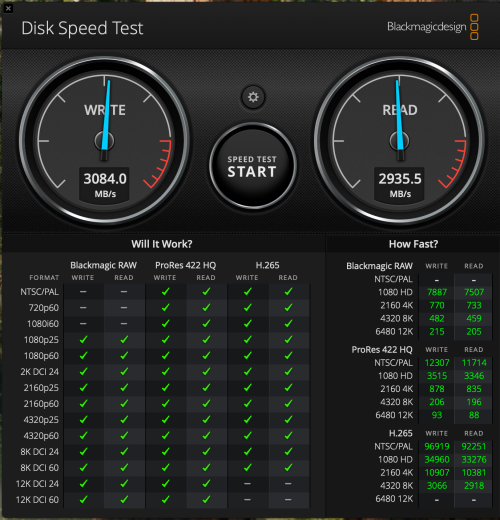
External USB 4 SSD
 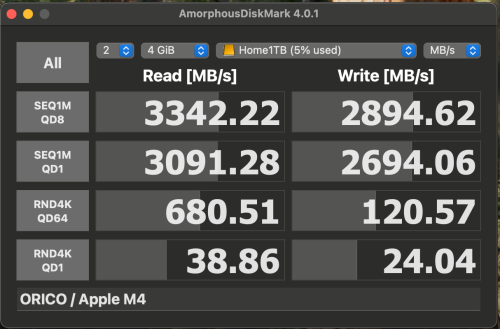 Internal 256GB SSD 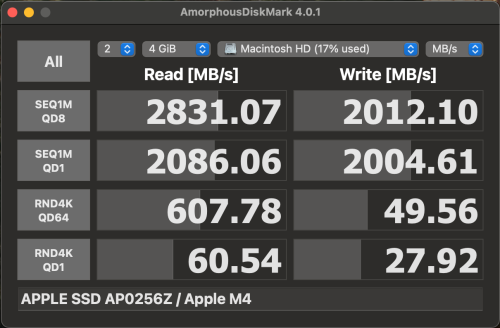 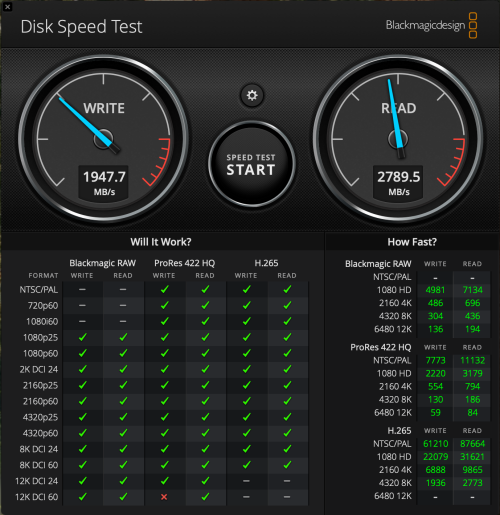 |
|
|
Dec 14 2024, 10:31 AM
|
|
Junior Member
274 posts Joined: Oct 2005
|
QUOTE(jonthebaptist @ Dec 14 2024, 01:01 AM) Just get a 6 inch or 8 inch mini fan and blow it on the SSD, don't have to worry about temperature anymore after that. Second that. While the enclosure fan only takes about 2-3C off the SSD temp, those fan can reduces up to 8-10C easily on my case. |
|
|
Dec 14 2024, 10:55 AM
|
|
Senior Member
3,918 posts Joined: Nov 2004
|
QUOTE(muman7 @ Dec 14 2024, 10:31 AM) Second that. While the enclosure fan only takes about 2-3C off the SSD temp, those fan can reduces up to 8-10C easily on my case. Getting the big ass heatsink. I find bigger heatsink does work. But unable to use the cover. This post has been edited by yvliew: Dec 14 2024, 10:56 AM jonthebaptist liked this post
|
|
|
|
|
|
Dec 14 2024, 11:17 AM
|
|
Junior Member
274 posts Joined: Oct 2005
|
QUOTE(yvliew @ Dec 14 2024, 10:55 AM) Getting the big ass heatsink. I find bigger heatsink does work. But unable to use the cover. This is for enclosure or just the nvme? I have one similar on my PC nvme.My cheap setup with 2 12CM fans, so effective I turned off the enclosure fan for good. Stil got space for another time machine drive later.   jonthebaptist liked this post
|
|
|
Dec 14 2024, 12:23 PM
Show posts by this member only | IPv6 | Post
#755
|
|
Senior Member
1,036 posts Joined: Sep 2022
|
QUOTE(muman7 @ Dec 14 2024, 10:31 AM) Second that. While the enclosure fan only takes about 2-3C off the SSD temp, those fan can reduces up to 8-10C easily on my case. My old ideapad 3 which I got cheap and why they sell it cheap because using low quality materials had very bad cooling, after few hours using the laptop will BSOD, got a fan last time for it and never had BSOD after that. I suspected the RAM got too hot and cause a BSOD.Also can help for the ethernet dongles, they also heat up after a while using under heavy load. Cooling is super important when comes to PC components. This post has been edited by jonthebaptist: Dec 14 2024, 12:24 PM Susuwatari liked this post
|
|
|
Dec 14 2024, 01:18 PM
|
|
Senior Member
3,918 posts Joined: Nov 2004
|
QUOTE(muman7 @ Dec 14 2024, 11:17 AM) This is for enclosure or just the nvme? I have one similar on my PC nvme. Dude. The SSD and SSD nand I/O are both your internal. I made this freaking mistake thinking the one is my external. Boy i'm so wrong. I notice my external was scorching hot and it couldn't be 37c.My cheap setup with 2 12CM fans, so effective I turned off the enclosure fan for good. Stil got space for another time machine drive later. You need to enable SMART to see your external ssd. Fan can't really dissipate heat faster than a heatsink. 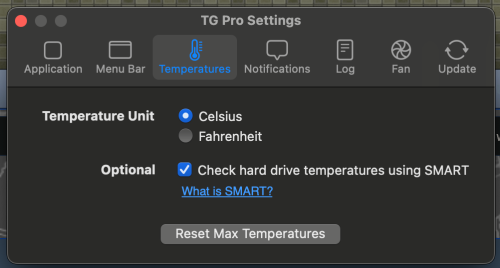  This post has been edited by yvliew: Dec 14 2024, 01:25 PM jonthebaptist liked this post
|
|
|
Dec 14 2024, 02:17 PM
Show posts by this member only | IPv6 | Post
#757
|

Junior Member
436 posts Joined: Oct 2005
|
My CPU is running at around 50-56 celcius. Is. this normal? Can't hear the fan though
|
|
|
Dec 14 2024, 02:39 PM
|
|
Junior Member
274 posts Joined: Oct 2005
|
QUOTE(yvliew @ Dec 14 2024, 01:18 PM) Dude. The SSD and SSD nand I/O are both your internal. I made this freaking mistake thinking the one is my external. Boy i'm so wrong. I notice my external was scorching hot and it couldn't be 37c. Yes SMART already enabled. It's my external SSD look at the second drive WDSN850X. Let me share my records so far, all with at least 30 minutes after turn on mini. My external drive only for storage so your mileage may vary: You need to enable SMART to see your external ssd. Fan can't really dissipate heat faster than a heatsink. a. drive + enclosure fan on - 45-47C b. drive + enclosure fan off - 49-52C c. drive + enclosure fan on + on top of 2 12CM fan - 39-42C d. drive + enclosure fan off + on top of 2 12CM fan - 39-42C All test while the drive is idle. If running speed test non stop for around 15 minutes add about 8-10C to the results above. |
|
|
Dec 14 2024, 05:06 PM
Show posts by this member only | IPv6 | Post
#759
|

Senior Member
1,365 posts Joined: Jan 2003 From: Seri Petaling
|
Wanna ask a question on the initial setup of mac mini.
When you first turn on the mac mini for setup, will it be able to detect BT keyboard/mouse or even your Magic mouse? Or need to use wired input devices / wireless adapter for first time setup? |
|
|
Dec 14 2024, 05:26 PM
Show posts by this member only | IPv6 | Post
#760
|
|
Junior Member
436 posts Joined: Oct 2005
|
QUOTE(kelvin88 @ Dec 14 2024, 05:06 PM) Wanna ask a question on the initial setup of mac mini. It detected my Magic mouse and magic keyboard immediately, probably because they are apple products. For other brands you may have to connect via wires. If you have bluetooth devices, press the power button 3 times for pairing.When you first turn on the mac mini for setup, will it be able to detect BT keyboard/mouse or even your Magic mouse? Or need to use wired input devices / wireless adapter for first time setup? https://www.youtube.com/watch?v=K6OOUYL_IoM This post has been edited by hellfried: Dec 14 2024, 05:28 PM |
| Change to: |  0.0217sec 0.0217sec
 0.77 0.77
 6 queries 6 queries
 GZIP Disabled GZIP Disabled
Time is now: 2nd December 2025 - 04:40 PM |
 Quote
Quote