


why my laptop one cannot change...
super bright now
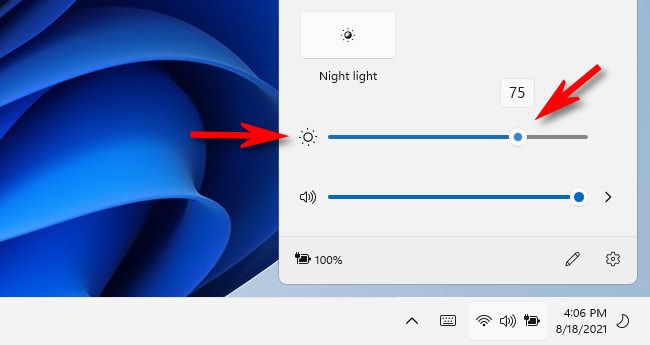
Change Laptop Screen Brightness windows 11
|
|
 Oct 22 2024, 12:44 PM, updated 2y ago Oct 22 2024, 12:44 PM, updated 2y ago
Show posts by this member only | Post
#1
|
 
Senior Member
1,837 posts Joined: May 2010 
|
why my laptop one cannot change... super bright now |
|
|
|
|
|
Oct 22 2024, 12:46 PM
Show posts by this member only | IPv6 | Post
#2
|

Senior Member
719 posts Joined: Jul 2011 
|
slider is locked? got adaptive brightness turned on?
|
|
|
Oct 22 2024, 12:46 PM
Show posts by this member only | Post
#3
|

Senior Member
1,267 posts Joined: Oct 2009
|
Because you already set in night mode?
|
|
|
Oct 22 2024, 01:01 PM
Show posts by this member only | Post
#4
|
|
Senior Member
1,837 posts Joined: May 2010
|
QUOTE(pandah @ Oct 22 2024, 12:46 PM) slider is locked? got adaptive brightness turned on?   |
|
|
Oct 22 2024, 01:01 PM
Show posts by this member only | Post
#5
|
|
Senior Member
1,837 posts Joined: May 2010
|
QUOTE(zuozi @ Oct 22 2024, 12:46 PM) Because you already set in night mode? no |
|
|
Oct 22 2024, 01:02 PM
Show posts by this member only | Post
#6
|

Junior Member
190 posts Joined: Dec 2017
|
QUOTE(plouffle0789 @ Oct 22 2024, 12:44 PM) » Click to show Spoiler - click again to hide... « why my laptop one cannot change... super bright now » Click to show Spoiler - click again to hide... « This post has been edited by Imbi Plaza Lot 1.28: Oct 22 2024, 01:08 PM |
|
|
|
|
|
Oct 22 2024, 01:08 PM
Show posts by this member only | Post
#7
|
|
Senior Member
1,267 posts Joined: Oct 2009
|
QUOTE(plouffle0789 @ Oct 22 2024, 01:01 PM) no I remember last time ac on/battery mode both have their own configuration occasionally stock software like the brand itself punya configuration also causing all this annoying thing. |
|
|
Oct 22 2024, 01:10 PM
Show posts by this member only | IPv6 | Post
#8
|
|
Senior Member
9,050 posts Joined: Jan 2003
|
Had this problem with a ThinkPad T450 before with a third party screen. The BIOS was locked to only Lenovo approved screens. If model not listed, Windows cannot control it.
|
|
|
Oct 22 2024, 01:21 PM
Show posts by this member only | IPv6 | Post
#9
|

Senior Member
6,019 posts Joined: Sep 2011 
|
buy new laptop
|
|
|
Oct 22 2024, 01:23 PM
Show posts by this member only | IPv6 | Post
#10
|
Junior Member
147 posts Joined: Dec 2011 
|
QUOTE(plouffle0789 @ Oct 22 2024, 12:44 PM) why my laptop one cannot change... super bright now |
|
|
Oct 22 2024, 01:24 PM
Show posts by this member only | IPv6 | Post
#11
|

All Stars
12,052 posts Joined: Oct 2017
|
Update driver, or you no install driver
|
|
|
Oct 22 2024, 01:25 PM
Show posts by this member only | IPv6 | Post
#12
|

Senior Member
6,733 posts Joined: Jan 2003 From: Zion
|
My PC has Nvidia GT740 graphics card and it cannot be adjusted inside windows too. The driver is not recognized by windows to adjust brightness because it is tied to HDR. My card does not have this function.
|
|
|
Oct 22 2024, 01:27 PM
|

Senior Member
3,081 posts Joined: May 2011 From: ▁ ▂ ▃ ▄ ▅ ▆ █ 100 %
|
your laptop got function button to increase or reduce brightnes? the Fn button i mean
|
|
|
|
|
|
Oct 22 2024, 01:41 PM
|
|
Senior Member
1,837 posts Joined: May 2010
|
QUOTE(acbc @ Oct 22 2024, 01:10 PM) Had this problem with a ThinkPad T450 before with a third party screen. The BIOS was locked to only Lenovo approved screens. If model not listed, Windows cannot control it. so cannot adjust?or when we turn on laptop, we go to bios adjust? |
|
|
Oct 22 2024, 01:42 PM
|
|
Senior Member
1,837 posts Joined: May 2010
|
QUOTE(netmatrix @ Oct 22 2024, 01:25 PM) My PC has Nvidia GT740 graphics card and it cannot be adjusted inside windows too. The driver is not recognized by windows to adjust brightness because it is tied to HDR. My card does not have this function. so your laptop also super bright now?totally no way to adjust brightness? |
|
|
Oct 22 2024, 01:44 PM
Show posts by this member only | IPv6 | Post
#16
|
|
Senior Member
6,733 posts Joined: Jan 2003 From: Zion
|
QUOTE(plouffle0789 @ Oct 22 2024, 01:42 PM) so your laptop also super bright now? This is my desktop. totally no way to adjust brightness? On old laptop the brightness slider does not work too. But the keyboard brightness adjustment works. |
|
|
Oct 22 2024, 01:48 PM
Show posts by this member only | IPv6 | Post
#17
|
|
Senior Member
9,050 posts Joined: Jan 2003
|
QUOTE(plouffle0789 @ Oct 22 2024, 01:41 PM) so cannot adjust? Cannot because the BIOS is not compatible with your panel. Need to flash a different BIOS or hack the panel firmware to match. Both can kill the laptop if not done carefully. or when we turn on laptop, we go to bios adjust? Did you change the panel previously? |
|
|
Oct 22 2024, 01:51 PM
|
|
Senior Member
1,837 posts Joined: May 2010
|
QUOTE(acbc @ Oct 22 2024, 01:48 PM) Cannot because the BIOS is not compatible with your panel. Need to flash a different BIOS or hack the panel firmware to match. Both can kill the laptop if not done carefully. No....Did you change the panel previously? Last time windows 10 no issue But I upgraded laptop to windows 11 already at least 6 month,now only got brightness issue |
|
|
Oct 22 2024, 01:56 PM
|

Junior Member
25 posts Joined: May 2011
|
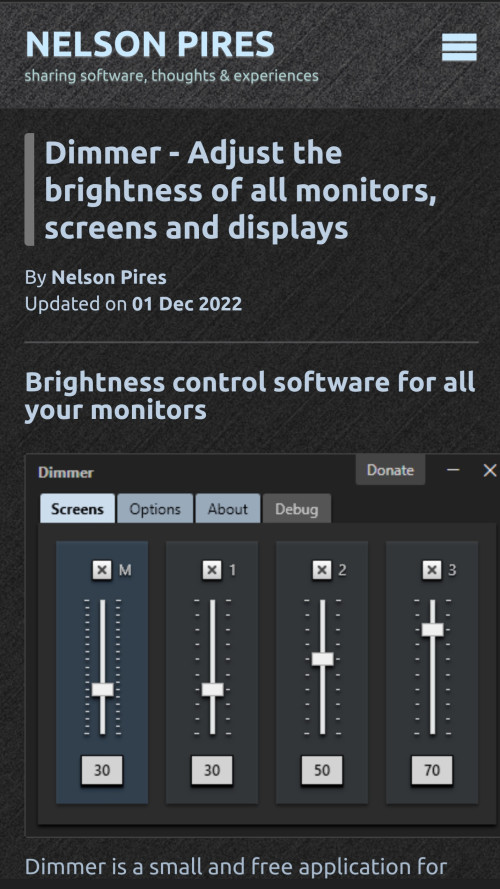 Dont headache, use dimmer |
|
|
Oct 22 2024, 01:59 PM
|

Senior Member
3,835 posts Joined: Oct 2011
|
Just wear sunglasses la if too bright.
|
| Change to: |  0.0167sec 0.0167sec
 0.60 0.60
 5 queries 5 queries
 GZIP Disabled GZIP Disabled
Time is now: 18th December 2025 - 07:46 AM |
 Quote
Quote