Welcome Guest ( Log In | Register )

Bump Topic Topic Closed RSS Feed

Outline · [ Standard ] · Linear+

Q and A How to Sync pc outlook with Android outlook, including subfolders

views
     
TSn8210
post Oct 13 2024, 12:11 AM, updated 2y ago

Look at all my stars!!
*******
Senior Member
2,678 posts

Joined: Mar 2005


Hi, I have 2 years of emails in my pc, with many subfolders. I do not have issues to sync between pc and laptop since they share the same windows file format, ie. outlook's own .pst file. But with android, it is different. So how do I export / import all the 2 years emails and subfolders over to my android phone / tablet? Thank you.
dcheah
post Oct 16 2024, 10:03 AM

OldSkool
******
Senior Member
1,457 posts

Joined: Jan 2005
From: Kajang


QUOTE(n8210 @ Oct 13 2024, 12:11 AM)
Hi, I have 2 years of emails in my pc, with many subfolders. I do not have issues to sync between pc and laptop since they share the same windows file format, ie. outlook's own .pst file. But with android, it is different. So how do I export / import all the 2 years emails and subfolders over to my android phone / tablet? Thank you.
*
First of all you need to change from using POP3 to IMAP protocol.

So all your emails stay in the email server & thus accessible from any devices. But take note that your email server must support IMAP (mostly all email servers support it) and have sufficient storage spaces.

Since you use .pst format, all emails is stored locally on your PC. If you received an email at PC your laptop will not have such email and it must be manually copied over.

Using IMAP is much more convenient as it supports multiple devices.

Hope this helps... cool2.gif

TSn8210
post Oct 18 2024, 08:21 AM

Look at all my stars!!
*******
Senior Member
2,678 posts

Joined: Mar 2005


QUOTE(dcheah @ Oct 16 2024, 10:03 AM)
First of all you need to change from using POP3 to IMAP protocol.

So all your emails stay in the email server & thus accessible from any devices. But take note that your email server must support IMAP (mostly all email servers support it) and have sufficient storage spaces.

Since you use .pst format, all emails is stored locally on your PC. If you received an email at PC your laptop will not have such email and it must be manually copied over.

Using IMAP is much more convenient as it supports multiple devices.

Hope this helps...  cool2.gif
*
Thank you. I am aware of IMAP. But that's just what I can do for the future emails. For the last 2 years of emails, I have no way to copy over, or export to android based email clients?
xxboxx
post Oct 20 2024, 11:11 AM

The mind is for having ideas, not holding them
*******
Senior Member
5,261 posts

Joined: Oct 2004
From: J@Y B33


You can import the pst file into a gmail or outlook account, and then sync this to your Android device.

Or find app that can read .pst format
TSn8210
post Oct 21 2024, 08:36 AM

Look at all my stars!!
*******
Senior Member
2,678 posts

Joined: Mar 2005


Let's forget about the pass. Which email client can let me sync laptop (windows 11) and tablet (android) so they both look the same, contains the same emails (both incoming and also outgoing)

With IMAP, I can receive the new incoming, but still :-
- outgoing emails are not sync
- folder structure is not sync
TSn8210
post Oct 21 2024, 08:38 AM

Look at all my stars!!
*******
Senior Member
2,678 posts

Joined: Mar 2005


Hmm... seems like the only way is to use Gmail to grab my company emails, then start creating my subfolders and rules, etc...

That seems like the only way to be able to sync across other devices and platforms.
dcheah
post Oct 21 2024, 11:38 AM

OldSkool
******
Senior Member
1,457 posts

Joined: Jan 2005
From: Kajang


QUOTE(n8210 @ Oct 21 2024, 08:36 AM)
Let's forget about the pass. Which email client can let me sync laptop (windows 11) and tablet (android) so they both look the same, contains the same emails (both incoming and also outgoing)

With IMAP, I can receive the new incoming, but still :-
- outgoing emails are not sync
- folder structure is not sync
*
Use Microsoft Outlook, it supports both on Windows and Android.

For the old emails (past 2yrs) that are in .pst, might as well manually move it back to the main incoming account, so it will auto-sync to all devices via IMAP.
Doing this will consume lot of time and storage (at server).

1. Create a new account in Outlook but this time configure it using IMAP instead of POP3.
2. Then manually copy (recommended) all the emails in that .pst file into the newly created IMAP account.
3. Once all done, remove that POP3 account so that Outlook will not sync again via POP3.
4. Now you can add the IMAP account in Android device via Outlook Apps, it will auto-sync.

Take note that your email server must have sufficient storage spaces, else it will runs out of space very quick.

Hope this helps... cool2.gif

TSn8210
post Oct 21 2024, 08:46 PM

Look at all my stars!!
*******
Senior Member
2,678 posts

Joined: Mar 2005


QUOTE(dcheah @ Oct 21 2024, 11:38 AM)
Use Microsoft Outlook, it supports both on Windows and Android.

For the old emails (past 2yrs) that are in .pst, might as well manually move it back to the main incoming account, so it will auto-sync to all devices via IMAP.
Doing this will consume lot of time and storage (at server).

1. Create a new account in Outlook but this time configure it using IMAP instead of POP3.
2. Then manually copy (recommended) all the emails in that .pst file into the newly created IMAP account.
3. Once all done, remove that POP3 account so that Outlook will not sync again via POP3.
4. Now you can add the IMAP account in Android device via Outlook Apps, it will auto-sync.

Take note that your email server must have sufficient storage spaces, else it will runs out of space very quick.

Hope this helps...  cool2.gif

*
Thank you. I think I get the idea. But even if I start with my new incoming, but eventually it will slowly build up my storage as time pass, bit by bit... correct? So isn't google better? Although I do not know what is my total storage capacity for my company email, but it is a small cheap ass company. Surely google's 15GB is way bigger. Safer there than in own company's email server. I'll think about the two options at hand.
dcheah
post Oct 23 2024, 12:47 PM

OldSkool
******
Senior Member
1,457 posts

Joined: Jan 2005
From: Kajang


QUOTE(n8210 @ Oct 21 2024, 08:46 PM)
Thank you. I think I get the idea. But even if I start with my new incoming, but eventually it will slowly build up my storage as time pass, bit by bit... correct? So isn't google better? Although I do not know what is my total storage capacity for my company email, but it is a small cheap ass company. Surely google's 15GB is way bigger. Safer there than in own company's email server. I'll think about the two options at hand.
*
Yeah, GMail does seems to be a better choice.

But you still need to considered the following :-

1. The company email have its own domain name (eg. company.example.com), it will looks more professional.
2. Potential & Existing Clients may be wary if you ask them to send to your GMail instead of company email address.

Do consider the Pros and Cons here.

Hope this helps... cool2.gif

TSn8210
post Oct 24 2024, 07:33 PM

Look at all my stars!!
*******
Senior Member
2,678 posts

Joined: Mar 2005


QUOTE(dcheah @ Oct 23 2024, 12:47 PM)
Yeah, GMail does seems to be a better choice.

But you still need to considered the following :-

1. The company email have its own domain name (eg. company.example.com), it will looks more professional.
2. Potential & Existing Clients may be wary if you ask them to send to your GMail instead of company email address.

Do consider the Pros and Cons here.

Hope this helps...  cool2.gif
*
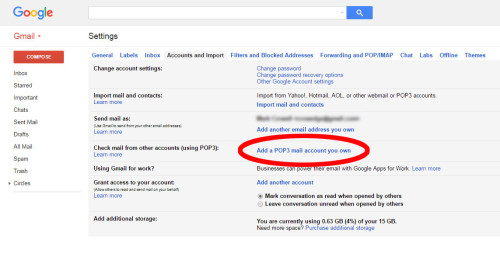
Thanks again for the input. Now we can use Gmail to grab (import) company emails into Gmail server. There is a section in Gmail settings, where you can setup the company email settings. Then Gmail will automatically check the company email from time to time and grab new emails over to Gmail server.

However, this is still not what I want because the only way to sync "sent" emails is to use online / browser to reply emails, then only it will sync the sent folder section across all devices. Otherwise I use laptop to reply, that particular sent email will be stored in laptop, and if I use tablet, then it would not have a similar sent folder.

user posted image
dcheah
post Oct 25 2024, 09:46 AM

OldSkool
******
Senior Member
1,457 posts

Joined: Jan 2005
From: Kajang


QUOTE(n8210 @ Oct 24 2024, 07:33 PM)
Thanks again for the input. Now we can use Gmail to grab (import) company emails into Gmail server. There is a section in Gmail settings, where you can setup the company email settings. Then Gmail will automatically check the company email from time to time and grab new emails over to Gmail server.

However, this is still not what I want because the only way to sync "sent" emails is to use online / browser to reply emails, then only it will sync the sent folder section across all devices. Otherwise I use laptop to reply, that particular sent email will be stored in laptop, and if I use tablet, then it would not have a similar sent folder.

user posted image
*
Yes, that "Sent" folder cannot be sync over POP3. Whatever email was sent on the laptop will not be available in other devices.

I suggest that you "BCC" yourself on all email sent out, this way you will get a copy of that email on other devices. But slightly hassle because you need to manually move that email into the "Sent" folder on other devices. But its entirely up to you whether you want or not.

Hope this helps... cool2.gif


Topic ClosedOptions
 

Change to:
| Lo-Fi Version
0.0183sec    0.52    5 queries    GZIP Disabled
Time is now: 16th December 2025 - 01:52 PM