Welcome Guest ( Log In | Register )

Bump Topic Topic Closed RSS Feed

Outline · [ Standard ] · Linear+

Enterprise Networking Set D-Link WIFI6 AX3000 as bridge mode

views
     
TSlulu87
post Sep 13 2024, 11:38 AM, updated 2y ago

New Member
*
Junior Member
15 posts

Joined: Aug 2009


Hi all, I'm trying to set a router - D-Link WIFI6 AX3000 as bridge mode within my office network.

My office network layout goes like this : Fortigate Firewall > Switch (go through 2 or 3 of them) then last switch connects to > D-Link WIFI6 AX3000.
I connect D-Link router to one of the switch to configure the bridge mode.

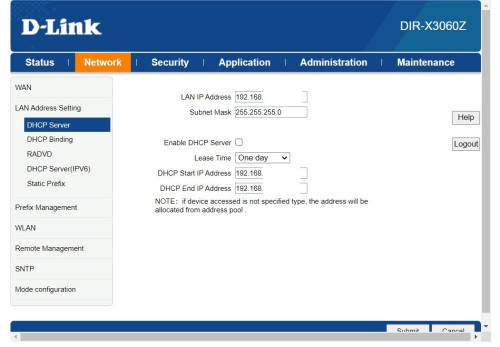
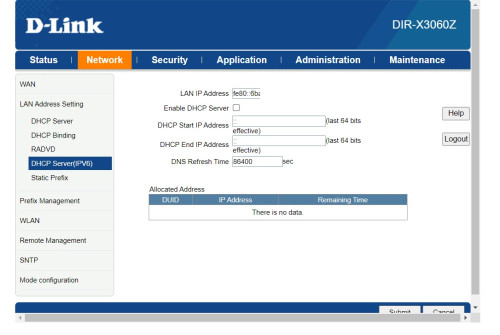
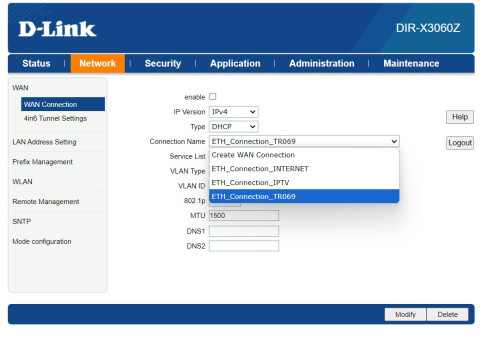
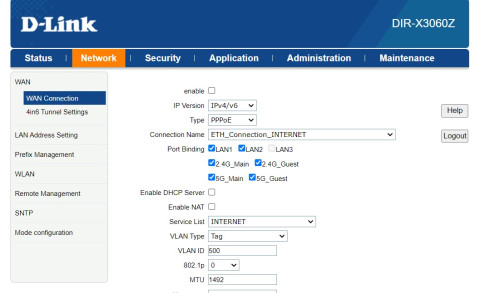
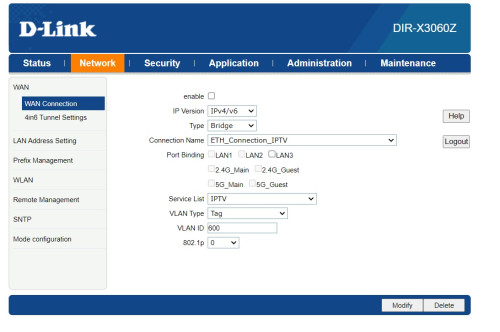
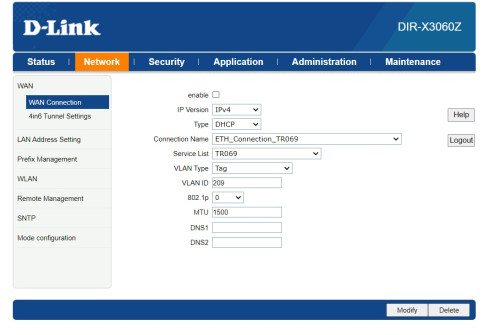
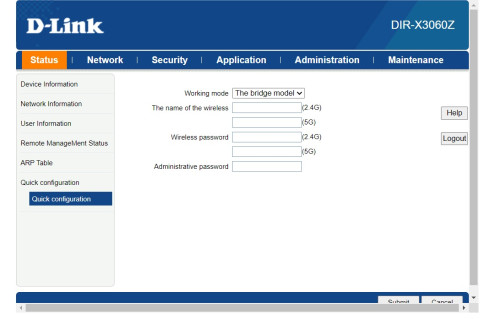
Once configuration is done, after running in the network for 10 mins, internet went unstable. Can anyone let me know where went wrong? Below is the snapshots of the configurations. I disabled all DHCP related and also WAN connections, then switch it to bridge mode. Port is plugging to LAN port 2.

Appreciate for any advise here. thank you.
user posted image

user posted image
user posted image

user posted image
user posted image
user posted image
user posted image
PRSXFENG
post Sep 13 2024, 11:42 AM

Look at all my stars!!
*******
Senior Member
2,614 posts

Joined: Nov 2020


QUOTE(lulu87 @ Sep 13 2024, 11:38 AM)
snip
*
What on earth are you trying to do?

It should be Fiber -> TM Provided Modem -> Fortigate -> Switches -> D-Link

all the router work should already be done on the Fortigate
the D-Link isnt the one handling the network in this case

so why on earth do you need to bridge it?

Do you need more lan ports? get a switch
Do you need wifi coverage? AP Mode

I fail to see why do you need this d-link at all on the network
TSlulu87
post Sep 13 2024, 11:44 AM

New Member
*
Junior Member
15 posts

Joined: Aug 2009


QUOTE(PRSXFENG @ Sep 13 2024, 11:42 AM)

It should be Fiber -> TM Provided Modem -> Fortigate -> Switches -> D-Link

*
Yes, it's like that i just shorten it up since it should be understood.

We need extra access point/bridged router at another area in our office, hence the additional router for that purpose.
csneo
post Sep 13 2024, 11:58 AM

Casual
***
Junior Member
398 posts

Joined: May 2005
just to confirm
1. now your network is
fiber- ONU-Fortigate-Switches
2. your D-Link WIFI6 AX3000 is to hv extra coverage of wifi access

Then u can set it as AP mode for D-Link WIFI6 AX3000.
TSlulu87
post Sep 13 2024, 01:02 PM

New Member
*
Junior Member
15 posts

Joined: Aug 2009


QUOTE(csneo @ Sep 13 2024, 11:58 AM)
just to confirm
1.  now your network is
    fiber- ONU-Fortigate-Switches
2. your  D-Link WIFI6 AX3000 is to hv extra coverage of wifi access

Then u can set it as AP mode for  D-Link WIFI6 AX3000.
*
yes correct., There's no AP mode for my d-link router model, only bridge mode.
csneo
post Sep 13 2024, 03:06 PM

Casual
***
Junior Member
398 posts

Joined: May 2005
turn off dhcp, to prevent ip conflict. Setup an free ip in you router. Setup as per bridge mode, then try again.
https://www.youtube.com/watch?v=KoVppsxgWjI
TSlulu87
post Sep 13 2024, 03:16 PM

New Member
*
Junior Member
15 posts

Joined: Aug 2009


QUOTE(csneo @ Sep 13 2024, 03:06 PM)
turn off dhcp, to prevent ip conflict. Setup an free ip in you router. Setup as per bridge mode, then try again.
https://www.youtube.com/watch?v=KoVppsxgWjI
*
I've watched many videos including yours and it's still the same. but anyway, thank you.

Topic ClosedOptions
 

Change to:
| Lo-Fi Version
0.0158sec    0.79    5 queries    GZIP Disabled
Time is now: 21st December 2025 - 04:31 AM